

Overview
For marketers utilizing Branch and Roku, this article details how to integrate Branch's robust deep linking and attribution features within your Roku ad campaigns.
Learn how this integration can improve the user journey and provide clearer insights into your advertising effectiveness on the Roku platform.
Roku Ad Manager
Roku's Self-Attributing Ad Network, provides access for its third-party Measurement Partners to request attribution for install and event attribution for clients utilizing Roku’s Endemic (i.e. streaming) Media to help drive distribution and re-engagement of their apps. Similar to other Self-Attributing Networks (SANs), Roku will be able to receive conversion events tracked via Branch SDK and use it for performance optimization, audience segmenting, and re-targeting.
Roku Data Sharing
Roku last-attributed data will be wiped at the log-level (via Custom Exports and Daily Exports) and this data will appear as null/blank in exports but you can still export it via aggregated data (Aggregate API or Query API).
Attention
Branch's new experience is rolling out in phases, so your interface may differ. This article covers the legacy version of ad partner setup. For the new version, see Ad Partners (New).
Before you begin
In order to enable Roku, you first need to:
Create a Branch Dashboard.
Enable Household Measurement for your Branch account. Household Measurement requires a premium plan. Please contact our Sales team to learn more about pricing and availability.
(Optional) Implement the Branch SDK into your OTT/CTV app:
Have admin access to your Roku Account.
Enable Roku
To enable Roku, you can either use Roku Ads Manager or Roku managed services.
Enable Roku with Roku Ads Manager
To enable Roku with Roku Ads Manager, complete the steps below:
Sign in to Roku Ads Manager.
Navigate to the Events page.
Identify an existing Event Group or create a new Event Group.
Copy the Event Group ID.
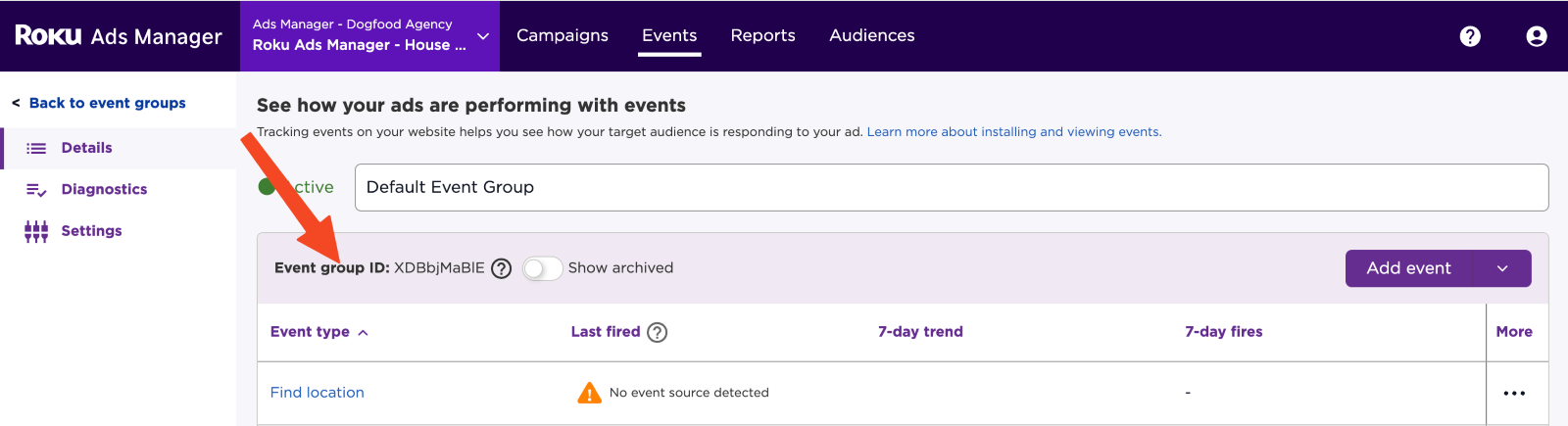
Send Roku (adsmanagersupport@roku.com) the following information:
- Your MMP name (Branch)
- Your Event Group ID
Enable Roku with managed services
To enable Roku with managed services, you will need Roku to provide you with an Event Group ID. Please reach out to your Roku representative for this.
Connect Roku in Branch
To connect Roku in Branch, complete the steps below:
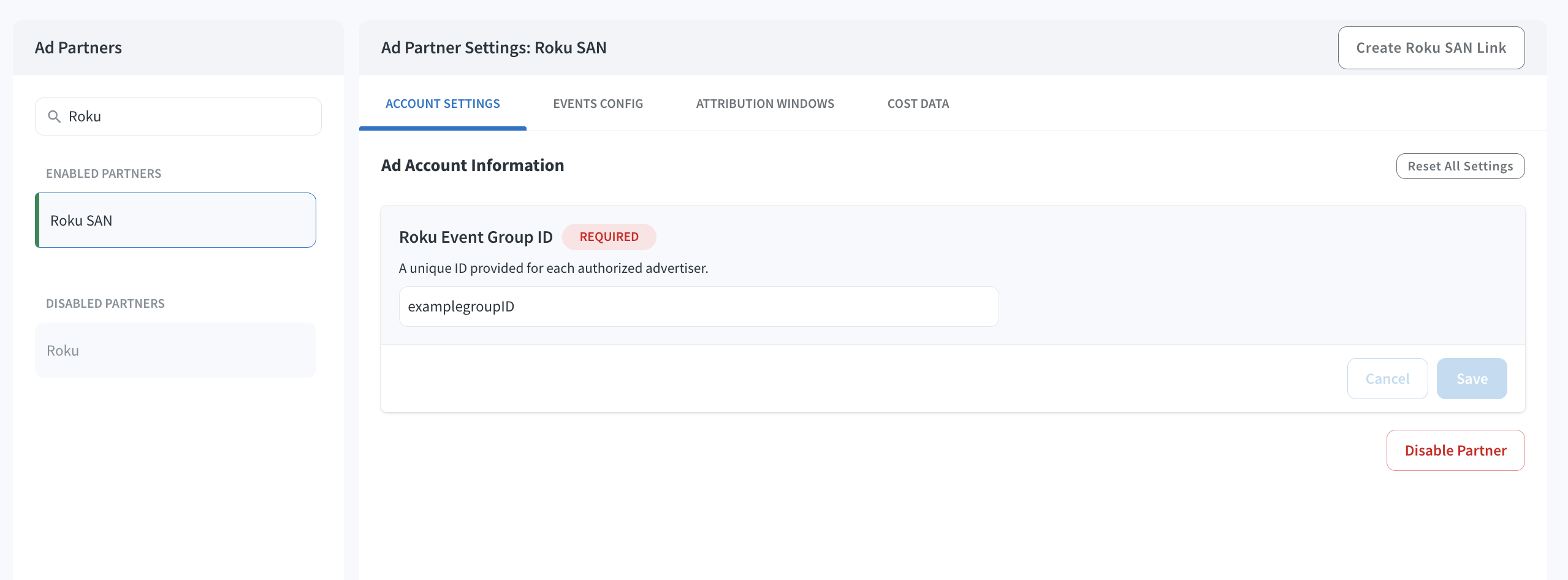
In the Branch Dashboard, navigate to the Ads Partner page, search for “Roku SAN” and select it. Do not use the “Roku” option.
Enter your Roku Ads Manager Event Group ID and click Save.
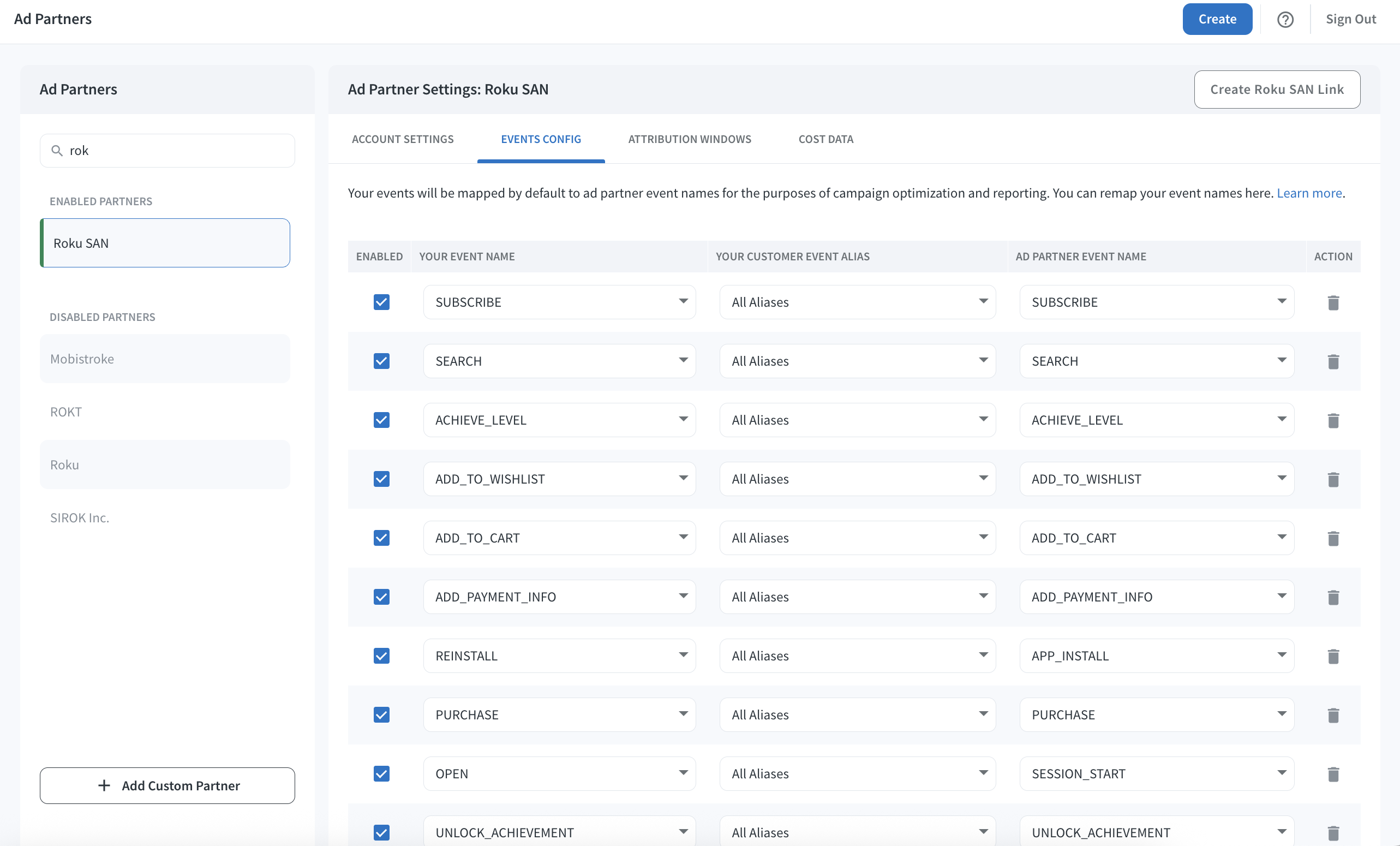
Switch to the Events Config tab and map your Branch app events to Roku Ads Manager events.
- Events will appear in Roku Ads Manager attribution reporting based on this mapping configuration.
- Click Save.
(Optional) After configuring your events, navigate to the Attribution Windows tab to set windows by attribution type. Here are Roku’s recommended attribution window settings:
Attribution Type Window click to session start 1 day click to install 7 days click to conversion event 1 day impression to session start 1 day impression to install 1 day impression to conversion event 1 day
Note
Events can take up to 4 hours to appear in Roku Ads Manager.
Data mapping between Roku & Branch
Branch maps the following data fields from Roku to Branch:
| Roku Data | Branch Data | Possible Values |
|---|---|---|
| Touch Type | last_attributed_touch_type | CLICK or IMPRESSION |
| Account ID | last_attributed_touch_data_tilde_advertising_account_id | The ID of your Roku Ads Manager account |
| Account Name | last_attributed_touch_data_tilde_advertising_account_name | The name of your Roku Ads Manager account |
| Campaign ID | last_attributed_touch_data_tilde_campaign_id | The ID of your Roku campaign |
| Campaign Name | last_attributed_touch_data_tilde_campaign | The name of your Roku campaign |
| Creative ID | last_attributed_touch_data_tilde_creative_id | The ID of your Roku creative |
| Creative Name | last_attributed_touch_data_tilde_creative_name | The name of your Roku creative |
| Flight ID | last_attributed_touch_data_tilde_ad_set_id | The ID of the Roku line item |
| Flight Name | last_attributed_touch_data_tilde_ad_set_name | The name of the Roku line item |
| Timestamp | last_attributed_touch_timestamp | Timestamp of the ad impression or click |
Forwarding events to Roku
Once you begin tracking events through the Branch SDK, we will start sending them to Roku. Roku has pre-defined events that map to pre-defined Branch events, listed below.
Branch will forward in-app events to Roku for campaign optimization. In addition, Branch will receive attribution data for rich analysis in the Branch Dashboard.
| Branch Event Name | Roku Event Name | Roku Description |
|---|---|---|
| INSTALL | APP_INSTALL | When a user installs an app, or the first time an app is opened/launched. |
| REINSTALL | APP_INSTALL | When a user installs an app, or the first time an app is opened/launched. |
| OPEN | SESSION_START | When a user starts an app session. |
| START_TRIAL | START_TRIAL | When a user starts a free trial of a product or service you offer. |
| COMPLETE_REGISTRATION | COMPLETE_REGISTRATION | When a user completes a registration form. |
| SUBSCRIBE | SUBSCRIBE | When a user applies to start a paid subscription for a product or service you offer. |
| COMPLETE_STREAM | QSS | Trigger Quality Streaming Session on Video Views exceeding 5M of contiguous video playback time. |
| ADD_TO_CART | ADD_TO_CART | When a user adds a product to their shopping cart. |
| ACHIEVE_LEVEL | ACHIEVE_LEVEL | When a user reaches a certain level that you have defined in your game. |
| ADD_PAYMENT_INFO | ADD_PAYMENT_INFO | When a user adds payment information during the checkout flow. |
| ADD_TO_WISHLIST | ADD_TO_WISHLIST | When a user adds a product to their wishlist. |
| INITIATE_PURCHASE | INITIATE_CHECKOUT | When a user enters the checkout flow, prior to completing the checkout flow. |
| SEARCH | SEARCH | When a user uses your search feature. |
| LOGIN | SIGN_UP | When a user applies for a product, service, or program you offer. |
| PAGEVIEW | PAGE_VIEW | When a user visits a page; uses default pixel tracking. |
| PURCHASE | PURCHASE | When a user completes a purchase or completes the checkout flow. |
| CUSTOM_EVENT | CONTACT | When a user initiates contact with your business via telephone, SMS, email, chat, etc. |
| CUSTOM_EVENT | CUSTOMIZE_PRODUCT | When a user customizes a product. |
| CUSTOM_EVENT | DONATE | When a user donates funds to your organization or cause. |
| CUSTOM_EVENT | DOWNLOAD | When a user downloads a doc, info, or service. |
| CUSTOM_EVENT | FIND_LOCATION | When a user searches for a location of your store via a website or app, with an intention to visit the physical location. |
| CUSTOM_EVENT | FIRST_VIDEO_VIEW | When a user first views a video. This will map to Roku FTV. |
| CUSTOM_EVENT | LEAD | When a user completes a sign up. |
| CUSTOM_EVENT | SCHEDULE | When a user books an appointment to visit one of your locations. |
| CUSTOM_EVENT | SUBSCRIPTION_CANCELLATION | When a user cancels their subscription. |
| CUSTOM_EVENT | SUBSCRIPTION_RENEWAL | When a subscription is auto-renewed - this could be system generated event. |