
Overview
After connecting TikTok For Business to Branch, data will seamlessly flow between the two to measure your campaigns' performance. It is helpful to know what kinds of data are passed to each platform to properly compare campaigns and optimize future campaigns. The Branch Dashboard will also populate with helpful reports for campaign measurement.
Mapping between TikTok & Branch
Campaign data mapping
| Branch data | TikTok data | Definition | Possible values |
|---|---|---|---|
~campaign | campaign_name | The advertiser-defined campaign name of the campaign that produced the ad event. This value is not guaranteed unique. | Light Bright Launch |
~campaign_id | campaign_id | The numeric campaign ID of the campaign that produced the ad event. This value is guaranteed unique. | 15292426 |
~country | country | User’s country code | 2-letter country code |
~ad_set_name | ad_group_name | The advertiser-defined ad group name of the campaign that produced the ad event. This value is not guaranteed unique. | “Example name” |
~ad_set_id | ad_group_id | The numeric ID of the ad group that produced the ad event. | 235465654654 |
~ad_name & ~creative_name | ad_name | The advertiser-defined ad name of the campaign that produced the ad event. This value is not guaranteed unique. | Creative name |
~ad_id & ~creative_id | ad_id | The numeric adID of the campaign that produced the ad event. This value is guaranteed unique. | 123456 |
~placement | placement | The advertiser-defined placement name of the campaign that produced the ad event. This value is not guaranteed unique. | placement |
last_attributed_touch_type | attribution_type | The type of attribution of the last touch event | CLICK or IMPRESSION |
Event mapping
This is the standard Branch events to TikTok for Business pre-defined event mapping. You can choose to select any Branch event you want to link and map the field with one of the predefined TikTok For Business (SAN) event names.
| Branch Event | TikTok Event | TikTok Event Enum (For reference) |
|---|---|---|
| INSTALL | InstallApp | 0 |
| OPEN | LaunchAPP | 129 |
| ACHIEVE_LEVEL | AchieveLevel | 40 |
| ADD_PAYMENT_INFO | AddPaymentInfo | 127 |
| ADD_TO_WISHLIST | AddToWishlist | 128 |
| INITIATE_PURCHASE | Checkout | 20 |
| COMPLETE_TUTORIAL | CompleteTutorial | 131 |
| CLICK_AD | InAppADClick | 132 |
| VIEW_AD | InAppAdImpr | 133 |
| ADD_TO_CART | AddToCart | 22 |
| LOGIN | Login | 114 |
| PURCHASE | Purchase | 2 |
| RATE | Rate | 138 |
| COMPLETE_REGISTRATION | Registration | 1 |
| SEARCH | Search | 140 |
| SPEND_CREDITS | SpendCredits | 141 |
| START_TRIAL | StartTrial | 142 |
| SUBSCRIBE | Subscribe | 143 |
| UNLOCK_ACHIEVEMENT | UnlockAchievement | 144 |
| VIEW_ITEM | ViewContent | 29 |
| CreateGroup | 135 | |
| CreateRole | 39 | |
| GenerateLead | 24 | |
| JoinGroup | 134 | |
| LoanApplication | 118 | |
| LoanApproval | 105 | |
| LoanDisbursal | 103 |
Branch Dashboard reports
Available dimensions to compare by
| Dimension | Supported? |
|---|---|
| Clicks | ✅ Yes |
| Cost | ✅ Yes |
| Impressions | ✅ Yes |
| Feature | ✅ Yes |
| Channel | ✅ Yes |
| Campaign | ✅ Yes |
| Tags | ❌ No |
| Stage | ❌ No |
| Ad Partner | ✅ Yes |
| OS | ✅ Yes |
| Platform | ✅ Yes |
| Keyword | ❌ No |
| Campaign ID | ✅ Yes |
| Ad Set Name | ✅ Yes |
| Ad Set ID | ✅ Yes |
| Ad Name | ✅ Yes |
| Ad ID | ✅ Yes |
| Placement | ✅ Yes |
| Last Touch Type | ✅ Yes |
Cost metrics data
| Analytics Tag | Description | Used For |
|---|---|---|
| Cost | Total cost | Sum of cost |
| ROI | Return on investment. Profit as a percentage of cost | (Revenue-Cost) * 100 /Cost |
| ROAS | Return on Ad Spend. Revenue as a percentage of cost | Revenue/Cost |
| eCPI | Effective cost per install. The total cost of the campaign divided by the number of installs driven. | Cost / Installs (eo_installs) |
| eCPC | Effective cost per click. The total cost of the campaign divided by the number of clicks. | Cost / Clicks (eo_clicks) |
| eCPM | Effective cost per milli (thousand impressions). The total cost of the campaign divided by the number of impressions / 1000 | Cost / (Impressions / 1000) (eo_impressions) |
| eCPA | Effective cost per purchase | Cost / Purchases |
Engagement metrics
You can view data for click-through and view-through engagement conversion metrics for TikTok for Business. Here are the following supported engagement types:
| Engagement Type | Attribution Support |
|---|---|
| Engaged View | Click-Through |
| Engaged Click | Click-Through |
| Click to Store | Click-Through |
| View | View-Through |
You can view these through Dashboard Reports or exports:
| Report/Export | Parameter | Value |
|---|---|---|
| Dashboard Report | touch subtype | engaged_view, engaged_click, click_to_store, view |
| Dashboard Custom Exports | Column | Touch Subtype |
| Custom Exports API | fields | last_attributed_touch_data_tilde_touch_subtype |
Possible data discrepancies
TikTok for Business and Branch use distinct attribution models. This may cause discrepancies between TikTok for Business and Branch. While we work closely with TikTok for Business, to minimize these discrepancies, advertisers need to be aware of potential causes.
The table below describes possible reasons for discrepancies between the TikTok Ads Manager and the Branch Dashboard.
| Branch | TikTok for Business | |
|---|---|---|
| Click-through attribution window | The default window is 1 day for session start. More details here. | The default window is 7 days. This window can be configured either 1 day or 7 day. |
| View-through attribution window | The default window is 1 day for session start. More details here. | The default window is 1 day. This window can be configured either 1 day or off. |
| Multi-channel source attribution | Branch attributes based on Last Touch; though, you may view different ad network touches using Branch. More details here. | TikTok attributes installs to itself if the install occurs within the attribution window following the ad engagement (view, click, etc.), regardless of other media sources |
| Different time zones | Timezone can be configured in the Profile Tab of Account Settings. | TikTok's timezone (displayed next to the date range) can't be adjusted. It was configured while creating the ad account. |
| iOS attribution | Branch combines iOS attribution across all integrated ad networks including SKAN | For iOS apps, the TikTok ads manager only displays SKAN attribution results |
| In-app event attribution periods | Branch attributes in-app events to the last touch ad engagement. Separate attribution windows can be configured for in-app events. | Attribution on each platform may differ based on period windows from the initial install: TikTok attributes post-install in-app events up to 90 days from the install date. |
| Click-Date Cohort vs. Install-Date Cohort | Branch shows installs as well as post-install events in cohorts based on the date of the ad engagement (ad click/ad view). More details here. | TikTok shows installs as well as post-install events in cohorts based on the date of the ad engagement (ad click/ad view) |
Learn more about possible data discrepancies here.
iOS real-time conversion reporting (recommended)
To minimize data discrepancies between Branch and TikTok Ads Manager for iOS campaigns, we recommend enabling iOS real-time conversion reporting. This feature provides near real-time, granular conversion data for iOS 14.5+ campaigns and replaces the delayed, aggregated results from SKAN with detailed reporting at the campaign, ad group, and ad level.
When enabled, iOS real-time reporting helps align the numbers reported in Branch with those in TikTok Ads Manager because we use a shared attribution signal. This reduces the timing and methodology gaps described above.
Benefits
The benefits of iOS real-time conversion reporting include:
- Near real-time data: Conversion metrics are available in close to real time.
- Granular reporting: Performance data is broken down at the campaign, ad group, and ad level.
- Goal-based bidding: Supports TikTok bidding strategies with more responsive data.
- Unlimited iOS campaigns: When SKAN reporting is turned off, TikTok’s campaign quota no longer applies.
Enable iOS real-time conversion reporting
To use iOS real-time conversion reporting with Branch, you must first enable Predictive Aggregate Measurement (PAM). For instructions, see our PAM guide.
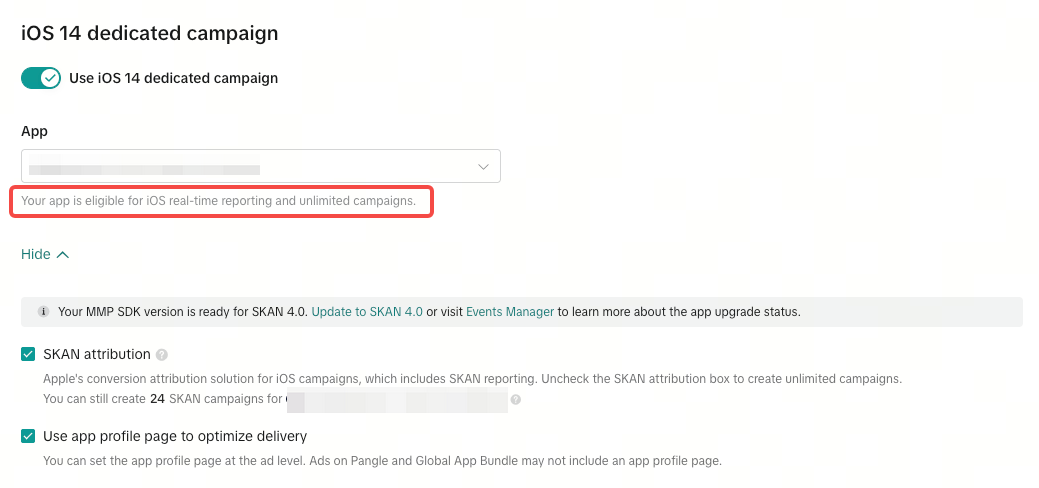
Once PAM is enabled, you can verify eligibility in TikTok Ads Manager when creating an iOS 14 dedicated campaign. If the app has sufficient data signals, the message “Your app is eligible for iOS real-time reporting” will appear.
Data considerations
Take the following considerations into account when deciding whether to use SKAN or iOS real-time reporting:
| Area | With SKAN | With iOS real-time reporting |
|---|---|---|
| Data freshness | Delayed | Near real-time |
| Reporting granularity | Aggregated; limited campaign-level data | Campaign, ad group, and ad level |
| Attribution model | Apple’s SKAdNetwork framework | TikTok’s modeled attribution via MMP signals |
| Campaign quota | Limited by SKAN campaign ID slots | Unlimited (when SKAN is turned off) |
| SKAN reporting | Available in both TikTok Ads Manager and Branch | Not available if SKAN attribution is disabled |
App activity for non-app promotion web campaigns
You can track app activities, such as installs and in-app purchases, for non-app promotion campaigns in TikTok Ads Manager. For example, if your web conversion or traffic campaign directs users to a web landing page, you can still measure app installs and related in-app events.
To learn how to do this, check out TikTok's instructions.
Note
TikTok does not support the use of Branch Ad Links for tracking purposes non-app-promotion web campaigns.