
Overview
The Branch Aggregate API allows you to programmatically query and export aggregate analytics.
Benefits
With the Aggregate API, you can:
- Give access to agencies and ad networks to pull aggregate data themselves. Learn more about user permissions and granting access to filtered data.
- Give Facebook Marketing Partners (FMP) some visibility through aggregate data.
Limitations
| Limitation | Details |
|---|---|
| Max number of records returned | 50,000 We may define dynamic record limits based on organization_id or app_id. |
| Export window | Rolling 2-year window. |
| Max number of dimensions | 11 dimensions. |
| Max number of days queried | 7 days. |
| Rate limits | 2 requests per second. 5 requests per minute. 150 requests per hour. |
SAN CCI data
SANs' cost/click/impression (CCI) data is not available via the Aggregate API.
Instead, use the Query API and the xx_impression field to get aggregated impression data for SANs.
Getting started
Before you begin
To use the Aggregate API, you first need to:
- Create a Branch account.
- Enable Universal Ads and start running ad campaigns from your Branch account.
- Implement the appropriate Branch SDK into your mobile app (iOS | Android).
- Make sure you have the appropriate permissions set on your user account. See the Access section for more.
Access
General access
To access the Aggregate API, a user must have the Aggregate Data Access Level enabled on their account.
Agency access
If you work with an agency that runs your advertising campaigns and want to give them access to export Aggregate API data, you can assign their account(s) the Aggregate Data Access Level as well.
To provide an agency team member with access to the Aggregate API:
In the left-hand navigation, under Setup & Testing, select Account Settings.
On the Account Settings page, select the Agencies tab.
Expand the agency in question, find the agency team member you want to give access to, hover over the button in the Actions column, and select Edit.
In the Edit Agency Team Member modal:
- Under Access Level, check the Export box.
- Under Permissions, check the Aggregate Data box.
Optional: Add data filters.
- Under Data Filters, toggle any necessary data filters on. Exported data will be filtered accordingly.
Select Save.
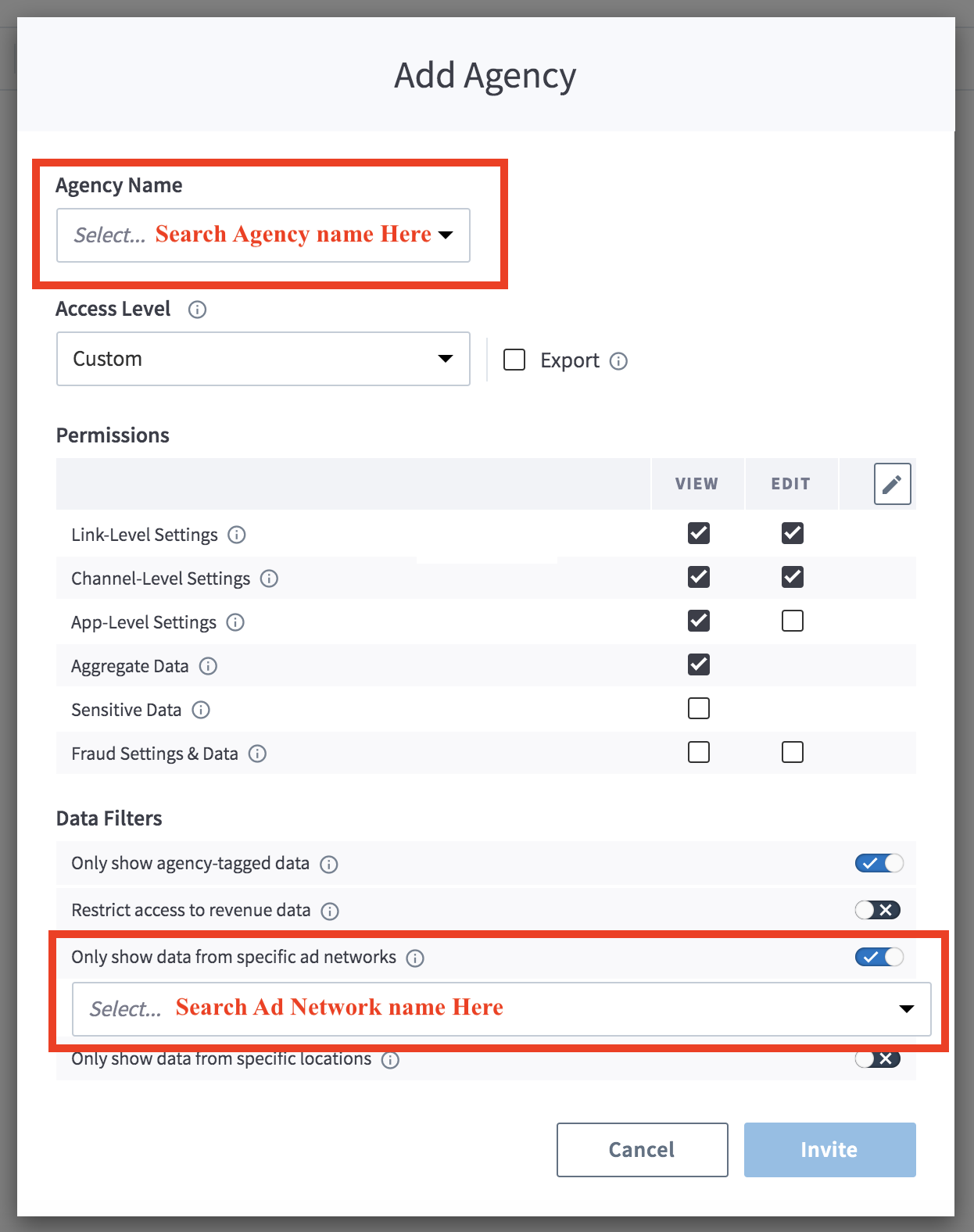
Agency-tagged data
If you do not enable the "Only Show Agency-Tagged Data" filter, the agency team member can export aggregate data associated with all of your campaigns, regardless of whether they are associated with them or not.
Authentication
For calls to the Aggregate API, you need your Access Token.
Legacy Branch
To retrieve your credentials in the legacy Branch experience:
- Navigate to the Account → Settings → User tab.
- If you have not yet generated an Access Token, select the Generate token button.
- Use the copy icon to copy your Access Token.
New Branch
To retrieve your credentials in the new Branch experience:
- Navigate to the Configuration → Security & Access → Credentials tab.
- If you have not yet generated an Access Token, select the Generate token button.
- Use the copy icon to copy your Access Token.
Visit our guide to learn more about managing your Branch credentials.
Usage
Request aggregate export
Request info
Export request
POST /v2/analytics
Host: api2.branch.io
Content-Type: application/json
Request headers
| Header | Description | Required |
|---|---|---|
Access-Token | Key that encapsulates the user's permission with regard to an organization. Obtained from Branch. Needed for authentication. | Yes |
accept | application/json | Recommended |
content-type | application/json | Recommended |
Request query parameters
| Parameter | Description | Required |
|---|---|---|
organization_id or app_id | Unique identifier for the app or organization of the requested data. | Yes |
limit | The maximum number of results to return. Default: 50000 Min: 50000 Max: 50000 (unless a higher limit is specified) | No |
format | Format of the returned data. Defaults to CSV. | No |
Request body parameters
| Parameter | Description | Required |
|---|---|---|
start_date | The start of the interval time range represented as an ISO-8601 complete date. | Yes |
end_date | The end of the interval time range represented as an ISO-8601 complete date. | Yes |
data_source | A string value representing the data source. See the topics section for the complete list. | Yes |
dimensions | An array representing dimension(s) to group by. The limit is 11. See the dimensions section for the complete list. Note: If you're querying skadnetwork-valid-messages, be sure to set aggregation to total_count. | No |
filters | Keys are the same as dimensions. Values are an array of values to match for the dimension. An object defining filters to match or disallow certain values. | No |
granularity | The time granularity that each band value represents. Granularity levels: - day- week- monthDefault: dayNote: Do not add timestamp to the dimensions field when setting granularity to day. Instead, add name to the dimensions field. | No |
aggregation | How to count events toward the final result count. Aggregation options: - unique_count- total_count- revenue- cost- cost-in-local-currencyDefault: total_countNote: When querying with a data source of eo_commerce_event, the aggregation may also be specified as revenue, in which case the counts returned are the sum of revenue from matching events, and not the number of events themselves. | No |
enable_install_calculation | If true, Branch will dedupe unattributed installs caused by duplicate events from non-opt-in users coming from paid ads (resulting from iOS 14.5 privacy changes).Default: false | No |
Response info
Response body parameters
| Parameter | Description |
|---|---|
code | The response code. Can be 200, 400, or 500. |
job_id | The unique ID of the request. This is used in the Export Download Status request. |
status_url | The URL of the export request. |
Example request & response
curl --request POST \
                    --url 'https://api2.branch.io/v2/analytics?organization_id={organization_id}&limit=5000&format=json' \
                    --header 'Accept: application/json' \
                    --header 'Access-Token: api_org_9999999999999999999999999999' \
                    --header 'Content-Type: application/json' \
                    --data '
                    {
                    "start_date": "2021-12-12",
                    "end_date": "2021-12-18",
                    "data_source": "eo_install",
                    "dimensions": [
                    "user_data_os"
                    ],
                    "filters": {
                    "attributed": "true",
                    "user_data_os": [
                    "IOS",
                    "ANDROID"
                    ]
                    },
                    "enable_install_recalculation": true,
                    "granularity": "day",
                    "aggregation": "total_count"
                    }
'{
"code": 200,
"job_id": "8a2514d5-9035-445f-b42a-948112aeb807",
"status_url": "https://api2.branch.io/v2/analytics/a38bd2f0-9740-4334-8c96-5bfd90671b06"
}Export download status
Request info
Export request
GET /v2/analytics/{job_id}?app_id={add app_id}' \
Host: api2.branch.io
Accept: application/json
Request headers
| Header | Description | Required |
|---|---|---|
Access-Token | Key that encapsulates the user's permission with regard to an organization. Obtained from Branch. Needed for authentication. | Yes |
accept | application/json | Recommended |
content-type | application/json | Recommended |
Request path parameters
| Parameter | Description | Required |
|---|---|---|
job_id | The unique ID of the request. Obtained from the Export Request. | Yes |
Request query parameters
| Parameter | Description | Required |
|---|---|---|
organization_id or app_id | Unique identifier for the app or organization of the requested data. | Yes |
limit | The maximum number of results to return. Default: 50000 Min: 50000 Max: 50000 (unless a higher limit is specified) | No |
format | Format of the returned data. Defaults to CSV. | No |
Response info
Response body parameters
| Parameter | Description |
|---|---|
code | The response code. |
status | The status of the original request by job_id. |
response_url | The URL of your request for download. |
Example request & response
curl --location 'https://api2.branch.io/v2/analytics/{Add the job_id}?app_id={add app_id}' \
                    --header 'Access-Token: api_app_XXXXXXXXXXXX' \
                    --header 'content-type: application/json' \
--header 'accept: application/json'{
"code": 200,
"status": "FINISHED",
"response_url": "https://branch-exports.s3.amazonaws.com/partner-query/2021-12-12-2021-12-18-eo_install-day-8a2514d5-9035-445f-b42a-948112aeb807-j6zbNS9OxQOz7spz.json?Signature=gbEoMAFAr0y7kN3stZ1zzUh60ko%3D&AWSAccessKeyId=AKIAI7A6NRHGMRDK2LIQ&Expires=1648077926"
}Appendix
Filters
Filters work based on AND at the top level. Each dimension can have multiple or filters, for example, { user_data_os": ["IOS", "ANDROID"] }.
Topics
[
  "eo_impression",
  "eo_click",
  "eo_branch_cta_view",
  "eo_sms_sent",
  "eo_open",
  "eo_install",
  "eo_reinstall",
  "eo_web_session_start",
  "eo_pageview",
  "eo_commerce_event",
  "eo_custom_event",
  "eo_content_event",
  "eo_dismissal",
  "eo_user_lifecycle_event",
  "cost",
  "skadnetwork-valid-messages",
  // Fraud topics:
  "eo_click_blocked",
  "eo_impression_blocked",
  "eo_install_blocked",
  "eo_reinstall_blocked",
  "eo_open_blocked",
  "eo_web_session_start_blocked",
  "eo_pageview_blocked",
  "eo_sms_sent_blocked",
  "eo_custom_event_blocked",
  "eo_content_event_blocked",
  "eo_commerce_event_blocked",
  "eo_user_lifecycle_event_blocked",
  "eo_branch_cta_view_blocked"
]
Dimensions
[
  "name",
  "origin",
  "timestamp",
  "deep_linked",
  "from_desktop",
  "attributed"
][
"user_data_app_store",
"user_data_app_version",
"user_data_os",
"user_data_language",
"user_data_platform",
"user_data_environment",
"user_data_geo_region_en",
"user_data_geo_dma_code",
"user_data_geo_country_code",
"user_data_country",
"user_data_cpp_level",
"user_data_opted_in",
"user_data_opted_in_status"
][
"last_attributed_touch_type",
"last_attributed_touch_data_dollar_meta_is_mobile_data_terms_signed",
"last_attributed_touch_data_tilde_tags",
"last_attributed_touch_data_tilde_secondary_publisher",
"last_attributed_touch_data_plus_current_feature",
"last_attributed_touch_data_plus_via_features",
"last_attributed_touch_data_plus_aggregate_measurement",
"last_attributed_touch_data_plus_pam_enabled",
"last_attributed_touch_data_tilde_campaign",
"last_attributed_touch_data_tilde_advertising_partner_name",
"last_attributed_touch_data_tilde_advertising_partner_id",
"last_attributed_touch_data_tilde_feature",
"last_attributed_touch_data_tilde_creative_name",
"last_attributed_touch_data_plus_web_format",
"last_attributed_touch_data_tilde_creative_id",
"last_attributed_touch_data_tilde_ad_name",
"last_attributed_touch_data_tilde_ad_id",
"last_attributed_touch_data_tilde_campaign_id",
"last_attributed_touch_data_tilde_placement",
"last_attributed_touch_data_tilde_stage",
"last_attributed_touch_data_tilde_channel",
"last_attributed_touch_data_tilde_ad_set_name",
"last_attributed_touch_data_tilde_ad_set_id",
"last_attributed_touch_data_tilde_keyword",
"last_attributed_touch_data_tilde_journey_id",
"last_attributed_touch_data_tilde_view_name",
"last_attributed_touch_data_tilde_view_id",
"last_attributed_touch_data_tilde_agency",
"last_attributed_touch_data_tilde_agency_id"
][
"last_cta_view_data_dollar_meta_is_mobile_data_terms_signed",
"last_cta_view_data_tilde_ad_name",
"last_cta_view_data_tilde_secondary_publisher",
"last_cta_view_data_tilde_campaign",
"last_cta_view_data_tilde_advertising_partner_name",
"last_cta_view_data_tilde_feature",
"last_cta_view_data_tilde_ad_set_name",
"last_cta_view_data_tilde_ad_set_id",
"last_cta_view_data_tilde_campaign_id",
"last_cta_view_data_tilde_creative_name",
"last_cta_view_data_tilde_creative_id",
"last_cta_view_data_plus_via_features",
"last_cta_view_data_dollar_3p",
"last_cta_view_data_tilde_tags",
"last_cta_view_data_plus_web_format",
"last_cta_view_data_tilde_channel",
"last_cta_view_data_tilde_ad_id",
"last_cta_view_data_tilde_stage"
][
"body_ad_network_id",
"body_campaign_id",
"body_app_id",
"body_redownload",
"body_source_app_id",
"body_source_identifier",
"body_conversion_value",
"body_coarse_conversion_value",
"body_last_attributed_touch_data_tilde_creative_name",
"body_last_attributed_touch_data_tilde_ad_set_name",
"body_last_attributed_touch_data_tilde_creative_id",
"body_last_attributed_touch_data_tilde_ad_set_id",
"body_last_attributed_touch_data_tilde_ad_name",
"body_last_attributed_touch_data_tilde_ad_id",
"body_last_attributed_touch_data_tilde_campaign_id",
"body_last_attributed_touch_data_tilde_campaign_name",
"annotation_dollar_3p",
"annotation_conversion_value_mapped_value",
"annotation_conversion_value_revision",
"annotation_campaign_id_mapped_value",
"annotation_campaign_id_revision",
"annotation_source_app_id_mapped_value",
"annotation_source_app_id_revision",
"body_last_attributed_touch_data_tilde_campaign",
"last_attributed_touch_data_tilde_creative_name",
"last_attributed_touch_data_tilde_ad_set_name",
"last_attributed_touch_data_tilde_creative_id",
"last_attributed_touch_data_tilde_ad_set_id",
"last_attributed_touch_data_tilde_ad_name",
"last_attributed_touch_data_tilde_ad_id",
"last_attributed_touch_data_tilde_campaign_id",
"last_attributed_touch_data_tilde_campaign",
"last_attributed_touch_data_tilde_agency",
"last_attributed_touch_data_tilde_agency_id",
"last_attributed_touch_data_tilde_advertising_partner_name",
"last_attributed_touch_data_tilde_advertising_partner_id",
"annotation_customer_event_alias"
][
"days_from_last_attributed_touch_to_event",
"days_from_last_cta_view_to_event",
"event_data_product_categories",
"event_data_custom_param_1",
"event_data_custom_param_2",
"event_data_custom_param_3",
"first_event_for_user",
"customer_event_alias",
"install_activity_touch_data_dollar_meta_is_mobile_data_terms_signed",
"reengagement_activity_touch_data_dollar_meta_is_mobile_data_terms_signed"
]