
Overview
Benefits of Custom Exports API
Use the Branch Custom Exports API to find and queue log records that match your search criteria for export. You can do so either via the Custom Exports section in Branch or via the API (this page).
API limitations
| Limitation | Details |
|---|---|
| Data availability | The data is typically available within 2 to 4 hours. However, under certain conditions, it may take as long as 6 hours. |
| Max number of records returned by API | If you want to limit the number of records returned to 15 million or less, use the limit parameter.If you need more than 15 million records returned, use the allow_multiple_files parameter instead and set it to true. When allow_multiple_files is set to true, the limit parameter is disregarded. It defaults to fitting 5 million records in a single file and provides multiple files depending on total record size. |
| Max number of days that can be queried at a time | The maximum number of days that can be queried at once is 60. Also, there is a restriction on querying more than 100 days of data within a one-hour window for the same app. For example, this could be 100 requests of 1 day each, or 4 requests covering 25 days each. |
| Rate limit for creating exports* | • 10 requests per minute • 25 requests per hour |
| Rate limit for checking the status of a report* | • 50 requests per minute • 1000 requests per hour |
| Exporting from test environments | At this moment, it is not possible to export data out of a Branch test environment. |
| Repeated requests within 60 minutes will be cached | If you make identical requests within 60 minutes of each other, you will not see multiple export jobs running. Instead, the same export job is used. If you're using the API, the same job_id is returned. This is to avoid the case of hundreds or thousands of requests being made for the exact same data set, within seconds or minutes of each other. After 60 minutes, your request kicks off a new job to retrieve data. |
You'll get the following response once you've hit the rate limit:
{
  "errors": [
    {
      "message": "Limit is exceeded for org-525983469347282987, retry after 3418 seconds",
      "error_code": 7
    }
  ]
}
Prerequisites & API access
To use the Custom Exports API, you need to have completed the following:
Created a Branch account.
Implemented the Branch SDK into your mobile app (iOS | Android).
Opted in to sharing device data through Apple's AppTrackingTransparency framework. When an install is attributed to paid ads, a 2nd install event fires after user opt-in.
Data changes post iOS
Opt-ins affect your final install count. We recommend using a different identifier (for example, IDFV) to dedupe install events on your internal systems.
For additional information on changes post iOS 14.5, visit our FAQ Pages.
Logged in to Branch with the Sensitive Data and Export Access Permission enabled.
Providing agencies API access
Any user with access to an account’s API keys can access Branch’s Custom Exports API (and thus unfiltered, log-level data). As a result, we recommend against providing third parties with the permissions required to view API keys during the invitation process.
Data purge
- Branch purges last-attributed data after 60 days.
If you work with an agency that runs your advertising campaigns and want to give them access to export the subsequent data, you can provide them with access to the Custom Exports API.
To provide an agency team member with access to the Custom Exports API:
In the left-hand navigation, under Configure, select Account Settings.
On the Account Settings page, select the Agencies tab.
Expand the agency in question, find the agency team member you want to give access to, hover over the button in the Actions column, and select Edit.
In the Edit Agency Team Member modal:
- Under Access Level, check the Export box.
- Under Permissions, check the Sensitive Data box.
Optional: Add data filters.
- Under Data Filters, toggle any necessary data filters on. Exported data will be filtered accordingly.
Select Save.
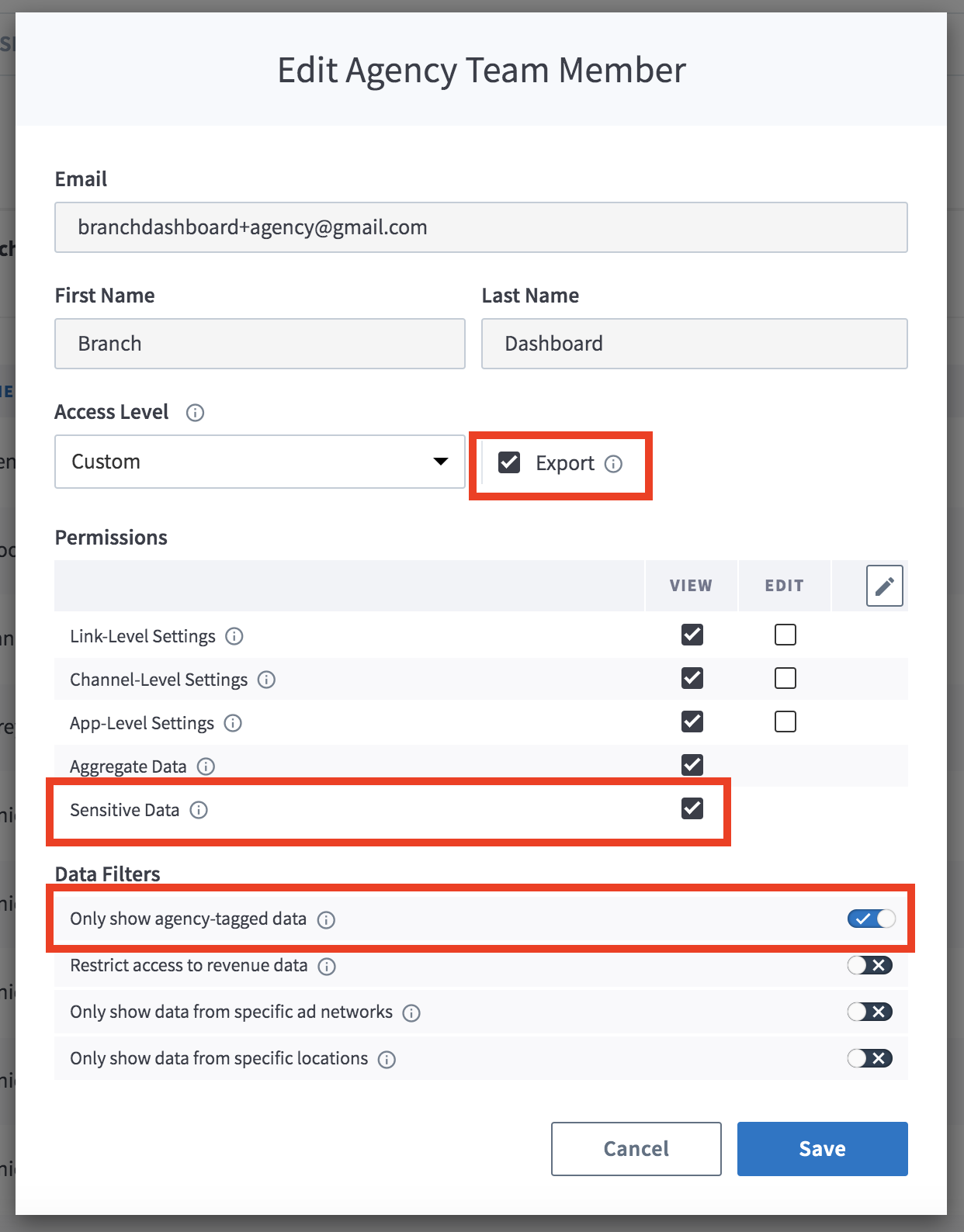
Agency-tagged data
If you do not enable the "Only Show Agency-Tagged Data" filter, the agency team member can export sensitive data associated with all of your campaigns, regardless of whether they are associated with them or not.
Authentication
For calls to the Custom Exports API, you need your Access Token.
Legacy Branch
To retrieve your Access Token in the legacy Branch experience:
- Navigate to Account → Settings → User.
- If you have not yet generated an Access Token, select the Generate token button.
- Use the copy icon to copy your Access Token.
New Branch
To retrieve your credentials in the new Branch experience:
- Navigate to the Configuration → Security & Access → Credentials tab.
- If you have not yet generated an Access Token, select the Generate token button.
- Use the copy icon to copy your Access Token.
Visit our guide to learn more about managing your Branch credentials.
API usage
Create export request
POST /v2/logs?organization_id=ORG_ID
POST /v2/logs?app_id=APP_ID
Headers:
Access-Token: API_KEY
Content-Type: application/json
Body: JSON parameters
Host: api2.branch.io
Request headers
| Header | Description | Required |
|---|---|---|
| Access-Token | Key that encapsulates the user's permission with regard to an organization. Obtained from Branch. Needed for authentication. | Yes |
| Content-Type | application/json | Yes |
Request body parameters
| Parameter | Type | Description | Required |
|---|---|---|---|
| start_date | Date | The beginning datetime for the requested results, provided in ISO-8601 format including hours, minutes, seconds, and milliseconds. Dates without offsets (that is, a time zone) default to the value provided for the timezone parameter. If the timezone parameter is not specified, the date's time zone defaults to UTC. The date must be within the last 120 days. Example: 2016-01-01T00:00:00Z | Yes |
| end_date | Date | The end datetime for the requested results, provided in ISO-8601 format including hours, minutes, seconds, and milliseconds. Dates without offsets (that is, a time zone) default to the value provided for the timezone parameter. If the timezone parameter is not specified, the date's time zone defaults to UTC. Example: 2016-01-01T23:59:59:999Z | Yes |
| report_type | String | The Branch EO topic to be exported. | Yes |
| fields | Comma Separated List | List of comma-separated fields desired in results. | Yes |
| limit | Integer | If you want to limit the number of records returned to 15 million or less, use the limit parameter.If you need more than 15 million records returned, use the allow_multiple_files parameter instead and set it to true. When allow_multiple_files is set to true, the limit parameter is disregarded. It defaults to fitting 5 million records in a single file and provides multiple files depending on total record size. | Yes |
| timezone | String | Time zone for results. Accepts tz database strings like ‘America/Los_Angeles’. Optional parameter; results are returned in the time zone set in Branch if not provided. Defaults to UTC only if a time zone is not set in Branch. | No |
| filter | Comma Separated List | Filter by fields and boolean operators against fields of the LogInstalls model; must be URI encoded and JSON parsed. Example: ["gt","last_attributed_touch_timestamp", 1604015756] | No |
| response_format | String | Format of the response; can be either "json" or "csv". If not selected, defaults to CSV. Branch uses UTF-8 encoding for CSV files. | No |
| allow_multiple_files | Boolean | Set this parameter to true if you want more than 15 million records returned. Branch makes the records available to you in multiple files. When allow_multiple_files is set to true, the limit parameter is disregarded. It defaults to fitting 5 million records in a single file and provides multiple files depending on total record size. | No |
| response_format_compression | String | The file compression method to use for the data. Options: - gz- snappy | Yes if you set allow_multiple_files to true |
Export all fields
To export every available field, use ["all"] in place of the field list:
- Scheduled Log Exports:
"report_fields": ["all"] - Custom Exports:
"fields": ["all"]
Before you use it:
- Your Access Token needs all export permissions. These currently include Sensitive Data and Fraud Settings & Data. If Branch adds new export permissions, you need those too.
- New fields appear in your export automatically as Branch adds them. Make sure your systems can handle new columns.
- Fields that don't apply to a report type still appear, with null values.
Response body parameters
| Parameter | Description |
|---|---|
| handle | Unique request handle generated against the endpoint call. |
| export_job_status_url | The URL of the export request. |
Example request/response
curl -X POST 'https://api2.branch.io/v2/logs?app_id=123456700098765432'
                    -H "Content-Type: application/json"
                    -H "Access-Token: YOUR_ACCESS_TOKEN_HERE"
                    -d '{"report_type": "eo_open",
                    "limit": 100,
                    "fields": ["timestamp","name"],
                    "start_date": "2019-12-09T00:00:00Z",
                    "end_date": "2019-12-09T01:59:59Z",
                    "filter": ["gt","last_attributed_touch_timestamp", 1604015756]
}'{"handle":"1612dbb3-85ef-49f8-b1c5-5818c163600c","export_job_status_url":"https://api2.branch.io/v2/logs/1612dbb3-85ef-49f8-b1c5-5818c163600c?app_id=123456700098765432"}Response codes
| Response code | Description |
|---|---|
| 200 | Status of aggregate export. |
| 400 | Authentication failed. |
Get export request
GET /v2/logs/JOB_ID
Headers:
Access-Token: API_KEY
Host: api2.branch.io
Request headers
| Header | Description | Required |
|---|---|---|
| Access-Token | Key that encapsulates the user's permission with regard to an organization. Obtained from Branch. Needed for authentication. | Yes |
| Content-Type | application/json | Yes |
Response path parameters
| Parameter | Type | Description | Required |
|---|---|---|---|
| request_handle | String | The ID returned by the log export queue. | Yes |
Request query parameters
| Parameter | Type | Description | Required |
|---|---|---|---|
| limit | Integer | The maximum number of results to return. | No |
| format | String | Format of returned data: json or csv. | No |
Response body parameters
| Parameter | Type | Description |
|---|---|---|
| code | Integer | The response code. |
| lines_exported | Integer | Number of lines exported against the originating request. |
| status | String | Request status over the current execution time. |
| status_url | String | The URL of the export request. |
Example request/response
curl -X GET https://api2.branch.io/v2/logs/<YOUR_HANDLE>\?app_id\=<YOUR_BRANCH_APP_ID>
                    -H "Content-Type: application/json"
-H "Access-Token:<YOUR_ACCESS_TOKEN>"{"code":200,"lines_exported":2000000,"status":"complete","response_url":"https://branch-exports-web.s3.amazonaws.com/732662944269095814-eo_open-2019-12-10-2019-12-10-1612dbb3-85ef-49f8-b1c5-5818c163600c-bUlN2lwyTE10qIVH.csv?Signature=YOUR_ACCESS_TOKEN_HERE&AWSAccessKeyId=YOUR_ACCESS_TOKEN_HERE&Expires=1577305615"}Response codes
| Response code | Description |
|---|---|
| 200 | Status of aggregate export. |
| 400 | Authentication failed. |
| 404 | Job ID not found. |
Status values
| Status | Description |
|---|---|
pending | Request is pending. |
running | Request is still running. |
complete | Request is complete. |
fail | Request failed. |
Check data readiness
POST /v2/data/ready
Headers:
Access-Token: YOUR_API_KEY_HERE
Content-Type: application/json
Body: JSON parameters
Host: api2.branch.io
Request headers
| Header | Description | Required |
|---|---|---|
| Access-Token | Key that encapsulates the user's permission with regard to an organization. Obtained from Branch. Needed for authentication. | Yes |
| Content-Type | application/json | Yes |
Request body parameters
| Parameter | Type | Description | Required |
|---|---|---|---|
| date | String | The start of the interval time range, in the format YYYY-MM-DD hh:mm:ss (must be within the past year). | Yes |
| warehouse_meta_type | String | The type of data to check for. Can be either EVENT or AGGREGATE. | Yes |
| topic | String | The Branch EO topic to be exported. | Yes |
| app_id | Integer | Your Branch app ID, found under Account Settings in Branch. | Yes |
Response body parameters
| Parameter | Description |
|---|---|
| data_ready | Whether or not the requested data is ready; can be true or false. |
| date | The date and time associated with the requested data, in the format YYYY-MM-DD hh:mm:ss. |
Examples
Successful request/response:
curl -X POST 'http://api2.branch.io/v2/data/ready'
                    -H 'Content-Type: application/json'
                    -H 'Accept: application/json'
                    -H 'Access-Token: <YOUR_API_KEY_HERE>'
                    -d '{"date":"2024-01-05 17:00:00",
                    "warehouse_meta_type":"EVENT",
                    "topic":"eo_click",
"app_id":"<YOUR_APP_ID_HERE>"}'{ "data_ready": true, "date": "2024-01-05 17:00:00" }Invalid request/response:
curl -X POST 'http://api2.branch.io/v2/data/ready'
                    -H 'Content-Type: application/json'
                    -H 'Accept: application/json'
                    -H 'Access-Token: <YOUR_API_KEY_HERE>'
                    -d '{"date":"2024-01-06 17:00:00",
                    "warehouse_meta_type":"EVENT",
                    "topic":"eo",
"app_id":"<YOUR_APP_ID_HERE>"}'{"errors":[{"message":"Report type eo is invalid. It has to be one of: [eo_branch_cta_view, eo_click, eo_commerce_event, eo_content_event, eo_custom_event, eo_impression, eo_install, eo_open, eo_pageview, eo_reinstall, eo_user_lifecycle_event, eo_web_session_start, eo_web_to_app_auto_redirect, eo_dismissal, eo_san_touch, webhook2, skadnetwork_invalid_messages, skadnetwork_valid_messages, eo_branch_cta_view_blocked, eo_click_blocked, eo_commerce_event_blocked, eo_content_event_blocked, eo_custom_event_blocked, eo_impression_blocked, eo_install_blocked, eo_open_blocked, eo_pageview_blocked, eo_reinstall_blocked, eo_user_lifecycle_event_blocked, eo_web_session_start_blocked]","error_code":7}]}Response codes
| Response code | Description |
|---|---|
| 200 | Status of data successfully retrieved. |
| 400 | Topic is invalid or data retention for requested data has expired. |
| 500 | Internal server error (Branch failure). |
Appendix
Available EO fields
| Fields | Type | Description |
|---|---|---|
android_app_link_url | String | A client-specified web URL (Branch or non-Branch) that opens an Android app via Android App Links. |
app_id | Long | App ID (capitalize ID in Liveview) |
app_name | String | App Name |
attributed | Boolean | Attributed |
content_items | ArrayStruct | Content Items |
custom_data | MapStringString | Custom Data |
customer_event_alias | String | Customer Event Alias |
days_from_last_attributed_touch_to_event | Integer | Days From Last Attributed Touch To Event |
deep_linked | Boolean | Deep Linked |
di_match_click_token | Long | DI Match Click Token |
event_data_ad_type | enum { BANNER, INTERSTITIAL, REWARDED_VIDEO, NATIVE } | Ad Type |
event_data_affiliation | String | Affiliation |
event_data_coupon | String | Coupon |
event_data_currency | String | Currency |
event_data_description | String | Event Description |
event_data_exchange_rate | Double | Exchange Rate |
event_data_revenue | Double | Revenue |
event_data_revenue_in_usd | Double | Revenue In USD |
event_data_search_query | String | Search Query |
event_data_shipping | Double | Shipping |
event_data_tax | Double | Tax |
event_data_transaction_id | String | Transaction ID |
event_data_local_currency | String | Local Currency |
event_data_local_currency_exchange_rate | String | Local Currency Exchange Rate |
event_data_revenue_in_local_currency | String | Revenue in Local Currency |
event_data_custom_param_1 | String | Custom parameter for event |
event_data_custom_param_2 | String | Custom parameter for event |
event_data_custom_param_3 | String | Custom parameter for event |
event_timestamp | Long | Event Timestamp |
existing_user | Boolean | Existing User |
external_intent_uri | String | External Intent URI |
first_event_for_user | Boolean | First Event For User |
fraud_bool_suspicious | Boolean | Indicates whether the underlying event (such as a click or install) was flagged as suspicious or fake by fraud detection. This typically triggers when traffic originates from known bad IPs, emulators, server farms, or TOR networks. |
fraud_bool_suspicious_attribution | Boolean | Indicates whether the attribution relationship was flagged as fraudulent by fraud detection. While the install itself might be real, the ad interaction claiming credit is suspicious (often used to detect Install Hijacking, Click Injection, or Click Flooding based on abnormal click-to-install latency times). |
fraud_descriptions | ArrayString | Contains the descriptions of the specific fraud detection rule(s) that flagged the event. Examples of values include 'Suspicious Device', 'Click Injection', 'Device Conflict', 'Geo Conflict', or 'Persona Fraud'. |
hash_version | String | Hash Version |
hours_from_last_attributed_touch_to_event | Integer | Hours From Last Attributed Touch To Event |
id | String | ID |
install_activity_attributed | Boolean | Install Attributed |
install_activity_data_has_clicked_ad | Boolean | Install Has Clicked Ad |
install_activity_data_has_clicked_email | Boolean | Install Has Clicked Email |
install_activity_timestamp | Long | Install Timestamp |
install_activity_touch_data_additional_data_tilde_ad_id | String | Install Ad ID |
install_activity_touch_data_additional_data_tilde_ad_set_id | String | Install Ad Set ID |
install_activity_touch_data_additional_data_tilde_campaign_id | String | Install Campaign ID |
install_activity_touch_data_additional_data_tilde_creative_id | String | Install Creative ID |
install_activity_touch_data_dollar_3p | String | Install Partner 3p Value |
install_activity_touch_data_dollar_meta_is_mobile_data_terms_signed | Boolean | Whether Meta's mobile data terms have been signed for the Install Touch. When true, Meta does not require Branch to scrub Meta-related data from this record. |
install_activity_touch_data_plus_via_features | ArrayString | Install Features |
install_activity_touch_data_plus_web_format | String | Install Web Format |
last_attributed_touch_data_plus_attribution_method | String | The specific signal or mechanism used to link the conversion event to the marketing touchpoint (for example, ADVERTISING_ID, GCLID, AEM, PERSONA). |
last_attributed_touch_data_plus_attribution_method_type | String | The category of methodology used to produce the attribution (for example, PARTNER_DETERMINISTIC, BRANCH_MODELLED, PARTNER_PRIVACY_FRAMEWORK). |
install_activity_touch_data_tilde_ad_name | String | Install Ad Name |
install_activity_touch_data_tilde_ad_set_name | String | Install Ad Set Name |
install_activity_touch_data_tilde_advertising_partner_id | String | Install Ad Partner ID |
install_activity_touch_data_tilde_advertising_partner_name | String | Install Ad Partner |
install_activity_touch_data_tilde_agency | String | Install Agency |
install_activity_touch_data_tilde_agency_id | Long | Install Agency ID |
install_activity_touch_data_tilde_campaign | String | Install Campaign |
install_activity_touch_data_tilde_channel | String | Install Channel |
install_activity_touch_data_tilde_creative_name | String | Install Creative Name |
install_activity_touch_data_tilde_customer_ad_name | String | Install Customer Ad Name |
install_activity_touch_data_tilde_customer_ad_set_name | String | Install Customer Ad Set Name |
install_activity_touch_data_tilde_customer_campaign | String | Install Customer Campaign |
install_activity_touch_data_tilde_customer_keyword | String | Install Customer Keyword |
install_activity_touch_data_tilde_customer_placement | String | Install Customer Placement |
install_activity_touch_data_tilde_customer_secondary_publisher | String | Install Customer Secondary Publisher |
install_activity_touch_data_tilde_customer_sub_site_name | String | Install Customer Sub Site Name |
install_activity_touch_data_tilde_feature | String | Install Feature |
install_activity_touch_data_tilde_journey_name | String | Install Journey Name |
install_activity_touch_data_tilde_keyword | String | Install Keyword |
install_activity_touch_data_tilde_placement | String | Install Placement |
install_activity_touch_data_tilde_secondary_publisher | String | Install Secondary Publisher |
install_activity_touch_data_tilde_stage | String | Install Stage |
install_activity_touch_data_tilde_tags | ArrayString | Install Tags |
install_activity_touch_data_tilde_view_name | String | Install View Name |
install_activity_touch_type | String | Install Touch Type |
last_attributed_touch_data_custom_fields | String | Last Attributed Touch Custom Fields |
last_attributed_touch_data_dollar_3p | String | Ad Partner (3p) |
last_attributed_touch_data_dollar_meta_is_mobile_data_terms_signed | Boolean | Whether Meta's mobile data terms have been signed for the Last Attributed Touch. When true, Meta does not require Branch to scrub Meta-related data from this attribution record. |
last_attributed_touch_data_dollar_marketing_title | String | Marketing Title |
last_attributed_touch_data_plus_current_feature | String | Current Feature |
last_attributed_touch_data_plus_pam_enabled | Boolean | Whether PAM was enabled for the last attributed touch. |
last_attributed_touch_data_plus_aggregate_measurement | Boolean | Aggregate measurement associated with the last attributed touch. |
last_attributed_touch_data_plus_attribution_method | String | The specific signal, mechanism, identifier, or framework used to link the conversion event to a marketing touchpoint (for example, ADVERTISING_ID, GCLID, GBRAID, AEM, PERSONA). |
last_attributed_touch_data_plus_attribution_method_type | String | Classifies the broader category of methodology used to generate or validate the attribution signal, grouping methods based on reliability or privacy frameworks (for example, PARTNER_DETERMINISTIC, PARTNER_CLICK_IDENTIFIERS, BRANCH_MODELLED, PARTNER_PRIVACY_FRAMEWORK). |
last_attributed_touch_data_tilde_id | Long | Last Attributed Touch ID |
last_attributed_touch_data_plus_touch_id | String | Last Attributed Touch Touch ID |
last_attributed_touch_data_plus_url | String | URL |
last_cta_view_data_plus_touch_id | String | Last CTA View Touch ID |
last_attributed_touch_data_plus_via_features | ArrayString | Via Features |
last_attributed_touch_data_plus_web_format | String | Web Format |
last_attributed_touch_data_tilde_ad_id | String | Ad ID |
last_attributed_touch_data_tilde_ad_name | String | Ad Name |
last_attributed_touch_data_tilde_ad_set_id | String | Ad Set ID |
last_attributed_touch_data_tilde_ad_set_name | String | Ad Set Name |
last_attributed_touch_data_tilde_advertising_account_name | String | Advertising Account Name |
last_attributed_touch_data_tilde_advertising_account_id | String | Advertising Account ID |
last_attributed_touch_data_tilde_advertising_partner_id | String | Ad Partner ID |
last_attributed_touch_data_tilde_advertising_partner_name | String | Ad Partner |
last_attributed_touch_data_tilde_agency | String | Agency |
last_attributed_touch_data_tilde_agency_id | String | Agency ID |
last_attributed_touch_data_tilde_banner_dimensions | String | Banner Dimensions |
last_attributed_touch_data_tilde_branch_ad_format | String | Branch Ad Format |
last_attributed_touch_data_tilde_campaign | String | Campaign |
last_attributed_touch_data_tilde_campaign_id | String | Campaign ID |
last_attributed_touch_data_tilde_campaign_type | String | Campaign Type |
last_attributed_touch_data_tilde_channel | String | Channel |
last_attributed_touch_data_tilde_creative_name | String | Creative Name |
last_attributed_touch_data_tilde_creative_id | String | Creative ID |
last_attributed_touch_data_tilde_customer_ad_name | String | Customer Ad Name |
last_attributed_touch_data_tilde_customer_ad_set_name | String | Customer Ad Set Name |
last_attributed_touch_data_tilde_customer_campaign | String | Customer Campaign |
last_attributed_touch_data_tilde_customer_keyword | String | Customer Keyword |
last_attributed_touch_data_tilde_customer_placement | String | Customer Placement |
last_attributed_touch_data_tilde_customer_secondary_publisher | String | Customer Secondary Publisher |
last_attributed_touch_data_tilde_customer_sub_site_name | String | Customer Sub Site Name |
last_attributed_touch_data_tilde_external_touch_id | String | External Touch ID |
last_attributed_touch_data_tilde_feature | String | Feature |
last_attributed_touch_data_tilde_journey_id | String | Journey ID |
last_attributed_touch_data_tilde_journey_name | String | Journey Name |
last_attributed_touch_data_tilde_keyword | String | Keyword |
last_attributed_touch_data_tilde_keyword_id | String | Keyword ID |
last_attributed_touch_data_tilde_optimization_model | String | Optimization Model |
last_attributed_touch_data_tilde_placement | String | Placement |
last_attributed_touch_data_tilde_placement_id | String | Placement ID |
last_attributed_touch_data_tilde_secondary_ad_format | String | Secondary Ad Format |
last_attributed_touch_data_tilde_secondary_publisher | String | Secondary Publisher |
last_attributed_touch_data_tilde_secondary_publisher_id | String | Secondary Publisher ID |
last_attributed_touch_data_tilde_stage | String | Stage |
last_attributed_touch_data_tilde_sub_site_name | String | Sub Site Name |
last_attributed_touch_data_tilde_tags | ArrayString | Tags |
last_attributed_touch_data_tilde_technology_partner | String | Technology Partner |
last_attributed_touch_data_tilde_touch_subtype | String | Google Video Ads "Engaged View" |
last_attributed_touch_data_tilde_view_id | String | View ID |
last_attributed_touch_data_tilde_view_name | String | View Name |
last_attributed_touch_timestamp | Long | Last Attributed Touch Timestamp |
last_attributed_touch_timestamp_iso | String | Last Attributed Touch Timestamp (ISO) |
last_attributed_touch_type | String | Last Attributed Touch Type |
last_cta_view_data_custom_fields | String | Last CTA View Custom Fields |
last_cta_view_data_dollar_3p | String | Last CTA View Ad Partner (3p) |
last_cta_view_data_dollar_meta_is_mobile_data_terms_signed | Boolean | Whether Meta's mobile data terms have been signed for the Last CTA View Touch. When true, Meta does not require Branch to scrub Meta-related data from this CTA view record. |
last_attributed_touch_data_plus_referring_domain | String | Referring Domain |
last_cta_view_data_plus_via_features | ArrayString | Last CTA View Via Features |
last_cta_view_data_plus_web_format | String | Last CTA View Web Format |
last_cta_view_data_tilde_ad_id | String | Last CTA View Ad ID |
last_cta_view_data_tilde_ad_name | String | Last CTA View Ad Name |
last_cta_view_data_tilde_ad_set_id | String | Last CTA View Ad Set ID |
last_cta_view_data_tilde_ad_set_name | String | Last CTA View Ad Set Name |
last_cta_view_data_tilde_advertising_partner_name | String | Last CTA View Ad Partner |
last_cta_view_data_tilde_agency | String | Last CTA View Agency |
last_cta_view_data_tilde_banner_dimensions | String | Last CTA View Banner Dimensions |
last_cta_view_data_tilde_branch_ad_format | String | Last CTA View Branch Ad Format |
last_cta_view_data_tilde_campaign | String | Last CTA View Campaign |
last_cta_view_data_tilde_campaign_id | String | Last CTA View Campaign ID |
last_cta_view_data_tilde_campaign_type | String | Last CTA View Campaign Type |
last_cta_view_data_tilde_channel | String | Last CTA View Channel |
last_cta_view_data_tilde_creative_id | String | Last CTA View Creative ID |
last_cta_view_data_tilde_creative_name | String | Last CTA View Creative Name |
last_cta_view_data_tilde_external_touch_id | Long | Last CTA View External Touch ID |
last_cta_view_data_tilde_feature | String | Last CTA View Feature |
last_cta_view_data_tilde_id | Long | Last CTA View ID |
last_cta_view_data_tilde_keyword_id | String | Last CTA View Keyword ID |
last_cta_view_data_tilde_optimization_model | String | Last CTA View Optimization Model |
last_cta_view_data_tilde_placement | String | Last CTA View Placement |
last_cta_view_data_tilde_secondary_ad_format | String | Last CTA View Secondary Ad Format |
last_cta_view_data_tilde_secondary_publisher | String | Last CTA View Secondary Publisher |
last_cta_view_data_tilde_stage | String | Last CTA View Stage |
last_cta_view_data_tilde_tags | ArrayString | Last CTA View Tags |
last_cta_view_data_tilde_technology_partner | String | Last CTA View Technology Partner |
last_cta_view_timestamp | Long | Last CTA View Timestamp |
last_cta_view_timestamp_iso | String | Last CTA View Timestamp (ISO) |
\+match_guaranteed | boolean | Flag that determines if the app session was made with 100% accuracy. Only available in the Custom Exports API. |
minutes_from_last_attributed_touch_to_event | Integer | Minutes From Last Attributed Touch To Event |
name | String | Name of event based on selected topic |
organization_id | Long | Organization ID |
organization_name | String | Organization Name |
origin | String | Origin |
reengagement_activity_attributed | Boolean | Reengagement Activity Attribute |
reengagement_activity_data_has_clicked_ad | Boolean | Reengagement Has Clicked Ad |
reengagement_activity_data_has_clicked_email | Boolean | Reengagement Has Clicked Email |
reengagement_activity_timestamp | Long | Reengagement Timestamp |
reengagement_activity_touch_data_additional_data_tilde_ad_id | String | Reengagement Ad ID |
reengagement_activity_touch_data_additional_data_tilde_ad_set_id | String | Reengagement Ad Set ID |
reengagement_activity_touch_data_additional_data_tilde_campaign_id | String | Reengagement Campaign ID |
reengagement_activity_touch_data_additional_data_tilde_creative_id | String | Reengagement Creative ID |
reengagement_activity_touch_data_dollar_3p | String | Reengagement Partner 3p Value |
reengagement_activity_touch_data_dollar_meta_is_mobile_data_terms_signed | Boolean | Whether Meta's mobile data terms have been signed for the Reengagement Touch. When true, Meta does not require Branch to scrub Meta-related data from this reengagement record. |
reengagement_activity_touch_data_plus_via_features | ArrayString | Reengagement Features |
reengagement_activity_touch_data_plus_web_format | String | Reengagement Web Format |
reengagement_activity_touch_data_tilde_ad_name | String | Reengagement Ad Name |
reengagement_activity_touch_data_tilde_ad_set_name | String | Reengagement Ad Set Name |
reengagement_activity_touch_data_tilde_advertising_partner_id | String | Reengagement Advertising Partner ID |
reengagement_activity_touch_data_tilde_advertising_partner_name | String | Reengagement Advertising Partner Name |
reengagement_activity_touch_data_tilde_agency | String | Reengagement Agency |
reengagement_activity_touch_data_tilde_agency_id | Long | Reengagement Agency ID |
reengagement_activity_touch_data_tilde_campaign | String | Reengagement Campaign |
reengagement_activity_touch_data_tilde_channel | String | Reengagement Channel |
reengagement_activity_touch_data_tilde_creative_name | String | Reengagement Creative Name |
reengagement_activity_touch_data_tilde_customer_ad_name | String | Reengagement Customer Ad Name |
reengagement_activity_touch_data_tilde_customer_ad_set_name | String | Reengagement Customer Ad Set Name |
reengagement_activity_touch_data_tilde_customer_campaign | String | Reengagement Customer Campaign |
reengagement_activity_touch_data_tilde_customer_keyword | String | Reengagement Customer Keyword |
reengagement_activity_touch_data_tilde_customer_placement | String | Reengagement Customer Placement |
reengagement_activity_touch_data_tilde_customer_secondary_publisher | String | Reengagement Customer Secondary Publisher |
reengagement_activity_touch_data_tilde_customer_sub_site_name | String | Reengagement Customer Sub Site |
reengagement_activity_touch_data_tilde_feature | String | Reengagement Feature |
reengagement_activity_touch_data_tilde_journey_name | String | Reengagement Journey Name |
reengagement_activity_touch_data_tilde_keyword | String | Reengagement Keyword |
reengagement_activity_touch_data_tilde_placement | String | Reengagement Placement |
reengagement_activity_touch_data_tilde_secondary_publisher | String | Reengagement Secondary Publisher |
reengagement_activity_touch_data_tilde_stage | String | Reengagement Stage |
reengagement_activity_touch_data_tilde_tags | ArrayString | Reengagement Tags |
reengagement_activity_touch_data_tilde_view_name | String | Reengagement View Name |
reengagement_activity_touch_type | String | Reengagement Touch Type |
referrer_click_timestamp | Long | Referrer Click Timestamp |
seconds_from_install_to_event | Integer | Seconds From Install To Event |
seconds_from_last_attributed_touch_to_event | Integer | Seconds From Last Attributed Touch To Event |
seconds_from_last_attributed_touch_to_store_install_begin | Integer | Seconds From Touch To Store Install Begin |
site_event_items_count | Integer | Content Items Count |
store_install_begin_timestamp | Long | Store Install Begin Timestamp |
timestamp | Long | Timestamp |
timestamp_iso | String | Timestamp (ISO) |
universal_link_url | String | A client-specified web URL (Branch or non-Branch) that opens an iOS app via Apple Universal Links. |
user_data_aaid | String | AAID |
user_data_android_id | String | Android ID |
user_data_app_version | String | App Version |
user_data_brand | String | Brand |
user_data_browser | String | Browser |
user_data_build | String | Build |
user_data_cpp_level | String | The Consumer Protection Preference level |
user_data_cpu_type | String | CPU Type |
user_data_cross_platform_id | String | Cross Platform ID |
user_data_developer_identity | String | Developer Identity |
user_data_device_type | String | Device Type |
user_data_dma_ad_personalization | Boolean | Indicates whether the end-user has explicitly granted or denied ads personalization consent. Set to true if consent is granted, and false if denied. |
user_data_dma_ad_user_data | Boolean | Indicates whether the end-user has explicitly granted or denied consent for the 3rd-party transmission of user-level data for advertising purposes. Set to true if consent is granted, and false if denied. Required if user_data_dma_eea is set to true. Warning: Failure to include user consent signals may result in attribution or campaign performance degradation. |
user_data_dma_eea | Boolean | Indicates whether European regulations, including the Digital Markets Act (DMA), apply to this user and conversion. Set to true if the user is included in European Union regulations (for example, located within the EEA), and false if they are excluded. Required if EU regulations apply to this user. Warning: Failure to include user consent signals may result in attribution or campaign performance degradation. |
user_data_environment | String | Environment |
user_data_geo_city_code | Integer | City Code |
user_data_geo_city_en | String | City |
user_data_geo_country_code | String | Country Code |
user_data_geo_country_en | String | Country |
user_data_geo_dma_code | Integer | DMA Code |
user_data_geo_lat | Float | Latitude |
user_data_geo_lon | Float | Longitude |
user_data_geo_postal_code | String | Postal Code |
user_data_geo_region_en | String | Region |
user_data_geo_region_code | String | Region Code |
user_data_http_referrer | String | HTTP Referrer |
user_data_idfa | String | IDFA |
user_data_idfv | String | IDFV |
user_data_internet_connection_type | String | Internet Connection Type |
user_data_ip | String | IP Address |
user_data_is_jailbroken | Boolean | Is Jailbroken |
user_data_kindle_id | String | Kindle ID |
user_data_language | String | Language |
user_data_limit_ad_tracking | Boolean | Limit Ad Tracking |
user_data_model | String | Model |
user_data_oaid | String | Huawei OAID |
user_data_os | String | OS |
user_data_os_version | String | OS Version |
user_data_os_version_android | String | OS Version (Android) |
user_data_past_cross_platform_ids | ArrayString | Past Cross Platform IDs |
user_data_platform | ArrayString | Platform |
user_data_prob_cross_platform_ids | ArrayStruct | Probabilistic Cross Platform IDs |
user_data_roku_rida | String | Roku Device ID |
user_data_screen_height | Integer | Screen Height |
user_data_screen_width | Integer | Screen Width |
user_data_sdk_version | String | SDK Version |
user_data_user_agent | String | User Agent |
user_data_windows_aid | String | Windows AID |
user_data_device_locale | String | Device Locale |
user_data_carrier_name | String | Carrier Name |
user_data_opted_in_status | String | Whether the user opted in to ATT or not |
user_data_app_store | String | The app store the user downloaded from |
Available SKAdNetwork (SKAN) message fields
| Field | Type | Description |
|---|---|---|
id | varchar | SKAN Message ID |
body_transaction_id | varchar | SKAN Transaction ID |
body_version | varchar | SKAN Version |
body_ad_network_id | varchar | SKAN Ad Network ID |
body_campaign_id | integer | SKAN Campaign ID |
body_app_id | bigint | SKAN App ID (App Store ID) |
body_attribution_signature | varchar | Body Attribution Signature |
body_redownload | boolean | SKAN Redownload |
body_source_app_id | bigint | SKAN Source App ID |
body_conversion_value | integer | Body Conversion Value |
body_fidelity_type | integer | Body Fidelity Type |
body_did_win | boolean | Body Did Win |
body_coarse_conversion_value | varchar | Coarse Conversion Value (SKAN 4 and above) |
body_source_domain | varchar | Source Domain |
body_source_identifier | integer | Apple Source Identifier (SKAN 4 and above) |
body_postback_sequence_index | integer | Postback Window (SKAN 4 and above) |
body_test | boolean | Whether the SKAN postback is a test record. When true, the record should be filtered out as it represents test data rather than production attribution. |
last_attributed_touch_data_tilde_creative_id | varchar | Ad Partner Creative ID |
last_attributed_touch_data_tilde_creative_name | varchar | Ad Partner Creative Name |
last_attributed_touch_data_tilde_ad_name | varchar | Ad Partner Ad Name |
last_attributed_touch_data_tilde_ad_id | varchar | Ad Partner Ad ID |
last_attributed_touch_data_tilde_ad_set_name | varchar | Ad Partner Ad Set Name |
last_attributed_touch_data_tilde_ad_set_id | varchar | Ad Partner Ad Set ID |
last_attributed_touch_data_tilde_campaign_id | varchar | Ad Partner Campaign ID |
last_attributed_touch_data_tilde_campaign | varchar | Ad Partner Campaign Name |
invalid_reason | varchar | Invalid Reason |
timestamp | bigint | Timestamp (when Branch received data) |
event_timezone_adjusted_day | bigint | Timestamp (provided by Partner) |
annotation_dollar_3p | varchar | Annotation Dollar 3P |
annotation_conversion_value_mapped_value | varchar | Annotation Conversion Value Mapped Value |
annotation_customer_event_alias | varchar | Annotation Customer Event Alias |
annotation_revenue_lower | varchar | Annotation Revenue Lower Bound |
annotation_revenue_upper | varchar | Annotation Revenue Upper Bound |
app_id | bigint | Branch App ID |
organization_id | bigint | Branch Organization ID |
advertiser_copy | boolean | Advertiser Copy for iOS 15+ devices |
IP discrepancies
Geographic data, such as country and city, may not be available for a very small percentage of events where the IP cannot be resolved to a location.
Available topics
| Topics | Human-readable name |
|---|---|
eo_click_blocked | Blocked Clicks |
eo_commerce_event_blocked | Blocked Commerce Events |
eo_content_event_blocked | Blocked Content Events |
eo_branch_cta_view_blocked | Blocked CTA Views |
eo_custom_event_blocked | Blocked Custom Events |
eo_impression_blocked | Blocked Impressions |
eo_install_blocked | Blocked Installs |
eo_open_blocked | Blocked Opens |
eo_pageview_blocked | Blocked Pageviews |
eo_reinstall_blocked | Blocked Reinstalls |
eo_user_lifecycle_event_blocked | Blocked User Lifecycle Events |
eo_web_session_start_blocked | Blocked Web Session Starts |
eo_click | Clicks |
eo_commerce_event | Commerce Events |
eo_content_event | Content Events |
eo_branch_cta_view | CTA Views |
eo_custom_event | Custom Events |
eo_dismissal | Dismissals |
eo_impression | Impressions |
eo_install | Installs |
eo_open | Opens |
eo_pageview | Pageviews |
webhook2 | Postback Records |
eo_reinstall | Reinstalls |
skadnetwork_invalid_messages | SKAdNetwork Invalid Messages |
skadnetwork_valid_messages | SKAdNetwork Valid Messages |
eo_user_lifecycle_event | User Lifecycle Events |
eo_web_session_start | Web Session Starts |
eo_san_touch | Self-Attributing Network Touch |
Blocked topics
Branch allows the export of blocked topics for up to 60 days from the time of the request.
Cthulhu filter specification
Cthulhu is a prefix notation syntax written in JSON for specifying filters on records (usually column-based records).
Purpose
Easily parses into an abstract syntax tree.
Glossaryany - any valid JSON basic value (number, string)... - previous item in a list can repeat as many times as necessary
| Name | Spec | Example | SQL equivalent |
|---|---|---|---|
| eq | ["eq",<> <> | ["eq","x", 1] | x= 1 |
| gt | ["gt",<> <> | ["gt","x", 1] | x> 1 |
| gte | ["gte",<> <> | ["gte","x", 1] | x >= 1 |
| lt | ["lt",<> <> | ["lt","x", 1] | x< 1 |
| lte | ["lte",<> <> | ["lte","x", 1] | x <= 1 |
| like | ["like",<> <> | ["like", "x", ". *foobar"] | x LIKE "% foobar" |
| between | ["between",<> <> <> | ["between", "x",1, 2] | x BETWEEN 1 AND 2x >= 1 AND x <= 2 |
| In | ["in", ,="">,=""> | ["in","x", 1,2, 3] | x IN (1,2,3) |
| and | ["and", , ...] | ["and",["gt","x", 1],["lt","x", 2]] | x> 1 AND x < 2 |
| or | ["or", , ...] | ["or",["eq","x", 1],["eq", "x", 2]] | x = 1 OR x= 2 |
| not | ["not",] | ["not",["eq","x", 1]] | x != 1 |
| array_contains | ["array_contains", , ] | ["array_contains","last_attributed_touch_data_tilde_tags","Share"] | array_contains(array(1, 2, 3), 2) |
Additional examples
| Filter | Meaning |
|---|---|
["eq", | Where last_attributed_touch_data_dollar_3p equals a_tiktok_ads. |
["eq", | Where name equals PURCHASE. |
["or", | Where name equals store_page, store_category_pay, or dynamic_home_page. |
["and", | Where last_attributed_touch_data_dollar_3p equals a_google_adwords, and last_attributed_touch_data_tilde_external_touch_id is not empty. |
FAQs
Why do I receive an error while trying to run a custom export from a test environment app?
While Branch's test environment is a fully functional, parallel configuration of your Branch live environment, the Custom Exports functionality is only available when used in the live environment. Attempting to export a report from an app running in the test environment always fails with the message "Error creating export."