

Overview
Attention
Branch's new experience is rolling out in phases, so your interface may differ. This article covers the legacy version of ad partner setup. For the new version, see Ad Partners (New).
Branch offers advanced ad attribution insights with integration for Snap. Using Snap's self-attribution network (SAN) data and Branch's mobile measurement system, you can see how many installs and conversion events were attributed to Snap, allowing you to make informed decisions with your advertising dollars.
Branch and Snap support mobile app conversion attribution for the following campaign objective and goal-based bidding objectives:
| Campaign Objective | Goal-Based Bidding Objective |
|---|---|
| Drive Traffic to App | Acquisition: • Swipe Up • Install • App Purchase • Add to Cart • App Sign Up |
| Drive Traffic to App | Re-Engagement: • Swipe Up • App Open (Re-Engagement) • App Purchase (Re-Engagement) |
Additional Campaign Identifiers
Snap Advanced Conversions
To utilize additional campaign identifiers, Snap Advanced Conversions need to be enabled.
Snap appends a Click ID, known as the ScCid parameter, to deep links on iOS and Android devices for opt-in and opt-out users. Branch then parses the ScCid from events and provides them to Snap for attribution and campaign optimization.
Branch supports engaged attribution for Snap: Engaged View-through attribution and Engaged Click-through attribution.
Before you begin
Before you begin, be sure the following is confirmed.
- First, the Branch SDK must be integrated into your app, for both iOS and Android.
- You must also collect the IDFA on iOS, or the AAID on Android. For specifics, refer to the setup guide for iOS and Android respectively.
- Make sure to track all necessary events through the SDKs.
In order to enable Snap, you need to have completed the following:
Created a Branch Dashboard.
Enabled Ads for your Branch account.
- Availability varies by Branch plan. See Branch pricing or contact your Branch representative.
Implemented the Branch SDK into your mobile app (iOS | Android).
Admin access to your Snap account.
Enable Snap
1. Connect Snap in Branch
In the Branch Dashboard under Ads > Partner Management, find/search for Snap. If you're already logged into the Branch Dashboard, you can also click here to go there directly.
Click the Log In With Snapchat button to authenticate with your Snap account.
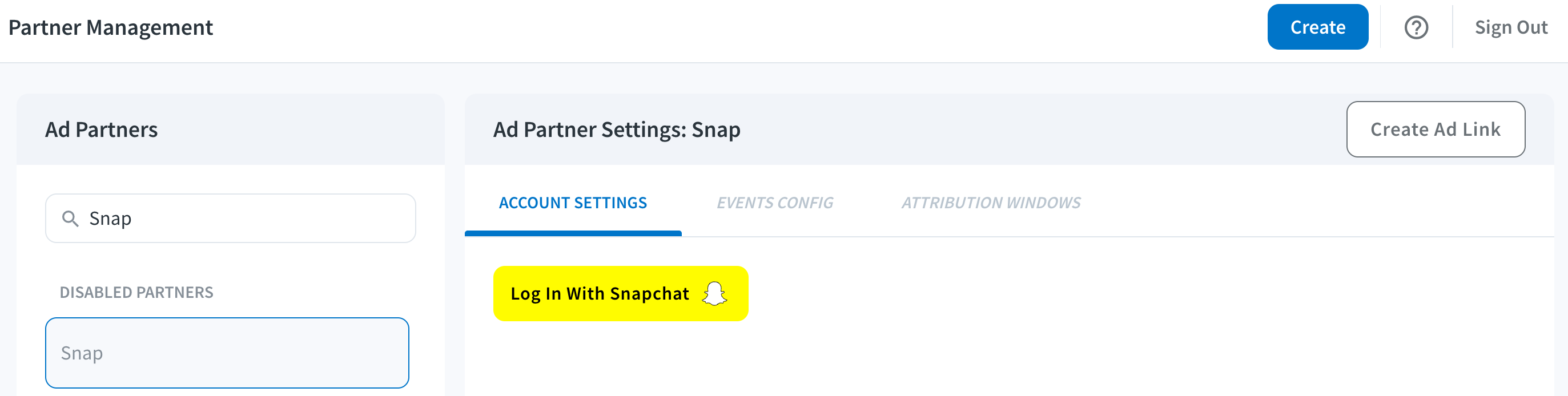
After connecting, Snap should be connected to Branch!
2. Add Snap App ID
Enter your Snap App ID. To use different IDs for your Android and iOS apps, check the Use different iOS and Android IDs box. To add multiple Snap App IDs, separate each value with a comma.
Connecting Multiple Accounts
All SANs - including Snap - accept multiple accounts. However, only a single Branch user can authenticate the integration. This means that the single user must have access to all of the accounts you wish to connect.
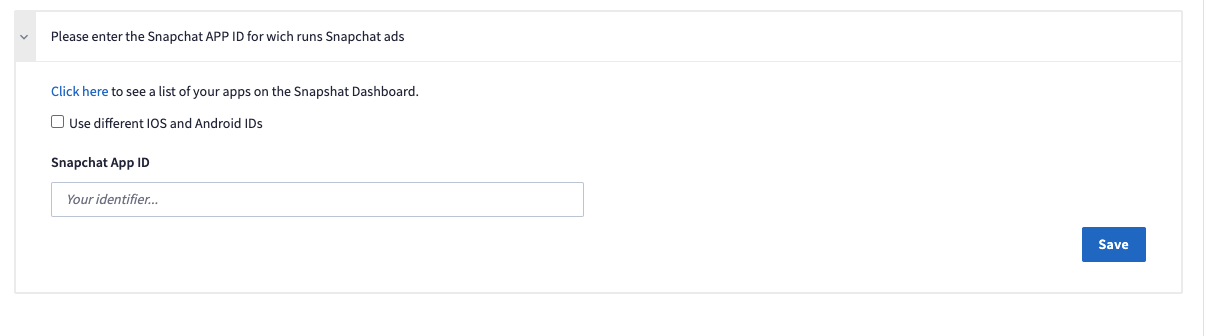
Click the Save button, and you can verify all of your Snap information:
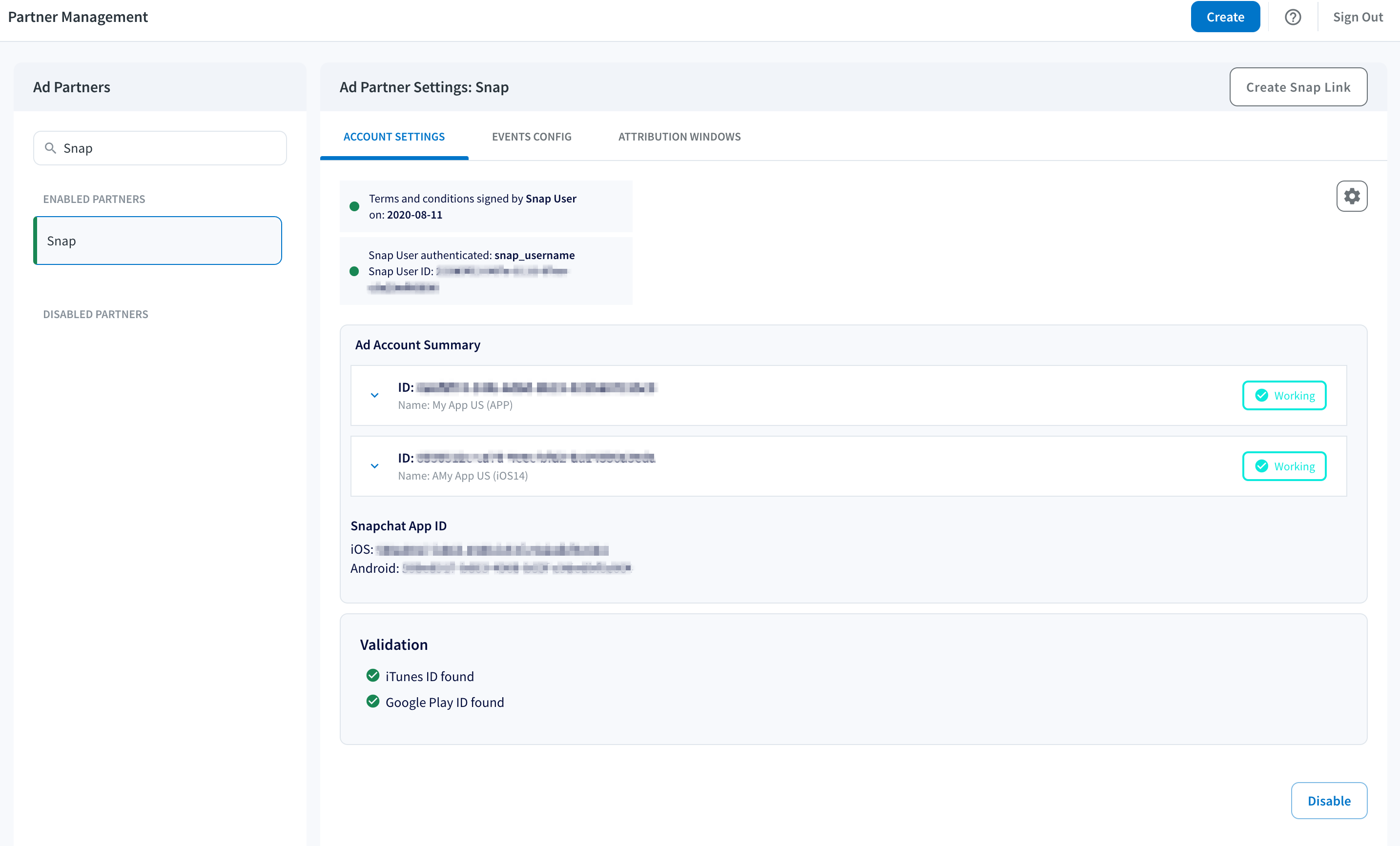
View Snap Data
Data Purge
- Branch will purge last-attributed data after 60 days.
Data Mapping
Event Names
Branch supports sending Standard and Custom Events to Snap.
Below are the mappings for Branch events to Snap events.
| Branch Event Name | Snap Event Name | Sent by Default |
|---|---|---|
INSTALL | APP_INSTALL | Yes |
VIEW_ITEM | VIEW_CONTENT | Yes |
ADD_TO_CART | ADD_CART | Yes |
INITIATE_PURCHASE | START_CHECKOUT | Yes |
PURCHASE | PURCHASE | Yes |
ADD_PAYMENT_INFO | ADD_BILLING | Yes |
COMPLETE_REGISTRATION | SIGN_UP | Yes |
SEARCH | SEARCH | Yes |
ACHIEVE_LEVEL | LEVEL_COMPLETE | Yes |
OPEN / REINSTALL | APP_OPEN | Yes |
SUBSCRIBE | SUBSCRIBE | Yes |
CLICK_AD | AD_CLICK | Yes |
VIEW_AD | AD_VIEW | Yes |
COMPLETE_TUTORIAL | COMPLETE_TUTORIAL | Yes |
INVITE | INVITE | Yes |
LOGIN | LOGIN | Yes |
SHARE | SHARE | Yes |
RESERVE | RESERVE | Yes |
UNLOCK_ACHIEVEMENT | ACHIEVEMENT_UNLOCKED | Yes |
ADD_TO_WISHLIST | ADD_TO_WISHLIST | Yes |
SPEND_CREDITS | SPENT_CREDITS | Yes |
RATE | RATE | Yes |
START_TRIAL | START_TRIAL | Yes |
VIEW_ITEMS | LIST_VIEW | Yes |
| Custom Branch Event | SAVE | No |
| Custom Branch Event | PAGE_VIEW | No |
Snap also allows 5 slots for custom events. To use these slots, you can create a Branch Event (either Standard or Custom), and that will get mapped to a Snap event that begins with CUSTOM_EVENT_....
| Branch Event | Snap Event Name | Sent by Default |
|---|---|---|
| Branch Event (Standard or Custom) | CUSTOM_EVENT_1 | No |
| Branch Event (Standard or Custom) | CUSTOM_EVENT_2 | No |
| Branch Event (Standard or Custom) | CUSTOM_EVENT_3 | No |
| Branch Event (Standard or Custom) | CUSTOM_EVENT_4 | No |
| Branch Event (Standard or Custom) | CUSTOM_EVENT_5 | No |
Campaign Data
Branch maps the following data fields from Snap to Branch.
| Branch Data | Snap Data | Parameter in Deep Link URL |
|---|---|---|
~campaign | campaign_name | cname |
~campaign_id | campaign_id | cid |
~ad_set_name | ad_squad_name | adsetname |
~ad_set_id | ad_squad_id | adsetid |
~ad_name | ad_name | adname |
~ad_id | ad_id | adid |
~ad_account_id | ad_account_id | adacctid |
Metadata
| Branch metadata | Snap Metadata | Description |
|---|---|---|
| SKU (list of) | item_ids | International Article Number (EAN) when applicable, or other product or category identifier. |
Quantity | number_items | Number of items. |
revenue | price | Monetary value of the conversion event in float format. Please do not include currency symbols or commas as part of the value. (ex. single value: price=34.24, multiple values: price=99.43,45.34;34.27) |
currency_code | currency | Currency in standard ISO 4217 code (ex. EUR, USD, JPY). Required if price is included. |
transactionID | transaction_id | Transaction ID. |
searchQuery | search_string | The text string that was searched. |
custom_data. | level | Level in the game. |
Cost Data
- To view the cost metrics Branch provides, please see SAN Cost Data.
- If you're seeing discrepancies, please see Common Sources of SAN Reporting Discrepancies.
Export Snap Data
Restrictions on Raw Data Exports
Snap applies restrictions to certain user-level raw data exports for Snap-attributed conversions, especially for view-through attribution data. These restrictions affect log-level export products, including Daily Exports, Custom Exports, Scheduled Log Exports APIs, webhooks, third-party data integrations, and ad partner Postbacks.
When Snap raw data restrictions apply, Branch may remove or obfuscate specific attribution fields from log-level exports. Customers can still identify Snap as the media source for restricted conversions, but certain granular attribution details may be unavailable at log level.
Aggregate reporting is not impacted by these log-level restrictions. Campaign-level aggregate data remains available in Branch, aggregate-level APIs, and Snap’s own reporting interfaces.
For the full list of restricted fields refer to the Restricted Parameters table below.
Restricted parameters
| Snap Parameter | Branch Parameter |
|---|---|
| ad_account_id | ~advertising_account_id |
| ad_id | ~ad_id |
| ad_name | ~ad_name |
| country | ~country_or_region |
| request_id | N/A |
| snap_channel | ~secondary_publisher |
| deep_link_url | external_intent_uri, universal_link_url, android_app_link_url |
We cannot send device-level Snap attribution data to third parties. Thus, we cannot send events attributed to Snap via Data Integrations. Please instead consider analyzing this data in-house (using our suite of Webhooks & Export APIs), or using the Branch Dashboard for all of your analytics and attribution needs.
Troubleshooting
Discrepancies
- Snap Ads Manager time zones are set at the time your ad account is created. You can see your Snap time zone in your Snap Ad Account Settings, but you cannot change it. You can change your Branch dashboard time zone in Account Settings to match.
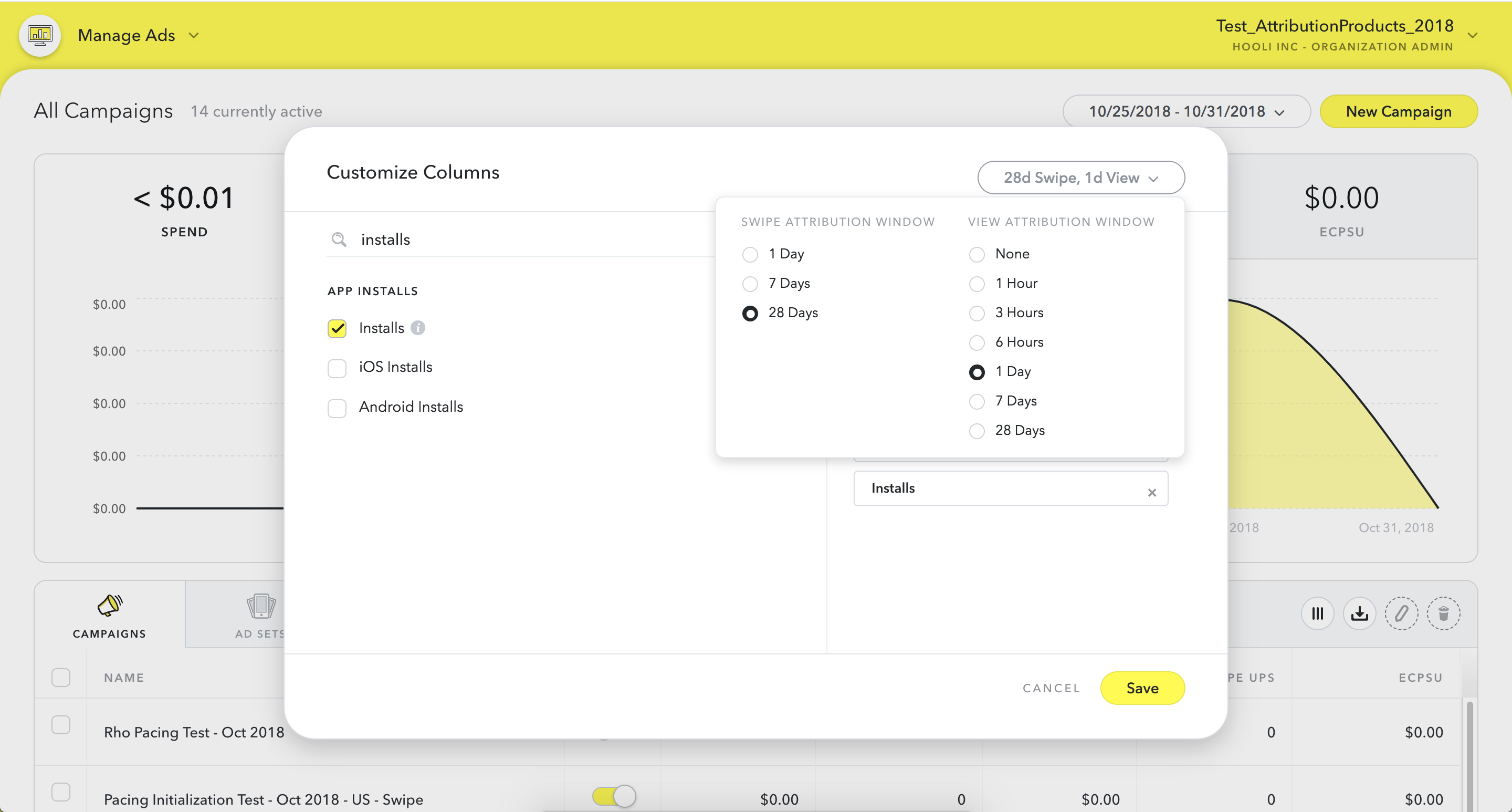
- Verify your Snap attribution windows match your Branch attribution windows. Ask your Snap account manager for your attribution windows. Your Branch windows are visible either in Link Settings (global windows) or in the Attribution Windows section of the Snap entry in Ads Partner Manager. Snap windows can be configured under "Customize Columns" in the Snap UI.
- When deep linking, create a link via the Branch dashboard. If you are running an app campaign, please ensure your link has
%24deeplink_no_attribution=trueas a query parameter to remove that link's ability to claim attribution, otherwise the link may claim attribution over the SAN claim. The link will still deep link. - Snap's reporting API does not provide any "compare by" functionality outside of the ads analytics tags. So, you cannot compare Snap click + impression data by platform, OS, or country, for example.
Data export issues
You can see analytics on impressions, clicks, installs, opens, and conversion events on various pages of Branch.
We cannot send device-level Snap attribution data to third parties. Thus, we cannot send events attributed to Snap via data integrations. Please instead consider analyzing this data in-house (using webhooks, the Daily Export API, or CSV exports), or using the Branch Dashboard for all of your analytics and attribution needs.
For more information, please see Export Snap Data.
Snap SKAdNetwork
Branch and Snap are integrated for SKAdNetwork! For customers using the Branch SDK, Branch will provide Snap your conversion value mapping for campaign optimization.
Snap requires that Snap event names be used in order to make use of that mapping. In order to accommodate, Branch will send the Snap event name for your conversion values as long as you have the correct events mapped under Partner Management --> Event Config.
To check if we will send Snap event names for your conversion value mapping:
- Go to Ads --> Partner Management --> Snap --> Event Config
- Add Branch MMP to Snap. Select Branch from the 'Please share postbacks with this MMP' drop down field in the Snap App Details
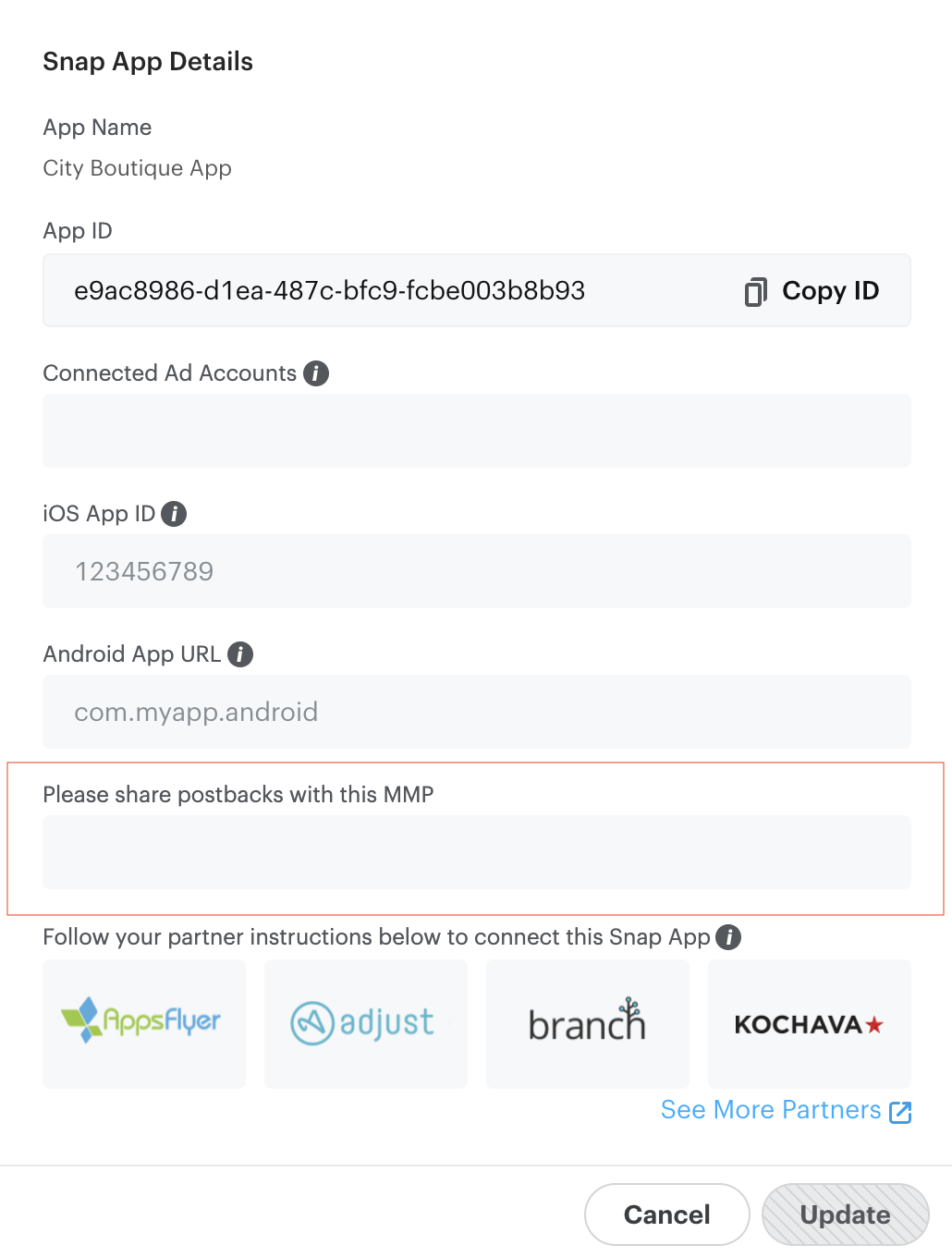
- Ensure that the Branch events you are using for Conversion Values are mapped to corresponding Snap event names
Advanced
Snap App ID
Snap App IDs are generated by an advertiser in Snap’s Business Manager or when they register their app for Snap at https://kit.snapchat.com/ and tied to the advertiser’s organization ID. Snap App IDs are associated to an advertiser’s organization in Snap’s ad platform. If the Snap App ID is generated in Snap Kit, it will need to be linked to their organization in Business Manager.
Advertisers will only be able to build mobile app custom audiences from their mobile measurement events inside Snap’s ad platform from postback events that have their Snap App ID(s).
Learn more about the Snap App ID.
Snap Audience Network
Snap Audience Network (SDK and RTB) is a network where advertisers can expand the reach of their campaigns beyond Snapchat. Conversion attribution will work the same as Snapchat conversion attribution and advertisers will have the ability to run a single campaign across both Snapchat and
the Snap Audience Network (SAN).
Learn more about Snap Custom Audiences.
Deep link support for Snap Campaigns
Branch Links can be used for click & impression tracking, however, you cannot leverage Branch Links directly in the Deeplink field. Snap currently restricts any Universal Link or App Link or MMP redirect link in their paid media campaigns (Snap documentation). For SAN deferred deep linking support go here.
Your app needs to be able to read the Deep link URI AND any additional data necessary for routing.
- Ensure that your app is set up to read custom URI scheme key:value pairs for the purposes of deep link routing.
- Fetch your URI scheme from the Branch app configuration.
- Combine your URI scheme with your required key:value pair (e.g. yourBranchappscheme://yourKeyValue).
- Set up your Snap campaign, selecting Drive Traffic to App.
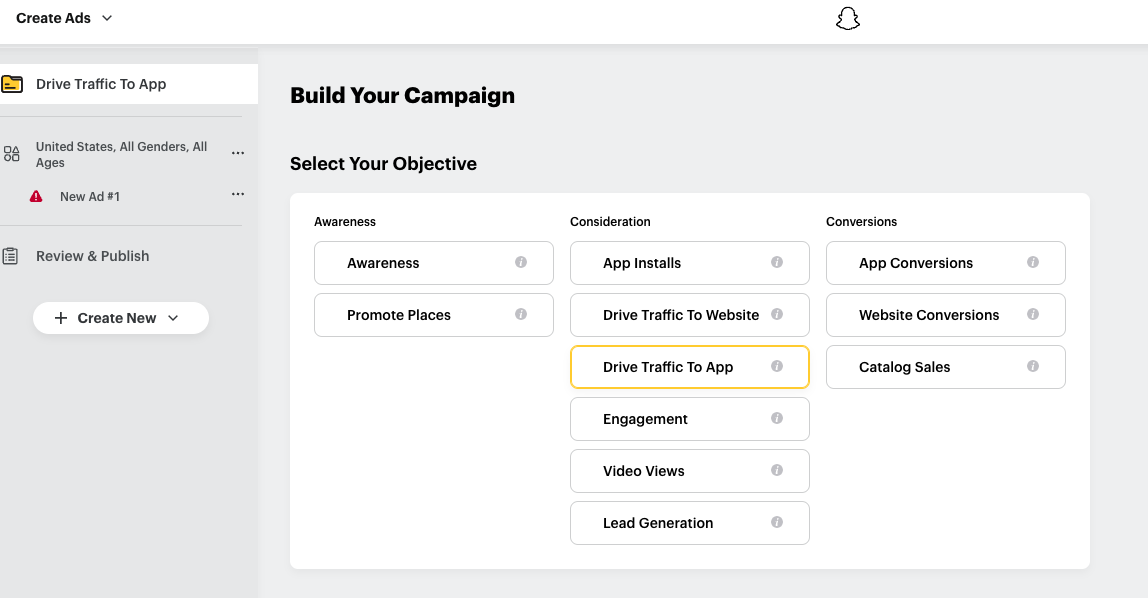
On the Build Your Ads page:
- Paste your Branch URI scheme into the DEEPLINK URI field.
- Select Web Site as the FALLBACK TYPE and add web URL to ensure routing for non-app users.
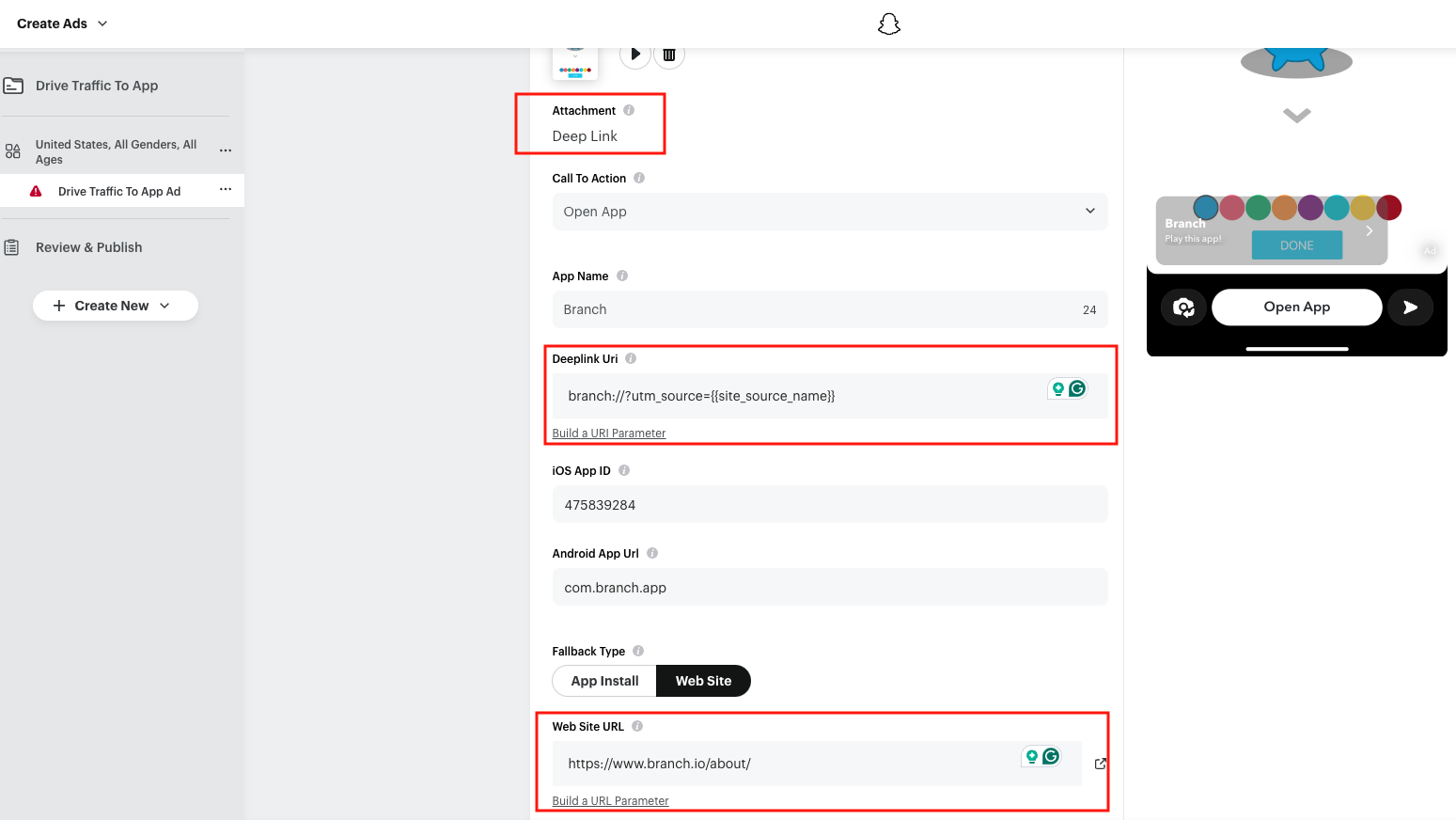
- Finish building your Snap campaign.
Web Site as Fallback Required for Deferred Deep Linking
Please ensure you choose Web Site as the FALLBACK TYPE and insert the same Branch Link into the provided field. If you choose App Install as the FALLBACK TYPE, users not properly routed will be sent to the App Store without the Branch Link and deferred deep linking will not occur.
Agency-Managed Campaigns
- If an Agency manages your Snap campaigns, please see Agency-managed SAN Campaigns.