
Overview
Data Integrations provide an easy way to automatically send Branch data to your other analytics services and marketing tools using pre-formatted webhooks.
This guide will walk you through how to send your Branch data to our Data Integration partners. For most integrations, configuration just requires you to input your credentials and hit "Enable".
Data limitations
Please note that installs and other events attributed to Meta Ads, Snap, Twitter Ads, or TikTok will not be sent to third parties via Data Integrations.
For more information, please refer to the following:
iOS 14.5 data changes
Apple requires users to opt into sharing their device data through Apple's AppTrackingTransparency framework. When an install is attributed to paid ads, a 2nd install event will fire post user opt-in.
Opt-ins will affect your paid ads attributed install events as they will be delayed until opt-in. No data will be available for opted-out users unless another Branch-attributed channel was encountered (Short Link, Journeys, Email, etc.). Our recommendation is to use a different identifier (ex. IDFV) to de-dupe install events on your partner systems.
For additional information on changes post iOS 14.5, visit our FAQ pages.
1. Verify the data partner accepts the events you want
The events Branch sends to third-party data tools varies based on the events the partner supports as well as whether or not you've implemented the Branch SDK to measure said events.
All non-attributed events will be excluded. Branch also sends all the data that is attached to the link that drove the referred event. This will allow you to analyze which campaigns, channels, etc. are helping you acquire and engage users.
VIEW BRANCH EVENTS SENT TO PARTNER
| Data Integration Partner | Branch Events Sent to Partner |
|---|---|
| 24Metrics Fraudshield | • Install Events • Click Events • Commerce Events |
| Adform | • Install Events • Commerce Events • Custom Events • Open Events |
| Adjust | • Click Events |
| Admost | • Install Events |
| Adobe Analytics (Data Connector) | • View Adobe Analytics (Data Connector) Specific Guide Here |
| Adobe Analytics (Processing Rules) | • View Adobe Analytics (Processing Rules) Specific Guide Here |
| Adoya | • Install Events • Commerce Events |
| Airship | • View Airship Specific Guide Here |
| Amplitude | • Install Events • Open Events • Reinstall Events • Commerce Events • Custom Events |
| AppMetrica | • Click Events |
| AppsFlyer | • Click Events ⚠ AppsFlyer does NOT accept query params on the end of Branch Links ⚠ AppsFlyer may not properly attribute installs to Journeys and other Branch Link clicks due to lack of IDFA on click ⚠ There may be a delay in clicks arriving at AppsFlyer via Webhook and the install event being sent to AppsFlyer by the AppsFlyer SDK |
| Appsee | • Install Events |
| Apptilaus - Subscription Analytics | • Install Events • Open Events • Commerce Events • Custom Events |
| Apxor | • Install Events • Open Events • Commerce Events • Custom Events |
| Backinapp | • Install Events • Reinstall Events • Open Events • Commerce Events • Custom Events |
| Batch | • View Batch Specific Guide Here |
| Bluecore | • Commerce Events |
| Braze | • View Braze Specific Guide Here |
| Bubbleye | • Click Events • Install Events • Open Events • Commerce Events • Custom Events |
| Chartable | • Install Events • Commerce Events • Custom Events |
| Claritas | • Install Events • Open Events • Custom Events |
| CleverTap | • View CleverTap Specific Guide Here |
| Convertro | • Click Events • Install Events • Reinstall Events • Open Events • Custom Events |
| Dataplusmath | • Install Events • Open Events • Commerce Events • User Lifecycle Events • Custom Events |
| Eulerian | • Click Events • Impression Events • Install Events • Open Events • Commerce Events |
| FollowAnalytics | • Install Events |
| Forensiq | • Click Events • Install Events |
| Fraudscore | • Install Events • Commerce Events • Custom Events |
| Fraud Defense | • Install Events |
| Google Analytics | • View Google Analytics Specific Guide Here |
| Google Analytics 4 | • View Google Analytics 4 Specific Guide Here |
| Google Firebase | • View Google Firebase Specific Guide Here |
| iCubes Pro | • Install Events • Commerce Events |
| Insider | • Install Events • Commerce Events • Custom Events |
| Iterable | • Install Events • Open Events • Commerce Events • Custom Events |
| Kochava | • Click Events |
| Leanplum | • View Leanplum Specific Guide Here |
| Localytics | • Install Events |
| Machine Advertising | • Install Events • Commerce Events • Custom Events |
| mFilterit | • Install Events • Open Events • Commerce Events • Custom Events |
| Mixpanel | • View Mixpanel Specific Guide Here |
| MobileAction | • Install Events • Commerce Events |
| MovableInk | • View MovableInk Specific Guide Here |
| MoEngage | • View MoEngage Specific Guide Here |
| mParticle (Import) | • View mParticle Import Specific Guide Here |
| mParticle (Export) | • View mParticle Export Specific Guide Here |
| myTracker | • Click Events |
| Netcore Smartech | • Install Events • Commerce Events • Custom Events |
| Neustar | • Install Events • Open Events • Commerce Events • Custom Events |
| NotifyVisitors | • Install Events • Commerce Events • Custom Events |
| Scalarr | • Install Events • Open Events • Commerce Events • User Lifecycle Events • Custom Events |
| SearchAdsHQ | • Install Events • Open Events • Commerce Events • Custom Events |
| Segment (Import) | • View Segment Import Specific Guide Here |
| Segment (Export) | • View Segment Export Specific Guide Here |
| Singular | • Click Events |
| Tealium (Import) | • View Tealium Import Specific Guide Here |
| TrafficGuard | • Click Events • Install Events • Open Events • Commerce Events • Custom Events |
| Visual IQ | • Install Events • Open Events • Commerce Events • Content • User Lifecycle Events |
| WebEngage | • Install Events |
2. Complete data integration prerequisites
Before enabling a Data Integration, you'll need to ensure the Branch SDK is implemented in your app and that you're tracking the events you want to send to your partner. You'll also need to have the partner's SDK installed in your app if required by that partner.
See our developer documentation for implementation details.
3. Retrieve keys/credentials from your partner
Find your Partner's Keys/Credentials. Later, you'll enter them into the Branch Dashboard.
FIND PARTNER KEY & METHOD TO PASS TO BRANCH
| Data Integration Partner | Partner Key & Method to pass to Branch SDK |
|---|---|
| Adobe Analytics | • View Adobe Analytics Specific Guide Here |
| Airship | • View Airship Specific Guide Here |
| Amplitude | • Set value for $amplitude_device_id & $amplitude_user_id keys using setRequestMetadataKey() method |
| Batch | • View Batch Specific Guide Here |
| Braze | • View Braze Specific Guide Here |
| CleverTap | • View CleverTap Specific Guide Here |
| Google Analytics | • View Google Analytics Specific Guide Here |
| Google Analytics 4 | • View Google Analytics 4 Specific Guide Here |
| Google Firebase | • View Google Firebase Specific Guide Here |
| Iterable | • Set Iterable user ID using setIdentity() method |
| Mixpanel | • View Mixpanel Specific Guide Here |
| MoEngage | • View MoEngage Specific Guide Here |
| Movable Ink | • View Movable Ink Specific Guide Here |
| mParticle | • View mParticle Import Specific Guide Here |
| mParticle | • View mParticle Export Specific Guide Here |
| Segment | • View Segment Import Specific Guide Here |
| Segment | • View Segment Export Specific Guide Here |
4. Enable the integration
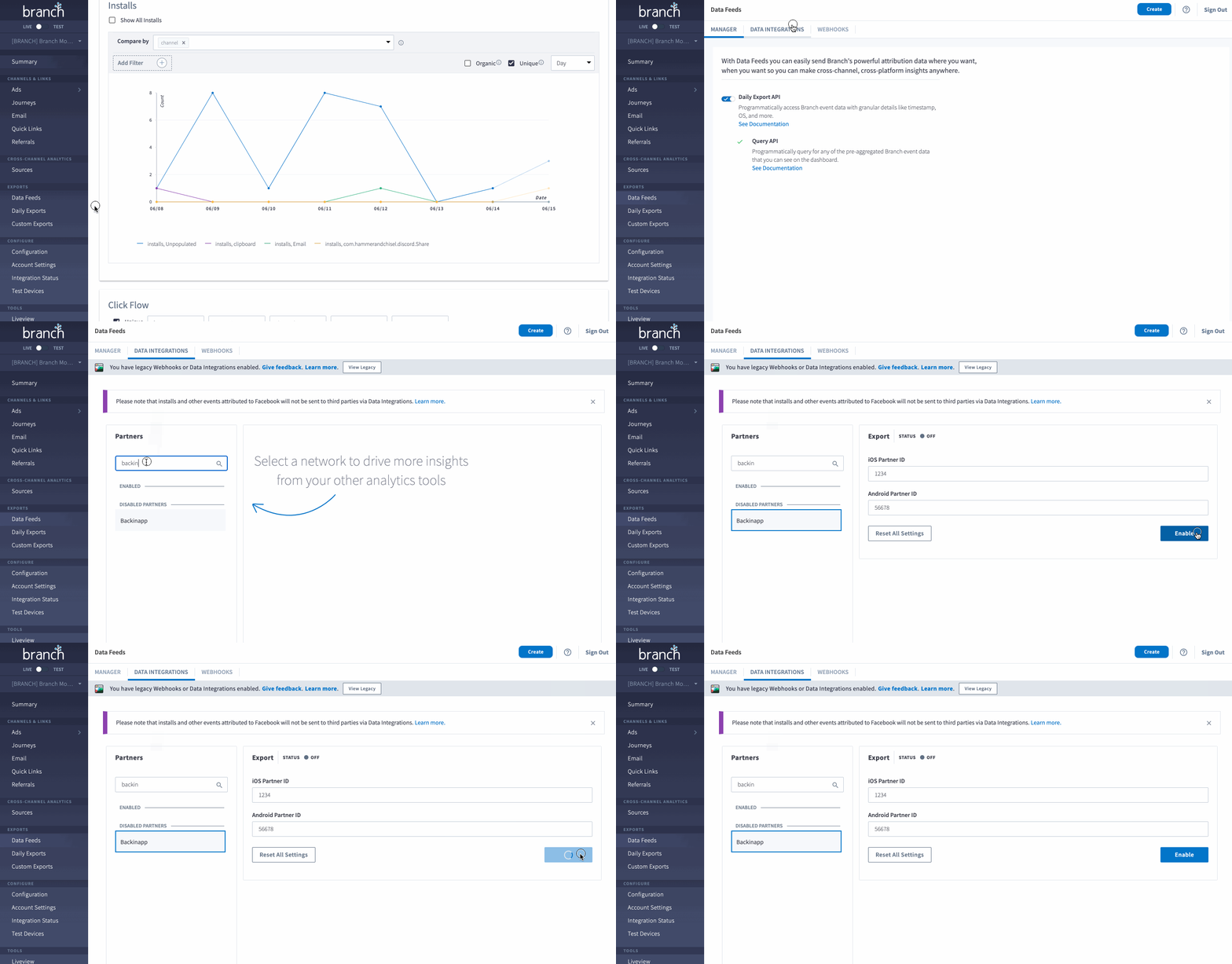
To enable the integration:
In the left-hand navigation, under the Exports section, click Data Feeds.
On the Data Feeds Manager page, click the Data Integrations tab at the top.
Search for and click on your data partner.
Provide the necessary credentials on the data partner's Export page.
Click Enable.
5. Additional partner-specific configuration
Some partners require additional SDK configuration to pass specific identifiers or metadata to Branch. If your partner requires this step, your development team will need to make SDK updates.
See our developer documentation for implementation details.