
Note
This article describes the legacy Branch method for adding additional apps. To add additional apps in new Branch, please reach out to support.
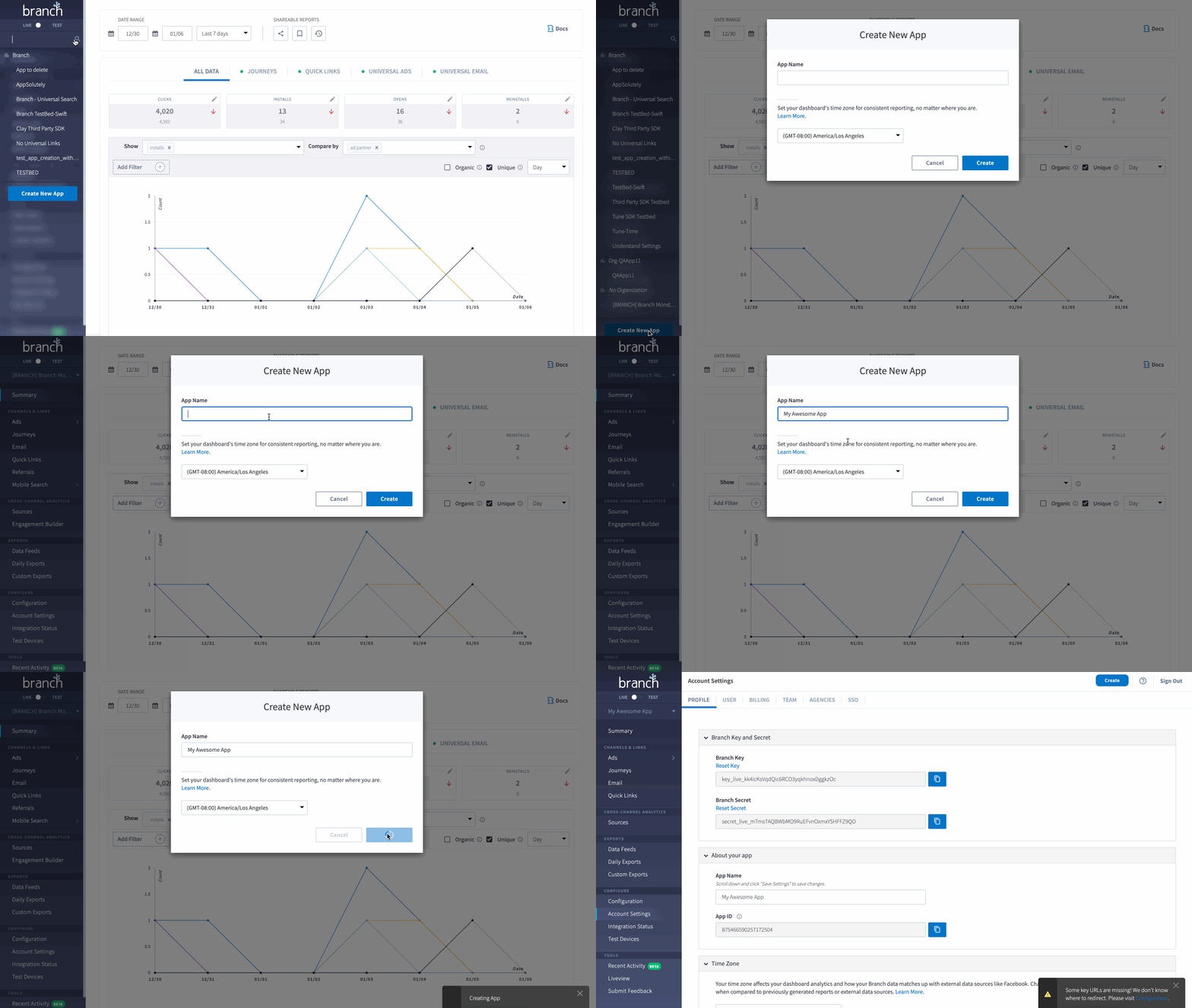
- Locate your app name on the top left corner of the dashboard, and click on the drop down arrow to open the menu.
- At the bottom of this menu, click Create New App.
- In the Create New App pop-up modal:
a. Provide the App Name.
b. Select the correct Timezone. - Click Create.
FAQs
Why can't I create additional apps?
If you don't see Create New App at the bottom of the app menu, one of the following applies:
- You're using new Branch. The Create New App button is only available in the legacy dashboard. To add an app in new Branch, contact Branch Support.
- You're an agency user in App view. Agency users can create apps in Organization view, but not stand-alone apps in App view. Use the menu dropdown to switch to Organization view, then create the app. Alternatively, ask your customer to create the app. For more information, see Grant an Agency Access.
- Your plan or account doesn't allow additional apps. The Intro plan includes 1 app, and Basics plans also include 1 app, so upgrading to Basics doesn't add apps. App creation and limits depend on your account. Contact your Branch representative to discuss adding apps.