
Overview
Branch includes SDK methods to allow retrieval of our last attributed touch data (LATD) from the client. This results in an asynchronous call being made to Branch's servers with LATD data returned when possible.
Last attributed touch data contains the information associated with that user's last viewed impression or clicked link.
Access
Please note that access to last attributed touch data is part of our Performance product.
Fields Returned
By using the LATD SDK querying, the following fields will be returned to the client:
- last_attributed_touch_data_tilde_id
- last_attributed_touch_data_tilde_campaign
- last_attributed_touch_data_tilde_campaign_id
- last_attributed_touch_data_tilde_campaign_type
- last_attributed_touch_data_tilde_customer_campaign
- last_attributed_touch_data_tilde_channel
- last_attributed_touch_data_tilde_feature
- last_attributed_touch_data_tilde_stage
- last_attributed_touch_data_tilde_tags
- last_attributed_touch_data_tilde_advertising_partner_name
- last_attributed_touch_data_tilde_advertising_partner_id
- last_attributed_touch_data_tilde_secondary_publisher
- last_attributed_touch_data_tilde_secondary_publisher_id
- last_attributed_touch_data_tilde_customer_secondary_publisher
- last_attributed_touch_data_tilde_creative_name
- last_attributed_touch_data_tilde_creative_id
- last_attributed_touch_data_tilde_ad_set_name
- last_attributed_touch_data_tilde_ad_set_id
- last_attributed_touch_data_tilde_customer_ad_set_name
- last_attributed_touch_data_tilde_ad_name
- last_attributed_touch_data_tilde_ad_id
- last_attributed_touch_data_tilde_customer_ad_name
- last_attributed_touch_data_tilde_keyword
- last_attributed_touch_data_tilde_keyword_id
- last_attributed_touch_data_tilde_customer_keyword
- last_attributed_touch_data_tilde_sub_site_name
- last_attributed_touch_data_tilde_customer_sub_site_name
- last_attributed_touch_data_tilde_branch_ad_format
- last_attributed_touch_data_tilde_technology_partner
- last_attributed_touch_data_tilde_banner_dimensions
- last_attributed_touch_data_tilde_placement
- last_attributed_touch_data_tilde_placement_id
- last_attributed_touch_data_tilde_customer_placement
- last_attributed_touch_data_tilde_agency
- last_attributed_touch_data_tilde_agency_id
- last_attributed_touch_data_tilde_optimization_model
- last_attributed_touch_data_tilde_secondary_ad_format
- last_attributed_touch_data_tilde_external_touch_id
- last_attributed_touch_data_tilde_journey_id
- last_attributed_touch_data_tilde_journey_name
- last_attributed_touch_data_tilde_view_id
- last_attributed_touch_data_tilde_view_name
- last_attributed_touch_data_plus_referring_domain
- last_attributed_touch_data_plus_current_feature
- last_attributed_touch_data_plus_via_features
- last_attributed_touch_data_dollar_3p
- last_attributed_touch_data_dollar_fb_data_terms_not_signed
- last_attributed_touch_data_plus_web_format
- last_attributed_touch_data_plus_touch_id
- last_attributed_touch_data_custom_fields
Enabling LATD Feature
Before you can receive Branch last attributed touch data client-side, you need to enable this functionality in Branch. This functionality is disabled by default.
To enable LATD:
In the left-hand navigation, click on Link Settings.
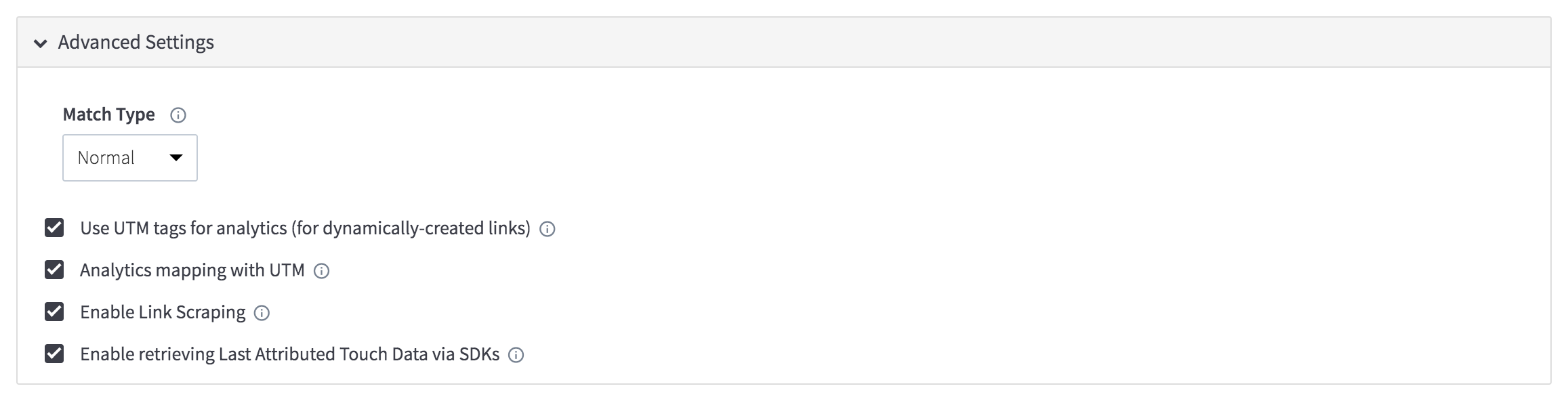
On the Link Settings page, scroll down and expand Advanced Settings.
Within the Advanced Settings section, check the box next to Enable retrieving Last Attributed Touch Data via SDKs.
Once checked, scroll down to the bottom of the page and click Save.
Required SDK Methods
Important: When calling the LATD method, you can provide a value for the attributionWindow you want applied to the data. As a best practice, we recommend always explicitly passing your desired attributionWindow value to ensure consistent behavior across Android and iOS, and across SDK versions.
Note: LATD for self-attributing networks
This endpoint reads last attributed touch data from our Persona store. If you invoke it immediately after session start, it may not contain the most recent attribution data. Requests to self-attributing networks (SANs) like Facebook and Google are processed asynchronously and take time to finish.
iOS
[[Branch getInstance] lastAttributedTouchDataWithAttributionWindow:0 completion:^(BranchLastAttributedTouchData * _Nullable latd, NSError * _Nullable error) {
        // access the data through latd.lastAttributedTouchJSON;
}];Branch.getInstance().lastAttributedTouchData(withAttributionWindow: 0) { latd, error in
// access the data through latd?.lastAttributedTouchJSON
}Android
Caution: use Android SDK version 5.21.1+
In Android SDK versions prior to 5.21.1, omitting the attributionWindow parameter caused the SDK to return no data. This has been fixed in SDK 5.21.1 so that if you don’t provide a value, the SDK will still correctly fall back to the attribution window you’ve configured in Branch.
You may omit the attributionWindow parameter if you are using Android SDK 5.21.1 or later. The SDK will use your Branch attribution window setting.
// Recommended: always specify the attribution window explicitly
Branch.getInstance().getLastAttributedTouchData(
    new BranchLastAttributedTouchDataListener() {
        @Override
        public void onDataFetched(JSONObject jsonObject, BranchError error) {
             // Read the data from the jsonObject
        }
    }, 30); // Attribution window in days
Web
branch.lastAttributedTouchData(
    attribution_window,
    callback (err, data)
);
React Native
const attributionWindow = 365;
const latData = await branch.lastAttributedTouchData(attributionWindow);
// latData is an Object