
Overview
Journeys Assist allows you to combine your powerful banners and interstitials from Journeys with your mobile measurement capabilities of Ads, Email, and other Branch-powered channels to provide complete attribution of the user flow.
How does it work?
Same Session (Enabled by default)
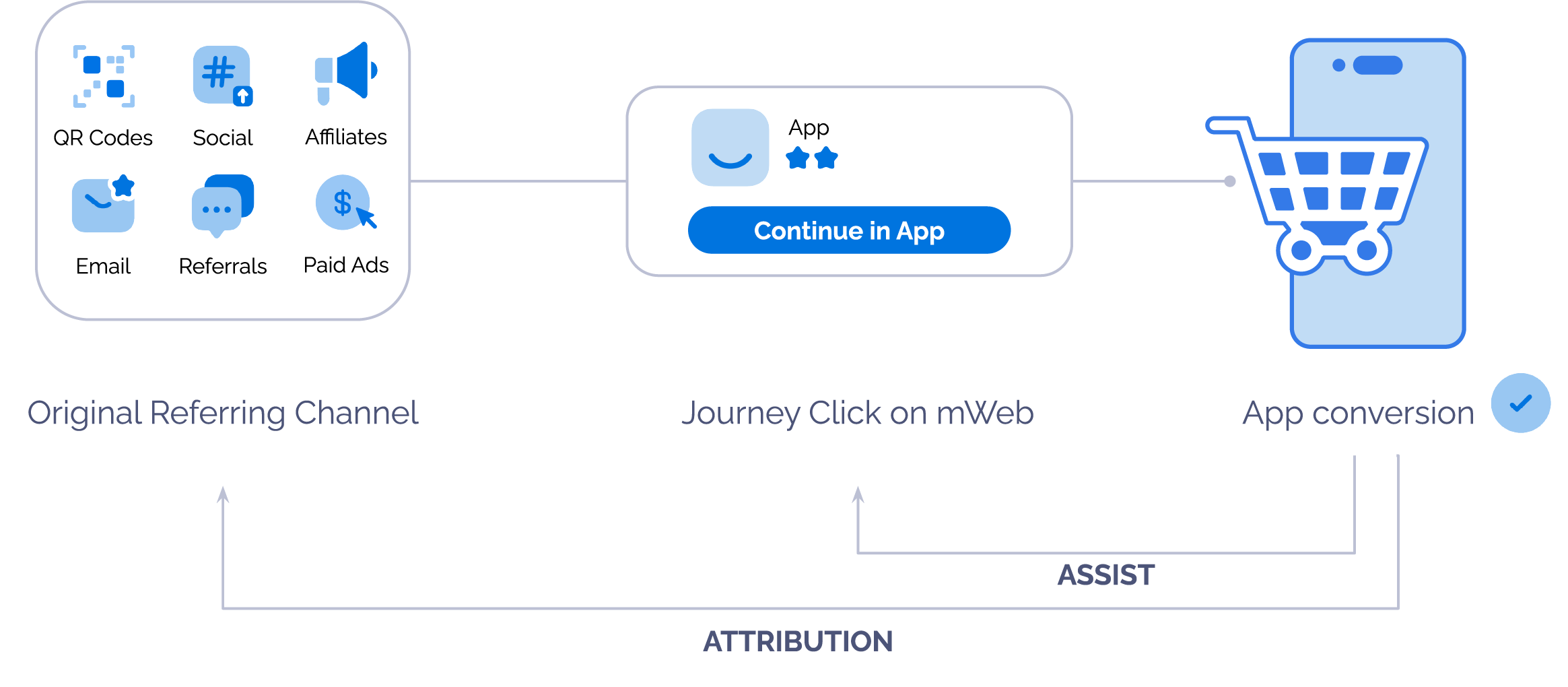
User lands on your mobile website and sees a banner or full-page interstitial promoting the mobile app coming from an ad, email interaction, or other Branch powered channel.
- User can come from an ad they interact with (click).
- User can come from an email campaign (click).
User clicks the call to action to install the mobile app within the same session.
Once the user opens the app, conversions (including the install) that happen in the app, are attributed to the original Branch powered campaign the user interacted with.
Multi Session
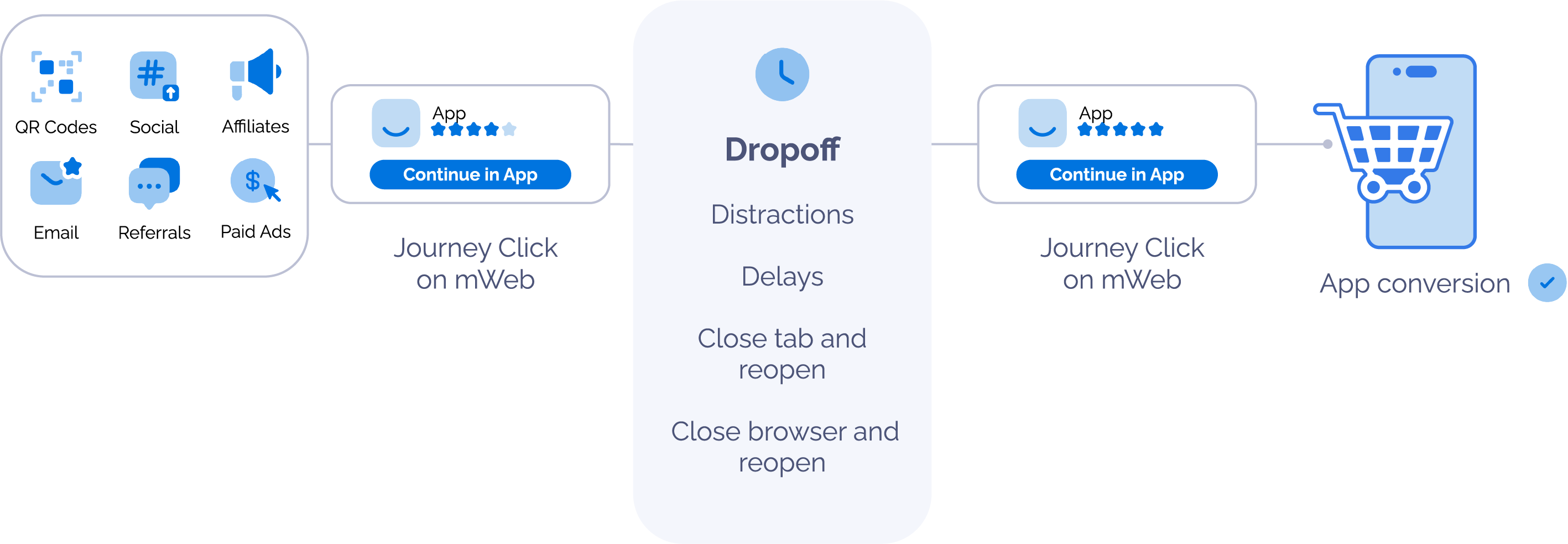
User lands on your mobile website and sees a banner or full-page interstitial promoting the mobile app coming from an ad, email interaction, or other Branch powered channel.
- User can come from an ad they interact with (click).
- User can come from an email campaign (click).
User drops off for some time and returns to the mobile website to see the Journeys banner/interstitial again.
User clicks the call to action to install the mobile app.
Once the user opens the app, conversions (including the install) that happen in the app, are attributed to the original Branch powered campaign the user interacted with.
Before you begin
In order to enable Journeys Assist, you need to have completed the following:
Created a Branch Dashboard.
Enabled Journeys for your Branch account.
- Contact your Branch account manager or visit https://branch.io/pricing.
Implemented the Branch SDK into your mobile app (iOS | Android).
Implemented the Branch Web SDK into your website.
Already running Journeys banners/interstitials.
Already running other Branch powered channels, like ad campaigns through your chosen ad partner and/or running email campaigns through your chosen email partner.
Enabling Journeys Assist
Same Session
This is enabled by default for all Journeys. If a user is driven to a mobile web session from a Branch powered channel and interacts with a Journey Banner within the same session, Branch will automatically bypass the Journey CTA link with the session's referring Branch Link.
Multi Session
If you wish to support Journeys Assist across multiple mobile web sessions to credit referring Branch powered channels for longer durations, you must add two new parameters to the web SDK's initialization options.
| Key | Value | Definition |
|---|---|---|
| enableExtendedJourneysAssist | Boolean | Enable or Disable Multi Session Journeys Assist. Branch defaults to false |
| extendedJourneysAssistExpiryTime | Timestamp | TTL value in milliseconds for the referring Branch Link. Branch recommends and defaults to 7 days |
Opt-In to Journeys Assist Multi Session through Web SDK Initialization Options
Before the Branch SDK initializes, implement the following method:
var options = {
  enableExtendedJourneysAssist: true, // enable or disable referring Branch link expiry for Journeys Assist
  extendedJourneysAssistExpiryTime : 5000 // TTL value in milliseconds for the referring Branch link. Defaults to 7 days
};
branch.init('key_live_YOUR_KEY_GOES_HERE', options, function(err, data) {
  console.log(err, data);
});
Disabling Journeys Assist
If you wish to disable the default Same Session Journeys Assist support and have Journeys always claim attribution for post CTA click conversions, you can do so through the following two ways:
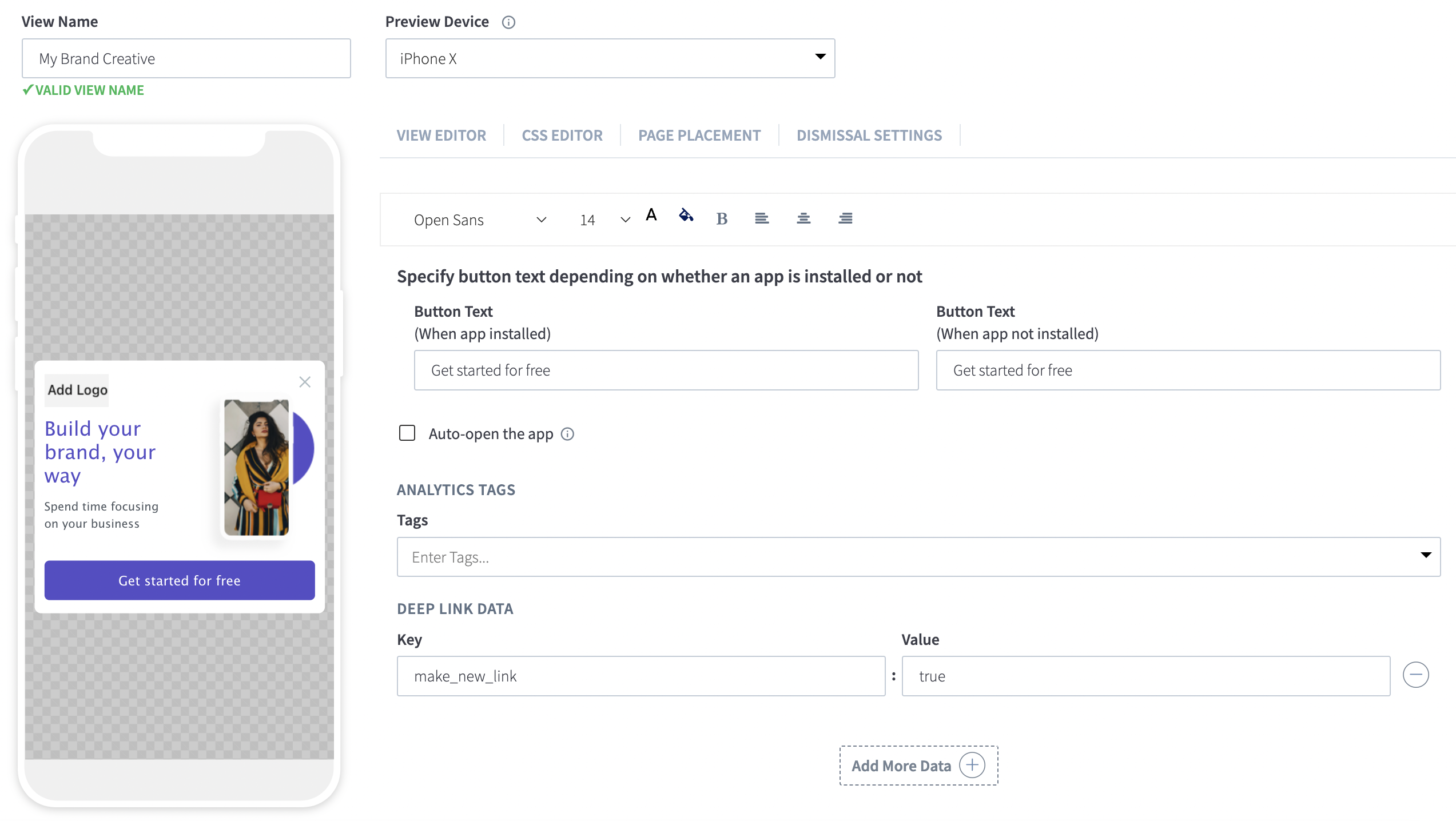
1. Add make_new_link:true to your Journey View Deep Link Data
2. Add make_new_link:true to the web SDK initialization options
var options = {
  make_new_link: true
};
branch.init('key_live_YOUR_KEY_GOES_HERE', options, function(err, data) {
  console.log(err, data);
});
View Analytics
After enabling Journeys Assist and as campaigns run, your ad/email campaigns should receive credit through Journeys installs and other conversions. To do this, we can apply the ~tags filter for your respective campaign. With this, you can view which Journeys campaign drove the ad/email conversion.
| Key | Value | |
|---|---|---|
| Dashboard Report Filter | tags | The view/creative name of your Journeys campaign. |
| Exports Key | Last Attributed Touch Data Tilde Journey Name | The view/creative name of your Journeys campaign. |