
Overview
Branch's Scheduled Log Exports API lets you schedule daily or hourly exports of log-level data from Branch.
We make these results available to you in one of three ways:
- The data is stored in Branch's AWS S3 bucket.
- The data is delivered to your own cloud storage account (AWS or GCP).
- The data is delivered to you via email.
You can stay on top of monitoring the data by creating a subscription to a particular feed. A subscription is a single report (which includes information such as data source, fields, and filters) that's set up to be exported over and over at a regular cadence.
A job represents one time that the report was run and data was exported. The result is one or more files with exported data. Depending on the cadence, a job results in exporting data for either one hour or one day.
Benefits
With the Scheduled Log Exports API, you can funnel your log-level data to a number of different places, and we make new data available to you on a daily cadence.
Use cases
- Automate Branch log-level data retrieval based on a schedule (hourly or daily), selecting your own data fields and filters.
- Set up notifications on sudden day-over-day increases or decreases in attributed installs.
- Export your data directly to your cloud account. There's no need to manually request exports. Instead, your data goes directly to your cloud storage, where you can access it at any time.
- Set up regular exports to agencies with the ability to hide certain data from partners to protect privacy, increasing your control over your data.
- Set up recurring emails with custom reports to share agency-attributed installs with your agency via email. Also share ad network postback records with your ad network.
Limits
| Limit | Details |
|---|---|
| Subscriptions | 35 subscriptions If you need to generate more than 35 reports, you should start by exporting all of the data you need for a particular event in one subscription. Then, split that data into multiple reports from within your data warehouse. Note that Branch currently has fewer than 30 events (called "eo topics") available for export. |
| Cadence | Data is exported on a daily or hourly cadence. For data that's exported on a daily cadence, the 24 hours of data from the previous day will typically be ready within 6 hours of a new UTC day (though often sooner), but may take as long as 8 hours. For data exported on an hourly cadence, the data for the previous hour will typically be ready within 2 to 4 hours but may take as long as 6 hours. |
Getting started
Before you begin
To use the Scheduled Log Exports API, you first need to:
- Create a Branch account.
- Make sure you have the appropriate permissions set on your account. See the "Access" section for more.
Cloud storage
If you want to store your Scheduled Log Exports API data in your own cloud storage account (AWS or GCP), you'll need to:
- Retrieve your external ID from Branch by using this API's
/scheduled-exports/logs/subscription/externalIdendpoint. - Follow our cloud set up guide to properly configure your AWS or GCP account to receive data from Branch.
- Use this API's
/scheduled-exports/logs/subscribeendpoint to create a new subscription that points the data to your cloud storage account.
Access
Availability varies by Branch plan. See Branch pricing.
General access
To access the Scheduled Log Exports API, a user must have both Aggregate Data and Export access enabled on their account.
Agency access
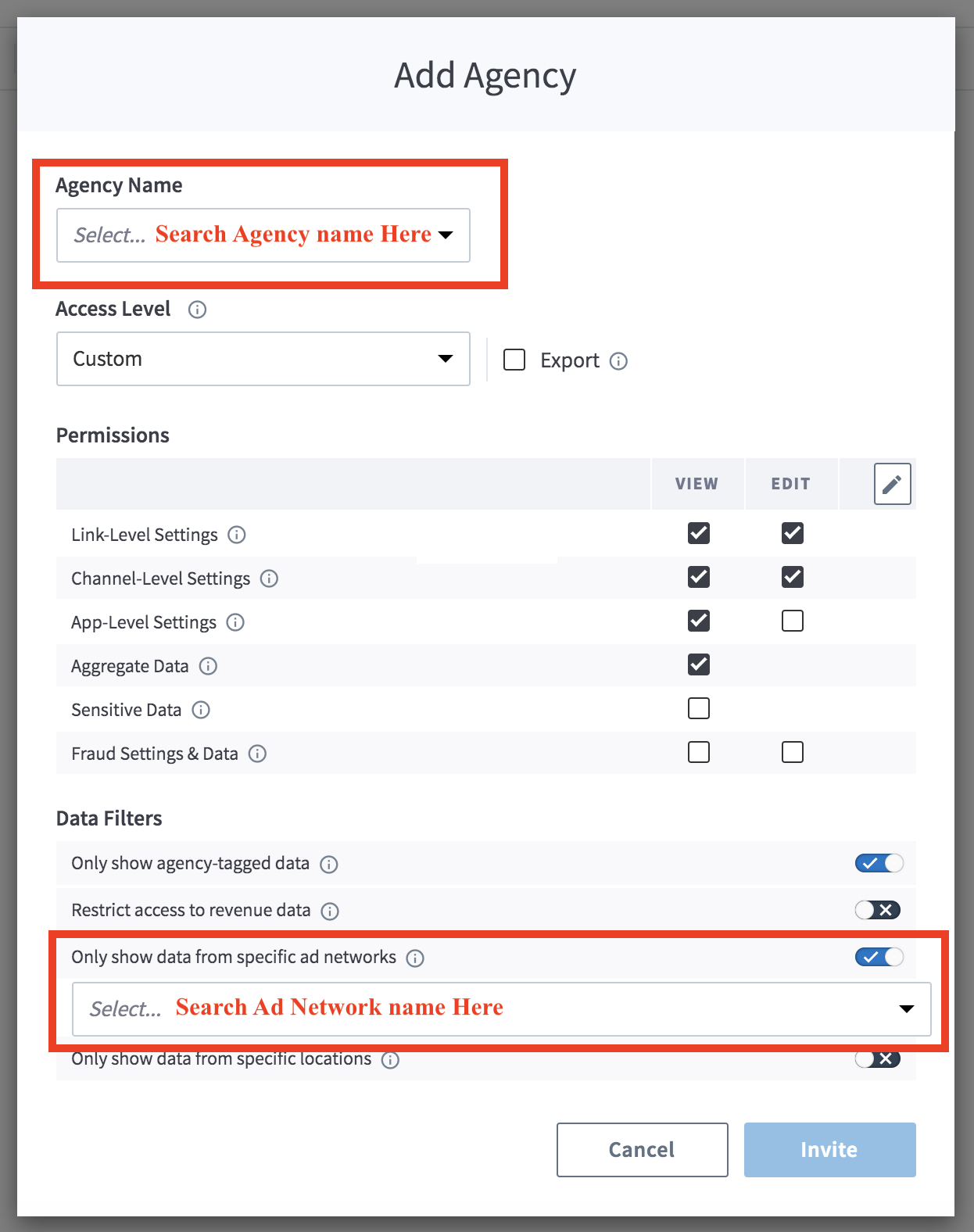
If you work with an agency that runs your advertising campaigns and want to give them access to export the subsequent data, you can give them Export and Aggregate Data access.
To provide an agency team member with access to the Scheduled Log Exports:
In the left-hand navigation, under Setup & Testing, select Account Settings.
On the Account Settings page, select the Agencies tab.
Expand the agency in question, find the agency team member you want to give access to, hover over the button in the Actions column, and select Edit.
In the Edit Agency Team Member modal:
- Under Access Level, check the Export box.
- Under Permissions, check the Aggregate Data box.
Optional: Add data filters.
- Under Data Filters, toggle any necessary data filters on. Exported data will be filtered accordingly.
Select Save.
Authentication
For calls to the Scheduled Log Exports API, you need your Access Token.
Legacy Branch
To retrieve your credentials in the legacy Branch experience:
- Navigate to the Account → Settings → User tab.
- If you have not yet generated an Access Token, select the Generate token button.
- Use the copy icon to copy your Access Token.
New Branch
To retrieve your credentials in the new Branch experience:
- Navigate to the Configuration → Security & Access → Credentials tab.
- If you have not yet generated an Access Token, select the Generate token button.
- Use the copy icon to copy your Access Token.
Visit our guide to learn more about managing your Branch credentials.
Usage
Get external ID
We provide a unique external ID for your Branch account.
You can use this external ID when you set up data to be exported to your own cloud service.
Your external ID is not relevant if you're accessing data via Branch's cloud or email.
Request info
Endpoint
GET /scheduled-exports/logs/subscription/externalId?{app_id|organization_id}={id}Request headers
| Header | Description | Required |
|---|---|---|
access-token | Key that encapsulates the user's permission with regard to an organization. Obtained from Branch. Needed for authentication. | Required |
content-type | application/json | Recommended |
accept | application/json | Recommended |
Request query parameters
Provide one of the following two options:
| Parameter | Description | Required |
|---|---|---|
app_id | The app ID with which the Access Token and subscriptions are associated. | Required if organization_id is not present |
organization_id | The organization ID with which the Access Token and subscriptions are associated. | Required if app_id is not present |
Response info
Response body parameters
| Parameter | Description |
|---|---|
external_id | The external ID associated with your Branch account. For AWS, you can use this external ID in the trust relationship for the role that you create to allow Branch to access your S3 bucket. |
Example request & response
# Include either app_id or organization_id in request query

curl -H 'access-token: api_app_99999999999999999999999999999999' \
'https://api2.branch.io/scheduled-exports/logs/subscription/externalId?app_id=123456789009876543'{"external_id":"111111bbbb-bbb111-1b1b1b1-1111-bbb"}Create new subscription
This type of request sets up a new scheduled log export subscription. This is supported at both the app and organization levels.
The result of this request is a subscription that specifies what data will be exported and where that data will be exported to.
Duplicate subscriptions
To prevent duplicate active subscriptions from being created accidentally, Branch throws an error if you attempt to create a subscription that exactly matches an existing subscription.
This is based on the following values:
subscription_typereport_typeapp_idororganization_idfieldsfiltercadence
However, simply reordering the values in fields is enough to bypass this check and create a new subscription.
Request info
Endpoint
POST /scheduled-exports/logs/subscribeRequest headers
| Header | Description | Required |
|---|---|---|
access-token | Key that encapsulates the user's permission with regard to an organization. Obtained from Branch. Needed for authentication. | Required |
content-type | application/json | Required |
accept | application/json | Recommended |
Request body parameters
| Parameter | Description | Required |
|---|---|---|
report | An object describing the report to be generated. | Required |
report. | How frequently to generate the report, and for what time period. Options: - Daily- Hourly | Required |
report. | Format that the report is delivered in. Options: - csv- json- parquet | Required |
report. | The file compression method to use for the data. Default: gzOptions: - gz- snappy | No |
response. | The topic to subscribe to for log-level data, also called the "eo topic". This is the data source from which data should be exported. See the "Available topics" section for a list of topics to choose from. | Required |
report. | The fields related to the topic that should be exported. These fields will be represented by columns in the CSV file. See the "Available fields" section for a list of fields to choose from. | Required |
report. | Filter used to limit which data points should be exported. These data points will be represented by rows in the CSV file. Learn more in the "Cthulhu filter specification" section. | No |
destination | An object containing information about where a finished report should be stored and how it can be accessed. | Required |
destination. | Options: - branch (to send the data to Branch's AWS S3 bucket)- cloud (to send the data to your own cloud)- email (to receive a daily email with the data) Learn more about sending data to your own cloud storage account in Branch's cloud setup guide. | Required |
destination. | If you set destination. to cloud, set this parameter to the cloud provider you want to use to store Branch data.Options: - s3 (AWS S3)- gcs (Google Cloud Storage) | Required if subscription_type is set to cloud |
destination. | The ID for the resource you own, which you're using to store Branch data. AWS: The ARN for the AWS role. GCP: The full service account name, which looks like an email address, for example, branch-sle-service-acct@your-sle-project.. | Required if subscription_type is set to cloud |
destination. | The name of the bucket you own, which you're using to store Branch data. | Required if subscription_type is set to cloud and you want to store Branch data in a bucket |
destination. | The prefix or folder you own, which you're using to store Branch data. AWS: For the path s3://my-branch-export-bucket/my-folder/, this would be my-folder.GCP: For the path /buckets/my-branch-bucket/objects/branch/important_reports/, this would be branch/important_reports. | Required if subscription_type is set to cloud and you want to store Branch data in a folder |
Response info
Response body parameters
| Parameter | Description |
|---|---|
subscription_id | The persistent ID created for and assigned to this subscription. You use this ID to check the status of a subscription, locate recent export jobs, and make modifications. |
status | The status of the newly created subscription. A subscription in the "ACTIVE" state means the subscription was set up successfully.The "PENDING" state means that Branch is still testing the setup of the subscription. Branch does this by creating an initial test report to make sure the export works properly.If the subscription is in the "FAILED" state, the test export was unsuccessful. |
description | More information about the status of the subscription. |
subscription_url | Use this URL in the future to get details about this particular subscription. See the "Get details on single subscription" section for more. |
Examples
Example requests
The examples below demonstrate how to create a new subscription and make your data accessible in one of three ways: Branch's S3 storage, your own cloud storage, or a daily email.
# Example Request: Store Data in Your Own Cloud

                    curl -X POST -H 'Content-Type: application/json' -H 'Accept: application/json' \
                    -H 'access-token: api_app_99999999999999999999999999999999' -d '{
                    "report": {
                    "cadence": "hourly",
                    "response_format": "csv",
                    "response_format_compression": "gz",
                    "report_type": "eo_install",
                    "report_fields": [
                    "id",
                    "timestamp",
                    "user_data_os",
                    "user_data_idfa",
                    "user_data_aaid",
                    "user_data_idfv"
                    ],
                    "filter": [
                    "eq",
                    "attributed",
                    "true"
                    ]
                    },
                    "destination": {
                    "subscription_type": "cloud",
                    "cloud": "s3",
                    "resource_access_id": "arn:aws:iam::xxxxxxxxxxxx:role/Branch-Export-Upload-tbd",
                    "bucket": "my-branch-export-bucket",
                    "prefix": "my-folder"
                    }
}' 'https://api2.branch.io/scheduled-exports/logs/subscribe?app_id=123456789009876543'# Example Request: Store Data in Branch's S3 Bucket
curl -X POST -H 'Content-Type: application/json' -H 'Accept: application/json' \
-H 'access-token: api_app_99999999999999999999999999999999' -d '{
"report": {
"cadence": "hourly",
"response_format": "csv",
"response_format_compression": "gz",
"report_type": "eo_install",
"report_fields": [
"id",
"timestamp",
"user_data_os",
"user_data_idfa",
"user_data_idfv",
"user_data_aaid"
],
"filter": [
"eq",
"attributed",
"true"
]
},
"destination": {
"subscription_type": "branch"
}
}' 'https://api2.branch.io/scheduled-exports/logs/subscribe?app_id=123456789009876543'# Example Request: Receive a Daily Email
curl -X POST -H 'Content-Type: application/json' -H 'Accept: application/json' \
-H 'access-token: api_app_99999999999999999999999999999999' -d '{
"report": {
"cadence": "hourly",
"response_format": "csv",
"response_format_compression": "gz",
"report_type": "eo_install",
"report_fields": [
"id",
"timestamp",
"user_data_os",
"user_data_idfa",
"user_data_idfv",
"user_data_aaid"
],
"filter": [
"eq",
"attributed",
"true"
]
},
"destination": {
"subscription_type": "email",
"recipient_emails": [ "user@example.com" ]
}
}' 'https://api2.branch.io/scheduled-exports/logs/subscribe?app_id=123456789009876543'Example generic response
{
  "subscription_id": "0000aaaa-00-0a0a-0000",
  "status": "PENDING",
  "description": "Generating sample report. Subscription will finish after Report is uploaded",
  "subscription_url": "https://api2.branch.io/scheduled-exports/exports/logs/subscription/0000aaaa-00-0a0a-0000?app_id=123456789009876543"
}
Deactivate subscription
Request info
Endpoint
DELETE /scheduled-exports/logs/subscription/{subscription_id}?{app_id|organization_id}={id}Request headers
| Header | Description | Required |
|---|---|---|
access-token | Key that encapsulates the user's permission with regard to an organization. Obtained from Branch. Needed for authentication. | Required |
content-type | application/json | Recommended |
accept | application/json | Recommended |
Request query parameters
| Parameter | Description | Required |
|---|---|---|
subscription_id | The subscription_id for the subscription you want to deactivate.You can only deactivate one subscription at a time. | Required |
app_id | The app ID with which the Access Token is associated. | Required if organization_id is not present |
organization_id | The organization ID with which the Access Token is associated. | Required if app_id is not present |
Response info
Response body parameters
| Parameter | Description |
|---|---|
status | Whether your deactivation request was successful. |
description | Additional information about the status of your request. |
Example request & response
# Include either `app_id` or `organization_id` in request query

curl -X DELETE -H 'access-token: api_app_99999999999999999999999999999999' \
'https://api2.branch.io/scheduled-exports/logs/subscription/0000aaaa-00-0a0a-0000?app_id=123456789009876543'{
"status": "SUCCESS",
"description": "Subscription deactivated successfully"
}Get details on single subscription
Returns a single export subscription for a given subscription ID.
See what data is being exported and where data is exported to (Branch's cloud, your own cloud, or email).
Request info
Endpoint
GET /scheduled-exports/logs/subscription/{subscription_id}?{app_id|organization_id}={id}Request headers
| Header | Description | Required |
|---|---|---|
access-token | Key that encapsulates the user's permission with regard to an organization. Obtained from Branch. Needed for authentication. | Required |
content-type | application/json | Recommended |
accept | application/json | Recommended |
Request query parameters
| Parameter | Description | Required |
|---|---|---|
subscription_id | The relevant subscription ID. | Required |
app_id | The app ID with which the Access Token is associated. | Required if organization_id is not present |
organization_id | The organization ID with which the Access Token is associated. | Required if app_id is not present |
Response info
Response body parameters
| Parameter | Description |
|---|---|
subscription_id | The persistent ID created for and assigned to this subscription. |
report | An object describing the report to be generated. |
report. | How frequently to generate the report, and for what time period. Options: - Daily - Hourly |
report. | Format that the report is delivered in. Options: - csv - json - parquet |
report. | The file compression method to use for the data. Default: gz Options: - gz - snappy |
response. | The topic to subscribe to for log-level data, also called the "eo topic". This is the data source from which data should be exported. See the "Available topics" section for a list of topics to choose from. |
report. | The fields related to the topic that should be exported. These fields will be represented by columns in the CSV file. See the "Available fields" section for a list of fields to choose from. |
report. | Filter used to limit which data points should be exported. These data points will be represented by rows in the CSV file. Learn more in the "Cthulhu filter specification" section. |
report. | The current status of this subscription. |
destination | An object containing information about where a finished report should be stored and how it can be accessed. |
destination. | Where the finished report is stored and how it can be accessed. Options: - branch (data sent to Branch's AWS S3 bucket)- cloud (data sent to your own cloud)- email (data sent via a daily email) |
destination. | If destination. is cloud, this parameter is populated with the cloud service you're using to store Branch data. |
destination. | If destination. is cloud, this parameter is populated with the ID for the resource you're using to store Branch data. |
destination. | If destination. is cloud, this parameter is populated with the name of the bucket you're using to store Branch data. |
destination. | If destination. is cloud, this parameter is populated with the prefix or folder you're using to store Branch data. |
Example request & response
# Include either `app_id` or `organization_id` in request query

curl -H 'access-token: api_app_99999999999999999999999999999999' \
'https://api2.branch.io/scheduled-exports/logs/subscription/0000aaaa-00-0a0a-0000?app_id=123456789009876543'{
"subscription_id": "0000aaaa-00-0a0a-0000",
"report": {
"cadence": "hourly",
"filter": [
"eq",
"attributed",
"true"
],
"response_format": "csv",
"response_format_compression": "gz",
"report_type": "eo_install",
"report_fields": [
"id",
"timestamp",
"user_data_os",
"user_data_idfa",
"user_data_idfv",
"user_data_aaid"
],
"subscription_status": "ACTIVE"
},
"destination": {
"cloud": null,
"bucket": null,
"prefix": null,
"subscription_type": "branch",
"resource_access_id": null
}
}Get details on all subscriptions
Returns all export subscriptions for a given app or organization ID.
See what data is being exported and where data is exported to (Branch's cloud, your own cloud, or email).
Request info
Endpoint
GET /scheduled-exports/logs/subscriptions?[app_id|organization_id]={id}Request headers
| Header | Description | Required |
|---|---|---|
access-token | Key that encapsulates the user's permission with regard to an organization. Obtained from Branch. Needed for authentication. | Required |
content-type | application/json | Recommended |
accept | application/json | Recommended |
Request query parameters
Provide one of the following two options:
| Parameter | Description | Required |
|---|---|---|
app_id | The app ID with which the Access Token and subscriptions are associated. | Required if organization_id is not present |
organization_id | The organization ID with which the Access Token and subscriptions are associated. | Required if app_id is not present |
Response info
Response body parameters
The API returns an array of subscriptions.
For each unique subscription, the API returns the following fields:
| Parameter | Description |
|---|---|
subscription_id | The persistent ID created for and assigned to this subscription. |
report | An object describing the report to be generated. |
report. | How frequently to generate the report, and for what time period. Options: - Daily - Hourly |
report. | Format that the report is delivered in. Options: - csv - json - parquet |
report. | The file compression method to use for the data. Default: gz Options: - gz - snappy |
response. | The topic to subscribe to for log-level data, also called the "eo topic". This is the data source from which data should be exported. See the "Available topics" section for a list of topics to choose from. |
report. | The fields related to the topic that should be exported. These fields will be represented by columns in the CSV file. See the "Available fields" section for a list of fields to choose from. |
report. | Filter used to limit which data points should be exported. These data points will be represented by rows in the CSV file. Learn more in the "Cthulhu filter specification" section. |
report. | The current status of this subscription. |
destination | An object containing information about where a finished report should be stored and how it can be accessed. |
destination. | Where the finished report is stored and how it can be accessed. Options: - branch (data sent to Branch's AWS S3 bucket)- cloud (data sent to your own cloud)- email (data sent via a daily email) |
destination. | If destination. is cloud, this parameter is populated with the cloud service you're using to store Branch data. |
destination. | If destination. is cloud, this parameter is populated with the ID for the resource you're using to store Branch data. |
destination. | If destination. is cloud, this parameter is populated with the name of the bucket you're using to store Branch data. |
destination. | If destination. is cloud, this parameter is populated with the prefix or folder you're using to store Branch data. |
Example request & response
curl -H 'access-token: api_app_99999999999999999999999999999999' \
'https://api2.branch.io/scheduled-exports/logs/subscriptions?app_id=123456789009876543'[
{
  "subscription_id": "0000aaaa-00-0a0a-0000",
  "report": {
    "cadence": "hourly",
    "filter": [
      "eq",
      "attributed",
      "true"
    ],
    "response_format": "csv",
    "response_format_compression": "gz",
    "report_type": "eo_install",
    "report_fields": [
      "id",
      "timestamp",
      "user_data_os",
      "user_data_idfa",
      "user_data_idfv",
      "user_data_aaid"
    ],
    "subscription_status": "ACTIVE"
  },
  "destination": {
    "cloud": null,
    "bucket": null,
    "prefix": null,
    "subscription_type": "branch",
    "resource_access_id": null
  }
},
{
"subscription_id": "222cc2-ccc-22c-2222",
"report": {
"cadence": "daily",
"filter": [
"eq",
"attributed",
"true"
],
"response_format": "csv",
"response_format_compression": "gz",
"report_type": "eo_install",
"report_fields": [
"id",
"timestamp",
"user_data_os",
"user_data_idfa",
"user_data_idfv",
"user_data_aaid"
],
"subscription_status": "ACTIVE"
},
"destination": {
"cloud": "s3",
"bucket": "my-branch-export-bucket",
"prefix": "my-folder",
"subscription_type": "cloud",
"resource_access_id": "arn:aws:iam::xxxxxxxxxxxx:role/Branch-Export-Upload-tbd"
}
}
]Get details on single export job
Scheduled exports run at a regular cadence. Each individual run is considered a "job" and has a "job ID".
You can get details on an individual job via this endpoint, as long as you know the subscription_id and the job_id. This includes where data was exported to (Branch's cloud, your own cloud, or email).
If you do not know the job_id and are instead trying to discover jobs associated with a particular subscription, see the "Get details on many export jobs" section.
Request info
Endpoint
GET /scheduled-exports/logs/subscription/{subscription_id}/job/{job_id}Request headers
| Header | Description | Required |
|---|---|---|
access-token | Key that encapsulates the user's permission with regard to an organization. Obtained from Branch. Needed for authentication. | Required |
content-type | application/json | Recommended |
accept | application/json | Recommended |
Request path parameters
| Parameter | Description |
|---|---|
subscription_id | The relevant subscription ID. |
job_id | The persistent identifier for this export job run. |
Request query parameters
Provide one of the following two options:
| Parameter | Description | Required |
|---|---|---|
app_id | The app ID with which the Access Token and subscriptions are associated. | Required if organization_id is not present |
organization_id | The organization ID with which the Access Token and subscriptions are associated. | Required if app_id is not present |
Response info
Response body parameters
| Parameter | Description |
|---|---|
job_id | The persistent identifier for this export job run. |
status | The state that the job is in. Options: PENDING_GENERATIONPENDING_UPLOADRUNNINGSUCCEEDEDFAILED |
start_date | The earliest date for which exported objects will be included. Time zone is UTC. Format: yyyy-MM-dd'T'HH:mm:ssZ |
end_date | The latest date for which exported objects will be included. Time zone is UTC. Format: "yyyy-MM-dd'T'HH:mm:ssZ"Note: This value includes data through the final millisecond. So if end_date is 2021-09-30T19:59:59, this export job run will include data through 2021-09-30T19:59:59.. |
export_url | If the export job is for a subscription where destination. is set to branch, this is an array of pre-signed S3 URLs for export files that you can download. |
lines_exported | Number of objects in the export (that is, CSV rows). |
Example request & response
curl -H 'access-token: api_app_99999999999999999999999999999999' \
'https://api2.branch.io/scheduled-exports/logs/subscription/0000aaaa-00-0a0a-0000/job/185c97bb-f928-4f0a-b295-63f2a087780e?app_id=123456789009876543'{
"job_id": "185c97bb-f928-4f0a-b295-63f2a087780e",
"status": "SUCCEEDED",
"start_date": "2021-09-16T01:00:00",
"end_date": "2021-09-16T01:59:59",
"export_url": [
"https://branch-exports-web.s3.us-west-1.amazonaws.com/v2/y%3D2021/m%3D09/d%3D16/app_id%3D123456789009876543/job_id%3D185c97bb-f928-4f0a-b295-63f2a087780e/task_id%3D0/123456789009876543-2021-09-16-eo_install-v2-7b7b72ee4e1a68a1ab57b626d3bc3701f0f39f4b976141fc5fcadf83e5ba5605-FSQEXZ-0.csv.gz?X-Amz-Algorithm=AWS4-HMAC-SHA256&X-Amz-Date=20210916T023737Z&X-Amz-SignedHeaders=host&X-Amz-Expires=604800&X-Amz-Credential=AKIA3HUFQARV3GLL7FKD%2F20210916%2Fus-west-1%2Fs3%2Faws4_request&X-Amz-Signature=19ad618f5c8a13bdf072925f664699c522b525187a968fb33442cb4abc915680"
],
"lines_exported": 43
}Get details on many export jobs
Scheduled exports run at a regular cadence. Each individual run is considered a "job" and has a "job ID".
You can get details on all recent export jobs for the subscription. This includes where data was exported to (Branch's cloud, your own cloud, or email).
Request info
Endpoint
GET /scheduled-exports/logs/subscription/{subscription_id}/jobsRequest headers
| Header | Description | Required |
|---|---|---|
access-token | Key that encapsulates the user's permission with regard to an organization. Obtained from Branch. Needed for authentication. | Yes |
content-type | application/json | Recommended |
accept | application/json | Recommended |
Request path parameters
| Parameter | Description |
|---|---|
subscription_id | The relevant subscription ID. |
Request query parameters
| Parameter | Description |
|---|---|
app_id | The app ID with which the Access Token and subscriptions are associated. |
organization_id | The organization ID with which the Access Token and subscriptions are associated. |
start_date | Required. The earliest date of export job runs to be included. Time zone is UTC. Format: yyyy-MM-dd'T'HH:mm:ssZ |
end_date | Required. The latest date of export job runs to be included. Time zone is UTC. Format: yyyy-MM-dd'T'HH:mm:ssZ |
Response info
Response body parameters
The API returns an array of jobs.
For each unique job, the API returns the following fields:
| Parameter | Description |
|---|---|
job_id | The persistent identifier for this export job run. |
status | The state that the job is in. Options: PENDING_GENERATIONPENDING_UPLOADRUNNINGSUCCEEDEDFAILED |
start_date | The earliest date for which exported objects will be included. Time zone is UTC. Format: yyyy-MM-dd'T'HH:mm:ssZ |
end_date | The latest date for which exported objects will be included. Time zone is UTC. Format: "yyyy-MM-dd'T'HH:mm:ssZ"Note: This value includes data through the final millisecond. So if end_date is 2021-09-30T19:59:59, this export job run will include data through 2021-09-30T19:59:59.. |
export_url | If the export job is for a subscription where destination. is set to branch, this is an array of pre-signed S3 URLs for export files that you can download. |
lines_exported | Number of objects in the export (that is, CSV rows). |
Example request & response
curl -H 'access-token: api_app_99999999999999999999999999999999' \
'https://api2.branch.io/scheduled-exports/logs/subscription/13dbe05c-175b-11ec-9621-0242ac130002/jobs?app_id=123456789009876543&start_date=2021-08-16T02:00:00&end_date=2021-08-16T02:59:59'[
{
"job_id": "185c97bb-f928-4f0a-b295-63f2a087780e",
"status": "SUCCEEDED",
"start_date": "2021-09-16T01:00:00",
"end_date": "2021-09-16T01:59:59",
"export_url": [
"https://branch-exports-web.s3.us-west-1.amazonaws.com/v2/y%3D2021/m%3D09/d%3D16/app_id%3D123456789009876543/job_id%3D185c97bb-f928-4f0a-b295-63f2a087780e/task_id%3D0/123456789009876543-2021-09-16-eo_install-v2-xxxxxxxx-FSQEXZ-0.csv.gz?X-Amz-Algorithm=AWS4-HMAC-SHA256&X-Amz-Date=20210916T023737Z&X-Amz-SignedHeaders=host&X-Amz-Expires=604800&X-Amz-Credential=AKIA3HUFQARV3GLL7FKD%xxxxxxxx%2Fus-west-1%2Fs3%2Faws4_request&X-Amz-Signature=xxxxxxxxxxxxxxxxxx"
],
"lines_exported": 43
},
{
"job_id": "225c97bb-f348-3c0a-d545-88c2b093710f",
"status": "SUCCEEDED",
"start_date": "2021-08-16T02:00:00",
"end_date": "2021-08-16T02:59:59",
"export_url": [
"https://branch-exports-web.s3.us-west-1.amazonaws.com/v2/y%3D2021/m%3D09/d%3D16/app_id%3D123456789009876543/job_id%3D225c97bb-f348-3c0a-d545-88c2b093710f/task_id%3D0/223456789009876543-2021-09-16-eo_install-v2-xxxxxxxx-FSQEXZ-2.csv.gz?X-Amz-Algorithm=AWS4-HMAC-SHA256&X-Amz-Date=20210916T023737Z&X-Amz-SignedHeaders=host&X-Amz-Expires=604800&X-Amz-Credential=AKIA3HUFQARV3GLL7FKD%xxxxxxxx%2Fus-west-1%2Fs3%2Faws4_request&X-Amz-Signature=xxxxxxxxxxxxxxxxxx"
],
"lines_exported": 86
}
]Appendix
Testing and best practices
Test export and cadence
Set up the subscription.
- Ensure that the
report.subscription_statusfield is set toACTIVE. - We recommend setting
report.cadencetohourlyso you can validate the export sooner.
- Ensure that the
Wait for a test export run to complete and confirm the data looks as expected.
Subscription status pending
If you check the report.subscription_status and it's in the PENDING state, wait a few minutes and try again. You should see it update to ACTIVE.
Querying exported data
Once the value of report.subscription_status is ACTIVE, we recommend searching through a full day's worth of data initially (set via the start_date and end_date parameters), then narrowing down after that if you plan to export data one hour at a time.
Available topics
| Topic | Human-readable name |
|---|---|
eo_click_blocked | Blocked Clicks |
eo_commerce_event_blocked | Blocked Commerce Events |
eo_content_event_blocked | Blocked Content Events |
eo_branch_cta_view_blocked | Blocked CTA Views |
eo_custom_event_blocked | Blocked Custom Events |
eo_impression_blocked | Blocked Impressions |
eo_install_blocked | Blocked Installs |
eo_open_blocked | Blocked Opens |
eo_pageview_blocked | Blocked Pageviews |
eo_reinstall_blocked | Blocked Reinstalls |
eo_sms_sent_blocked | Blocked SMS Sent |
eo_user_lifecycle_event_blocked | Blocked User Lifecycle Events |
eo_web_session_start_blocked | Blocked Web Session Starts |
eo_click | Clicks |
eo_commerce_event | Commerce Events |
eo_content_event | Content Events |
eo_branch_cta_view | CTA Views |
eo_custom_event | Custom Events |
eo_impression | Impressions |
eo_install | Installs |
eo_open | Opens |
eo_pageview | Pageviews |
webhook2 | Postback Records |
eo_reinstall | Reinstalls |
skadnetwork_invalid_messages | SKAdNetwork Invalid Messages |
skadnetwork_valid_messages | SKAdNetwork Valid Messages |
eo_sms_sent | SMS Sent |
eo_user_lifecycle_event | User Lifecycle Events |
eo_web_session_start | Web Session Starts |
eo_san_touch | Self-Attributing Network Touch |
Export all fields
To export every available field, use ["all"] in place of the field list:
- Scheduled Log Exports:
"report_fields": ["all"] - Custom Exports:
"fields": ["all"]
Before you use it:
- Your Access Token needs all export permissions. These currently include Sensitive Data and Fraud Settings & Data. If Branch adds new export permissions, you need those too.
- New fields appear in your export automatically as Branch adds them. Make sure your systems can handle new columns. Parquet is recommended.
- Fields that don't apply to a report type still appear, with null values.
Available fields
| Fields | Type | Description |
|---|---|---|
app_id | Long | App ID (capitalize ID in Liveview) |
app_name | String | App Name |
attributed | Boolean | Attributed |
content_items | ArrayStruct | Content Items |
custom_data | MapStringString | Custom Data |
customer_event_alias | String | Customer Event Alias |
days_from_last_attributed_touch_to_event | Integer | Days From Last Attributed Touch To Event |
deep_linked | Boolean | Deep Linked |
di_match_click_token | Long | DI Match Click Token |
event_data_ad_type | enum { BANNER, INTERSTITIAL, REWARDED_VIDEO, NATIVE } | Ad Type |
event_data_affiliation | String | Affiliation |
event_data_coupon | String | Coupon |
event_data_currency | String | Currency |
event_data_description | String | Event Description |
event_data_exchange_rate | Double | Exchange Rate |
event_data_revenue | Double | Revenue |
event_data_revenue_in_usd | Double | Revenue In USD |
event_data_search_query | String | Search Query |
event_data_shipping | Double | Shipping |
event_data_tax | Double | Tax |
event_data_transaction_id | String | Transaction ID |
event_data_local_currency | String | Local Currency |
event_data_local_currency_exchange_rate | String | Local Currency Exchange Rate |
event_data_revenue_in_local_currency | String | Revenue in Local Currency |
event_data_custom_param_1 | String | Custom parameter for event |
event_data_custom_param_2 | String | Custom parameter for event |
event_data_custom_param_3 | String | Custom parameter for event |
event_timestamp | Long | Event Timestamp |
existing_user | Boolean | Existing User |
external_intent_uri | String | External Intent URI |
first_event_for_user | Boolean | First Event For User |
hash_version | String | Hash Version |
hours_from_last_attributed_touch_to_event | Integer | Hours From Last Attributed Touch To Event |
id | String | ID |
install_activity_attributed | Boolean | Install Attributed |
install_activity_data_has_clicked_ad | Boolean | Install Has Clicked Ad |
install_activity_data_has_clicked_email | Boolean | Install Has Clicked Email |
install_activity_timestamp | Long | Install Timestamp |
install_activity_touch_data_additional_data_tilde_ad_id | Long | Install Ad ID |
install_activity_touch_data_additional_data_tilde_ad_set_id | Long | Install Ad Set ID |
install_activity_touch_data_additional_data_tilde_campaign_id | Long | Install Campaign ID |
install_activity_touch_data_additional_data_tilde_creative_id | Long | Install Creative ID |
install_activity_touch_data_dollar_3p | String | Install Partner 3p Value |
install_activity_touch_data_plus_via_features | String | Install Features |
install_activity_touch_data_plus_web_format | String | Install Web Format |
install_activity_touch_data_tilde_ad_name | String | Install Ad Name |
install_activity_touch_data_tilde_ad_set_name | String | Install Ad Set Name |
install_activity_touch_data_tilde_advertising_partner_id | Long | Install Ad Partner ID |
install_activity_touch_data_tilde_advertising_partner_name | String | Install Ad Partner |
install_activity_touch_data_tilde_agency | String | Install Agency |
install_activity_touch_data_tilde_agency_id | Long | Install Agency ID |
install_activity_touch_data_tilde_campaign | String | Install Campaign |
install_activity_touch_data_tilde_channel | String | Install Channel |
install_activity_touch_data_tilde_creative_name | String | Install Creative Name |
install_activity_touch_data_tilde_customer_ad_name | String | Install Customer Ad Name |
install_activity_touch_data_tilde_customer_ad_set_name | String | Install Customer Ad Set Name |
install_activity_touch_data_tilde_customer_campaign | String | Install Customer Campaign |
install_activity_touch_data_tilde_customer_keyword | String | Install Customer Keyword |
install_activity_touch_data_tilde_customer_placement | String | Install Customer Placement |
install_activity_touch_data_tilde_customer_secondary_publisher | String | Install Customer Secondary Publisher |
install_activity_touch_data_tilde_customer_sub_site_name | String | Install Customer Sub Site Name |
install_activity_touch_data_tilde_feature | String | Install Feature |
install_activity_touch_data_tilde_journey_name | String | Install Journey Name |
install_activity_touch_data_tilde_keyword | String | Install Keyword |
install_activity_touch_data_tilde_placement | String | Install Placement |
install_activity_touch_data_tilde_secondary_publisher | String | Install Secondary Publisher |
install_activity_touch_data_tilde_stage | String | Install Stage |
install_activity_touch_data_tilde_tags | String | Install Tags |
install_activity_touch_data_tilde_view_name | String | Install View Name |
install_activity_touch_type | String | Install Touch Type |
last_attributed_touch_data_custom_fields | String | Last Attributed Touch Custom Fields |
last_attributed_touch_data_dollar_3p | String | Ad Partner (3p) |
last_attributed_touch_data_dollar_marketing_title | String | Marketing Title |
last_attributed_touch_data_plus_current_feature | String | Current Feature |
last_attributed_touch_data_tilde_id | Long | Last Attributed Touch ID |
last_attributed_touch_data_plus_touch_id | String | Last Attributed Touch Touch ID |
last_cta_view_data_plus_touch_id | String | Last CTA View Touch ID |
last_attributed_touch_data_plus_via_features | ArrayString | Via Features |
last_attributed_touch_data_plus_web_format | String | Web Format |
last_attributed_touch_data_tilde_ad_id | String | Ad ID |
last_attributed_touch_data_tilde_ad_name | String | Ad Name |
last_attributed_touch_data_tilde_ad_set_id | String | Ad Set ID |
last_attributed_touch_data_tilde_ad_set_name | String | Ad Set Name |
last_attributed_touch_data_tilde_advertising_account_name | String | Advertising Account Name |
last_attributed_touch_data_tilde_advertising_account_id | String | Advertising Account ID |
last_attributed_touch_data_tilde_advertising_partner_id | String | Ad Partner ID |
last_attributed_touch_data_tilde_advertising_partner_name | String | Ad Partner |
last_attributed_touch_data_tilde_agency | String | Agency |
last_attributed_touch_data_tilde_agency_id | String | Agency ID |
last_attributed_touch_data_tilde_banner_dimensions | String | Banner Dimensions |
last_attributed_touch_data_tilde_branch_ad_format | String | Branch Ad Format |
last_attributed_touch_data_tilde_campaign | String | Campaign |
last_attributed_touch_data_tilde_campaign_id | String | Campaign ID |
last_attributed_touch_data_tilde_campaign_type | String | Campaign Type |
last_attributed_touch_data_tilde_channel | String | Channel |
last_attributed_touch_data_tilde_creative_name | String | Creative Name |
last_attributed_touch_data_tilde_creative_id | String | Creative ID |
last_attributed_touch_data_tilde_customer_ad_name | String | Customer Ad Name |
last_attributed_touch_data_tilde_customer_ad_set_name | String | Customer Ad Set Name |
last_attributed_touch_data_tilde_customer_campaign | String | Customer Campaign |
last_attributed_touch_data_tilde_customer_keyword | String | Customer Keyword |
last_attributed_touch_data_tilde_customer_placement | String | Customer Placement |
last_attributed_touch_data_tilde_customer_secondary_publisher | String | Customer Secondary Publisher |
last_attributed_touch_data_tilde_customer_sub_site_name | String | Customer Sub Site Name |
last_attributed_touch_data_tilde_external_touch_id | String | External Touch ID |
last_attributed_touch_data_tilde_feature | String | Feature |
last_attributed_touch_data_tilde_journey_id | String | Journey ID |
last_attributed_touch_data_tilde_journey_name | String | Journey Name |
last_attributed_touch_data_tilde_keyword | String | Keyword |
last_attributed_touch_data_tilde_keyword_id | String | Keyword ID |
last_attributed_touch_data_tilde_optimization_model | String | Optimization Model |
last_attributed_touch_data_tilde_placement | String | Placement |
last_attributed_touch_data_tilde_placement_id | String | Placement ID |
last_attributed_touch_data_tilde_secondary_ad_format | String | Secondary Ad Format |
last_attributed_touch_data_tilde_secondary_publisher | String | Secondary Publisher |
last_attributed_touch_data_tilde_secondary_publisher_id | String | Secondary Publisher ID |
last_attributed_touch_data_tilde_stage | String | Stage |
last_attributed_touch_data_tilde_sub_site_name | String | Sub Site Name |
last_attributed_touch_data_tilde_tags | ArrayString | Tags |
last_attributed_touch_data_tilde_technology_partner | String | Technology Partner |
last_attributed_touch_data_tilde_touch_subtype | String | Google Video Ads "Engaged View" |
last_attributed_touch_data_tilde_view_id | String | View ID |
last_attributed_touch_data_tilde_view_name | String | View Name |
last_attributed_touch_timestamp | Long | Last Attributed Touch Timestamp |
last_attributed_touch_timestamp_iso | String | Last Attributed Touch Timestamp (ISO) |
last_attributed_touch_type | String | Last Attributed Touch Type |
last_cta_view_data_custom_fields | String | Last CTA View Custom Fields |
last_cta_view_data_dollar_3p | String | Last CTA View Ad Partner (3p) |
last_attributed_touch_data_plus_referring_domain | String | Referring Domain |
last_cta_view_data_plus_via_features | ArrayString | Last CTA View Via Features |
last_cta_view_data_plus_web_format | String | Last CTA View Web Format |
last_cta_view_data_tilde_ad_id | String | Last CTA View Ad ID |
last_cta_view_data_tilde_ad_name | String | Last CTA View Ad Name |
last_cta_view_data_tilde_ad_set_id | String | Last CTA View Ad Set ID |
last_cta_view_data_tilde_ad_set_name | String | Last CTA View Ad Set Name |
last_cta_view_data_tilde_advertising_partner_name | String | Last CTA View Ad Partner |
last_cta_view_data_tilde_agency | String | Last CTA View Agency |
last_cta_view_data_tilde_banner_dimensions | String | Last CTA View Banner Dimensions |
last_cta_view_data_tilde_branch_ad_format | String | Last CTA View Branch Ad Format |
last_cta_view_data_tilde_campaign | String | Last CTA View Campaign |
last_cta_view_data_tilde_campaign_id | String | Last CTA View Campaign ID |
last_cta_view_data_tilde_campaign_type | String | Last CTA View Campaign Type |
last_cta_view_data_tilde_channel | String | Last CTA View Channel |
last_cta_view_data_tilde_creative_id | String | Last CTA View Creative ID |
last_cta_view_data_tilde_creative_name | String | Last CTA View Creative Name |
last_cta_view_data_tilde_external_touch_id | Long | Last CTA View External Touch ID |
last_cta_view_data_tilde_feature | String | Last CTA View Feature |
last_cta_view_data_tilde_id | Long | Last CTA View ID |
last_cta_view_data_tilde_keyword_id | String | Last CTA View Keyword ID |
last_cta_view_data_tilde_optimization_model | String | Last CTA View Optimization Model |
last_cta_view_data_tilde_placement | String | Last CTA View Placement |
last_cta_view_data_tilde_secondary_ad_format | String | Last CTA View Secondary Ad Format |
last_cta_view_data_tilde_secondary_publisher | String | Last CTA View Secondary Publisher |
last_cta_view_data_tilde_stage | String | Last CTA View Stage |
last_cta_view_data_tilde_tags | ArrayString | Last CTA View Tags |
last_cta_view_data_tilde_technology_partner | String | Last CTA View Technology Partner |
last_cta_view_timestamp | Long | Last CTA View Timestamp |
last_cta_view_timestamp_iso | String | Last CTA View Timestamp (ISO) |
\+match_guaranteed | boolean | Flag that determines if the app session was made with 100% accuracy. Only available in the Custom Exports API. |
minutes_from_last_attributed_touch_to_event | Integer | Minutes From Last Attributed Touch To Event |
name | String | Name of event based on selected topic |
organization_id | Long | Organization ID |
organization_name | String | Organization Name |
origin | String | Origin |
reengagement_activity_attributed | Boolean | Reengagement Activity Attribute |
reengagement_activity_data_has_clicked_ad | Boolean | Reengagement Has Clicked Ad |
reengagement_activity_data_has_clicked_email | Boolean | Reengagement Has Clicked Email |
reengagement_activity_timestamp | String | Reengagement Timestamp |
reengagement_activity_touch_data_additional_data_tilde_ad_id | Long | Reengagement Ad ID |
reengagement_activity_touch_data_additional_data_tilde_ad_set_id | Long | Reengagement Ad Set ID |
reengagement_activity_touch_data_additional_data_tilde_campaign_id | Long | Reengagement Campaign ID |
reengagement_activity_touch_data_additional_data_tilde_creative_id | Long | Reengagement Creative ID |
reengagement_activity_touch_data_dollar_3p | String | Reengagement Partner 3p Value |
reengagement_activity_touch_data_plus_via_features | String | Reengagement Features |
reengagement_activity_touch_data_plus_web_format | String | Reengagement Web Format |
reengagement_activity_touch_data_tilde_ad_name | String | Reengagement Ad Name |
reengagement_activity_touch_data_tilde_ad_set_name | String | Reengagement Ad Set Name |
reengagement_activity_touch_data_tilde_advertising_partner_id | Long | Reengagement Advertising Partner ID |
reengagement_activity_touch_data_tilde_advertising_partner_name | String | Reengagement Advertising Partner Name |
reengagement_activity_touch_data_tilde_agency | String | Reengagement Agency |
reengagement_activity_touch_data_tilde_agency_id | Long | Reengagement Agency ID |
reengagement_activity_touch_data_tilde_campaign | String | Reengagement Campaign |
reengagement_activity_touch_data_tilde_channel | String | Reengagement Channel |
reengagement_activity_touch_data_tilde_creative_name | String | Reengagement Creative Name |
reengagement_activity_touch_data_tilde_customer_ad_name | String | Reengagement Customer Ad Name |
reengagement_activity_touch_data_tilde_customer_ad_set_name | String | Reengagement Customer Ad Set Name |
reengagement_activity_touch_data_tilde_customer_campaign | String | Reengagement Customer Campaign |
reengagement_activity_touch_data_tilde_customer_keyword | String | Reengagement Customer Keyword |
reengagement_activity_touch_data_tilde_customer_placement | String | Reengagement Customer Placement |
reengagement_activity_touch_data_tilde_customer_secondary_publisher | String | Reengagement Customer Secondary Publisher |
reengagement_activity_touch_data_tilde_customer_sub_site_name | String | Reengagement Customer Sub Site |
reengagement_activity_touch_data_tilde_feature | String | Reengagement Feature |
reengagement_activity_touch_data_tilde_journey_name | String | Reengagement Journey Name |
reengagement_activity_touch_data_tilde_keyword | String | Reengagement Keyword |
reengagement_activity_touch_data_tilde_placement | String | Reengagement Placement |
reengagement_activity_touch_data_tilde_secondary_publisher | String | Reengagement Secondary Publisher |
reengagement_activity_touch_data_tilde_stage | String | Reengagement Stage |
reengagement_activity_touch_data_tilde_tags | String | Reengagement Tags |
reengagement_activity_touch_data_tilde_view_name | String | Reengagement View Name |
reengagement_activity_touch_type | String | Reengagement Touch Type |
referrer_click_timestamp | Long | Referrer Click Timestamp |
seconds_from_install_to_event | Integer | Seconds From Install To Event |
seconds_from_last_attributed_touch_to_event | Integer | Seconds From Last Attributed Touch To Event |
seconds_from_last_attributed_touch_to_store_install_begin | Integer | Seconds From Touch To Store Install Begin |
site_event_items_count | Integer | Content Items Count |
store_install_begin_timestamp | Long | Store Install Begin Timestamp |
timestamp | Long | Timestamp |
timestamp_iso | String | Timestamp (ISO) |
user_data_aaid | String | AAID |
user_data_android_id | String | Android ID |
user_data_app_version | String | App Version |
user_data_brand | String | Brand |
user_data_browser | String | Browser |
user_data_build | String | Build |
user_data_cpu_type | String | CPU Type |
user_data_cross_platform_id | String | Cross Platform ID |
user_data_developer_identity | String | Developer Identity |
user_data_device_type | String | Device Type |
user_data_environment | String | Environment |
user_data_geo_city_code | Integer | City Code |
user_data_geo_city_en | String | City |
user_data_geo_country_code | String | Country Code |
user_data_geo_country_en | String | Country |
user_data_geo_dma_code | Integer | DMA Code |
user_data_geo_lat | Float | Latitude |
user_data_geo_lon | Float | Longitude |
user_data_geo_postal_code | String | Postal Code |
user_data_geo_region_en | String | Region |
user_data_geo_region_code | String | Region Code |
user_data_http_referrer | String | HTTP Referrer |
user_data_idfa | String | IDFA |
user_data_idfv | String | IDFV |
user_data_internet_connection_type | String | Internet Connection Type |
user_data_ip | String | IP Address |
user_data_is_jailbroken | Boolean | Is Jailbroken |
user_data_kindle_id | String | Kindle ID |
user_data_language | String | Language |
user_data_limit_ad_tracking | Boolean | Limit Ad Tracking |
user_data_model | String | Model |
user_data_oaid | String | Huawei OAID |
user_data_os | String | OS |
user_data_os_version | String | OS Version |
user_data_os_version_android | String | OS Version (Android) |
user_data_past_cross_platform_ids | ArrayString | Past Cross Platform IDs |
user_data_platform | ArrayString | Platform |
user_data_prob_cross_platform_ids | ArrayStruct | Probabilistic Cross Platform IDs |
user_data_roku_rida | String | Roku Device ID |
user_data_screen_height | Integer | Screen Height |
user_data_screen_width | Integer | Screen Width |
user_data_sdk_version | String | SDK Version |
user_data_user_agent | String | User Agent |
user_data_windows_aid | String | Windows AID |
user_data_device_locale | String | Device Locale |
user_data_carrier_name | String | Carrier Name |
user_data_opted_in_status | String | Whether the user opted in to ATT or not |
user_data_app_store | String | The app store the user downloaded from |
Cthulhu filter specification
Cthulhu is a prefix notation syntax written in JSON for specifying filters on records (usually column-based records).
Purpose
Easily parses into an abstract syntax tree.
Glossaryany - any valid JSON basic value (number, string)... - previous item in a list can repeat as many times as necessary
| Name | Spec | Example | SQL equivalent |
|---|---|---|---|
| eq | ["eq",<> <> | ["eq","x", 1] | x= 1 |
| gt | ["gt",<> <> | ["gt","x", 1] | x> 1 |
| gte | ["gte",<> <> | ["gte","x", 1] | x >= 1 |
| lt | ["lt",<> <> | ["lt","x", 1] | x< 1 |
| lte | ["lte",<> <> | ["lte","x", 1] | x <= 1 |
| like | ["like",<> <> | ["like", "x", ". *foobar"] | x LIKE "% foobar" |
| between | ["between",<> <> <> | ["between", "x",1, 2] | x BETWEEN 1 AND 2x >= 1 AND x <= 2 |
| In | ["in", ,="">,=""> | ["in","x", 1,2, 3] | x IN (1,2,3) |
| and | ["and", , ...] | ["and",["gt","x", 1],["lt","x", 2]] | x> 1 AND x < 2 |
| or | ["or", , ...] | ["or",["eq","x", 1],["eq", "x", 2]] | x = 1 OR x= 2 |
| not | ["not",] | ["not",["eq","x", 1]] | x != 1 |
| array_contains | ["array_contains", , ] | ["array_contains","last_attributed_touch_data_tilde_tags","Share"] | array_contains(array(1, 2, 3), 2) |
Additional examples
| Filter | Meaning |
|---|---|
["eq", | Where last_attributed_touch_data_dollar_3p equals a_tiktok_ads. |
["eq", | Where name equals PURCHASE. |
["or", | Where name equals store_page, store_category_pay, or dynamic_home_page. |
["and", | Where last_attributed_touch_data_dollar_3p equals a_google_adwords, and last_attributed_touch_data_tilde_external_touch_id is not empty. |