
Overview
The Cross-Events Export API is a powerful tool for querying and comparing large pools of data across multiple sources.
Access
Availability varies by Branch plan. See Branch pricing.
Benefits
With the Cross-Events Export API, your queries can:
- Access extensive aggregate-level data.
- Return an unlimited number of rows.
- Include as many dimensions as you want.
- Group results by several metrics.
- Pull from Log Click Warehouse, Log Impression Warehouse, and Aggregate SAN CCI Warehouse data.
Limitations
| Limitation | Details |
|---|---|
| Max number of rows returned | No limit. If the result has over 200,000 rows, multiple files are returned. |
| Export window | Rolling 2-year window. |
| Max number of dimensions | No limit. |
| Max number of days queried | 90 days. |
| Rate limits | 2 requests per second. 5 requests per minute. 150 requests per hour. |
| Data readiness | Data generally takes about 1.5 hours to be ready. To check for data readiness, you can use Branch's Custom Exports API and set the warehouse_meta_type to AGGREGATE. |
Try it!
Try out the Cross-Events Export API in your browser, using your Branch data:
Retrieve Export Download Status
Getting started
Before you begin
To use the Cross-Events Export API, you first need to:
- Create a Branch account.
- Enable Universal Ads and start running ad campaigns from your Branch account.
- Implement the appropriate Branch SDK into your mobile app (iOS | Android).
- Make sure you have the appropriate permissions set on your user account. See the Access section for more.
General access
A user must have the Aggregate Data Access Level enabled on their account to use the Cross-Events Export API.
Agency access
If you work with an agency that runs your advertising campaigns and want to give them access to export Cross-Events Export API data, you can assign their account(s) the Aggregate Data Access Level as well.
To provide an agency team member with access to the Cross-Events Export API:
In the left-hand navigation, under Setup & Testing, select Account Settings.
On the Account Settings page, select the Agencies tab.
Expand the agency in question, find the agency team member you want to give access to, hover over the button in the Actions column, and select Edit.
In the Edit Agency Team Member modal:
- Under Access Level, check the Export box.
- Under Permissions, check the Aggregate Data box.
Optional: Add data filters.
- Under Data Filters, toggle any necessary data filters on. Exported data will be filtered accordingly.
Select Save.
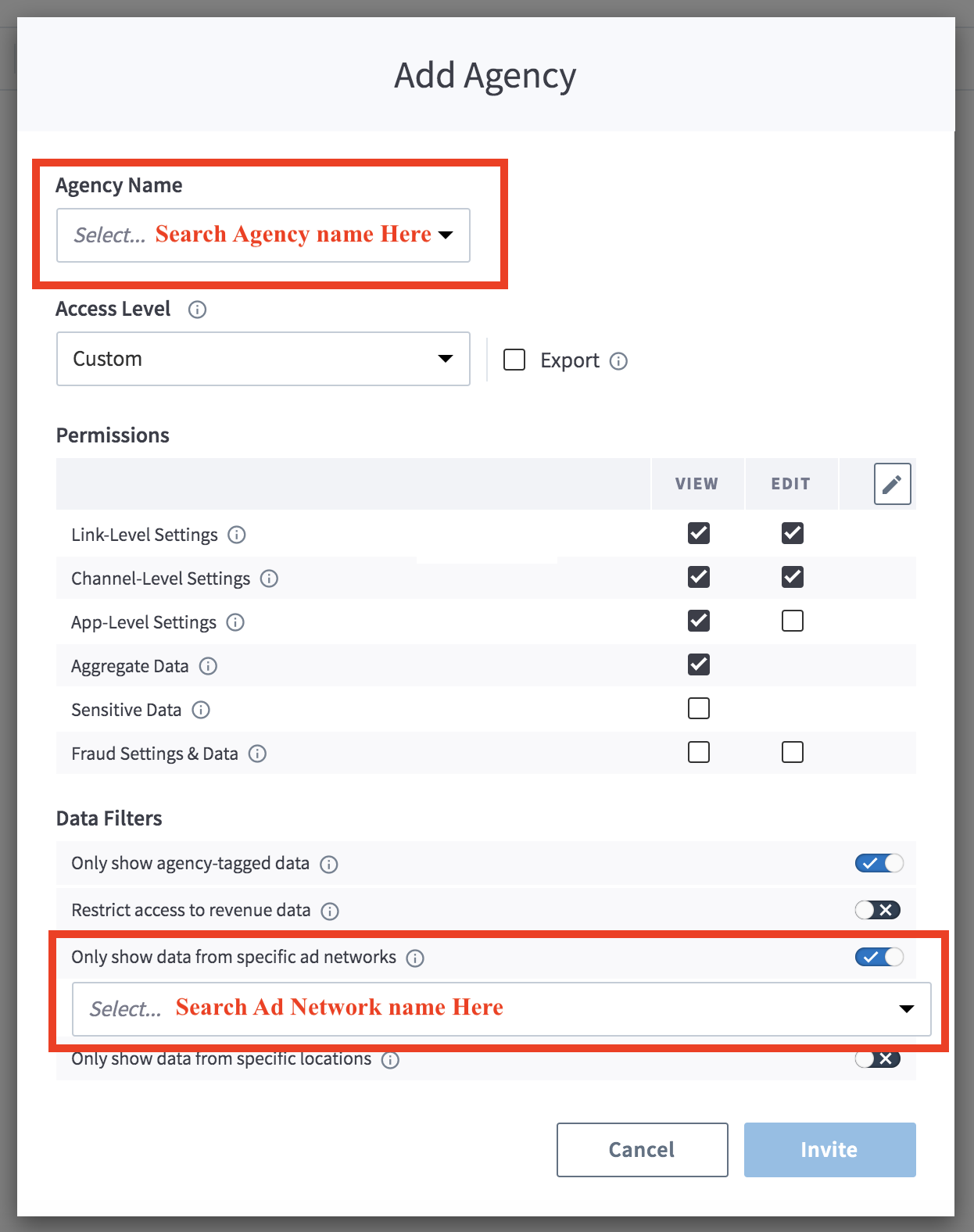
Agency-tagged data
If you do not enable the "Only Show Agency-Tagged Data" filter, the agency team member can export aggregate data associated with all of your campaigns, regardless of whether they are associated with them or not.
Authentication
For calls to the Cross-Events Export API, you need your Access Token.
Legacy Branch
To retrieve your credentials in the legacy Branch experience:
- Navigate to the Account → Settings → User tab.
- If you have not yet generated an Access Token, select the Generate token button.
- Use the copy icon to copy your Access Token.
New Branch
To retrieve your credentials in the new Branch experience:
- Navigate to the Configuration → Security & Access → Credentials tab.
- If you have not yet generated an Access Token, select the Generate token button.
- Use the copy icon to copy your Access Token.
Visit our guide to learn more about managing your Branch credentials.
Usage
Request data export
Request info
Export request
POST /v1/branch_aggregate/async/analytics
Host: api2.branch.io
Content-Type: application/json
Request headers
| Header | Description | Required |
|---|---|---|
Access-Token | Key that encapsulates the user's permission with regard to an organization. Obtained from Branch. Needed for authentication. | Yes |
Request query parameters
| Parameter | Description | Required |
|---|---|---|
organization_id or app_id | Unique identifier for the app or organization requesting data. | Yes |
Request body parameters
| Parameter | Description | Required |
|---|---|---|
start_date | The start of the interval time range represented as an ISO-8601 complete date. | Yes |
end_date | The end of the interval time range represented as an ISO-8601 complete date. | Yes |
dimensions | An array representing dimension(s) to group by. See the dimensions section for more. | No |
filter | A JSON object representing one or more filters. This is a global filter and applies to all aggregations. Filter types: - In - Selector - And / Or - Bound - Not - Like See filter examples below. | No |
granularity | Granularity levels: - day- week- month- allSetting a day, week, or month automatically adds a dimension named date_range, which is the date of range start. | No; defaults to all |
limit_sort_spec | Special object. See limit_sort_spec table for schema. | No |
aggregations | An array where each element is an aggregation. See aggregations table for schema. | No |
response_format_compression | - snappy - gz | No; defaults to snappy |
response_format | - parquet - csv - json | No; defaults to parquet |
Schema for limit_sort_spec
| Parameter | Description | Required |
|---|---|---|
sort_columns | An array where each element is a sort_column. See sort_column table for schema. | No |
limit | Limit the number of rows returned. Leave blank for no limit. | No; defaults to no limit |
Schema for sort_column
| Parameter | Description | Required |
|---|---|---|
ascending_order | Whether to return the rows in ascending order. Value can be true or false. | No; defaults to true |
order_type | Order types: - Numeric - Lexicographic - Natural | No; defaults to natural |
column | Can be any dimension or display_name of an aggregation in the request. | Yes, if sort_columns is provided |
Schema for aggregation
| Parameter | Description | Required |
|---|---|---|
field_name | Metric requested. See "Data source + field name" table below for available combinations. | Yes |
display_name | The name you want to set for the metric, which is provided in the result. | Yes |
data_source | The data source of the data. Learn more about the specifics of what's included in particular data sources in the notes on data sources. See "Data source + field name" table below for available combinations. | Yes |
days_to_accept_late_arriving_data | Relevant for apps with late-arriving data. You can set this value as high as 7 (to accept data arriving 7 days late). | No; defaults to 0 |
filter | This parameter is the same as the global filter defined at the root level, but applicable to only this aggregation.See filter examples below. | No |
start_date_override | Override the global start_date set at the root level if this aggregation requires a specific date range. | No; default is global start_date |
end_date_overrride | Override the global end_date set at the root level if the aggregation requires a specific date range. | No; default is global end_date |
Response info
Response body parameters
| Parameter | Description |
|---|---|
code | The response code. |
job_id | The unique ID of the request. Obtained from the export request. |
status_url | The URL of the export request. |
Example request & response
# Example 1
                    curl -X POST -d
                    '{
                    "end_date": "2023-10-14",
                    "filter": null,
                    "limit_sort_spec": { "sort_columns": [] },
                    "response_format": "csv",
                    "granularity": "all",
                    "aggregations": [
                    {"field_name":"total_count","display_name":"eo_click","data_source":"eo_click"},
                    {"field_name":"total_count","display_name":"eo_impression","data_source":"eo_impression"},
                    {"field_name":"total_count","display_name":"eo_commerce_event","data_source":"eo_commerce_event"},
                    {"field_name":"total_count","display_name":"eo_install","data_source":"eo_install"}
                    ],
                    "response_format_compression": "gz",
                    "start_date": "2023-10-01",
                    "dimensions": [
                    "app_id"
                    ]
                    }'
                    -H 'Access-Token: api_app_xxxxxx'
                    -H 'Content-Type: application/json' 'https://api2.branch.io/v1/branch_aggregate/async/analytics?organization_id=000000000000000'

                    # Example 2
                    curl -X POST -d
                    '{
                    "end_date": "2023-10-16",
                    "limit_sort_spec": { "sort_columns": [] },
                    "response_format": "csv",
                    "granularity": "day",
                    "aggregations": [
                    { "field_name": "sketch_unique_count", "display_name": "unique_lifecycle_events_count", "data_source": "eo_user_lifecycle_event" }
                    ],
                    "response_format_compression": "gz",
                    "start_date": "2023-10-11",
                    "dimensions": [
                    "name",
                    "last_attributed_touch_data_tilde_advertising_partner_name",
                    "last_attributed_touch_data_tilde_secondary_publisher",
                    "last_attributed_touch_data_tilde_campaign_id",
                    "last_attributed_touch_data_tilde_campaign",
                    "last_attributed_touch_data_tilde_ad_set_id",
                    "last_attributed_touch_data_tilde_ad_set_name",
                    "last_attributed_touch_data_tilde_ad_id",
                    "last_attributed_touch_data_tilde_ad_name",
                    "last_attributed_touch_data_tilde_creative_id",
                    "last_attributed_touch_data_tilde_creative_name",
                    "last_attributed_touch_data_tilde_keyword_id",
                    "last_attributed_touch_type",
                    "user_data_platform",
                    "user_data_os",
                    "user_data_country"
                    ]
                    }'
                    -H 'Access-Token: api_app_xxxxxx'
-H 'Content-Type: application/json' 'https://api2.branch.io/v1/branch_aggregate/async/analytics?app_id=111111111111111'{
"code": 200,
"job_id": "8a2514d5-9035-445f-b42a-948112aeb807",
"status_url": "https://api2.branch.io/v1/branch_aggregate/async/analytics/a38bd2f0-9740-4334-8c96-5bfd90671b06"
}View additional use cases with examples in the additional examples section.
Retrieve export download status
Request info
Status request
GET v1/branch_aggregate/async/status/{job_id}
Host: api2.branch.io
Accept: application/json
Request headers
| Header | Description | Required |
|---|---|---|
Access-Token | Key that encapsulates the user's permission with regard to an organization. Obtained from Branch. Needed for authentication. | Yes |
Request path parameters
| Parameter | Description | Required |
|---|---|---|
job_id | The unique ID of the request. Obtained from the export request. | Yes |
Request query parameters
| Parameter | Description | Required |
|---|---|---|
organization_id or app_id | Unique identifier for the app or organization requesting data. | Yes |
Response info
Response body parameters
| Parameter | Description |
|---|---|
code | The response code. |
status | The status of the original request by job_id. |
response_url | The URL of your request for download. |
Example request & response
curl --request GET \
                    --url 'https://api2.branch.io/v1/branch_aggregate/async/status/a0563710-d55b-4293-a82c-f0cdfbbd0298?app_id=111111111111111' \
                    --header 'Accept: application/json' \
--header 'Access-Token: api_app_xxxxxx'{
"code": 200,
"status": "FINISHED",
"response_url": "https://branch-exports.s3.amazonaws.com/partner-query/2021-12-12-2021-12-18-eo_install-day-8a2514d5-9035-445f-b42a-948112aeb807-j6zbNS9OxQOz7spz.json?Signature=gbEoMAFAr0y7kN3stZ1zzUh60ko%3D&AWSAccessKeyId=AKIAI7A6NRHGMRDK2LIQ&Expires=1648077926"
}Appendix
Filters
Some filters, like the in and selector filters below, are just a single filter applied to the query.
Other filters, like and and or, combine multiple filters in a single JSON object, and apply that to the query. This is done using the object's fields key.
In
{
    "type":"in",
    "dimension":"dimension_name",
    "values":["x","y"]
}
Selector
{
    "type":"selector",
    "dimension":"dimension_name",
    "value":"value (leave null if filtering for null)"
}
And
{
    "type":"and",
    "fields":[
        {"type":"selector","dimension":"name","value":"x"},
        {"type":"selector","dimension":"name","value":"y"}
    ]
}
Or
{
    "type":"or",
    "fields":[
        {"type":"selector","dimension":"name","value":"x"},
        {"type":"selector","dimension":"name","value":"y"}
    ]
}
Bound
// `lower_strict`=true corresponds to "greater than" or ">"
// `lower_strict`=false corresponds to "greater than or equal to" or ">="
// This works for integer or string type comparisons
// You can remove either `upper` or `lower` for boundless comparison

// Filter example below states "where id > 5 and id <= 10"
{
    "type":"bound",
    "dimension":"id",
    "lower":"5",
    "lower_strict":"true",
    "upper":"10",
    "upper_strict":"false"
}

// If you remove `upper` value from example above, it would say "where id > 5"
Not
{
    "type":"not",
    "field": {
        "type":"and",
        "fields":[
            {"type":"selector","dimension":"name","value":"x"},
            {"type":"selector","dimension":"name","value":"y"}
        ]
    }
}
Like
// Below filter will return every `campaign_name` which starts with "oct_2045"
// The "-" symbol denotes any character
{
    "type":"like",
    "dimension":"campaign_name",
    "pattern":"oct_2045%"
}

// Reference:
// - Special character "_" will match any single character
// - Special character "%" will match any number of characters
// - Special character "\" will escape characters above, if you want literal "_" or "%"
Dimensions
Link
last_op
link_alias
link_archived
link_creation_source
link_dollar_sign_3p
link_dollar_sign_android_deeplink_path
link_dollar_sign_android_deepview
link_dollar_sign_android_passive_deepview
link_dollar_sign_android_url
link_dollar_sign_canonical_identifier
link_dollar_sign_canonical_url
link_dollar_sign_deeplink_path
link_dollar_sign_desktop_deeplink_path
link_dollar_sign_desktop_deepview
link_dollar_sign_desktop_passive_deepview
link_dollar_sign_desktop_url
link_dollar_sign_fallback_url
link_dollar_sign_ios_deeplink_path
link_dollar_sign_ios_deepview
link_dollar_sign_ios_passive_deepview
link_dollar_sign_ios_url
link_dollar_sign_marketing_title
link_dollar_sign_og_description
link_dollar_sign_og_image_url
link_dollar_sign_og_title
link_dollar_sign_og_type
link_dollar_sign_og_url
link_dollar_sign_uri_redirect_mode
link_dollar_sign_web_only
link_domain
link_id
link_tilde_campaign
link_tilde_channel
link_tilde_feature
link_tilde_quick_link_template_id
link_tilde_tags
link_type
Analytics/metrics
app_id
app_name
attributed
body_ad_network_id
body_app_id
body_campaign_id
body_conversion_value
body_last_attributed_touch_data_tilde_ad_id
body_last_attributed_touch_data_tilde_ad_name
body_last_attributed_touch_data_tilde_ad_set_id
body_last_attributed_touch_data_tilde_ad_set_name
body_last_attributed_touch_data_tilde_campaign
body_last_attributed_touch_data_tilde_campaign_id
body_last_attributed_touch_data_tilde_campaign_name
body_last_attributed_touch_data_tilde_creative_id
body_last_attributed_touch_data_tilde_creative_name
body_redownload
body_source_app_id
deep_linked
name
organization_id
originlast_attributed_touch_data_dollar_3p
last_attributed_touch_data_dollar_marketing_title
last_attributed_touch_data_plus_current_feature
last_attributed_touch_data_plus_referring_domain
last_attributed_touch_data_plus_via_features
last_attributed_touch_data_plus_web_format
last_attributed_touch_data_tilde_ad_id
last_attributed_touch_data_tilde_ad_name
last_attributed_touch_data_tilde_ad_set_id
last_attributed_touch_data_tilde_ad_set_name
last_attributed_touch_data_tilde_advertising_partner_id
last_attributed_touch_data_tilde_advertising_partner_name
last_attributed_touch_data_tilde_agency
last_attributed_touch_data_tilde_agency_id
last_attributed_touch_data_tilde_campaign
last_attributed_touch_data_tilde_campaign_id
last_attributed_touch_data_tilde_campaign_name
last_attributed_touch_data_tilde_channel
last_attributed_touch_data_tilde_creative_id
last_attributed_touch_data_tilde_creative_name
last_attributed_touch_data_tilde_customer_ad_name
last_attributed_touch_data_tilde_customer_ad_set_name
last_attributed_touch_data_tilde_customer_campaign
last_attributed_touch_data_tilde_customer_keyword
last_attributed_touch_data_tilde_customer_placement
last_attributed_touch_data_tilde_customer_secondary_publisher
last_attributed_touch_data_tilde_customer_sub_site_name
last_attributed_touch_data_tilde_feature
last_attributed_touch_data_tilde_id
last_attributed_touch_data_tilde_journey_id
last_attributed_touch_data_tilde_journey_name
last_attributed_touch_data_tilde_keyword
last_attributed_touch_data_tilde_keyword_id
last_attributed_touch_data_tilde_placement
last_attributed_touch_data_tilde_secondary_publisher
last_attributed_touch_data_tilde_stage
last_attributed_touch_data_tilde_tags
last_attributed_touch_data_tilde_touch_subtype
last_attributed_touch_data_tilde_view_id
last_attributed_touch_data_tilde_view_name
last_attributed_touch_typelast_cta_view_data_dollar_3p
last_cta_view_data_plus_referring_domain
last_cta_view_data_plus_via_features
last_cta_view_data_plus_web_format
last_cta_view_data_tilde_ad_id
last_cta_view_data_tilde_ad_name
last_cta_view_data_tilde_ad_set_id
last_cta_view_data_tilde_ad_set_name
last_cta_view_data_tilde_advertising_partner_name
last_cta_view_data_tilde_campaign
last_cta_view_data_tilde_campaign_id
last_cta_view_data_tilde_channel
last_cta_view_data_tilde_creative_id
last_cta_view_data_tilde_creative_name
last_cta_view_data_tilde_feature
last_cta_view_data_tilde_journey_id
last_cta_view_data_tilde_journey_name
last_cta_view_data_tilde_keyword
last_cta_view_data_tilde_secondary_publisher
last_cta_view_data_tilde_stage
last_cta_view_data_tilde_tags
last_cta_view_data_tilde_view_id
last_cta_view_data_tilde_view_nameannotation_campaign_id_mapped_value
annotation_campaign_id_revision
annotation_conversion_value_mapped_value
annotation_conversion_value_revision
annotation_customer_event_alias
annotation_dollar_3p
annotation_source_app_id_mapped_value
annotation_source_app_id_revisionuser_data_app_store
user_data_app_version
user_data_brand
user_data_country
user_data_custom_events_completed
user_data_device_type
user_data_environment
user_data_geo_country_code
user_data_geo_dma_code
user_data_geo_region_en
user_data_has_app
user_data_has_clicked_ad
user_data_has_clicked_email
user_data_language
user_data_model
user_data_opted_in
user_data_opted_in_status
user_data_os
user_data_platform
user_data_standard_events_completedcustomer_event_alias
days_from_last_attributed_touch_to_event
days_from_last_cta_view_to_event
event_data_custom_param_1
event_data_custom_param_2
event_data_custom_param_3
event_data_product_categories
first_event_for_user
fraud_codes
fraud_names
from_desktopData source + field name
data_source | field_name |
|---|---|
- eo_install- eo_install_blocked- eo_impression- eo_impression_blocked- eo_click- eo_click_blocked | - total_count- sketch_unique_count- cost- cost_in_local_currency- cost_in_app_local_currency |
- eo_reinstall- eo_reinstall_blocked- eo_open- eo_open_blocked- eo_web_session_start- eo_web_session_start_blocked- eo_pageview- eo_pageview_blocked- eo_dismissal- eo_dismissal_blocked- eo_content_event- eo_content_event_blocked- eo_user_lifecycle_event- eo_user_lifecycle_event_blocked- eo_custom_event- eo_custom_event_blocked- eo_branch_cta_view- eo_branch_cta_view_blocked- xx_impression- xx_click | - total_count- sketch_unique_count |
- eo_commerce_event- eo_commerce_event_blocked | - total_count- sketch_unique_count- revenue- revenue_in_local_currency |
- link- skadnetwork_valid_messages- skadnetwork_invalid_messages | - total_count |
- cost- cost_actions- cost_clicks- cost_installs- cost_impressions | - cost- cost_in_local_currency- cost_in_app_local_currency |
skan_unified_view | - skan_count- skan_revenue- non_skan_revenue- unified_revenue- non_skan_total_count- unified_total_count- non_skan_unique_count- unified_unique_count |
Notes on data sources
data_source | Note |
|---|---|
xx_impression | Combines impressions from eo_impression and SAN impression data. |
xx_click | Combines clicks from eo_click and SAN click data. |
cost | Combines cost from SAN with cost on clicks data from eo_impression, eo_install, and eo_click. |
cost_actions | Gets cost only from SAN data. |
cost_clicks | Combines cost from SAN and eo_click. |
cost_installs | Combines cost from SAN and eo_installs. |
cost_impressions | Combines cost from SAN and eo_impressions. |
Notes on links
- Only a single aggregation, including link
data_source, will be allowed. - Additional analytics, like clicks and installs, can be attributed to any link type.
- Start and end dates for link
data_sourcecorrespond to the link creation date in the app's time zone. - When filtering in a links request, the filter should be put at the aggregation level.
Additional examples
Query all standard events
Pull all Branch Standard Events (Commerce, Content, Lifecycle, and Custom):
curl -X POST -d
        '{
        "granularity": "all",
        "response_format_compression": "gz",
        "response_format": "json",
        "start_date": "2023-10-01",
        "end_date": "2023-10-14",
        "dimensions": [
        "app_id"
        ],
        "aggregations": [
        {"field_name":"total_count","display_name":"eo_commerce_event","data_source":"eo_commerce_event"},
        {"field_name":"total_count","display_name":"eo_content_event","data_source":"eo_content_event"},
        {"field_name":"total_count","display_name":"eo_user_lifecycle_event","data_source":"eo_user_lifecycle_event"},
        {"field_name":"total_count","display_name":"eo_custom_event","data_source":"eo_custom_event"}
        ]
        }'
        -H 'Access-Token: api_app_xxxxxx'
        -H 'Content-Type: application/json' 'https://api2.branch.io/v1/branch_aggregate/async/analytics?organization_id=000000000000000'
Split revenue field by ad partner
Take the revenue field associated with the eo_commerce_event data source and split it by ad partner name:
curl -X POST -d
                    '{
                    "granularity": "all",
                    "response_format_compression": "gz",
                    "response_format": "json",
                    "start_date": "2023-10-01",
                    "end_date": "2023-10-14",
                    "dimensions": [
                    "last_attributed_touch_data_tilde_advertising_partner_name"
                    ],
                    "aggregations": [
                    {"field_name":"revenue","display_name":"revenue","data_source":"eo_commerce_event"}
                    ]
                    }'
                    -H 'Access-Token: api_app_xxxxxx'
-H 'Content-Type: application/json' 'https://api2.branch.io/v1/branch_aggregate/async/analytics?organization_id=000000000000000'// The first two lines show advertising partners and their corresponding revenue
// The last line shows revenue that could not be attributed back to an ad partner
{"last_attributed_touch_data_tilde_advertising_partner_name":"Taptica","revenue":12400.0}
{"last_attributed_touch_data_tilde_advertising_partner_name":"Ad4Game","revenue":6400.0}
{"revenue":6150.0}Split various events by ad partner
Look at six different data sources and split their unique counts by ad partner name:
curl -X POST -d
                    '{
                    "granularity": "all",
                    "response_format_compression": "gz",
                    "response_format": "json",
                    "start_date": "2023-10-01",
                    "end_date": "2023-10-14",
                    "dimensions": [
                    "last_attributed_touch_data_tilde_advertising_partner_name"
                    ],
                    "aggregations": [
                    {"field_name":"sketch_unique_count","display_name":"eo_click","data_source":"eo_click"},
                    {"field_name":"sketch_unique_count","display_name":"eo_install","data_source":"eo_install"},
                    {"field_name":"sketch_unique_count","display_name":"eo_open","data_source":"eo_open"},
                    {"field_name":"sketch_unique_count","display_name":"eo_reinstall","data_source":"eo_reinstall"},
                    {"field_name":"sketch_unique_count","display_name":"eo_web_session_start","data_source":"eo_web_session_start"},
                    {"field_name":"sketch_unique_count","display_name":"eo_commerce_event","data_source":"eo_commerce_event"}
                    ]
                    }'
                    -H 'Access-Token: api_app_xxxxxx'
-H 'Content-Type: application/json' 'https://api2.branch.io/v1/branch_aggregate/async/analytics?organization_id=000000000000000'// This data is also split by ad partner, but it gives a unique count for each queried event
// The first line shows events that cannot be attributed back to an ad partner
{"eo_commerce_event":621,"eo_install":1269,"eo_reinstall":0,"eo_open":0,"eo_web_session_start":0,"eo_click":1290}
{"last_attributed_touch_data_tilde_advertising_partner_name":"Taptica","eo_commerce_event":1265,"eo_install":2592,"eo_reinstall":0,"eo_open":0,"eo_web_session_start":0,"eo_click":1649}
{"last_attributed_touch_data_tilde_advertising_partner_name":"Ad4Game","eo_commerce_event":640,"eo_install":1286,"eo_reinstall":0,"eo_open":0,"eo_web_session_start":0,"eo_click":1648}Pull all links for an app
Get the total_count for several link-related dimensions:
curl -X POST -d
        '{
        "granularity": "all",
        "response_format_compression": "gz",
        "response_format": "json",
        "start_date": "2023-10-01",
        "end_date": "2023-10-14",
        "dimensions": [
        "link_domain",
        "link_alias",
        "link_creation_source"
        ],
        "aggregations": [
        {"field_name":"total_count","display_name":"link","data_source":"link"}
        ]
        }'
        -H 'Access-Token: api_app_xxxxxx'
        -H 'Content-Type: application/json' 'https://api2.branch.io/v1/branch_aggregate/async/analytics?app_id=111111111111111'
Add a filter
Query link data where the deep link path starts with the word blog:
curl -X POST -d
        '{
        "granularity": "all",
        "response_format_compression": "gz",
        "response_format": "csv",
        "start_date": "2024-03-20",
        "end_date": "2024-03-21",
        "dimensions": [
        "link_domain",
        "link_alias",
        "link_dollar_sign_canonical_url"
        ],
        "aggregations": [
        {
        "field_name": "total_count", "display_name": "link", "data_source": "link", "filter": {"type":"like", "dimension":"link_dollar_sign_deeplink_path", "pattern":"blog%"}
        }
        ]
        }'
        -H 'Access-Token: api_app_xxxxxx'
        -H 'Content-Type: application/json' 'https://api2.branch.io/v1/branch_aggregate/async/analytics?app_id=111111111111111'