Overview
The Branch Events API is a robust tool for tracking events that take place in your app.
These events fall under 4 categories: Commerce, Content, Lifecycle, or Custom.
Benefits
With the Branch Events API, you can track conversion data and include detailed metadata to help you better understand user behavior as it relates to your campaigns.
Try it!
Try out the Events API in your browser, using your Branch data:
Getting started
Before you begin
To use the Events API, you first need to create a Branch account.
Authentication
For calls to the Events API, you need your Branch Key.
Legacy Branch
To retrieve your credentials in the legacy Branch experience:
- Navigate to the Account → Settings → Profile tab.
- Use the copy icon to copy your Branch Key.
New Branch
To retrieve your credentials in the new Branch experience:
- Navigate to the Configuration → Security & Access → Credentials tab.
- Use the copy icon to copy your Branch Key.
Visit our guide to learn more about managing your Branch credentials.
Important considerations
- Real-time only: You must send events in real time as they occur. Branch does not support backtracking or historical event ingestion. Events with timestamps in the past will not be backfilled into reports.
- SKAdNetwork (SKAN): Your app must handle SKAN natively, not through the Branch SDK. Branch returns SKAN-relevant fields (such as
coarse_keyandupdate_conversion_value) in the API response so your app can update its conversion value accordingly. See the SKAdNetwork guide for details.
Usage
Logging standard events
Use this endpoint to log standard Branch Events.
Standard Branch Events are limited to Commerce, Content, and Lifecycle events. See the "Request body parameters" table in this section to see which standard Branch Events you can log with this endpoint.
Request info
Export request
POST /v2/event/standardRequest headers
| Parameter | Value | Required |
|---|---|---|
content-type | application/json | Recommended |
accept | application/json | Recommended |
X-IP-Override | A public IPv4 address (for example, 198.) | Optional. See callout below. |
Caution
The X-IP-Override header lets you specify the IP address Branch uses for the event (for example, when forwarding events server-to-server from your own backend). You must meet two requirements for this header to function:
- Your app ID must be allowlisted by Branch. The header is ignored until allowlisting is enabled. Open a support request to have your app ID allowlisted before you begin sending the header in production.
- You must also include
user_data.ipin the request body with the same IP value. Sending the header alone is not sufficient. The body field is what Branch persists for attribution.
Top-level request body parameters
| Top-level parameter | Type | Description | Required |
|---|---|---|---|
branch_key | String | The Branch Key for the relevant application. | Yes |
name | String | The name of the event to log. Must be one of the standard Branch Event names included below. Commerce event names: ADD_TO_CARTADD_TO_WISHLISTCLICK_ADVIEW_CARTINITIATE_PURCHASEADD_PAYMENT_INFOPURCHASESPEND_CREDITSContent event names: SEARCHVIEW_ITEMVIEW_ITEMSRATESHARELifecycle event names: ADD_TO_CARTADD_TO_WISHLISTCLICK_ADVIEW_CARTINITIATE_PURCHASEADD_PAYMENT_INFOPURCHASESPEND_CREDITS | Yes |
customer_event_alias | String | The event alias, as defined by you. Used in addition to the Branch Event name in the name parameter. | No |
user_data | Obj | An object related to user data, containing things like device information and advertising IDs. Also used to provide information regarding the user for Google DMA compliance. See user_data table for more. | Yes |
custom_data | Obj | An object for additional custom key-value pairs that you want attached to the Branch Event. This is attached to Branch Events that are retrieved via exports and sent via webhooks. | No |
event_data | Obj | An object containing additional data about the specific event, including information about things like currency and revenue. See event_data table for more. | No |
content_items | Obj | An object only for Commerce and Content Branch Events. Contains additional information about specific content. See content_items table for more. | No |
Parameters included in user_data object
Caution: Required identifiers
You must include at least one of the following in user_data:
user_data.developer_identityoruser_data.browser_fingerprint_idoruser_data.os=iOSANDuser_data.idfaoruser_data.os=iOSANDuser_data.idfvoruser_data.os=AndroidANDuser_data.android_idoruser_data.os=AndroidANDuser_data.aaid
Note
In addition to the standard identifiers above, include any third-party IDs that apply to your integration so you can join events with downstream tools.
Common examples:
user_data.google_analytics_id: the Google Analytics client ID, for cross-platform stitching with GA.- A Snowflake user identifier (or equivalent data-warehouse key) inside
custom_data, so you can join events with your data warehouse.
Including these where applicable improves attribution coverage and downstream analytics.
Parameters for user_data | Type | Description | Required |
|---|---|---|---|
user_data. | String | Examples:AndroidiOSMac_OSLinuxWindows | See "Required identifiers" callout |
user_data. | String | The version of the operating system. | Strongly recommended for all paid traffic to ensure accurate attribution Required for Facebook campaigns on iOS |
user_data. | Obj | A wrapper object for advertising identifiers. Use this in addition to the flat aaid, idfa, and idfv fields above to future-proof your integration for non-standard IDs (for example, OAID on Huawei devices).Example: "advertising_ids": {"oaid": "00aa00a0-0000-0a00-a000-aaa0000a0aaa"} | No (recommended for non-standard IDs like OAID) |
user_data. | String | Usually FULL_APP. | No |
user_data. | String | The Android Advertising ID. | See "Required identifiers" callout |
user_data. | String | The Android hardware ID. | See "Required identifiers" callout |
user_data. | String | The iOS advertising ID. | See "Required identifiers" callout |
user_data. | String | The iOS vendor ID. | See "Required identifiers" callout |
user_data. | String | The Facebook anonymous user ID. Used for measurement and attribution when running Facebook campaigns that rely on Aggregated Event Measurement (AEM). | Required when running Facebook campaigns using Aggregated Event Measurement (AEM) on iOS |
user_data. | Bool | Set to true if the partner has opted to not be tracked by advertisers. | No |
user_data. | String | The user agent of the browser or app where the event occurred. Usually associated with a webview. | No |
user_data. | String | An internal-only field for Branch to track browsers. | See "Required identifiers" callout |
user_data. | String | The current page URL where the Branch Web SDK logged a web session start. | No |
user_data. | String | The referral URL that led to the current page where the Branch Web SDK logged a web session start. | No |
user_data. | String | The developer-specified identity for a user. | See "Required identifiers" callout |
user_data. | String | The country code of the user, usually based on device settings or the user agent string. | No |
user_data. | String | The language code of the user, usually based on device settings or the user agent string. | No |
user_data. | String | The IP address for the device where the event occurred. | No |
user_data. | String | Android only: the local IP of the device. Example: "168. | No |
user_data. | String | The brand of the device. | No |
user_data. | String | An internal-only Branch field for tracking devices. | No |
user_data. | String | The version of the app downloaded by the user. | No |
user_data. | String | The model of the device. | No |
user_data. | Int | The screen's DPI. | No |
user_data. | Int | The screen's height. | No |
user_data. | Int | The screen's width. | No |
user_data. | Bool | Whether European regulations, including the DMA, apply to this user and conversion. Set to true if the user is included in European Union regulations. For example, if the user is located within the EEA, they are within the scope of the DMA.Set to false if the user is considered excluded from European Union regulations. | Required if EU regulations apply to this user Warning: Failure to include user consent signals may result in attribution or campaign performance degradation |
user_data. | Bool | Whether the end user has granted or denied ads personalization consent. Set to true if the user has granted consent for ads personalization.Set to false if the user has denied consent for ads personalization. | Required if dma_eea is set to true (that is, EU regulations apply to this user)Warning: Failure to include user consent signals may result in attribution or campaign performance degradation |
user_data. | Bool | Whether the end user has granted or denied consent for 3P transmission of user-level data for ads. Set to true if the user has granted consent for 3P transmission of user-level data for ads.Set to false if the user has denied consent for 3P transmission of user-level data for ads. | Required if dma_eea is set to true (that is, EU regulations apply to this user)Warning: Failure to include user consent signals may result in attribution or campaign performance degradation |
Parameters included in event_data object
Parameters for event_data | Type | Description | Required |
|---|---|---|---|
event_data. | String | The partner-specified transaction ID for their internal use. | No |
event_data. | Num | The partner-specified reported revenue for the event. | No |
event_data. | String | The currency that the revenue, price, shipping, and tax were originally reported in by the partner. | No |
event_data. | Num | The shipping cost associated with the transaction. | No |
event_data. | Num | The total tax associated with the transaction. | No |
event_data. | String | The transaction coupon redeemed with the transaction (for example, "SPRING2017"). | No |
event_data. | String | The store or affiliation associated with this transaction (for example, "Google Store"). | No |
event_data. | String | The description associated with the event, not necessarily specific to any individual content items (see the content_items parameter). | No |
event_data. | String | Additional search queries. | No |
Parameters included in content_items object
Parameters for content_items | Type | Description | Required |
|---|---|---|---|
content_items[i]. | String | The category or schema for a piece of content. May be used in the future for analytics. Must be one of the following:COMMERCE_AUCTIONCOMMERCE_BUSINESSCOMMERCE_OTHERCOMMERCE_PRODUCTCOMMERCE_RESTAURANTCOMMERCE_SERVICECOMMERCE_TRAVEL_FLIGHTCOMMERCE_TRAVEL_HOTELCOMMERCE_TRAVEL_OTHERGAME_STATEMEDIA_IMAGEMEDIA_MIXEDMEDIA_MUSICMEDIA_OTHERMEDIA_VIDEOOTHERTEXT_ARTICLETEXT_BLOGTEXT_OTHERTEXT_RECIPETEXT_REVIEWTEXT_SEARCH_RESULTSTEXT_STORYTEXT_TECHNICAL_DOC | No |
content_items[i]. | String | The title for the content item. | No |
content_items[i]. | String | The image URL for the content item. | No |
content_items[i]. | String | Allows Branch to unify content/messages for content analytics. | No |
content_items[i]. | Bool | Whether content can be indexed for public use. Use true for content that can be seen by anyone, and false for content that cannot be indexed for public use. | No |
content_items[i]. | Bool | Use true for content that can be indexed for local (device) use, and false for content that cannot be indexed for local use. | No |
content_items[i]. | String | The price for the product or content. | No |
content_items[i]. | String | The quantity of the item to be ordered. | No |
content_items[i]. | String | The product SKU or product ID. | No |
content_items[i]. | String | The product's name. | No |
content_items[i]. | String | The product's brand. | No |
content_items[i]. | String | The product's category. Must be one of the following:ANIMALS_AND_PET_SUPPLIESAPPAREL_AND_ACCESSORIESARTS_AND_ENTERTAINMENTBABY_AND_TODDLERBUSINESS_AND_INDUSTRIALCAMERAS_AND_OPTICSELECTRONICSFOOD_BEVERAGES_AND_TOBACCOFURNITUREHARDWAREHEALTH_AND_BEAUTYHOME_AND_GARDENLUGGAGE_AND_BAGSMATUREMEDIAOFFICE_SUPPLIESRELIGIOUS_AND_CEREMONIALSOFTWARESPORTING_GOODSTOYS_AND_GAMESVEHICLES_AND_PARTS | No |
content_items[i]. | String | The product's variant. Examples include red and XL. | No |
content_items[i]. | Num | The average rating of the item. | No |
content_items[i]. | Num | The number of ratings for the item. | No |
content_items[i]. | Num | The maximum possible rating for the item (for example, 5.0 if 5 stars is the highest possible rating). | No |
content_items[i]. | Int | The time the content was created. | No |
content_items[i]. | Int | The time after which this content is no longer valid. The values null and 0 mean no limit.Should rarely be set. | No |
content_items[i]. | Array | An array of keywords (strings) related to the product. | No |
content_items[i]. | String | The street address for a restaurant, business, room (hotel), etc. | No |
content_items[i]. | String | The city for a restaurant, business, room (hotel), etc. | No |
content_items[i]. | String | The state or region for a restaurant, business, room (hotel), etc. | No |
content_items[i]. | String | The country code for a restaurant, business, room (hotel), etc. | No |
content_items[i]. | String | The postal/zip code for a restaurant, business, room (hotel), etc. | No |
content_items[i]. | Num | The latitude for a restaurant, business, room (hotel), etc. | No |
content_items[i]. | Num | The longitude for a restaurant, business, room (hotel), etc. | No |
content_items[i]. | Array | An array of captions (strings) associated with the image. | No |
content_items[i]. | String | Relates to product condition and is generally used for auctions. Must be one of the following:OTHERNEWEXCELLENTGOODFAIRPOORUSEDREFURBISHED | No |
content_items[i]. | Obj | An object containing key-value pairs that you want attached to the content item. Attached to events that are retrieved via exports and sent via webhooks. | No |
Response info
Response codes
| Response code | Definition |
|---|---|
| 200 | Success |
| 400 | Authentication failed |
| 429 | Rate limit reached |
Examples
Example requests
curl -vvv -d '{
    "name": "PURCHASE",
    "customer_event_alias": "my custom alias",
    "user_data": {
        "advertising_ids": {
            "oaid": "00aa00a0-0000-0a00-a000-aaa0000a0aaa"
        },
        "os": "Android",
        "os_version": 25,
        "anon_id": "fbanon_abc123def456",
        "environment": "FULL_APP",
        "aaid": "abcdabcd-0123-0123-00f0-000000000000",
        "android_id": "a12300000000",
        "limit_ad_tracking": false,
        "developer_identity": "user123",
        "country": "US",
        "language": "en",
        "ip":"000.000.0.0",
        "local_ip": "000.000.0.0",
        "brand": "LGE",
        "app_version": "1.0.0",
        "model": "Nexus 5X",
        "screen_dpi": 420,
        "screen_height": 1794,
        "screen_width": 1080,
        "dma_eea": true,
        "dma_ad_personalization": true,
        "dma_ad_user_data": true
    },
    "custom_data": {
        "purchase_loc": "Palo Alto",
        "store_pickup": "unavailable"
    },
    "event_data": {
        "transaction_id": "tras_Id_1232343434",
        "currency": "USD",
        "revenue": 180.2,
        "shipping": 10.5,
        "tax": 13.5,
        "coupon": "promo-1234",
        "affiliation": "high_fi",
        "description": "Preferred purchase"
    },
    "content_items": [
        {
            "$content_schema": "COMMERCE_PRODUCT",
            "$og_title": "Nike Shoe",
            "$og_description": "Start loving your steps",
            "$og_image_url": "http://example.com/img1.jpg",
            "$canonical_identifier": "nike/1234",
            "$publicly_indexable": false,
            "$price": 101.2,
            "$locally_indexable": true,
            "$quantity": 1,
            "$sku": "1101123445",
            "$product_name": "Runner",
            "$product_brand": "Nike",
            "$product_category": "Sporting Goods",
            "$product_variant": "XL",
            "$rating_average": 4.2,
            "$rating_count": 5,
            "$rating_max": 2.2,
            "$creation_timestamp": 1499892854966,
            "$exp_date": 1499892854966,
            "$keywords": [
                "sneakers",
                "shoes"
            ],
            "$address_street": "230 South LaSalle Street",
            "$address_city": "Chicago",
            "$address_region": "IL",
            "$address_country": "US",
            "$address_postal_code": "60604",
            "$latitude": 12.07,
            "$longitude": -97.5,
            "$image_captions": [
                "my_img_caption1",
                "my_img_caption_2"
            ],
            "$condition": "NEW",
            "$custom_fields": "{\"foo1\":\"bar1\",\"foo2\":\"bar2\"}"
        },
        {
            "$og_title": "Nike Woolen Sox",
            "$canonical_identifier": "nike/5324",
            "$og_description": "Fine combed woolen sox",
            "$publicly_indexable": false,
            "$price": 80.2,
            "$locally_indexable": true,
            "$quantity": 5,
            "$sku": "110112467",
            "$product_name": "Woolen Sox",
            "$product_brand": "Nike",
            "$product_category": "Apparel & Accessories",
            "$product_variant": "Xl",
            "$rating_average": 3.3,
            "$rating_count": 5,
            "$rating_max": 2.8,
            "$creation_timestamp": 1499892854966
        }
    ],
    "metadata": {},
    "branch_key": "key_test_XXX"
}' https://api2.branch.io/v2/event/standard
curl -vvv -d '{
"name": "VIEW_ITEMS",
"customer_event_alias": "my custom alias",
"user_data": {
"advertising_ids": {
"oaid": "00aa00a0-0000-0a00-a000-aaa0000a0aaa"
},
"os": "Android",
"os_version": 25,
"anon_id": "fbanon_abc123def456",
"environment": "FULL_APP",
"aaid": "abcdabcd-0123-0123-00f0-000000000000",
"android_id": "a12300000000",
"limit_ad_tracking": false,
"developer_identity": "user123",
"country": "US",
"language": "en",
"ip": "000.000.0.0",
"local_ip": "000.000.0.0",
"brand": "LGE",
"app_version": "1.0.0",
"model": "Nexus 5X",
"screen_dpi": 420,
"screen_height": 1794,
"screen_width": 1080,
"dma_eea": true,
"dma_ad_personalization": true,
"dma_ad_user_data": true
},
"custom_data": {
"purchase_loc": "Palo Alto",
"store_pickup": "unavailable"
},
"event_data": {
"search_query": "red sneakers",
"description": "Preferred purchase"
},
"content_items": [
{
"$content_schema": "COMMERCE_PRODUCT",
"$og_title": "Nike Shoe",
"$og_description": "Start loving your steps",
"$og_image_url": "http://example.com/img1.jpg",
"$canonical_identifier": "nike/1234",
"$publicly_indexable": false,
"$price": 101.2,
"$locally_indexable": true,
"$sku": "1101123445",
"$product_name": "Runner",
"$product_brand": "Nike",
"$product_category": "Sporting Goods",
"$product_variant": "XL",
"$rating_average": 4.2,
"$rating_count": 5,
"$rating_max": 2.2,
"$creation_timestamp": 1499892854966,
"$exp_date": 1499892854966,
"$keywords": [
"sneakers",
"shoes"
],
"$address_street": "230 South LaSalle Street",
"$address_city": "Chicago",
"$address_region": "IL",
"$address_country": "US",
"$address_postal_code": "60604",
"$latitude": 12.07,
"$longitude": -97.5,
"$image_captions": [
"my_img_caption1",
"my_img_caption_2"
],
"$condition": "NEW",
"$custom_fields": "{\"foo1\":\"bar1\",\"foo2\":\"bar2\"}"
},
{
"$og_title": "Nike Woolen Sox",
"$canonical_identifier": "nike/5324",
"$og_description": "Fine combed woolen sox",
"$publicly_indexable": false,
"$price": 80.2,
"$locally_indexable": true,
"$sku": "110112467",
"$product_name": "Woolen Sox",
"$product_brand": "Nike",
"$product_category": "Apparel & Accessories",
"$product_variant": "Xl",
"$rating_average": 3.3,
"$rating_count": 5,
"$rating_max": 2.8,
"$creation_timestamp": 1499892854966
}
],
"metadata": {},
"branch_key": "key_test_XXX"
}' https://api.branch.io/v2/event/standardcurl -vvv -d '{
"name": "COMPLETE_REGISTRATION",
"user_data": {
"advertising_ids": {
"oaid": "00aa00a0-0000-0a00-a000-aaa0000a0aaa"
},
"os": "Android",
"os_version": 25,
"anon_id": "fbanon_abc123def456",
"environment": "FULL_APP",
"aaid": "abcdabcd-0123-0123-00f0-000000000000",
"android_id": "a12300000000",
"limit_ad_tracking": false,
"developer_identity": "user123",
"country": "US",
"language": "en",
"ip": "000.000.0.0",
"local_ip": "000.000.0.0",
"brand": "LGE",
"app_version": "1.0.0",
"model": "Nexus 5X",
"screen_dpi": 420,
"screen_height": 1794,
"screen_width": 1080,
"dma_eea": true,
"dma_ad_personalization": true,
"dma_ad_user_data": true
},
"custom_data": {
"foo": "bar"
},
"event_data": {
"description": "Preferred purchase"
},
"metadata": {},
"branch_key": "key_test_XXX"
}' https://api.branch.io/v2/event/standardExample response
{
  "ascending_only": false,
  "locked": false
}
Logging custom events
Request info
Export request
POST /v2/event/customRequest header parameters
| Parameter | Value | Required |
|---|---|---|
content-type | application/json | Recommended |
accept | application/json | Recommended |
X-IP-Override | A public IPv4 address (for example, 198.) | Optional. See callout below. |
Caution
The X-IP-Override header lets you specify the IP address Branch uses for the event (for example, when forwarding events server-to-server from your own backend). You must meet two requirements for this header to function:
- Your app ID must be allowlisted by Branch. The header is ignored until allowlisting is enabled. Open a support request to have your app ID allowlisted before you begin sending the header in production.
- You must also include
user_data.ipin the request body with the same IP value. Sending the header alone is not sufficient. The body field is what Branch persists for attribution.
Top-level request body parameters
| Top-level parameter | Type | Description | Required |
|---|---|---|---|
branch_key | String | The Branch Key for the relevant application. | Yes |
name | String | The name of the event to log. Can be a custom event name and include spaces, for example, "picture swapped". | Yes |
user_data | Obj | An object related to user data, containing things like device information and advertising IDs. Also used to provide information regarding the user for Google DMA compliance. See user_data table for more. | Yes |
custom_data | Obj | An object for additional custom key-value pairs that you want attached to the Branch Event. This is attached to Branch Events that are retrieved via exports and sent via webhooks. | No |
meta_data | Obj | An object to store further information about the Branch Event. | No |
event_data | Obj | An object containing additional data about the specific event, including information about things like currency and revenue. See event_data table for more. | No |
Parameters included in user_data object
Caution: Required identifiers
You must include at least one of the following in user_data:
user_data.developer_identityoruser_data.browser_fingerprint_idoruser_data.os=iOSANDuser_data.idfaoruser_data.os=iOSANDuser_data.idfvoruser_data.os=AndroidANDuser_data.android_idoruser_data.os=AndroidANDuser_data.aaid
Note
In addition to the standard identifiers above, include any third-party IDs that apply to your integration so you can join events with downstream tools.
Common examples:
user_data.google_analytics_id: the Google Analytics client ID, for cross-platform stitching with GA.- A Snowflake user identifier (or equivalent data-warehouse key) inside
custom_data, so you can join events with your data warehouse.
Including these where applicable improves attribution coverage and downstream analytics.
Parameters for user_data | Type | Description | Required |
|---|---|---|---|
user_data. | String | Examples:AndroidiOSMac_OSLinuxWindows | See "Required identifiers" callout |
user_data. | String | The version of the operating system. | Strongly recommended for all paid traffic to ensure accurate attribution Required for Facebook campaigns on iOS |
user_data. | Obj | A wrapper object for advertising identifiers. Use this in addition to the flat aaid, idfa, and idfv fields above to future-proof your integration for non-standard IDs (for example, OAID on Huawei devices).Example: "advertising_ids": {"oaid": "00aa00a0-0000-0a00-a000-aaa0000a0aaa"} | No (recommended for non-standard IDs like OAID) |
user_data. | String | Usually FULL_APP. | No |
user_data. | String | The Android Advertising ID. | See "Required identifiers" callout |
user_data. | String | The Android hardware ID. | See "Required identifiers" callout |
user_data. | String | The iOS advertising ID. | See "Required identifiers" callout |
user_data. | String | The iOS vendor ID. | See "Required identifiers" callout |
user_data. | String | The Facebook anonymous user ID. Used for measurement and attribution when running Facebook campaigns that rely on Aggregated Event Measurement (AEM). | Required when running Facebook campaigns using Aggregated Event Measurement (AEM) on iOS |
user_data. | Bool | Set to true if the partner has opted to not be tracked by advertisers. | No |
user_data. | String | The user agent of the browser or app where the event occurred. Usually associated with a webview. | No |
user_data. | String | An internal-only field for Branch to track browsers. | See "Required identifiers" callout |
user_data. | String | The current page URL where the Branch Web SDK logged a web session start. | No |
user_data. | String | The referral URL that led to the current page where the Branch Web SDK logged a web session start. | No |
user_data. | String | The developer-specified identity for a user. | See "Required identifiers" callout |
user_data. | String | The country code of the user, usually based on device settings or the user agent string. | No |
user_data. | String | The language code of the user, usually based on device settings or the user agent string. | No |
user_data. | String | The IP address for the device where the event occurred. | No |
user_data. | String | Android only: the local IP of the device. Example: "168. | No |
user_data. | String | The brand of the device. | No |
user_data. | String | An internal-only Branch field for tracking devices. | No |
user_data. | String | The version of the app downloaded by the user. | No |
user_data. | String | The model of the device. | No |
user_data. | Int | The screen's DPI. | No |
user_data. | Int | The screen's height. | No |
user_data. | Int | The screen's width. | No |
user_data. | Bool | Whether European regulations, including the DMA, apply to this user and conversion. Set to true if the user is included in European Union regulations. For example, if the user is located within the EEA, they are within the scope of the DMA.Set to false if the user is considered excluded from European Union regulations. | Required if EU regulations apply to this user Warning: Failure to include user consent signals may result in attribution or campaign performance degradation |
user_data. | Bool | Whether the end user has granted or denied ads personalization consent. Set to true if the user has granted consent for ads personalization.Set to false if the user has denied consent for ads personalization. | Required if dma_eea is set to true (that is, EU regulations apply to this user)Warning: Failure to include user consent signals may result in attribution or campaign performance degradation |
user_data. | Bool | Whether the end user has granted or denied consent for 3P transmission of user-level data for ads. Set to true if the user has granted consent for 3P transmission of user-level data for ads.Set to false if the user has denied consent for 3P transmission of user-level data for ads. | Required if dma_eea is set to true (that is, EU regulations apply to this user)Warning: Failure to include user consent signals may result in attribution or campaign performance degradation |
Parameters included in event_data object
Parameters for event_data | Type | Description | Required |
|---|---|---|---|
event_data. | String | The partner-specified transaction ID for their internal use. | No |
event_data. | Num | The partner-specified reported revenue for the event. | No |
event_data. | String | The currency that the revenue, price, shipping, and tax were originally reported in by the partner. | No |
event_data. | Num | The shipping cost associated with the transaction. | No |
event_data. | Num | The total tax associated with the transaction. | No |
event_data. | String | The transaction coupon redeemed with the transaction (for example, "SPRING2017"). | No |
event_data. | String | The store or affiliation associated with this transaction (for example, "Google Store"). | No |
event_data. | String | The description associated with the event, not necessarily specific to any individual content items (see the content_items parameter). | No |
event_data. | String | Additional search queries. | No |
Response info
Response codes
| Response code | Definition |
|---|---|
| 200 | Success |
| 400 | Authentication failed |
| 429 | Rate limit reached |
Example request & response
curl -vvv -d '{
    "name": "picture swiped",
    "user_data": {
        "advertising_ids": {
            "oaid": "02ab41d3-7886-4f29-a606-fba4372e9fdc"
        },
        "os": "Android",
        "os_version": 25,
        "anon_id": "fbanon_abc123def456",
        "environment": "FULL_APP",
        "aaid": "abcdabcd-0123-0123-00f0-000000000000",
        "android_id": "a12300000000",
        "limit_ad_tracking": false,
        "developer_identity": "user123",
        "country": "US",
        "language": "en",
        "ip": "000.000.0.0",
        "local_ip": "000.000.0.0",
        "brand": "LGE",
        "app_version": "1.0.0",
        "model": "Nexus 5X",
        "screen_dpi": 420,
        "screen_height": 1794,
        "screen_width": 1080,
        "dma_eea": true,
        "dma_ad_personalization": true,
        "dma_ad_user_data": true
    },
    "custom_data": {
        "foo": "bar"
    },
    "meta_data": {
        "foo": "bar"
    },
    "branch_key": "key_test_XXX"
}' https://api.branch.io/v2/event/custom{
"ascending_only": false,
"locked": false
}Verify events sent
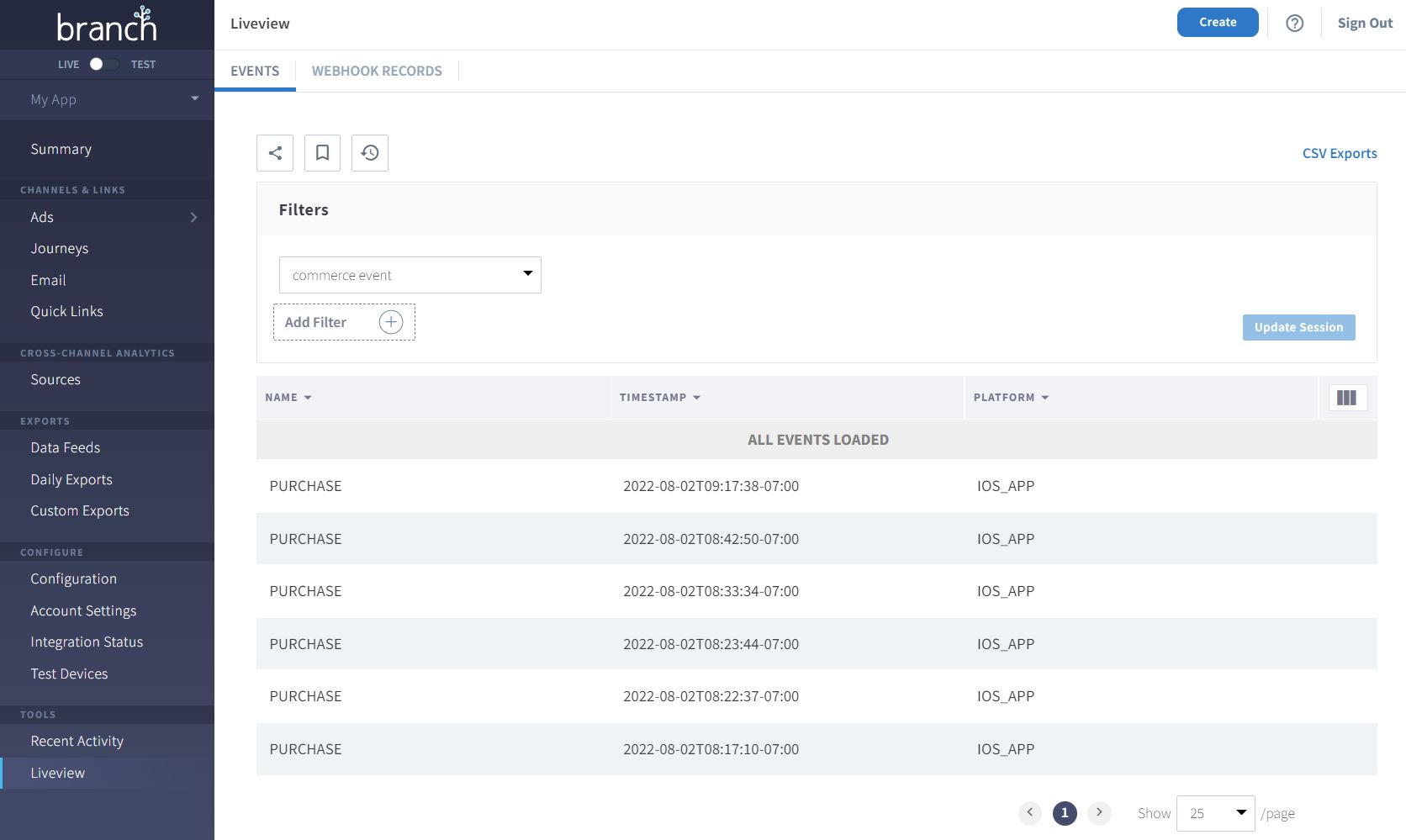
Once you've used the Branch Events API to track a Branch Event, you can verify that it was successfully sent for attribution by using the Liveview screen in Branch.
Note: Be patient when using the Liveview screen, as it may take some time for data to flow from our attribution systems to Branch. If the data has not appeared in Liveview after 30 minutes, review your API request to see if you may have missed something.