> For the complete documentation index, see [llms.txt](https://help.branch.io/llms.txt).
# Meta Aggregate Reporting Changes
> Understand the Meta aggregate reporting practices Branch follows as a certified mobile measurement partner.
## Overview
Being a certified mobile measurement partner (MMP) with Meta (Facebook), Branch guarantees full alignment with certain reporting practices to help balance the privacy of Meta's users with the needs of marketers to get useful insights into their campaigns.
Starting on **May 8th, 2023**, Branch may redact specific metrics/events (ex. INSTALLS) through the Branch Dashboard or through Aggregate Exports of Meta-attributed campaigns when aggregation levels are not high enough to prevent the potential de-anonymization of specific Meta users. In a large majority of situations, this is only likely to happen in the very earliest portion of the campaign cycle where traffic is at its lowest. Data is not lost and will be shown once required aggregation levels are met.
When the number of users/impressions included in the metric does not meet/exceed the necessary threshold, Branch will display "**undisclosed**" in Dashboard Reports and `null` in Aggregate Exports. This is similar to how Branch cannot show non-aggregated view-through and click-through data from Meta on the Branch Dashboard.
> **Note**
>
> Between April 24 and May 8, 2023, Branch temporarily applied more stringent thresholds for Meta reporting. We have since worked closely with Meta regarding a solution that complies with Meta’s policies and restores industry-standard functionality.
> **Tip**
>
> Exceptions
>
> When the conversion is attributed to **Meta** via [Meta Install Referrer](https://help.branch.io/developer-hub/meta-install-referrer.md) or there is no Meta Campaign ID, it is exempt from these requirements; thus, data will show in the Dashboard and in Exports.
## What does it look like?
### Dashboard Reports
The first place you will notice a change is within the Branch Dashboard when looking at Meta-related [Ads Analytics](https://help.branch.io/marketer-hub/paid-ads-analytics.md). More specifically when you are comparing Meta data in the Events table.
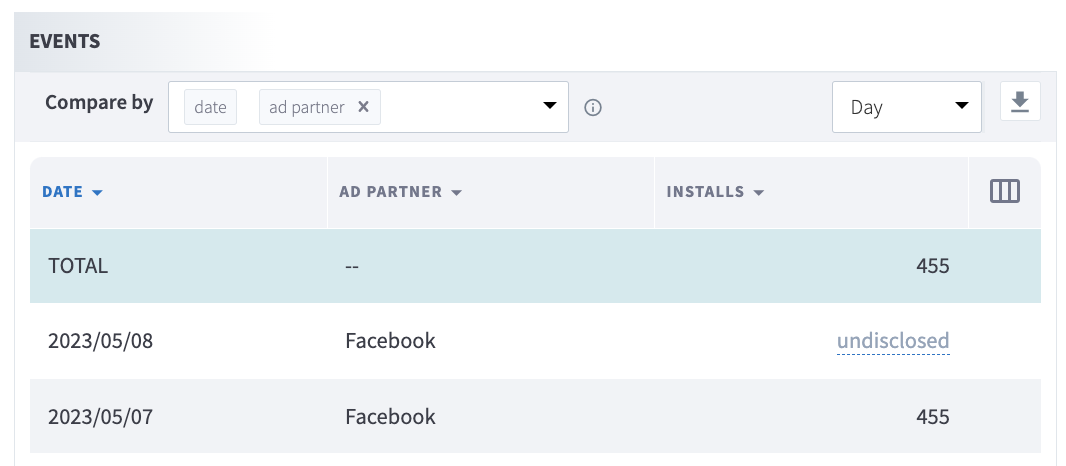
In the example screenshot above, you will notice that when data reported for Meta does not exceed the right threshold, "undisclosed" will replace the real value while abstracting the data from the `TOTAL` values.
### Aggregate Exports
The second place you will notice a change is in Branch's Aggregate Data Exports. When exporting aggregate Meta data, you will see changes in the following export fields:
| API | Data Sources | Aggregation/Measures |
| --- | --- | --- |
| [Aggregate](https://help.branch.io/apidocs/aggregate/overview.md) | - `cost`
- `eo_click`
- `eo_impression`
- `eo_install`
- `eo_open`
- `eo_reinstall`
- `SKAdNetwork-valid-messages` | - `unique_count`
- `total_count`
- `cost`
- `cost_in_local_currency` |
| [Query](https://help.branch.io/apidocs/query/overview.md) | - `cost`
- `eo_click`
- `eo_impression`
- `eo_install`
- `eo_open`
- `eo_reinstall`
- `xx_click`
- `xx_impression` | - `unique_count`
- `total_count`
- `cost`
- `cost_in_local_currency` |
| [Cohort](https://help.branch.io/apidocs/cohort/overview.md) | - `install_cohort`
- `reengagement_cohort` | - All Measures |
#### Output
When running any of the above Aggregate Data Exports where the Meta-attributed metric/event does not meet the threshold, the API response for the Aggregation/Measure will return `null`. Otherwise, it will return the real/expected value.
## Reporting Best Practices
If you are finding that your reports are showing "undisclosed" in Dashboard Reports or `null` in Aggregate Exports, follow these steps to help:
1. Wait for additional campaign traffic - If you have just begun running a new campaign, it can take a short time to generate sufficient traffic volumes to meet the thresholds. You may opt to increase spend during this initial period to reach it more quickly.
2. Select reporting dimensions higher than Campaign-level, such as Ad Partner Level, to see overall Meta performance.
3. Reach out to your Ads Account Manager - Talk to your Meta team or agency about how you can set up campaigns so you regularly exceed privacy thresholds.