> For the complete documentation index, see [llms.txt](https://help.branch.io/llms.txt).
# Awin
> Connect Awin to Branch for attribution and deep linking across their global affiliate network.
## Overview
[Awin](https://www.awin.com) With 20+ years of experience, [Awin's](https://www.awin.com) network offers a global community of people, technology, and business intelligence insights. Awin helps to connect advertisers to a larger audience base through its huge network of publishers. No matter what type of partner, level of service, or tools your business needs, Awin provides solutions to drive sustainable growth.
### Partner Capabilities
| Capability | Details |
| --- | --- |
| Company Type | Contact support at Awin for more information. |
| Deep Linking | Supported |
| Attribution | • Click-Through Attribution
• View-Through Attribution |
| Ad Campaign Types | • Acquisition Campaigns |
| Ad Formats | Contact support at Awin for more information. |
| Click Types | • Client-side click |
| Supported Platforms | • iOS
• Android
• Amazon
• Windows |
| Link Wrapping | Supported |
| Cost Ingestion Support | Supported |
| Cost Ingestion Types | • Email Import
• Manual File Upload |
| Pricing Models | • CPI
• CPA |
## Before you begin
In order to enable Awin, you need to have completed the following:
1. Created a [Branch Dashboard](https://dashboard.branch.io/).
2. Have Branch's Performance [product](https://help.branch.io/marketer-hub/products.md) enabled for your Branch Account.
3. Implemented the Branch SDK into your mobile app ([iOS](https://help.branch.io/developer-hub/ios-sdk-overview.md) | [Android](https://help.branch.io/developer-hub/android-sdk-overview.md))
- [Track events](https://help.branch.io/developer-hub/track-branch-events.md)
4. Running campaigns through Awin.
## Enable Awin
### 1. Enable Awin in Branch
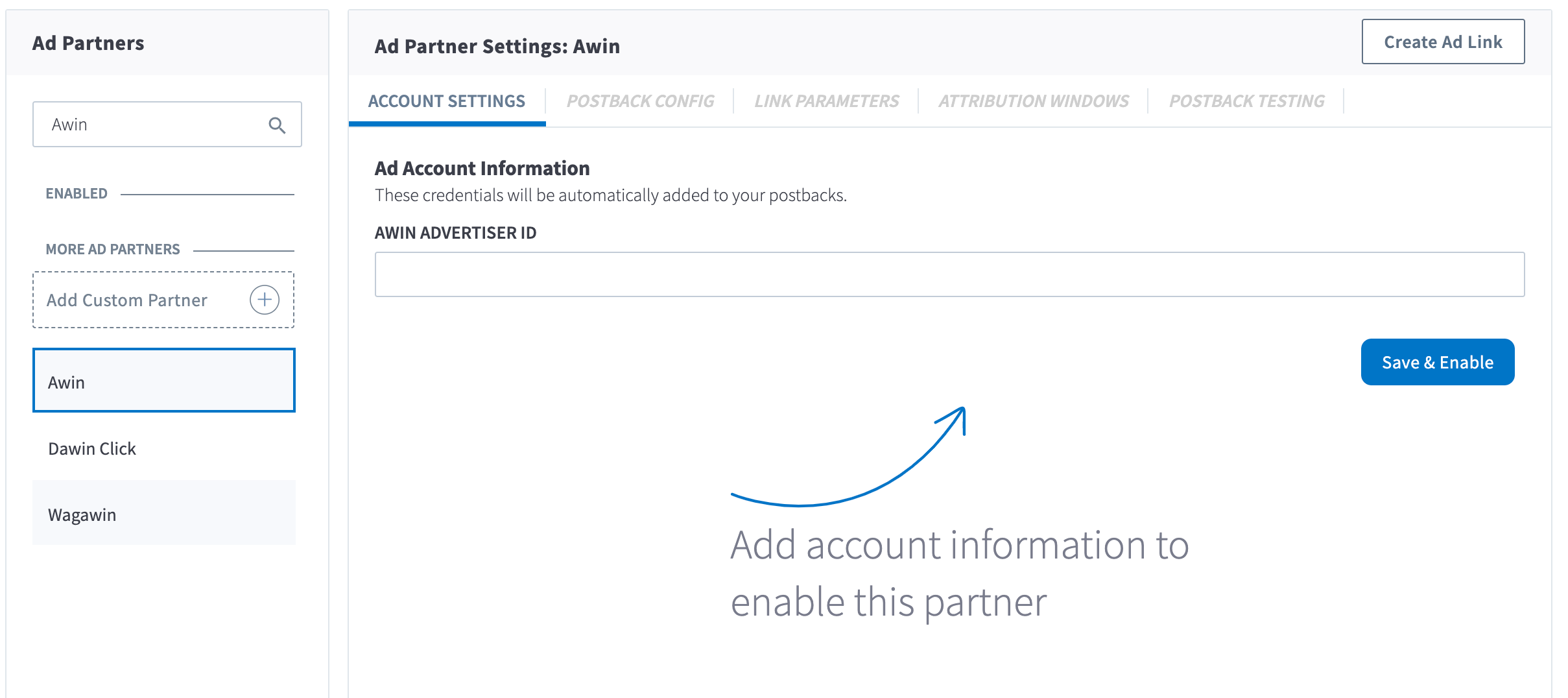
In the Branch Dashboard under **Ads** > [**Partner Management**](https://dashboard.branch.io/ads/partner-management), find/search for Awin. If you're already logged into the Branch Dashboard, you can also click [here](https://dashboard.branch.io/ads/partner-management/a_awin?tab=settings) to go there directly.
You'll need to input your **Awin Advertiser ID**. Please reach out to your Awin Account Manager for details.
Click the **Save & Enable** button.
### 2. Configure Postbacks
Enabling Awin will automatically enable the following postbacks:
- INSTALL
- PURCHASE
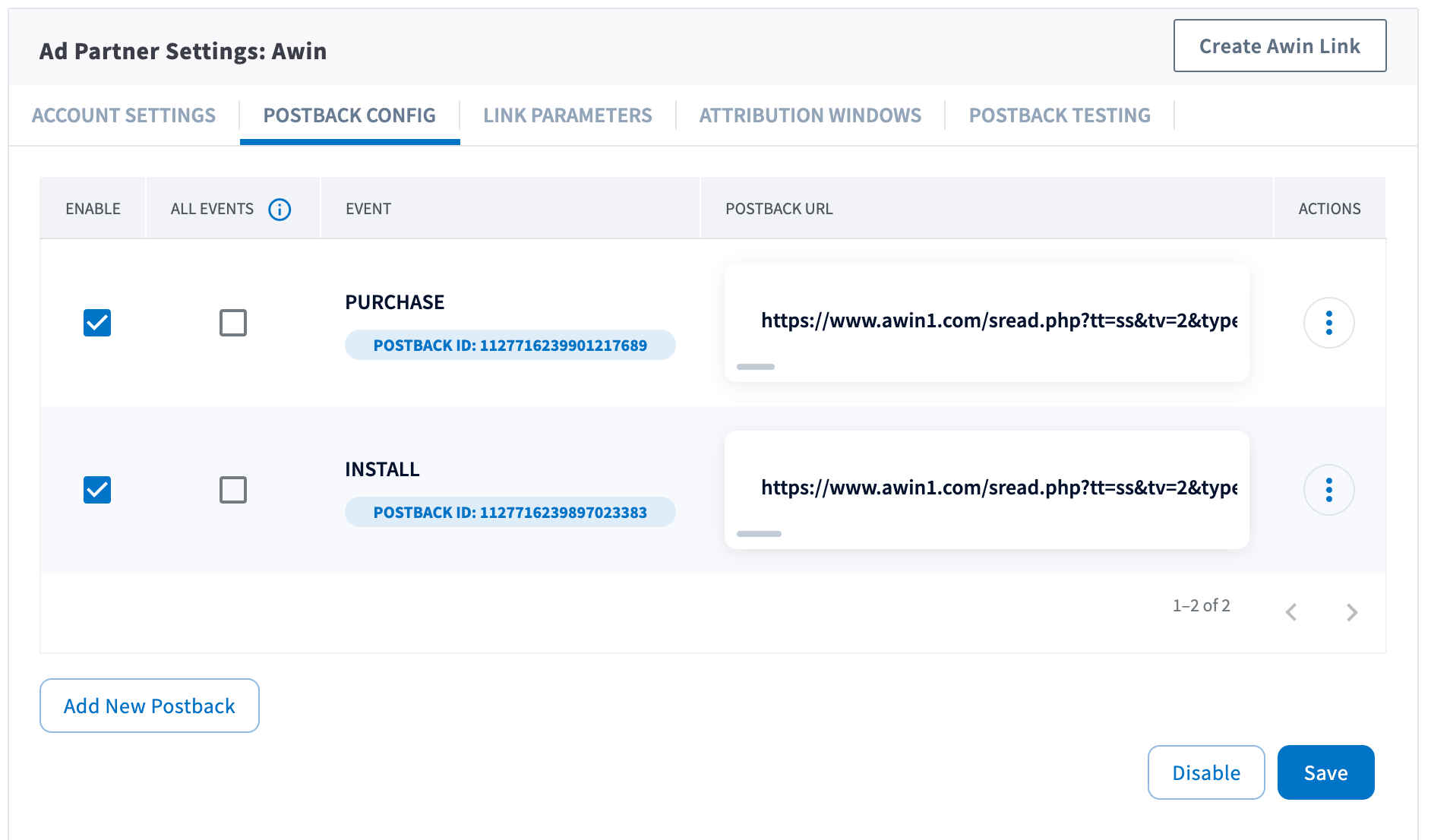
You can configure these postbacks or add more under the [**Postback Config**](https://dashboard.branch.io/ads/partner-management/a_awin?tab=postback) tab.
#### Send All Events
Optionally, you can check the checkbox for a given postback for sending all events. When checked, all events will be sent regardless of attribution. Otherwise, the postback will only fire for events attributed to Awin.
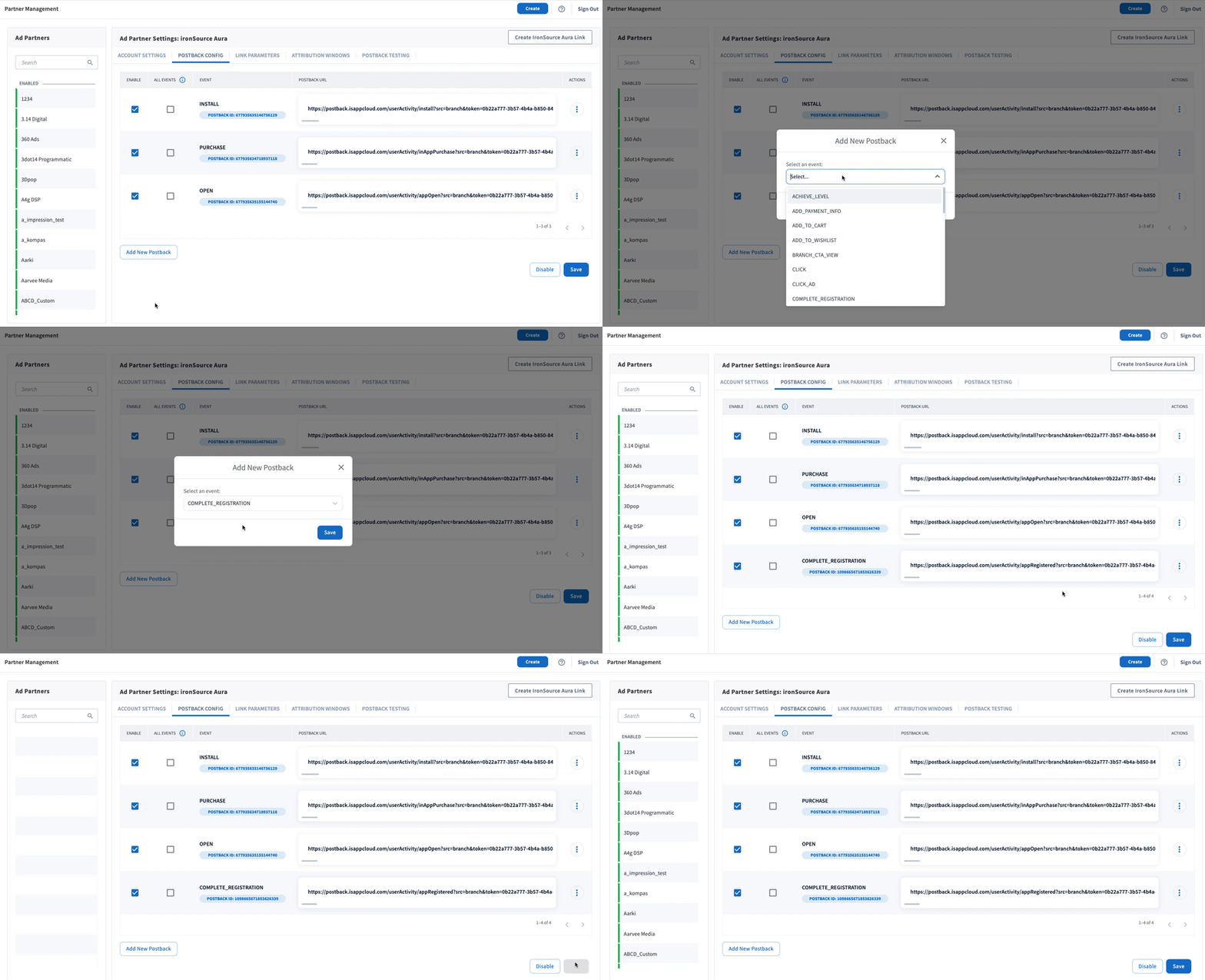
#### Adding Postbacks
Click the **Add New Postback** button at the bottom of the screen. A modal will appear that will allow you to select an event that you are tracking with the Branch SDKs (including Custom Events).
For more in-depth postback configurations, view our guides:
- [Basic Postback Configuration](https://help.branch.io/marketer-hub/basic-postback-configuration.md)
- [Advanced Postback Configuration](https://help.branch.io/developer-hub/advanced-postback-configuration.md)
- **Recommended** 👍 [Test Postbacks](https://help.branch.io/marketer-hub/testing-postbacks.md)
### 3. Configure Attribution Windows
After configuring your events, navigate to the [**Attribution Windows**](https://dashboard.branch.io/ads/partner-management/a_awin?tab=attribution_windows) tab to set windows by attribution type.
#### Recommended Attribution Windows
| Attribution Type | Window |
| --- | --- |
| click to session start | 90 days |
| click to install | 30 days |
| click to conversion event | 90 days |
| impression to session start | 1 day |
| impression to install | 1 day |
| impression to conversion event | 1 day |
### 4. Create Branch Ad Link
Next, you'll need to create a Branch Ad Link for your Awin campaigns in order for Branch to properly attribute conversions.
[Create Ad Links](https://help.branch.io/marketer-hub/ad-links.md)
The Branch Ad Link you create will be placed in your Awin campaign.
### 5. Verify Data in Branch
After launching your Awin campaigns, and conversions begin to happen, you'll want to verify data is being sent from Branch to Awin. You can look at the [Branch Dashboard's Liveview Webhook Records](https://dashboard.branch.io/liveview/webhooks) and apply the following filter:
| Filter | Operator | Value |
| --- | --- | --- |
| ad partner (3p) | equals | `a_awin` |
Once applied, data should flow through the Liveview, and you can see the data being sent to Awin from Branch.