
Overview
Branch’s Fraud Detection Platform uses an intelligent blocklist to block known bad actors in real time, ensuring customers don’t pay for fraudulent traffic. It includes core metrics that help identify forms of fraud such as install hijacking, click flooding, and device reset fraud.
The platform leverages Branch’s persona data to give you RealScore - a model that intelligently scores the likelihood that any given install comes from a real person rather than a bot, malware, or false attribution claim. RealScore depends on a variety of web and app signals to establish patterns of normal and fraudulent behavior, making it the first fraud detection product to leverage the full set of signals available on mobile.
Warning
This article details the fraud analytics experience for the legacy Branch platform, which is slated for deprecation. For more information on fraud analytics in the new Branch platform, visit our Analysis Dashboards guide.
Before you begin
In order to view fraud analytics, you need to have completed the following:
Have sufficient access/permission rights for your Branch app.
- View/Edit access to the Fraud Settings & Data permission.
Core Metrics

Core Metrics allow you to quickly analyze fraud detection performance.
| Metric | Description |
|---|---|
| % Blocked Installs | The percentage of blocked installs divided by installs. |
| Click to Install % | The percentage of attributed installs divided by clicks. |
| Install % Over 1d | The percentage of unblocked installs where the time from click to install was over 1 day - an indicator of click flooding. |
| Install % Under 10s | The percentage of unblocked installs where the time from click to install was under 10 seconds - an indicator of click injection. |
Fraud Report
In-Depth Fraud & Recommendations
Because Fraud Detection is very complex, visit our guide on understanding fraud and recommendations here.
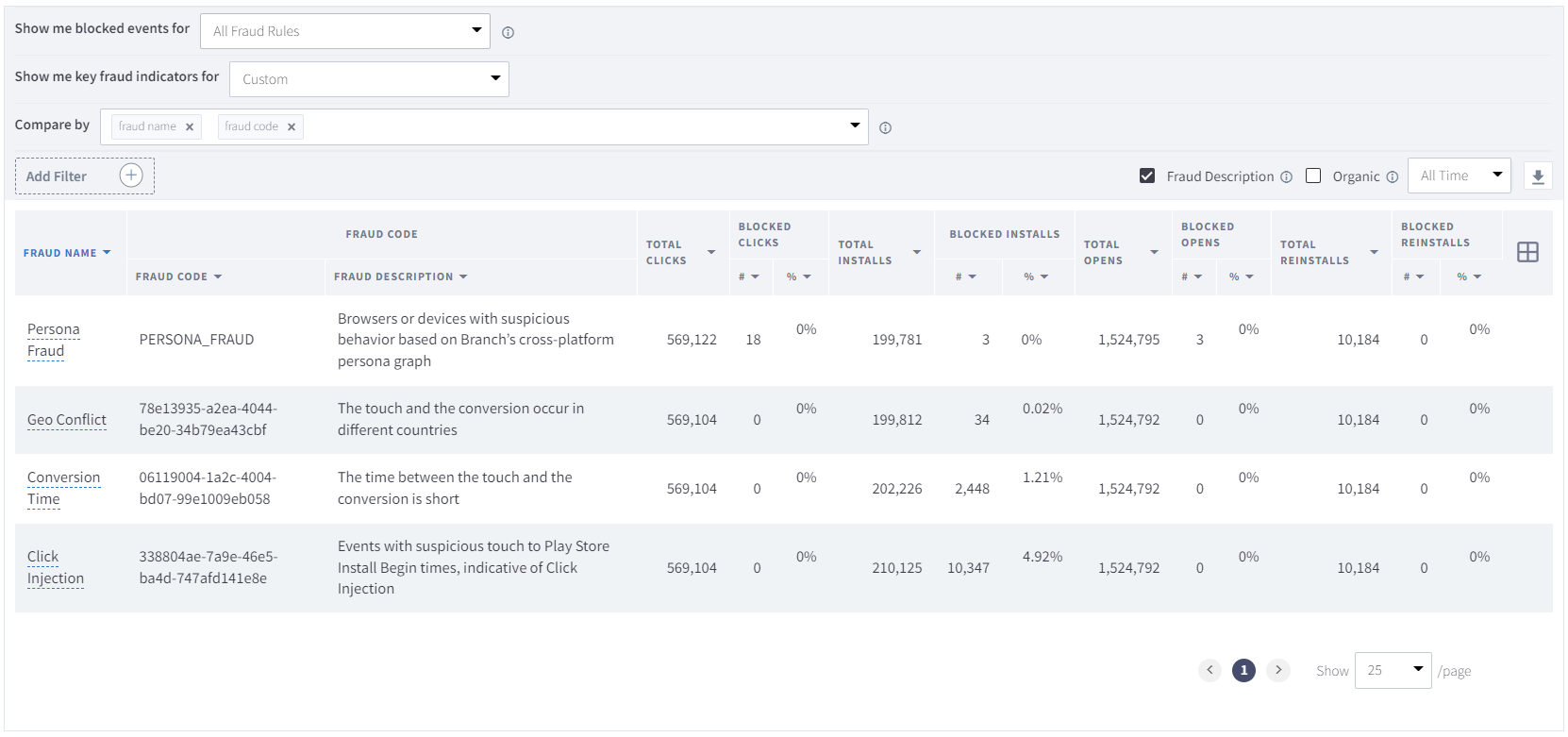
The Fraud Report will measure the performance of your blocked events for specific fraud indicators. Branch recommends creating fraud rules to block erroneous attribution credit in real time.
Available Fraud Rules
| Fraud Rule | Description |
|---|---|
| Conversion Time | The time between the touch and the conversion is short. |
| Click Injection | Events with suspicious touch to Play Store Install Begin times, indicative of Click Injection. |
| Device Conflict | The device information on the touch and the conversion are different. |
| Geo Conflict | The touch and the conversion occur in different countries. |
| IP | Events coming from known TOR networks. |
| Once Ever Capped | Events only occurring once per user. |
| Persona Fraud | Browsers or devices with suspicious behavior based on Branch’s cross-platform Link Graph. |
| Suspicious Device | Install from fake devices or emulators. |
| Custom | Events matching your custom selection of fraud parameters. |
| None | Do not show blocked events based on Fraud Rules. Branch automatically selects None when you filter on Key Fraud Indicators instead. |
Key Fraud Indicators
| Fraud Indicator | Description |
|---|---|
| Fake Devices/Click Farms | Emulators and click farms generate clicks from suspicious IPs, as well as show abnormal behavior after installing. Check blocked clicks and your user value metrics in Ads Analytics to identify this fraud. |
| Install Hijacking/Click Injection | When a new app is installed, other apps on the phone can sometimes detect the install, even before the first open. Fraudulent publishers may fire off a click when they detect an organic install, just before the app is opened. This can be identified by suspiciously low click to install times. |
| Click Flooding | Publishers can generate millions of clicks with different device IDs in the hope that one of those users will install later. Generally the click and install actions are disconnected, so you can expect to see long click to install times and a very low conversion rate. |
| Ad Stacking | Publishers will sometimes put dozens of ads in one ad placement, causing high numbers of impressions and clicks, with low install rates. |
| Device Reset | Device reset fraud is characterized by new devices from suspicious IPs. Keep an eye on your user value metrics and suspiciously high click to install rates. |
Click to Install (CTI) Time Chart
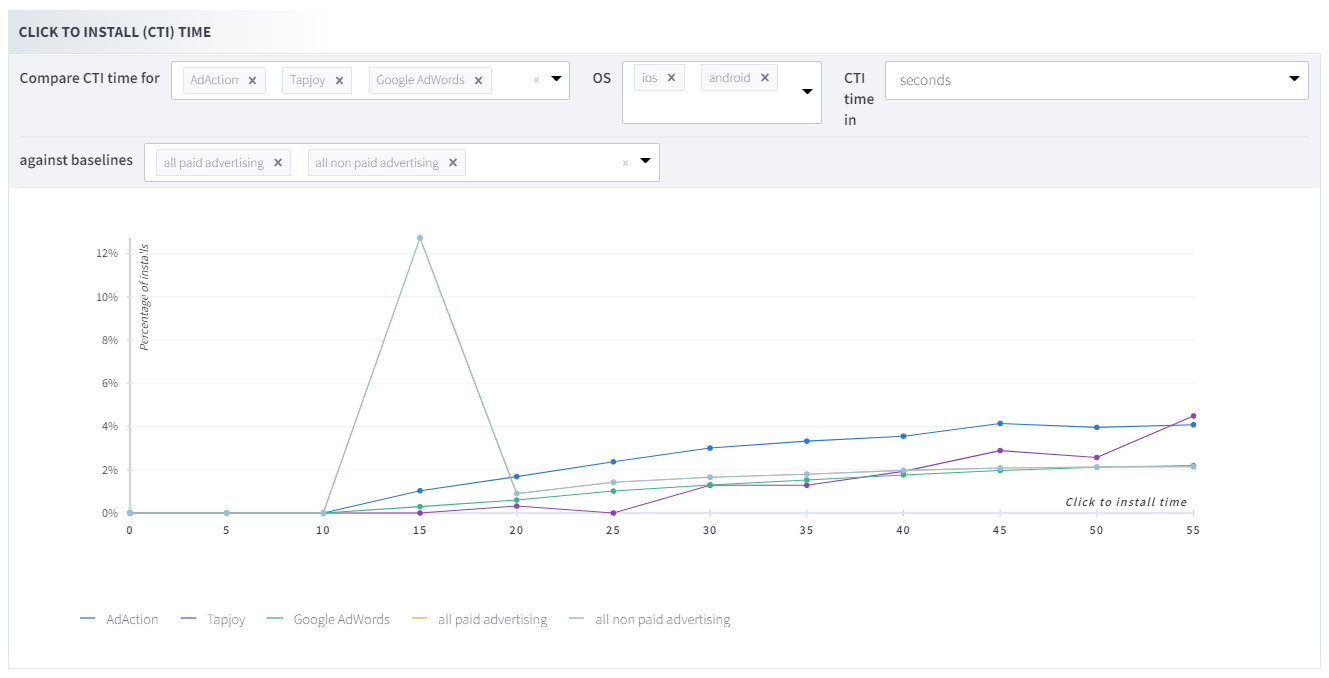
The Click to Install (CTI) Time is a great tool for comparing CTI time for specific ad networks broken out by OS. Here you'll be able to compare CTI time in:
- seconds
- minutes
- hours
- days
Click and impression abuse thresholds
Overview
This protective threshold protects against inhuman levels of illegitimate click and/or impression activity from a single ad network.
How it works:
For ad networks with low conversion rates and inhumanly high click/impression volumes, Branch will protect the account by blocking the ad network traffic for a period of 24 hours or more.
For this specific threshold, networks exceeding the click/impression abuse rate will have further clicks blocked for a 48-hour period and then reset. Branch will not report further excessive clicks for that period and those clicks/impressions will not be used for attribution.
The dynamic logic applied for this threshold accounts for multiple factors including conversion rate, click volume, impression volume, detected fraud rate, and geographic and industry benchmarks.
FAQs
Why not block only a portion of the traffic?
There are several upstream measures to limit blocking to a limited set of devices and sub-sources from the network. This additional network-level measure only activates following cases where several upstream measures have been exceeded. This level of blocking is extremely rare and only occurs when a network is rotating several sources in high frequency, or not specifying sub-sources, and the vast majority are determined to be inhuman with excessive volume.
How is the threshold determined?
The threshold is dynamic and accounts for several factors including conversion rate, excessively high click/impression volumes, and geographic and industry benchmarks. In general, this threshold is exceeded only rarely, and only under inhuman click/impression abuse volume. It applies to a minute fraction of activity system-wide. We do not disclose further specifics on the logic to protect customers from attempted manipulation.
How often will the temporary blocking be lifted or reset?
The threshold is automatically reassessed every 48 hours. It is imperative that the click/impression abuse subsides prior or it is possible that the block may be continued for another period. Once the temporary block is applied, it cannot be reset prior to the end of the active period.
What happens if a network is flagged multiple times for abuse?
Subsequent violations will be reviewed for potential removal and longer-term banning of the source.
What if the click/impression traffic is not considered as abusive by the client app?
Media sources triggering this threshold violate Branch terms of system abuse. This abuse protection is an additional layer above and beyond other client fraud protections. For questions and concerns about this protective threshold, please contact your Branch Client Success Manager.
What if the customer wishes for this traffic not to be blocked?
While clients have direct control over fraud protection settings, the click and impression abuse thresholds cannot be bypassed. This abuse protection helps ensure reliability of the API and protects customers from heavy attack.
What is the reason for this additional approach when there are more granular approaches?
While there are several layers of fraud protection with fine-tuning, this is a broader “safety net” to protect from gross, extreme abuse of the system. In most cases, abuse is blocked at more granular levels, and in the case of an excessive abuse volume, this threshold protects the customer account.
How can networks ensure not to be blocked during campaign launch & optimization?
Ensure that all click/impression activity is legitimate and is driving a conversion rate within normal expected tolerance. Conversion rates should be representative of what is typical for the app, given a genuine legitimate user-initiated click/impression of interest. If sending ad views as click/impressions, or if the audience conversion rate is several deviations outside of the normal range, this will fail the conversion rate criteria. If the campaign is also sending multiple millions of click/impressions daily, that is additionally figured as part of the criteria. The campaign should have normal tolerance rates for the geographic and industry benchmarks or may be temporarily blocked for excessive volume.
How can networks check for problematic traffic and sub-sources?
Using reporting, networks can monitor click/impression volumes and conversion rates by secondary_publisher source. Networks are encouraged to optimize away from sources that have excessively high click/impression volumes with uncommonly low conversion rates. If using sources with lower conversion rates, the activity must be within a reasonable tolerance. It is a violation of Branch terms to send abuse level volume.