> For the complete documentation index, see [llms.txt](https://help.branch.io/llms.txt).
# Unity SDK
> Integrate the Branch Unity SDK into your game, including how the SDK handles the iOS 14 IDFA permission modal.
> **Note**
>
> In order to give **iOS 14** developers full control over the user experience, the Branch SDK will not trigger the IDFA permission modal.
>
> However, we will still collect and use IDFAs when available if you do choose to trigger the modal.
>
> [Learn more](https://help.branch.io/developer-hub/category/branch-sdks.md)
> **Warning**
>
> If you reference **Google Play Services version 17 or higher**, you **must** complete Google's update instructions [here](https://developers.google.com/android/guides/releases#june_17_2019).
>
> Due to a major Google Play Services change made in June 2019, not completing the update steps will cause Branch's Android SDK (and various other cross-platform SDKs, e.g. Unity) to stop collecting Android AID which we use to ensure accurate deep linking and attribution.
>
> If you are running Google Play Services versions below 17, no update is necessary.
>
> To use Google Play Services **versions below 17 for future app builds**, follow these [workaround implementation steps](https://help.branch.io/developer-hub/unity.md#workaround-implementation-steps-for-using-google-play-services-version-17).
> **Warning**
>
> If you use your own Android Manifest and not the one provided with the Branch SDK, make sure you change the `android:name` field of your launcher activity you are referencing from `com.unity3d.player.UnityPlayerActivity` to `BranchUnityActivity`. `BranchUnityActivity` extends the `UnityPlayerActivity` but also contains code responsible for initializing the Branch SDK on Android.
>
> Not doing so will result in the callback in `init()` never getting hit.
## Configure Branch
1. Configure Branch:
- **New Branch**: In the left-hand navigation, go to **Configuration** and click on **Link Controls**. Navigate to the **Link Routing Rules** tab to configure your app settings.
- **Legacy Branch**: Navigate to the [Link Settings page](https://dashboard.branch.io/settings/link).
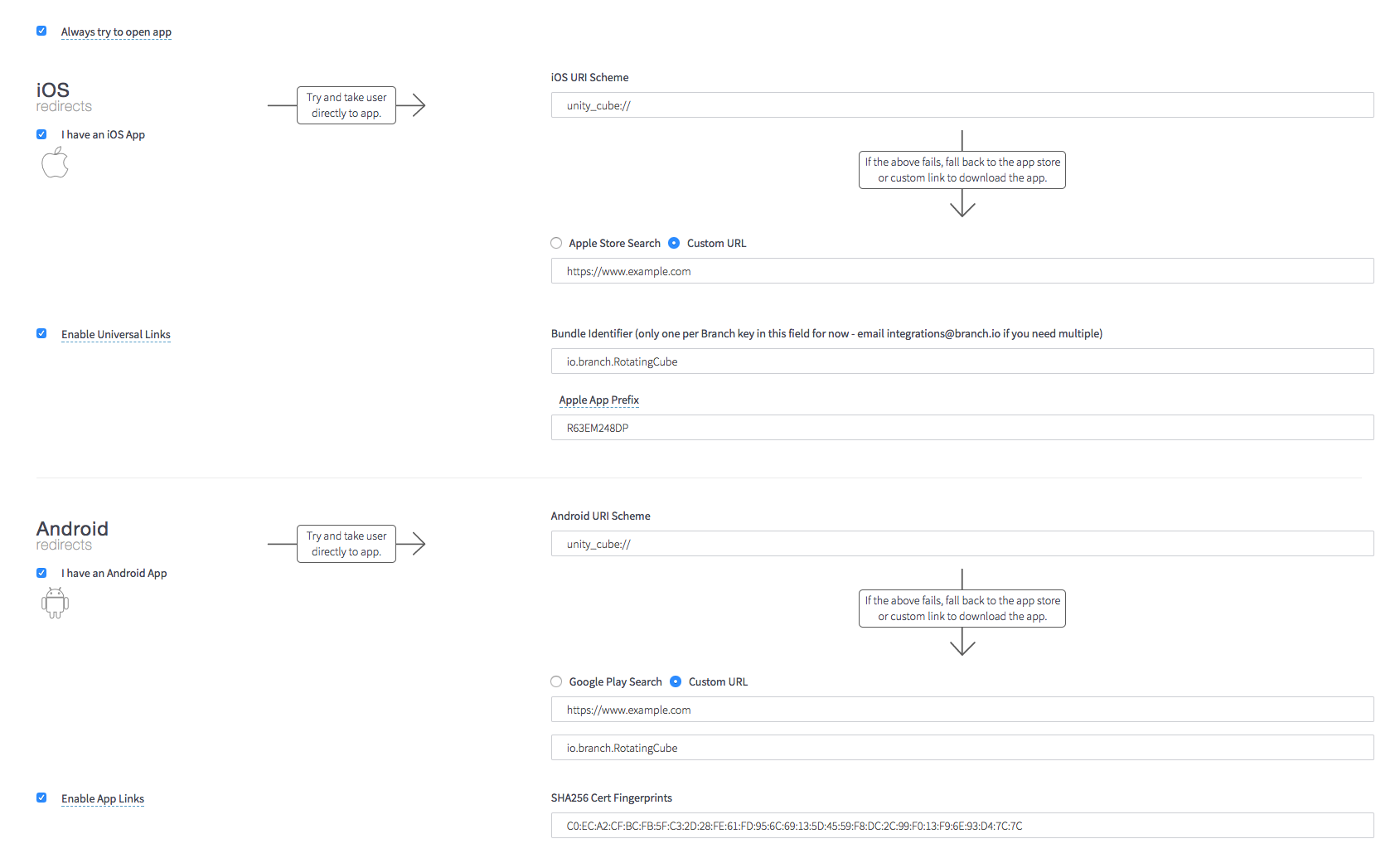
2. Customize your app.link domain:

## Configure the Branch SDK
- [Download the latest SDK version](https://raw.githubusercontent.com/BranchMetrics/unity-branch-deep-linking-attribution/master/BranchUnityWrapper.unitypackage) or clone our [open-source GitHub repository](https://github.com/BranchMetrics/unity-branch-deep-linking-attribution).
- Import the BranchUnityWrapper.unitypackage into your project by clicking `Assets -> Import Package`.
## Configure app
You can configure your Unity app to work with Branch by either using a Branch prefab asset or by adding a `branch.json` file.
> **Warning**
>
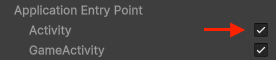
> Please ensure that the **Activity** checkbox is checked in **Project Settings** → **Player,** because the Unity SDK currently uses `UnityPlayerActivity`.
>
> 
>
> Not doing so **will** **cause a build error** on Android.
### Configure with Branch prefab
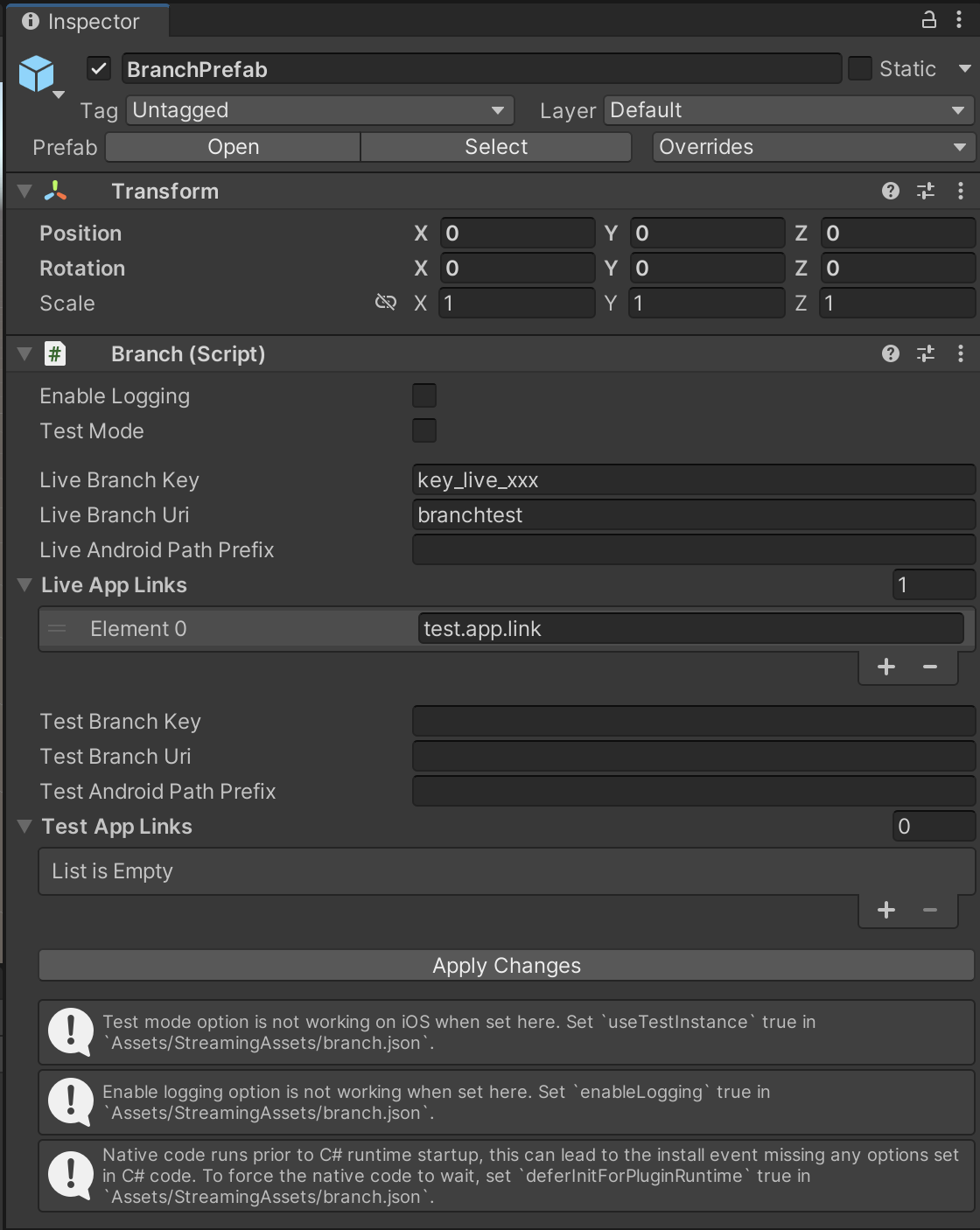
Add the Branch prefab asset to the **first scene** of your Unity project.
> **Note**
>
> - Do not forget to click on the **Apply Changes** once you are done.
> - On Android, these values are used to generate `Assets/Plugins/Android/AndroidManifest.xml`. If you have any conflicts, you may manually enter these settings.
> - On iOS, these values are used to update the `Info.plist`, `branch_domains.entitlements` and update a few build settings to enable C++ exceptions. If you have any conflicts, you may manually enter these settings.
#### Prefab fields
To find your Branch keys, URI schemes, and link domains:
- **New Branch**: In the left-hand navigation, go to **Configuration** and click on **Security & Access** for your Branch keys and link domains. Click on **Link Controls** and navigate to the **Link Routing Rules** tab for URI schemes and platform-specific settings.
- **Legacy Branch**: Navigate to the [App Settings page](https://dashboard.branch.io/account-settings/app) for your Branch keys, or the [Link Settings page](https://dashboard.branch.io/link-settings) for URI schemes, link domains, and platform-specific settings.
| Field | Description |
| --- | --- |
| **Enable Logging** | This feature is currently NOT working. Workaround is to set this in the `branch.json` config file. |
| **Test Mode** | This feature is currently NOT working on iOS. Workaround is to set this in the `branch.json` config file.
Enables use of the Test Key. |
| **Live Branch Key** | This is the Live Branch key found in Branch (see navigation above). |
| **Live Branch URI** | This is the Live URI scheme that you have set for your app in Branch (see navigation above). |
| **Live Android Path Prefix** | This field is only applicable if you are on the `bnc.lt` domain. You can find it underneath the field labeled SHA256 Cert Fingerprints once you've enabled App Links. It will look something like this: `/WSuf` (the initial / character should be included). |
| **Live App Links** | This field is applicable if you want to enable `APPLINKS` and `UNIVERSAL LINKS` for your domain. Please make sure to add the correct domain found in Branch (see navigation above). Add the -alternate domain to have your Branch links deeplink from your [Deepviews](https://help.branch.io/marketer-hub/deepviews.md) and [Journeys](https://help.branch.io/marketer-hub/journeys-overview.md). If you are not using an `app.links` domain please contact our [support team](https://help.branch.io/account-hub/submit-a-ticket.md). |
| **Test Branch Key** | This is the test Branch key found in Branch (see navigation above). |
| **Test Branch URI** | This is the test URI scheme that you have set for your app in Branch (see navigation above). |
| **Test Android Path Prefix** | This field is only applicable if you are on the `bnc.lt` domain of your Test Branch app. You can find it underneath the field labeled SHA256 Cert Fingerprints once you've enabled App Links. It will look something like this: `/WSuf` (the initial / character should be included). |
| **Test App Links** | This field is applicable if you want to enable `APPLINKS` and `UNIVERSAL LINKS` for your domain. Please make sure to add the correct domain found in Branch (see navigation above). Add the -alternate domain to have your Branch links deeplink from your [Deepviews](https://help.branch.io/marketer-hub/deepviews.md) and [Journeys](https://help.branch.io/marketer-hub/journeys-overview.md). If you are not using an `app.links` domain please contact our [support team](https://help.branch.io/account-hub/submit-a-ticket.md). |
### Configuration with `branch.json`
You may also configure the app by adding `Assets/StreamingAssets/branch.json` to your project.
| Key | Type | |
| --- | --- | --- |
| enableLogging | boolean | Enables Branch SDK logging |
| deferInitForPluginRuntime | boolean | Defers underlying iOS and Android SDKs initialization until the C# layer registers a callback. |
| useTestInstance | boolean | Enables using the Test Key on iOS |
## Initialize Branch
Add Branch to your `Monobehavior` script of your **first Scene:**
```csharp
using UnityEngine;
using System.Collections;
public class Spin : MonoBehaviour {
// Use this for initialization
void Start () {
Branch.initSession(CallbackWithBranchUniversalObject);
}
void CallbackWithBranchUniversalObject(BranchUniversalObject buo,
BranchLinkProperties linkProps,
string error) {
if (error != null) {
Debug.LogError("Error : "
+ error);
} else if (linkProps.controlParams.Count > 0) {
Debug.Log("Deeplink params : "
+ buo.ToJsonString()
+ linkProps.ToJsonString());
}
}
// Update is called once per frame
void Update () {
//rotate 90 degress per second
transform.Rotate(Vector3.up * Time.deltaTime*90);
}
}
```
## Test Branch Deep Link
1. [Create a Branch Short Link](https://dashboard.branch.io/quick-links/qlc/define) in Branch.
2. Delete your app from the device.
3. Paste Short Link in **Google Hangouts (Android)** or **Notes (iOS).**
4. Click on the Short Link to open your app.
5. Compile and download your app to your device.
6. You should see deferred deep link data show in your app.
## Implement features
### Create content reference
The **Branch Universal Object** encapsulates the thing you want to share with your link:
```csharp
BranchUniversalObject universalObject = new BranchUniversalObject();
// Content index mode: 0 - private mode, 1 - public mode
universalObject.contentIndexMode = 1;
//Identifier that helps Branch dedupe across many instances of the same content.
universalObject.canonicalIdentifier = "id12345";
// OG title
universalObject.title = "id12345 title";
// OG Description
universalObject.contentDescription = "My awesome piece of content!";
// OG Image
universalObject.imageUrl = "https://example.com/image.png";
// User defined key value pair
universalObject.metadata.AddCustomMetadata("foo", "bar");
```
### Create Deep Link
After you have created a `Branch Universal Object`, Define Link Properties:
```csharp
BranchLinkProperties linkProperties = new BranchLinkProperties();
linkProperties.tags.Add("tag1");
linkProperties.tags.Add("tag2");
// Feature link is associated with. Eg. Sharing
linkProperties.feature = "invite";
// The channel where you plan on sharing the link Eg.Facebook, Twitter, SMS etc
linkProperties.channel = "Twitter";
linkProperties.stage = "2";
// Parameters used to control Link behavior
linkProperties.controlParams.Add("$desktop_url", "http://example.com");
```
Then, generate a Branch link:
```csharp
Branch.getShortURL(universalObject, linkProperties, (parameters, error) => {
if (error != null) {
Debug.LogError("Branch.getShortURL failed: " + error);
} else if (params != parameters) {
Debug.Log("Branch.getShortURL shared params: " + parameters["url"].ToString());
}
});
```
### Share Deep Link
Share Branch Deep Links between users and apps:
```csharp
Branch.shareLink(universalObject, linkProperties, "Sharing link: ", (parameters, error) => {
if (error != null) {
Debug.LogError("Branch.shareLink failed: " + error);
} else if (parameters != null) {
Debug.Log("Branch.shareLink: " + parameters["sharedLink"].ToString() + " " + parameters["sharedChannel"].ToString());
}
});
```
### Read Deep Link
- Read Deep Link params from a **BUO** in your `BranchInitSession callback`
- Returns [deep link properties](https://help.branch.io/marketer-hub/deep-link-reference.md#read-deep-links)
```csharp
public void CallbackWithBranchUniversalObject(BranchUniversalObject universalObject, BranchLinkProperties linkProperties, string error) {
if (error != null) {
Debug.LogError("Branch Error: " + error);
} else {
Debug.Log("Branch initialization completed: ");
Debug.Log("Universal Object: " + universalObject.ToJsonString());
Debug.Log("Link Properties: " + linkProperties.ToJsonString());
}
}
```
> **Note**
>
> This refreshes with every session (App Installs and App Opens).
#### Retrieve link data
> **Warning**
>
> Make sure you run this code after `initSession()`.
```csharp
//get the latest referring params (last Branch link click)
BranchUniversalObject obj = Branch.getLatestReferringBranchUniversalObject();
BranchLinkProperties link = Branch.getLatestReferringBranchLinkProperties();
//get the first referring params (open or install)
BranchUniversalObject obj = Branch.getFirstReferringBranchUniversalObject();
BranchLinkProperties link = Branch.getFirstReferringBranchLinkProperties();
```
#### NativeLink™ Deferred Deep Linking (iOS only)
Use iOS pasteboard to enable deferred deep linking using Branch NativeLink™.
To use this feature you must:
- [Enable NativeLink™ Deep Linking](https://help.branch.io/account-hub/basic-link-configuration.md):
- **New Branch**: In the left-hand navigation, go to **Configuration** and click on **Link Controls**. Navigate to the **Link Routing Rules** tab, then find the **Mobile Routing** section and find **iOS**.
- **Legacy Branch**: Navigate to the [Configuration page](https://dashboard.branch.io/configuration/general).
**or**
- Manually configure your Branch Link to use [$ios_nativelink](https://help.branch.io/marketer-hub/deep-link-reference.md#forced-redirections).
> **Warning**
>
> Make sure the underlying **iOS SDK Version is v1.39.4+.**
Implement one of the [pasteboard opt-in options](https://help.branch.io/developer-hub/ios-advanced-features.md) in the native iOS SDK code.
#### Access
Please note that deferred deep linking requires a premium plan. Please [contact our Sales team](https://www.branch.io/contact-sales/) to learn more about pricing and availability.
### Navigate to and display content
Use the link parameters to decide which view you wish to load:
```csharp
public class MyCoolBehaviorScript : MonoBehaviour {
void Start () {
Branch.initSession(delegate(Dictionary parameters, string error) {
if (parameters.ContainsKey("picture_id") {
// load the Scene to show the picture
SceneManager.LoadSceneAsync("ImageScene", LoadSceneMode.Additive);
} else {
// load your normal Scene
SceneManager.LoadSceneAsync("NormalScene", LoadSceneMode.Single);
}
});
}
}
```
### Track content
If you want to track the number of times a user views a piece of content associated with a Branch Universal Object, use the following snippet:
```csharp
Branch.registerView(universalObject);
```
### Track users
#### Set user IDs on login
Set the identity of a user (ID, UUID, etc.) for events, deep links, and referrals:
```csharp
Branch.setIdentity("your user id");
```
#### Unset user IDs on logout
To log a user out, use the `logout()` method:
```csharp
Branch.logout();
```
### Tracking user actions and events
Use the `BranchEvent` class to monitor unique user interactions beyond app installations and openings. Use it to log Branch Events like adding items to a shopping cart or completing a registration form. The class links content via a `BranchUniversalObject` and allows for metric analytics on the Branch Dashboard. `BranchEventType` will enumerate frequently tracked events and parameters. You can also use custom names and custom parameters using a [Branch Custom Event.](https://help.branch.io/developer-hub/track-branch-events.md)
```csharp
BranchEvent e01 = new BranchEvent (BranchEventType.COMPLETE_REGISTRATION);
e01.SetAffiliation("my_affilation");
e01.SetCoupon("my_coupon");
e01.SetCurrency(BranchCurrencyType.USD);
e01.SetTax(10.0f);
e01.SetRevenue(100.0f);
e01.SetShipping(1000.0f);
e01.SetDescription("my_description");
e01.SetSearchQuery("my_search_query");
e01.AddCustomData("custom_data_key01", "custom_data_value01");
e01.AddContentItem(universalObject);
Branch.sendEvent (e01);
BranchEvent e02 = new BranchEvent ("MY_CUSTOM_EVENT");
e02.SetAffiliation("my_affilation");
e02.SetCoupon("my_coupon");
e02.SetCurrency(BranchCurrencyType.USD);
e02.SetTax(10.0f);
e02.SetRevenue(100.0f);
e02.SetShipping(1000.0f);
e02.SetDescription("my_description");
e02.SetSearchQuery("my_search_query");
e02.AddCustomData("custom_data_key01", "custom_data_value01");
e02.AddContentItem(universalObject);
Branch.sendEvent (e02);
```
## Troubleshooting issues
## iOS + Unity 4.6
Branch requires ARC, and we don’t intend to add checks throughout the SDK to try and support pre-ARC.
However, you can add flags to the project to compile the Branch files with ARC. If you wish to do this
add `-fobjectivec-arc` to all Branch files.
> **Note**
>
> By default this flag is checked, but please check before building for iOS.
## Android - using your own custom application class
If you are using your own custom `application` class, you will need to add Branch Android library into your project and call the following in method `OnCreate()`:
```java
Branch.getAutoInstance(this.getApplicationContext());
```
If you are using your own custom `activity` class, please make sure that you are overriding the following functions:
```java
@Override
public void onCreate(Bundle savedInstanceState) {
super.onCreate(savedInstanceState);
}
@Override
public void onNewIntent(Intent intent) {
this.setIntent(intent);
}
```
## Support Branch with different plugins
The Branch SDK has its own custom `activity` and `application` classes. Other plugins that use their own
custom activity and application classes can cause conflicts between these classes.
To resolve these conflicts:
1. Create an empty Android library.
2. Add the Branch plugin along with the other plugins into your project.
3. Create a custom `activity` and `application` class that will contain the custom logic for all your plugins.
4. Build your library.
5. Add your library into your Unity project.
6. Change `android:name` to name of your custom `application` class in the `application` tag of your Manifest.
7. Change `android:name` to name of your custom `activity` class in the `activity` tag of your Manifest.
## Support several `IMPL_APP_CONTROLLER_SUBCLASS`
The Branch Unity SDK plugin uses its own `UnityAppController` that expands default `AppController.` This is used to catch Universal Links.
```csharp
@interface BranchAppController : UnityAppController
{
}
@end
@implementation BranchAppController
- (BOOL)application:(UIApplication *)application continueUserActivity:(NSUserActivity *)userActivity restorationHandler:(void (^)(NSArray *))restorationHandler {
BOOL handledByBranch = [[BranchUnityWrapper sharedInstance] continueUserActivity:userActivity];
return handledByBranch;
}
@end
IMPL_APP_CONTROLLER_SUBCLASS(BranchAppController)
```
Some plugins expand the default `AppController` the same way as Branch does, like the Cardboard SDK plugin. To resolve conflicts:
1. Merge all custom `AppControllers` in one.
2. Comment code in other `AppControllers` (or delete other `AppControllers`).
## Sample app
[Branch testbed app](https://github.com/BranchMetrics/unity-branch-deep-linking-attribution/tree/master/BranchUnityTestBed)
## Workaround implementation steps for using Google Play Services < Version 17
1. Install `BranchUnityWrapper.unitypackage`.
2. Delete `android-support-customtabs-23.3.0.jar` from **Assets->Plugins->Branch->Android->libs**.
3. Create an **Assets->Plugins->Branch->Editor** folder.
4. Add the attached `BranchPluginDependencies.xml` to the new **Editor** folder.
5. Install the latest Google Play Resolver from .
6. Dependencies will now auto-resolve, but you may want to confirm by listing the libraries from the play resolver menu. You will see the following block:
```groovy
dependencies {
implementation 'com.android.installreferrer:installreferrer:1.0' // Assets/Plugins/Editor/BranchPluginDependencies.xml:11
implementation 'com.android.support:customtabs:23.3.0' // Assets/Plugins/Editor/BranchPluginDependencies.xml:13
implementation 'com.google.android.gms:play-services-ads:16.0.0' // Assets/Plugins/Editor/BranchPluginDependencies.xml:12
}
```