> For the complete documentation index, see [llms.txt](https://help.branch.io/llms.txt).
# Relay Subscriptions and In-App Purchases
> Log app store subscriptions and in-app purchases to Branch without populating transaction data yourself.
## Overview
Unlike other [Branch Events](https://help.branch.io/developer-hub/create-branch-objects-and-events.md), you can log app store subscriptions and in-app purchases (IAPs) without needing to populate the Branch Event with transaction data yourself (although you still have that [option](https://help.branch.io/developer-hub/track-branch-events.md#track-commerce-events) as well).
Instead, the Branch iOS and Android SDKs include methods that turn a standard app store purchase event into a Branch Event for you. This simplifies your code and reduces development overhead for your team.
When you pass Branch a standard purchase event, we log a Branch `PURCHASE` Event in our system for that transaction.
Branch recommends that customers implement validation checking within their systems for these app store transactions, which can be done either on-device or server-side using APIs provided by [Apple](https://developer.apple.com/documentation/storekit/in-app_purchase/original_api_for_in-app_purchase/choosing_a_receipt_validation_technique) and [Google](https://developer.android.com/google/play/billing/security).
## Before you begin
To relay subscriptions and IAPs to Branch for event mapping, you first need to:
1. Create a [Branch Dashboard](https://dashboard.branch.io/).
2. Integrate the appropriate Branch SDK into your mobile app ([iOS](https://help.branch.io/developer-hub/ios-sdk-overview.md) | [Android](https://help.branch.io/developer-hub/android-sdk-overview.md)).
## Implementation
### iOS
1. Create a new Branch Event.
**Swift**
```swift
let event = BranchEvent(name: "PURCHASE")
```
**Objective-C**
```objective-c
BranchEvent *event = [[BranchEvent alloc] initWithName:@"eventName"];
```
2. Log the new Branch Event using the `logEvent` method, and pass that method an `SKPaymentTransaction` [object](https://developer.apple.com/documentation/storekit/skpaymenttransaction) that you've fetched from the [Apple StoreKit API](https://developer.apple.com/documentation/storekit).
**Swift**
```swift
event.logEvent(with: transaction as! SKPaymentTransaction)
```
**Objective-C**
```objective-c
[event logEventWithTransaction:(SKPaymentTransaction *)transaction];
```
### Android
1. On Android, use the [Google Play Developer API](https://developers.google.com/android-publisher#subscriptions) to retrieve and pass a `Purchase` [object](https://developer.android.com/reference/com/android/billingclient/api/Purchase) to the Branch `logEventWithPurchase` method. This method is accessible directly from the global Branch instance.
**Java**
```java
Branch.getInstance().logEventWithPurchase(MainActivity.this, (Purchase) purchase);
```
**Kotlin**
```kotlin
Branch.getInstance().logEventWithPurchase(this, purchase);
```
## Object Mapping
The Branch iOS and Android SDKs map transaction details from the Apple and Google APIs into a `BranchUniversalObject` and `BranchStandardEvent` for you, based on the tables in this section.
Note that [Branch Universal Objects](https://help.branch.io/developer-hub/create-branch-objects-and-events.md) represent the thing you want to share (such as an article, video, or item for sale), and that `BUO` is an instance of `BranchUniversalObject`.
#### iOS to Branch Basic Mapping
Branch uses the object you pass in for `transaction` to look up the `Product` object associated with it, and maps it in the following way:
| iOS | Branch |
| --- | --- |
| `Product.quantity` | `BUO.quantity` |
| `Product.description` | `BUO.description` |
| `Product.displayName` | `BUO.title` |
| `Product.price` | `BUO.price` |
| `Product.id` | `BUO.canonicalIdentifer` |
| `Product.type` | `BranchStandardEvent` |
#### Android to Branch Basic Mapping
On Android, the `purchase` object you pass in is used to look up the `productId` and associated `productDetails`, and has the following mapping:
| Android | Branch |
| --- | --- |
| `Purchase.quantity` | `BUO.quantity` |
| `ProductDetails.description` | `BUO.description` |
| `ProductDetails.title` | `BUO.title` |
| `ProductDetails.formattedPrice` | `BUO.price` |
| `ProductDetails.productId` | `BUO.canonicalIdentifer` |
| `ProductDetails.productType` | `BranchStandardEvent` |
#### Additional Object Mapping on iOS and Android
| Branch | iOS | Android |
| --- | --- | --- |
| `BranchEvent.name` | `“Purchase”` | `“Purchase”` |
| `BranchEvent.Description` | `Transaction.Identifier` | `Purchase.OrderID` |
| `BranchEvent.Currency` | `Product.CurrencyCode` | `Product.CurrencyCode` |
| `BranchEvent.revenue` | `Product.Price` | `Product.Price` \* `Transaction.Quantity` |
| `BUO.canonicalIdentifier` | `Product Identifier` | `Product.ProductID` |
| `BUO.title` | `Product.LocalizedTitle` | `Product.Title` |
| `BUO.price` | `Product.Price` | `Product.Price` |
| `BUO.currency` | `Product.CurrencyCode` | `Product.CurrencyCode` |
| `BUO.productName` | `Product.Title` | `Product.Name` |
| `BUO.contentDescription` | `Product.Description` | N/A |
| `BUO.quantity` | 1 | `Transaction.Quantity` |
| `BranchEvent.CustomerEventAlias` | `IAP` **or** `Subscription` | `“inapp”` **or** `”subs”` |
| `BranchEvent.CustomMetadata` | `@"transaction_identifier": _transactionID,`
`@"logged_from_IAP": @true` | `("package_name", purchase.packageName) ("order_id", purchase.orderId) ("logged_from_IAP", "true") ("is_auto_renewing", purchase.isAutoRenewing.toString()) ("purchase_token", purchase.purchaseToken)` |
| `BUO.CustomMetadata` | `@"content_version": product.contentVersion`
`@"is_downloadable": @product.isDownloadable`
`@"is_family_shareable”:product.isFamilyShareable` | `("product_type", product.productType)` |
| `BranchEvent.ContentItems` | N/A | `ProductDetails` as `BUO` |
## Access the Data
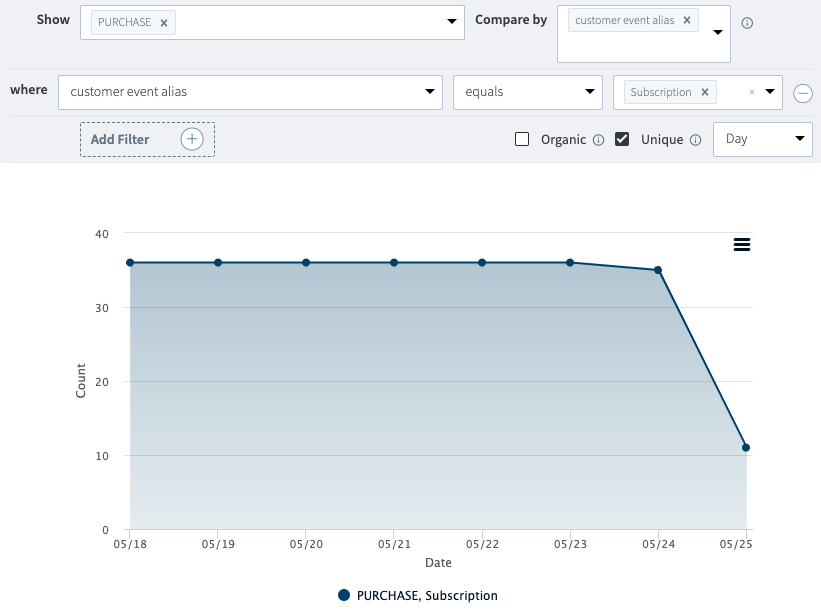
Subscription and IAP event data is accessible the same way as data from other Branch Events. You can view and export the data via the [Branch Dashboard](https://help.branch.io/marketer-hub/branch-dashboard-overview.md), as well as through our [APIs](https://help.branch.io/developer-hub/index.md), by targeting `PURCHASE` Branch Events.
You can also use the Dashboard to configure the data to be sent to an ad network with a [postback](https://help.branch.io/marketer-hub/postbacks.md).
To differentiate between subscription data and IAP data, filter your analytics by the `CustomerEventAlias` field, the values for which can be found in the "Additional Object Mapping" [table](https://help.branch.io/developer-hub/relay-subscriptions-and-in-app-purchases.md#additional-object-mapping-on-ios-and-android).