> For the complete documentation index, see [llms.txt](https://help.branch.io/llms.txt).
# iOS SDK Advanced Features
> Implement advanced Branch iOS SDK features in Swift or Objective-C, with prerequisites and code for each method.
## Overview
The Branch iOS SDK exposes a set of methods specifically made for iOS apps, which you can call using Swift or Objective-C.
## Before you begin
Before you get started implementing the features on this page, you first need to:
1. Create an account in [Branch Dashboard](https://dashboard.branch.io/).
2. [Integrate](https://help.branch.io/developer-hub/ios-basic-integration.md) the Branch iOS SDK into your mobile app.
3. [Validate](https://help.branch.io/developer-hub/ios-basic-integration.md#_8-validate-integration) your Branch iOS SDK integration.
> **Note: Branch data retention policy**
>
> Before sending data to Branch, review the "[Data Branch Hashes](https://help.branch.io/account-hub/best-practices-to-minimize-data-sent-to-branch.md#data-branch-hashes)" section of our data best practices guide for field definitions and retention policies.
## Set initialization metadata
Some third-party [Data Integration Partners](https://help.branch.io/marketer-hub/supported-data-integration-partners.md) require setting certain identifiers before initializing the Branch iOS SDK. Do this using the `setRequestMetadataKey()` method.
**Swift**
```swift
// Before Branch initialization
// Inside the `didFinishLaunchingWithOptions()` method
Branch.getInstance().setRequestMetadataKey("KEY", "VALUE")
```
**Objective-C**
```objective-c
// Before Branch initialization
// Inside the `didFinishLaunchingWithOptions()` method
[[Branch getInstance] setRequestMetadataKey:@"{ANALYTICS_ID}" value: @"{VALUE}"];
```
## Delay Branch initialization
It is possible to delay Branch initialization for Installs so that you can request tracking permission from the user first.
To delay Branch initialization:
1. Create a boolean flag to represent an Install session and set it to `true` (in this example, the flag is called `firstOpen`).
2. Before you initialize Branch with `initSession()` in `didFinishLaunchingWithOptions()`, add the following logic:
1. If `false`, continue with `initSession()`.
2. If `true`:
1. Persist `launchOptions` throughout onboarding flow, or store locally when `firstOpen` is `true`.
2. Continue with onboarding flow.
3. After determining the user's tracking preference:
1. Enable or disable Branch tracking based on the user's preference.
2. Initialize the Branch SDK with the persisted `launchOptions` information.
4. Set `firstOpen` (the Install boolean) to `false`.
## ESP CTD (email)
**Note**: These steps are only required if you have an iOS app and use the Branch [Email](https://help.branch.io/marketer-hub/email-overview.md) integration.
In order for Apple to recognize your ESP's click tracking domain (CTD) as an Apple Universal Link, the CTD must be added to your Associated Domains entitlement. This allows your app to open immediately, without the browser opening.
To add your ESP's CTD to your associated domains:
1. Find and copy the click tracking domain for your ESP. There are several [ways](https://help.branch.io/marketer-hub/email-integration-guide.md#provide-click-tracking-domain) to do this, including retrieving it from your ESP's settings or inspecting a recent email you've sent using the ESP.
2. Navigate to the `Signing & Capabilities` tab of your project file in Xcode, then scroll to the `Associated Domains` section.
3. Add your ESP's CTD to the list of domains, appending `applinks:` to the beginning of the CTD. For example, if the CTD is `email.brand.com` then add `applinks:email.brand.com` to the domain list. Also add `applinks:email-alternate.brand.com` to the domain list.

Email is part of Branch's Engagement product. Learn more [here](https://help.branch.io/marketer-hub/products.md).
## General deep linking
Branch Deep Links point to specific content that exists inside your app.
If a user clicks a Branch Deep Link and they have your app installed, the Deep Link will take them directly to your app and the specific content featured in your ad.
If the user does not have your app installed, they will be routed to the fallback URL you specified in your Branch Dashboard.
#### Deep link prerequisites
Before you can create a Branch Deep Link, you first need to:
1. Create a `BranchUniversalObject` [instance](https://help.branch.io/developer-hub/create-branch-objects-and-events.md#branch-universal-object) that will represent a unique piece of content:
**Swift**
```swift
let buo: BranchUniversalObject = BranchUniversalObject(canonicalIdentifier: "item/12345")
buo.title = "My Content Title"
buo.contentDescription = "My Content Description"
buo.imageUrl = "https://example.com/mycontent-12345.png"
buo.contentMetadata.contentSchema = .product;
buo.contentMetadata.customMetadata["property1"] = "blue"
buo.contentMetadata.customMetadata["property2"] = "red"
```
**Objective-C**
```objective-c
BranchUniversalObject *buo = [[BranchUniversalObject alloc] initWithCanonicalIdentifier:@"item/12345"];
buo.title = @"My Content Title";
buo.contentDescription = @"My Content Description";
buo.imageUrl = @"https://example.com/mycontent-12345.png";
buo.contentMetadata.contentSchema = BranchContentSchemaCommerceProduct;
buo.contentMetadata.customMetadata[@"property1"] = @"blue";
buo.contentMetadata.customMetadata[@"property2"] = @"red";
```
2. Create a `BranchLinkProperties` [instance](https://help.branch.io/marketer-hub/deep-link-reference.md#configure-deep-links) that will contain info about the URL associated with the content:
**Swift**
```swift
let lp: BranchLinkProperties = BranchLinkProperties()
lp.channel = "facebook"
lp.feature = "sharing"
lp.campaign = "content 123 launch"
lp.stage = "new user"
lp.tags = ["one", "two", "three"]
lp.addControlParam("$desktop_url", withValue: "http://example.com/desktop")
lp.addControlParam("$ios_url", withValue: "http://example.com/ios")
lp.addControlParam("$ipad_url", withValue: "http://example.com/ios")
lp.addControlParam("$android_url", withValue: "http://example.com/android")
lp.addControlParam("$match_duration", withValue: "2000")
lp.addControlParam("custom_data", withValue: "yes")
lp.addControlParam("look_at", withValue: "this")
lp.addControlParam("nav_to", withValue: "over here")
lp.addControlParam("random", withValue: UUID.init().uuidString)
```
**Objective-C**
```objective-c
BranchLinkProperties *lp = [[BranchLinkProperties alloc] init];
lp.feature = @"facebook";
lp.channel = @"sharing";
lp.campaign = @"content 123 launch";
lp.stage = @"new user";
lp.tags = @[@"one", @"two", @"three"];
[lp addControlParam:@"$desktop_url" withValue: @"http://example.com/desktop"];
[lp addControlParam:@"$ios_url" withValue: @"http://example.com/ios"];
[lp addControlParam:@"$ipad_url" withValue: @"http://example.com/ios"];
[lp addControlParam:@"$android_url" withValue: @"http://example.com/android"];
[lp addControlParam:@"$match_duration" withValue: @"2000"];
[lp addControlParam:@"custom_data" withValue: @"yes"];
[lp addControlParam:@"look_at" withValue: @"this"];
[lp addControlParam:@"nav_to" withValue: @"over here"];
[lp addControlParam:@"random" withValue: [[NSUUID UUID] UUIDString]];
```
#### Create deep links
Once you have a `BranchUniversalObject` and a `BranchLinkProperties` instance, you can use the `getShortUrlWithLinkProperties()` method to create a Branch Deep Link.
**Swift**
```swift
let buo: BranchUniversalObject = BranchUniversalObject(canonicalIdentifier: "item/12345")
let lp: BranchLinkProperties = BranchLinkProperties()
buo.getShortUrl(with: lp) { url, error in
print(url ?? "")
}
```
**Objective-C**
```objective-c
BranchUniversalObject *buo = [[BranchUniversalObject alloc] initWithCanonicalIdentifier:@"item/12345"];
BranchLinkProperties *lp = [[BranchLinkProperties alloc] init];
[buo getShortUrlWithLinkProperties:lp andCallback:^(NSString* url, NSError* error) {
if (!error) {
NSLog(@"@", url);
}
}];
```
The Branch iOS SDK offers a [variety of methods](https://help.branch.io/developer-hub/ios-full-reference.md) for creating Deep Links, depending on your project requirements.
#### Read deep links
You can read a Branch Deep Link to retrieve data from it.
The best practice is to get the data from the listener, since this will prevent a possible race condition.
Do this in your AppDelegate file, within the `didFinishLaunchingWithOptions()` method:
**Swift**
```swift
// In AppDelegate file, inside `didFinishLaunchingWithOptions()` method
// Branch listener object
Branch.getInstance().initSession(launchOptions: launchOptions) { params, error in
// Referring params
print(params as? [String: AnyObject] ?? {})
}
// Get latest referring params for Deep Link
// Warning: This method may return results from a previous referral
let sessionParams = Branch.getInstance().getLatestReferringParams()
// Get first referring params for Deep Link
let installParams = Branch.getInstance().getFirstReferringParams()
```
**Objective-C**
```objective-c
// In AppDelegate file, inside `didFinishLaunchingWithOptions()` method
// Branch listener object
[[Branch getInstance] initSessionWithLaunchOptions:launchOptions
andRegisterDeepLinkHandler:^(NSDictionary * _Nullable params,
NSError * _Nullable error) {
if (!error) {
// Referring params
NSLog(@"Referring link params %@",params);
}
}];
// Get latest referring params for Deep Link
// Warning: This method may return results from a previous referral
NSDictionary *sessionParams = [[Branch getInstance] getLatestReferringParams];
// Get first referring params for Deep Link
NSDictionary *installParams = [[Branch getInstance] getFirstReferringParams];
```
These methods return [Deep Link properties](https://help.branch.io/marketer-hub/deep-link-reference.md#configure-deep-links). For the synchronous version of `getLatestReferringParams()`, use the `getLatestReferringParamsSynchronous()` [method](https://help.branch.io/developer-hub/ios-full-reference.md#getlatestreferringparamssynchronous).
#### Navigate to content
Using data you've retrieved from a Branch Deep Link, you can navigate the user to specific content.
This is handled within the `Branch.initSessionWithLaunchOptions()` method (also sometimes called simply the `initSession()` method), which you can learn more about in the iOS SDK [Full Reference](https://help.branch.io/developer-hub/ios-full-reference.md).
**Swift**
```swift
// Within AppDelegate `application.didFinishLaunchingWithOptions`
Branch.getInstance().initSession(launchOptions: launchOptions) { params , error in
// Option 1: Read deep link data
guard let data = params as? [String: AnyObject] else { return }
// Option 2: Save deep link data to global model
SomeCustomClass.sharedInstance.branchData = data
// Option 3: Display data
let alert = UIAlertController(title: "Deep link data", message: "\(data)", preferredStyle: .alert)
alert.addAction(UIAlertAction(title: "Okay", style: .default, handler: nil))
self.window?.rootViewController?.present(alert, animated: true, completion: nil)
// Option 4: Navigate to view controller
guard let options = data["nav_to"] as? String else { return }
switch options {
case "landing_page": self.window?.rootViewController?.present( SecondViewController(), animated: true, completion: nil)
case "tutorial": self.window?.rootViewController?.present( SecondViewController(), animated: true, completion: nil)
case "content": self.window?.rootViewController?.present( SecondViewController(), animated: true, completion: nil)
default: break
}
}
```
**Objective-C**
```objective-c
// Within AppDelegate `application.didFinishLaunchingWithOptions`
[[Branch getInstance] initSessionWithLaunchOptions:launchOptions andRegisterDeepLinkHandler:^(NSDictionary * _Nonnull params, NSError * _Nullable error) {
// Option 1: Read deep link data
NSLog(@"%@", params);
// Option 2: Save deep link data to global model
NSUserDefaults *defaults = [NSUserDefaults standardUserDefaults];
[defaults setObject:params.description forKey:@"BranchData"];
[defaults synchronize];
// Option 3: Display data
UIAlertController * alert = [UIAlertController alertControllerWithTitle:@"Title" message:params.description preferredStyle:UIAlertControllerStyleAlert];
UIAlertAction *button = [UIAlertAction actionWithTitle:@"Deep Link Data" style:UIAlertActionStyleDefault handler:nil];
[alert addAction:button];
[self.window.rootViewController presentViewController:alert animated:YES completion:nil];
// Option 4: Navigate to view controller
if ([params objectForKey:@"navHere"]) {
ViewController *anotherViewController = [[ViewController alloc] initWithNibName:@"anotherViewController" bundle:nil];
[self.window.rootViewController presentViewController:anotherViewController animated:YES completion:nil];
}
}];
```
#### Store deep link data
To store Branch Deep Link data, you can save the data to a global model:
**Swift**
```swift
// In AppDelegate file, inside `didFinishLaunchingWithOptions()` method
Branch.getInstance().initSession(launchOptions: launchOptions) { params , error in
// Read Deep Link data
guard let data = params as? [String: AnyObject] else { return }
// Save Deep Link data to global model
SomeCustomClass.sharedInstance.branchData = data
}
```
**Objective-C**
```objective-c
// In AppDelegate file, inside `didFinishLaunchingWithOptions()` method
[[Branch getInstance] initSessionWithLaunchOptions:launchOptions andRegisterDeepLinkHandler:^(NSDictionary * _Nonnull params, NSError * _Nullable error) {
// Save Deep Link data to global model
NSUserDefaults *defaults = [NSUserDefaults standardUserDefaults];
[defaults setObject:params.description forKey:@"BranchData"];
[defaults synchronize];
}];
```
## NativeLink™ Deferred Deep Linking
Use iOS pasteboard to enable deferred deep linking via Branch NativeLink™, which enables 100% matching on iOS through Installs.
> **Prerequisite**
>
> Minimum SDK Version: v1.39.4
>
> To use this feature you must:
>
> - [Enable NativeLink™ Deep Linking](https://help.branch.io/account-hub/basic-link-configuration.md#_3-ios-default-link-behavior) in the [Branch Dashboard Configuration tab](https://dashboard.branch.io/configuration/general)
>
> **or**
>
> - Manually configure your Branch Link to use [$ios_nativelink](https://help.branch.io/marketer-hub/deep-link-reference.md#forced-redirections)
#### Access
Please note that Deferred Deep Linking is part of Branch's Engagement package. Learn more on our Pricing [page](https://help.branch.io/marketer-hub/products.md).
#### Implementation options
##### Basic example
To enable this feature, call the `checkPasteboardOnInstall()` method in the AppDelegate file. Call this method prior to Branch initialization.
**Swift**
```swift
// Inside the AppDelegate file
func application(_ application: UIApplication, didFinishLaunchingWithOptions launchOptions: [UIApplicationLaunchOptionsKey: Any]?) -> Bool {
// Call `checkPasteboardOnInstall()` before Branch initialization
Branch.getInstance().checkPasteboardOnInstall()
// Branch initialization (listener for Branch Deep Link data)
Branch.getInstance().initSession(launchOptions: launchOptions) { (params, error) in
// Do stuff with Branch Deep Link data (nav to page, display content, etc)
print(params as? [String: AnyObject] ?? {})
}
return true
}
```
**Objective-C**
```objective-c
// Inside the AppDelegate file
- (BOOL)application:(UIApplication *)application didFinishLaunchingWithOptions:(NSDictionary *)launchOptions {
// Call `checkPasteboardOnInstall()` before Branch initialization
[[Branch getInstance] checkPasteboardOnInstall];
// Branch initialization (listener for Branch Deep Link data)
[[Branch getInstance] initSessionWithLaunchOptions:launchOptions andRegisterDeepLinkHandler:^(NSDictionary * _Nonnull params, NSError * _Nullable error) {
// Do stuff with Branch Deep Link (nav to page, display content, etc)
NSLog(@"%@", params);
}];
return YES;
}
```
##### Example with iOS 15.X check
If you only want to enable this feature on **iOS 15.X**, include an iOS version check prior to calling the `checkPasteboardOnInstall()` method. Both the version check and the method call happen inside the AppDelegate file, before Branch initialization.
**Swift**
```swift
// Inside the AppDelegate file
func application(_ application: UIApplication, didFinishLaunchingWithOptions launchOptions: [UIApplicationLaunchOptionsKey: Any]?) -> Bool {
if #available(iOS 16.0, *) {
// Don't check pasteboard on install, instead utilize UIPasteControl
} else if #available(iOS 15.0, *) {
// Call `checkPasteboardOnInstall()` before Branch initialization
branch.checkPasteboardOnInstall()
}
// Branch initialization (listener for Branch Deep Link data)
Branch.getInstance().initSession(launchOptions: launchOptions) { (params, error) in
// Do stuff with Branch Deep Link data (nav to page, display content, etc)
print(params as? [String: AnyObject] ?? {})
}
return true
}
```
**Objective-C**
```objective-c
// Inside the AppDelegate file
- (BOOL)application:(UIApplication *)application didFinishLaunchingWithOptions:(NSDictionary *)launchOptions {
if (@available(iOS 16.0, *)) {
// Don't check pasteboard on install, instead utilize UIPasteControl
} else if (@available(iOS 15.0, *)) {
// Call `checkPasteboardOnInstall()` before Branch initialization
[[Branch getInstance] checkPasteboardOnInstall];
}
// Branch initialization (listener for Branch Deep Link data)
[[Branch getInstance] initSessionWithLaunchOptions:launchOptions andRegisterDeepLinkHandler:^(NSDictionary * _Nonnull params, NSError * _Nullable error) {
// Do stuff with Branch Deep Link data (nav to page, display content, etc)
NSLog(@"%@", params);
}];
return YES;
}
```
##### Example with iOS 15.X and pasteboard visibility checks
You can also check whether the pasteboard toast will show or not by using the `willShowPasteboardToast()` method. This call happens inside the AppDelegate file, before Branch initialization.
**Swift**
```swift
// Inside the AppDelegate file
func application(_ application: UIApplication, didFinishLaunchingWithOptions launchOptions: [UIApplicationLaunchOptionsKey: Any]?) -> Bool {
if #available(iOS 16.0, *) {
// Don't check pasteboard on install, instead utilize UIPasteControl
} else if #available(iOS 15.0, *) {
// Call `checkPasteboardOnInstall()` before Branch initialization
branch.checkPasteboardOnInstall()
}
// Check if pasteboard toast will show
if Branch.getInstance().willShowPasteboardToast(){
// You can notify the user of what just occurred here
}
// Branch initialization (listener for Branch Deep Link data)
Branch.getInstance().initSession(launchOptions: launchOptions) { (params, error) in
// Do stuff with Branch Deep Link data (nav to page, display content, etc)
print(params as? [String: AnyObject] ?? {})
}
return true
}
```
**Objective-C**
```objective-c
// Inside the AppDelegate file
- (BOOL)application:(UIApplication *)application didFinishLaunchingWithOptions:(NSDictionary *)launchOptions {
if (@available(iOS 16.0, *)) {
// Don't check pasteboard on install, instead utilize UIPasteControl
} else if (@available(iOS 15.0, *)) {
// Call `checkPasteboardOnInstall()` before Branch initialization
[[Branch getInstance] checkPasteboardOnInstall];
}
// Check if pasteboard toast will show
if ([[Branch getInstance] willShowPasteboardToast]) {
// You can notify the user of what just occurrred here
}
// Branch initialization (listener for Branch Deep Link data)
[[Branch getInstance] initSessionWithLaunchOptions:launchOptions andRegisterDeepLinkHandler:^(NSDictionary * _Nonnull params, NSError * _Nullable error) {
// Do stuff with Branch Deep Link data (nav to page, display content, etc)
NSLog(@"%@", params);
}];
return YES;
}
```
#### iOS 16 UIPasteControl support
With iOS 16, Apple introduced an automatic modal prompt to request permissions from the user whenever the pasteboard is accessed for an item. `UIPasteControl` is an alternative for you to create your own prompt requesting access to the pasteboard.
This approach does not interfere with Branch initialization and Branch will treat the paste action as if it were an in-app Branch Deep Link.
> **Backwards Compatibility**
>
> **Do not** call both `checkPasteboardOnInstall()` and `passPasteItemProviders()` or use `BranchPasteControl()` without properly version checking, as `checkPasteboardOnInstall()` will be called on iOS 16+ as well.
##### Example with `passPasteItemProviders()` API call
If you are using [UIPasteControl](https://developer.apple.com/documentation/uikit/uipastecontrol?language=objc), its target (which also conforms to protocol [UIPasteConfigurationSupporting](https://developer.apple.com/documentation/uikit/uipasteconfigurationsupporting?language=objc)) will receive the pasted information when the button is tapped.
Pass the list of objects to the Branch SDK using the `passPasteItemProviders()` API within the [paste(itemProviders:)](https://developer.apple.com/documentation/uikit/uipasteconfigurationsupporting/2887579-paste) function. Do this inside of the ViewController.
**Swift**
```swift
// Inside the ViewController
override func paste(itemProviders: [NSItemProvider]) {
if #available(iOS 16.0, *) {
Branch.getInstance().passPaste(itemProviders)
} else {
// Fallback on earlier versions
}
}
```
**Objective-C**
```objective-c
// Inside the ViewController
if (@available(iOS 16.0, *)) {
[[Branch getInstance] passPasteItemProviders:itemProviders]
}
```
You can also configure the paste button's look using `UIPasteControl.Configuration()` inside of the ViewController.
```swift
// Inside the ViewController
if #available(iOS 16.0, *) {
let appleUIPasteControlButton: UIPasteControl = {
let pcConfig = UIPasteControl.Configuration()
pcConfig.baseBackgroundColor = UIColor(red: 55/255, green: 153/255, blue: 211/255, alpha: 1)
pcConfig.baseForegroundColor = .white
pcConfig.cornerStyle = .capsule
// Three options: icon only, label only, or icon and label
pcConfig.displayMode = .iconAndLabel
let frame = CGRect(x: 20 , y: 60, width: 40, height: 40)
let pc = UIPasteControl(configuration: pcConfig)
pc.frame = frame
self.pasteConfiguration = UIPasteConfiguration(acceptableTypeIdentifiers: [UTType.url.identifier])
// Very important: must set target so that the overridden `paste(itemProviders)` function gets called
pc.target = self
return pc;
}()
view.addSubview(appleUIPasteControlButton)
}
```
##### Example with `BranchPasteControl()`
Instead of calling the `passPasteItemProviders()` API, you can also use the wrapper class `BranchPasteControl()` to automatically conform to the [UIPasteConfigurationSupporting](https://developer.apple.com/documentation/uikit/uipasteconfigurationsupporting?language=objc) protocol.
You can still configure the paste button's look by calling the `UIPasteControl.Configuration()` method.
Make both calls inside of the ViewController.
**Swift**
```swift
// Inside the ViewController
if #available(iOS 16.0, *) {
// Setup `UIPasteControl` configuration
let pcConfig = UIPasteControl.Configuration()
pcConfig.baseBackgroundColor = UIColor.blue
pcConfig.displayMode = UIPasteControl.DisplayMode.iconOnly
// Create frame and button
let frameDimension = CGRect(x: 0, y: 0, width: 40, height: 40)
let bc = BranchPasteControl(frame: frameDimension, andConfiguration: pcConfig)
// Add `BranchPasteControl()` button to superview
view.addSubview(bc)
}
```
**Objective-C**
```objective-c
// Inside the ViewController
if (@available(iOS 16.0, *)) {
// Setup `UIPasteControl` configuration
UIPasteControlConfiguration *pcConfig = [[UIPasteControlConfiguration alloc] init];
pcConfig.baseBackgroundColor = UIColor.blueColor;
pcConfig.displayMode = UIPasteControlDisplayModeIconOnly;
// Create frame and button
CGRect frameDimension = CGRectMake(0, 0, 120.0, 30.0);
BranchPasteControl *bc = [[BranchPasteControl alloc] initWithFrame:frameDimension AndConfiguration:pcConfig];
// Add `BranchPasteControl` button to superview
[view addSubview:bc];
}
```
> **Note**
>
> **BranchPasteControl.frame & UIPasteControl.frame**:
> Based on Branch's testing there are undeclared restrictions as to the width and height for `UIPasteControl` corresponding to the declared `DisplayMode`. Branch found that the minimum height for all display modes is 40, while the minimum widths are as follows:
>
> - .iconOnly: 40
> - .labelOnly: 60
> - .iconAndLabel: 80
>
> `BranchPasteControl()` only accepts UTType.url as an acceptable type identifier for its `UIPasteConfiguration`. If the main purpose is to support NativeLink, Branch strongly suggests doing the same.
>
> If utilizing your own `UIPasteControl`, Branch recommends clearing the iOS pasteboard after accessing it.
>
> When there is not an acceptable type copied to the iOS pasteboard, the `BranchPasteControl` and `UIPasteControl` UI will be grayed out.
## Event tracking
By default, the Branch iOS SDK tracks clicks, opens, installs, reinstalls, and impressions automatically (out-of-the-box).
You can also use the `BranchEvent` class to [track special user actions or application specific events](https://help.branch.io/developer-hub/track-branch-events.md). For example, you can track when a user adds an item to a shopping cart or searches for a keyword.
In short, a `BranchEvent` instance corresponds to an in-app event that you want to log with Branch.
You can use a `BranchUniversalObject` (BUO) [instance](https://help.branch.io/developer-hub/create-branch-objects-and-events.md) to populate the `contentItems` field of the `BranchEvent` [class](https://help.branch.io/developer-hub/create-branch-objects-and-events.md#branch-event). This is how you associate BUO data with a specific event.
Learn more about [tracking events](https://help.branch.io/developer-hub/track-branch-events.md) and the `logEvent()` [method](https://help.branch.io/developer-hub/ios-full-reference.md#logevent) in our guides.
## Sharing
If you want to create Branch Deep Links that have special properties when shared, you can use a [variety of methods](https://help.branch.io/developer-hub/ios-full-reference.md) from the Branch iOS SDK to customize your user's sharing experience.
#### iOS Share Sheet
Use the `showShareSheetWithLinkProperties()` method to create a Branch Deep Link that has both a `shareText` message and a `BranchLinkProperties` object associated with it.
**Swift**
```swift
let buo = BranchUniversalObject(canonicalIdentifier: "item/12345")
let lp = BranchLinkProperties()
let message = "Check out this link"
buo.showShareSheet(with: lp, andShareText: message, from: self) { (activityType, completed) in
print(activityType ?? "")
}
```
**Objective-C**
```objective-c
BranchUniversalObject *buo = [[BranchUniversalObject alloc] initWithCanonicalIdentifier:@"item/12345"];
BranchLinkProperties *lp = [BranchLinkProperties new];
buo showShareSheetWithLinkProperties:lp andShareText:@"Super amazing thing I want to share!" fromViewController:self completion:^(NSString* activityType, BOOL completed) {
NSLog(@"finished presenting");
}];
```
The `showShareSheetWithLinkProperties()` method uses the `UIViewController` for link sharing.
You can also use the `showShareSheetWithShareText()` [method](https://help.branch.io/developer-hub/ios-full-reference.md) if you don't want to include a `BranchLinkProperties` object.
#### Email
You can customize a `BranchLinkProperties` object to have certain values when your Branch Deep Link is shared specifically via email.
The share text will fill in the body, and you can specify the email subject in the `BranchLinkProperties` object, as well as other parameters related to email.
**Swift**
```swift
let lp = BranchLinkProperties()
lp.feature = "share"
lp.channel = "facebook"
lp.addControlParam("$email_subject", withValue: "Your Awesome Deal")
lp.addControlParam("$email_html_header", withValue: "\nOr Dear Friend,")
lp.addControlParam("$email_html_footer", withValue: "Thanks!")
lp.addControlParam("$email_html_link_text", withValue: "Tap here")
```
**Objective-C**
```objective-c
BranchLinkProperties *lp = [[BranchLinkProperties alloc] init];
lp.feature = @"share";
lp.channel = @"facebook";
[lp addControlParam:@"$email_subject" withValue:@"Your Awesome Deal"];
[lp addControlParam:@"$email_html_header" withValue:@"\nOr Dear Friend,"];
[lp addControlParam:@"$email_html_footer" withValue:@"Thanks!"];
[lp addControlParam:@"$email_html_link_text" withValue:@"Tap here"];
```
#### Dynamic messaging
With the Branch iOS SDK, you can change the text of a message that is shared based on the source. Do this using the `channel` property associated with a `BranchShareLink` instance.
**Swift**
```swift
// Import delegate
class ViewController: UITableViewController, BranchShareLinkDelegate
let buo = BranchUniversalObject(canonicalIdentifier: "item/12345")
let lp = BranchLinkProperties()
let shareLink = BranchShareLink(universalObject: buo, linkProperties: lp)
func branchShareLinkWillShare(_ shareLink: BranchShareLink) {
// Choose shareSheet.activityType
shareLink.shareText = "\(shareLink.linkProperties.channel)"
}
```
**Objective-C**
```objective-c
// Import delegate
@interface ViewController ()
BranchUniversalObject *buo = [[BranchUniversalObject alloc] initWithCanonicalIdentifier:@"item/12345"];
BranchLinkProperties *lp = [BranchLinkProperties new];
BranchShareLink *shareLink =
[[BranchShareLink alloc]
initWithUniversalObject:buo
linkProperties:lp];
- (void) branchShareLinkWillShare:(BranchShareLink*)shareLink {
// Choose shareSheet.activityType
shareLink.shareText = [NSString stringWithFormat:@"@%", shareLink.linkProperties.channel];
}
```
#### LPLinkMetadata
To associate `LPLinkMetadata` with a Branch Deep Link, use the `addLPLinkMetadata()` method on a `BranchShareLink` instance. Then, present the iOS Share Sheet to the user with the `presentActivityViewController()` method.
**Swift**
```swift
let buo = BranchUniversalObject(canonicalIdentifier: "item/12345")
let lp = BranchLinkProperties()
let shareLink = BranchShareLink(universalObject: buo, linkProperties: lp)
shareLink.addLPLinkMetadata("LPLinkMetaData Link Title", icon: iconImg)
shareLink.presentActivityViewController(from: self, anchor: nil)
```
**Objective-C**
```objective-c
BranchUniversalObject *buo = [[BranchUniversalObject alloc] initWithCanonicalIdentifier:@"item/12345"];
BranchLinkProperties *lp = [BranchLinkProperties new];
BranchShareLink *shareLink =
[[BranchShareLink alloc]
initWithUniversalObject:buo
linkProperties:lp];
[shareLink addLPLinkMetadata:@"LPLinkMetadata Link Title" icon:iconImg];
[shareLink presentActivityViewControllerFromViewController:self anchor:nil];
```
#### Dynamic links without Share Sheet
If you've built your own share sheet and you want to create a Branch Deep Link for an individual share message or you have another use case, you can create Branch Deep Links directly:
**Swift**
```swift
let buo = BranchUniversalObject(canonicalIdentifier: "item/12345")
buo.getShortUrl(with: linkProperties) { (url, error) in
if (error == nil) {
print("Got my Branch link to share: (url)")
} else {
print(String(format: "Branch error : %@", error! as CVarArg))
}
}
```
**Objective-C**
```objective-c
BranchUniversalObject *buo = [[BranchUniversalObject alloc] initWithCanonicalIdentifier:@"item/12345"];
[buo getShortUrlWithLinkProperties:linkProperties andCallback:^(NSString *url, NSError *error) {
if (!error) {
NSLog(@"got my Branch invite link to share: %@", url);
}
}];
```
## Handle links in your own app
Use the code below to deep link into your own app from within the app itself. This is done by launching a Chrome intent.
**Note**: Handling a new Branch Deep Link in your app will clear the current session data and a new referred `OPEN` will be attributed.
**Swift**
```swift
// The following call would return `false`
Branch.getInstance().handleDeepLink("myapp://")
// The following call would return `true`
Branch.getInstance().handleDeepLink("myapp://open?link_click_id=12345")
```
**Objective-C**
```objective-c
// The following call would return `YES`
NSURL *URL = [NSURL URLWithString:@"myapp://open?link_click_id=12345"];
[[Branch getInstance] handleDeepLink:URL];
```
## Web-only content
#### Handle deep links for web-only content (email)
This feature is relevant for Branch [Email](https://help.branch.io/marketer-hub/email-overview.md) integration customers.
If you have links to content that exists only on the web and not in the app (for example, a temporary marketing webpage), then you want to ensure that all links which have not had the deep linking script applied will open in a browser. Do this using the following code within your deep link handler code block:
**Swift**
```swift
// Inside your deep link handler code block
branch.initSession(launchOptions: launchOptions, andRegisterDeepLinkHandler: { (params, error) in
// Params are the deep linked params associated with the link that the user clicked
// This uses query parameter $web_only=true
// This should match the query parameter on the web URL you enter in the email
if (params?["$3p"] != nil && params?["$web_only"] != nil) {
if let urlString = params?["$original_url"] as? String {
if let url = URL(string: urlString) {
// Check to make sure your existing deep linking logic, if any, is not executed, perhaps by returning early
application.openURL(url)
}
} else {
// Is a Branch Deep Link
self.handleBranchDeeplink(params)
}
}
})
```
**Objective-C**
```objective-c
// Inside your deep link handler code block
[branch initSessionWithLaunchOptions:launchOptions andRegisterDeepLinkHandler:^(NSDictionary *params, NSError *error) {
// Params are the deep linked params associated with the link that the user clicked
// This uses query parameter $web_only=true
// This should match the query parameter on the web URL you enter in the email
if (params[@"$3p"] && params[@"$web_only"]) {
NSURL *url = [NSURL URLWithString:params[@"$original_url"]];
if (url) {
// Check to make sure your existing deep linking logic, if any, is not executed, perhaps by returning early
[application openURL:url];
}
} else {
// Is a Branch Deep Link
GDLog(@"Branch Deep Link: %@", [params description]);
[self handleBranchDeeplink:params];
}
}];
```
Learn more about the `initSessionWithLaunchOptions()` and `handleBranchDeeplink()` methods in the iOS SDK [Full Reference](https://help.branch.io/developer-hub/ios-full-reference.md).
Please note that Email is part of Branch's Engagement product. Learn more [here](https://help.branch.io/marketer-hub/products.md).
#### Handle Universal Links with web-only content
Web-only Branch Links that redirect to a site hosting its own [AASA](https://developer.apple.com/documentation/xcode/supporting-associated-domains) file where Universal Links (UL) is enabled will cause unexpected behavior.
Since Branch does not have a way to bypass UL, you must add a query parameter exclusion in the AASA file to persist web-only behavior when redirecting to a website.
This only applies if you are trying to redirect via `$web_only=true` to the website.
Add the following filter to the AASA file:
```json
{
"/": "*",
"?": { "$web_only": "true" },
"exclude": true,
"comment": "Matches any URL which has a query item with name '$web_only' and a value of exactly true"
}
```
Now if `$web_only=true` is appended to the final fallback URL/redirect, iOS will not attempt to launch the app even if it is installed.
An example of the appended parameter: `https://myhomepage.com/?$web_only=true`
The example URL with the query parameter can now be used as the fallback for a web-only Branch Deep Link.
## Push notifications
To handle push notifications, use the `handlePushNotifications()` [method](https://help.branch.io/developer-hub/ios-full-reference.md) and include the Branch Link you would like to see as part of the push notification.
**Swift**
```swift
// NSDictionary userInfo = @{@"branch": @"https://bnc.lt/...", ... };
// NSDictionary userInfo = @{@"branch": @"https://app.link/...", ... };
Branch.getInstance().handlePushNotification(response.notification.request.content.userInfo)
```
**Objective-C**
```objective-c
// NSDictionary userInfo = @{@"branch": @"https://bnc.lt/...", ... };
// NSDictionary userInfo = @{@"branch": @"https://app.link/...", ... };
[[Branch getInstance] handlePushNotification:userInfo];
```
**Note**: The format of your push notification payload will vary based on your push provider setup. Since there is no consistent format across providers, Branch relies on the relevant data being easily discoverable in your payload, such as in the `userInfo` example above, where a top-level dictionary key called `branch` contains the Branch Link value.
Here is another example of a payload where the Branch Link is easily discoverable, this time in JSON:
```json
{
"aps": {
"alert": "Push notification with a Branch deep link",
"badge": "1"
},
"branch": "https://example.app.link/u3fzDwyyjF"
}
```
## QR codes
To use a Branch QR Code, first create a `BranchQRCode` object. Fill out relevant properties for that object, then use `BranchQRCode` methods like `getAsImage()` and `showShareSheetWithQRCode()` to take different actions with your Branch QR Code.
**Swift**
```swift
let qrCode = BranchQRCode()
qrCode.codeColor = UIColor.white
qrCode.backgroundColor = UIColor.blue
qrCode.centerLogo = "https://cdn.branch.io/branch-assets/1598575682753-og_image.png"
qrCode.width = 1024
qrCode.margin = 1
qrCode.imageFormat = .JPEG
let buo = BranchUniversalObject(canonicalIdentifier: "item/12345")
let lp = BranchLinkProperties()
qrCode.getAsImage(buo, linkProperties: lp) { qrCodeImage, error in
// Do something with your Branch QR Code here
}
// Or display the Branch QR Code directly in a Share Sheet
qrCode.showShareSheetWithQRCode(from: self, anchor: nil, universalObject: buo, linkProperties: lp) { error in
// Show a Share Sheet with the QR code
}
```
**Objective-C**
```objective-c
BranchQRCode *qrCode = [BranchQRCode new];
qrCode.codeColor = [[UIColor new] initWithRed:0.1 green:0.8392 blue:0.8667 alpha:1.0];
qrCode.backgroundColor = [UIColor whiteColor];
qrCode.width = @700;
qrCode.margin = @1;
qrCode.centerLogo = @"https://cdn.branch.io/branch-assets/1598575682753-og_image.png";
qrCode.imageFormat = BranchQRCodeImageFormatPNG;
BranchUniversalObject *buo = [[BranchUniversalObject alloc] initWithCanonicalIdentifier:@"item/12345"];
BranchLinkProperties *lp = [BranchLinkProperties new];
[qrCode getQRCodeAsImage:buo linkProperties:lp completion:^(UIImage * _Nonnull qrCode, NSError * _Nonnull error) {
// Do something with the Branch QR Code here
}];
// Or display the QR code directly in a Share Sheet
[qrCode showShareSheetWithQRCodeFromViewController:self anchor:nil universalObject:buo linkProperties:lp completion:^(NSError * _Nullable error) {
// Showing a Share Sheet with the Branch QR Code
}];
```
To learn more about Branch QR Code methods, visit our iOS SDK [Full Reference](https://help.branch.io/developer-hub/ios-full-reference.md).
#### Access
Basic Branch QR Codes are included in the free tier of the Branch Growth Platform.
For more advanced QR Code capabilities, see our Engagement Pro [package](https://help.branch.io/marketer-hub/products.md), which includes access to the [QR Code API](https://help.branch.io/apidocs/qr-code/overview.md) as well as the ability to create custom QR Codes in the Branch Dashboard.
## App Clips
Introduced in iOS 14, an App Clip is a mini app that shares some functionality with your full app. Because the App Clip limits its functionality to just a portion of what the full app can do, the App Clip is lightweight and efficient. You can present users with your App Clip during unique moments in their journey, like when they click a location-based suggestion from Siri Suggestions. If they don't have your full app downloaded, that click can bring them to an App Clip instead.
The Xcode target for your App Clip lives in the same project as the target for your full app, allowing you to share code between the two.
> **Important**
>
> - The Associated Domains entitlement has a new `appclips` type, which is required if you’re implementing App Clips.
> - The AASA file must be updated to support App Clips via a Branch database update. Please [submit a ticket](https://help.branch.io/account-hub/submit-a-ticket.md) to make this request. Make sure to include your App Clip **bundle ID** and **team ID** in your request.
Learn more about App Clip creation from [Apple's Developer Documentation](https://developer.apple.com/documentation/app_clips/creating_an_app_clip_with_xcode).
#### Implementation
An App Clip needs the Branch iOS SDK integrated into it the same way a full app does.
However, a few things change when you integrate the Branch iOS SDK into an App Clip compared to a full app:
1. You do not need to use the `applinks` setting in the App Clip's Associated Domains entitlement.
2. Cocoapods will not install the Branch iOS SDK into your App Clip.
Visit the Branch iOS SDK Basic Integration [guide](https://help.branch.io/developer-hub/ios-basic-integration.md) for steps on integrating the SDK.
#### Set user identity
Similar to full apps, it is possible to set the identity of a user while they're using an App Clip. To do so, use the `setIdentity()` method. Learn more about this method in the "Tracking" [section](https://help.branch.io/developer-hub/ios-advanced-features.md#user-data) or in the iOS SDK [Full Reference](https://help.branch.io/developer-hub/ios-full-reference.md).
#### App Clip analytics
Branch will automatically attribute App Clip sessions and touches (like a Branch QR Code scan).
##### Session:
| Dimension | Value |
| --- | --- |
| `name` | `Install` or `Open` |
| `user_data_environment` | `APP_CLIP` |
| `last_attributed_touch_data_tilde_creative_name` | `$app_clip_id` if present |
##### Touch:
| Dimension | Value |
| --- | --- |
| `name` | `Click` |
| `last_attributed_touch_data_tilde_customer_placement` | `APP_CLIP` |
| `last_attributed_touch_data_tilde_creative_name` | `$app_clip_id` if present |
#### Persist App Clip install data to full app install
To persist App Clip install data to the subsequent full app install:
1. Add an App Groups entitlement and choose a group that will be used to share data between the App Clip and subsequent full app install.
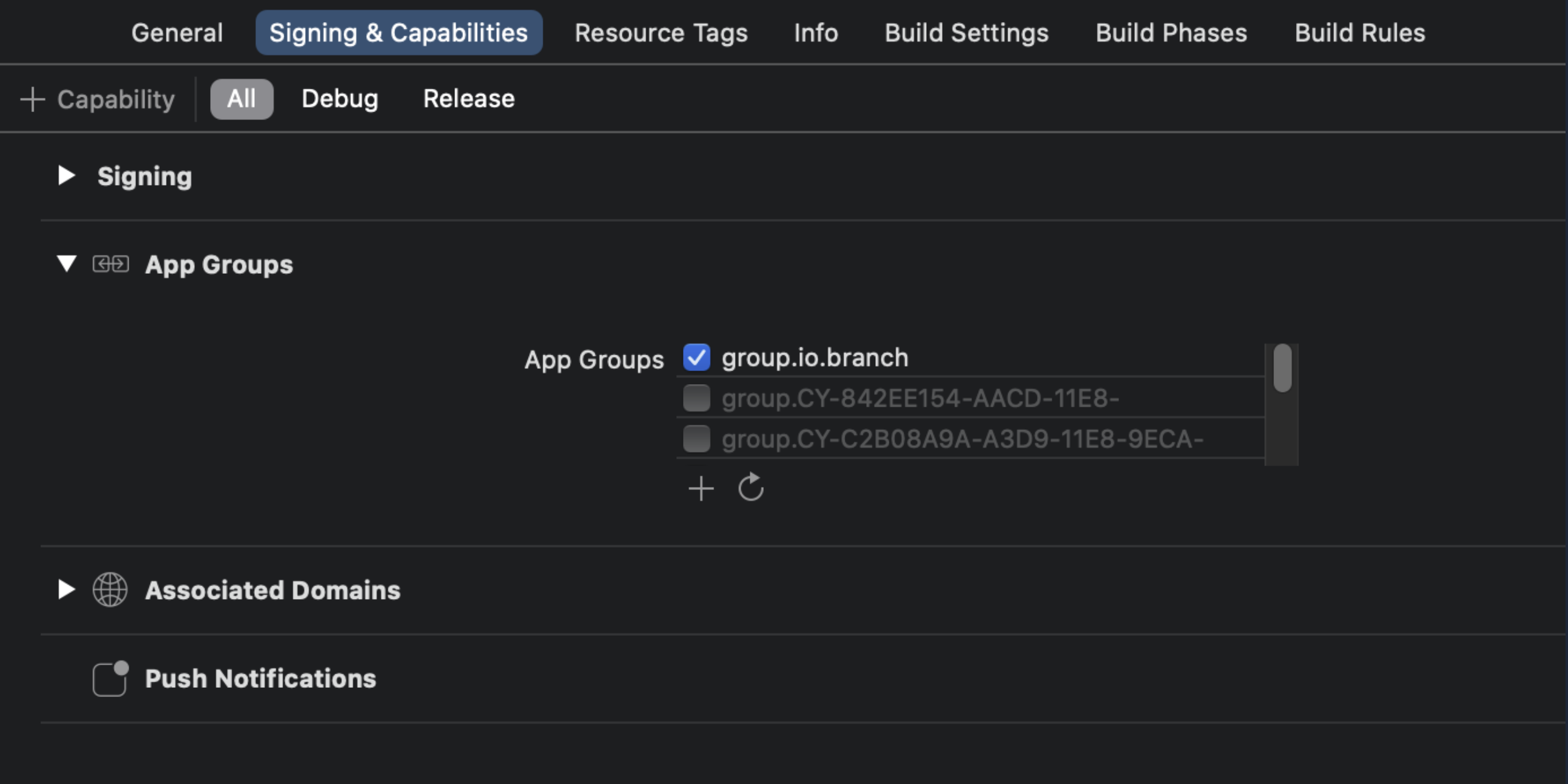
2. In both your App Clip and your full app, inform the Branch iOS SDK of the App Group name prior to calling `initSession()`. See [Apple's Developer Documentation](https://developer.apple.com/documentation/app_clips/making_data_available_to_the_app_clip_s_corresponding_app) for more info.
**Objective-C**
```objective-c
[[Branch getInstance] setAppClipAppGroup:@"group.io.branch"];
```
**Swift**
```swift
Branch.getInstance().setAppClipAppGroup("group.io.branch")
```
#### Handle URL invocations
It is possible to associate Branch Deep Links with specific App Clips. In this scenario, the Branch Deep Link acts as the App Clip Invocation URL.
When creating a Branch Deep Link to use in this way, you'll need to specify which App Clip the Branch Deep Link should open. Do this via the `$app_clip_id` Branch Deep Link parameter.
Imagine a scenario where you have two App Clips: one for Stores and one for Products.
On the iTunesConnect Dashboard, you would register the following as advanced App Clip Experiences:
1. `your.app.link/ac/s/*` for the Stores App Clip
2. `your.app.link/ac/p/*` for the Products App Clip
Then, you would create a Branch Deep Link and set the `$app_clip_id`:
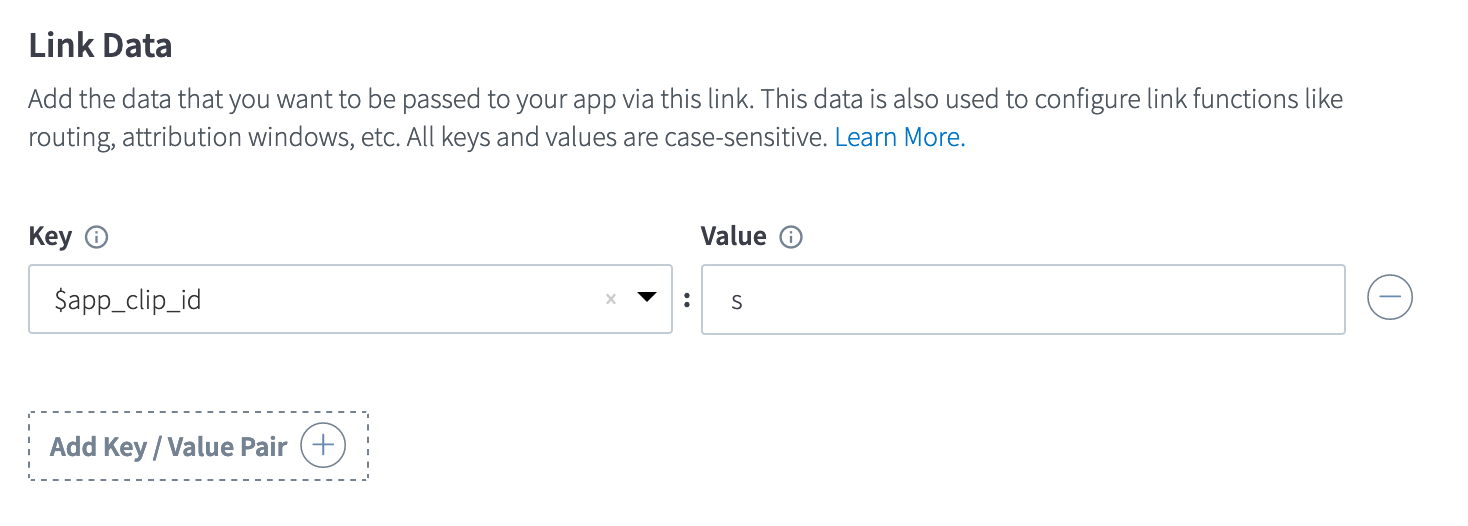
Now Branch will automatically create a Deep Link with the App Clip ID as part of the path: `https://your.app.link/ac/s/QfJ2H7c7jcb`
Additionally, you can specify an alias for these Branch Deep Links with the `alias` key - for example, a Deep Link with an `alias` set to `12345` would look like: `https://your.app.link/ac/s/12345`. In the example above, this would be a great way to create a link to "store 12345" in the Stores App Clip!
**Note**: The Deep Link `https://your.app.link/ac/s/12345` returns the same payload as `https://your.app.link/12345`. The path elements are only to ease registering App Clip experiences.
> **Caution**
>
> Unlike most App Clips, App Clip Code has a short URL limit. The length limit varies, but is about 35 characters. It is possible your Branch Deep Link will be too long to be used in this situation.
>
> **Use the shortest placement identifier possible** to increase the odds your generated link will be short enough. **We recommend specifying a short $app_clip_id and a short alias.**
>
> Learn more at [Apple's Developer Documentation](https://developer.apple.com/documentation/app_clips/creating_app_clip_codes).
#### Invoke App Clips on iOS channels
Once you register your App Clip (containing the Branch SDK) with Apple, they allow you to invoke App Clips on a few channels.
View this example application on various channels to see the different ways it responds.
##### iMessage
Branch Links will automatically register and display your App Clip CTA on iMessage by default if they are registered as App Clip Invocation URLs.
##### Web banner
You can display an App Clip banner on your website yourself. To do this, add the standard Apple meta tag to your website:
```xml
**Caution**
>
> **Warning:** `NULL` **by Default**
>
> Please note that the 3 parameters passed to `setDMAParamsForEEA()` are all `NULL` by default.
>
> **Failure to include user consent signals may result in attribution or campaign performance degradation. For additional information, please reach out to your Google AM.**
##### Example usage
**Swift**
```swift
// Example for an EEA resident who has denied both ad personalization and data usage consent
Branch.getInstance().setDMAParamsForEEA(true,false,false)
```
**Objective-C**
```objective-c
// Example for an EEA resident who has denied both ad personalization and data usage consent
[[Branch getInstance]
setDMAParamsForEEA:YES
adPersonalizationConsent:NO
adUserDataUsageConsent:NO];
```
**Swift**
```swift
// Example for an EEA resident who has consented to ad personalization but denied data usage consent
Branch.getInstance().setDMAParamsForEEA(true,true,false)
```
**Objective-C**
```objective-c
// Example for an EEA resident who has consented to ad personalization but denied data usage consent
[[Branch getInstance]
setDMAParamsForEEA:YES
adPersonalizationConsent:YES
adUserDataUsageConsent:NO];
```
**Swift**
```swift
// Example for an EEA resident who has denied ad personalization but granted data usage consent
Branch.getInstance().setDMAParamsForEEA(true,false,true)
```
**Objective-C**
```objective-c
// Example for an EEA resident who has denied ad personalization but granted data usage consent
[[Branch getInstance]
setDMAParamsForEEA:YES
adPersonalizationConsent:NO
adUserDataUsageConsent:YES];
```
#### Set user identity
An "identity" is a unique alias attributed to a specific user in the Branch system.
Some scenarios which could leverage the `setIdentity()` function:
1. You have your own user IDs that you want to see reflected in the Branch system.
2. You want referral and event data to persist across platforms so you can see how your users access your service from different devices.
3. You want referral and event data to persist across uninstall/reinstall events.
> **Warning**
>
> Be sure to not send any PII through the `setIdentity()` method. For additional details, please view our guide on [Best Practices to Avoid Sending PII to Branch](https://help.branch.io/account-hub/best-practices-to-minimize-data-sent-to-branch.md).
This method **must** be called after `initSession()`, either within a callback or after a delay. Otherwise, Branch will silently initialize the SDK before the callback has been set in order to carry out this method's required task. As a result, you may experience issues where the `initSession()` callback does not fire.
To confirm that user identities are being set as expected, use the [Liveview](https://dashboard.branch.io/liveview) section of the Branch Dashboard.
**Swift**
```swift
// Login
Branch.getInstance().setIdentity("your_user_id")
// Logout
Branch.getInstance().logout() // Or replace with `logoutWithCallback()` to customize further
```
**Objective-C**
```objective-c
// Login
[[Branch getInstance] setIdentity:@"your_user_id"];
// Logout
[[Branch getInstance] logout];
```
Learn more about best practices related to the `setIdentity()` function, visit our Full Reference [guide](https://help.branch.io/developer-hub/ios-full-reference.md#setidentity).
You can also visit the Full Reference to learn how to [disable tracking](https://help.branch.io/developer-hub/ios-full-reference.md#settrackingdisabled-deprecated) across your entire application with the `setTrackingDisabled()` method.
#### Tracking ATT opt-in and opt-out prompt responses
To track prompt performance, use the `handleATTAuthorizationStatus()` method. This method logs a Branch Event every time someone submits a response regarding whether they want to share their device data using Apple's `AppTrackingTransparency` [framework](https://developer.apple.com/app-store/user-privacy-and-data-use/):
**Swift**
```swift
if #available(iOS 14.0, *) {
if ATTrackingManager.trackingAuthorizationStatus == .notDetermined {
ATTrackingManager.requestTrackingAuthorization { (status) in
Branch.getInstance().handleATTAuthorizationStatus(status.rawValue)
}
}
}
```
**Objective-C**
```objective-c
if (@available(iOS 14.0, *)) {
if (ATTrackingManager.trackingAuthorizationStatus == ATTrackingManagerAuthorizationStatusNotDetermined) {
[ATTrackingManager requestTrackingAuthorizationWithCompletionHandler:^(ATTrackingManagerAuthorizationStatus status) {
[[Branch getInstance] handleATTAuthorizationStatus:status];
}];
}
}
```
After Branch sees the user opt-in via ATT, Branch starts tracking an additional analytics event called “second install” for ad-driven installs, which gets deduped from "first install" on the Branch Dashboard. All conversion events will be attributed to "second install". Learn more on the Branch [Blog](https://www.branch.io/resources/blog/ads-analytics-changes-ios-14-5/).
#### Include Apple's ATTrackingManager
By default, the Branch iOS SDK does not include the `ATTrackingManager`, which is required by Apple if you want to collect the IDFA for attribution purposes. Learn more about Apple's [App Transparency Tracking Manager](https://developer.apple.com/documentation/apptrackingtransparency).
Note that in order for the `ATTrackingManager` to function, you must include the `AdSupport` framework in your Branch iOS SDK implementation.
If you **have already implemented** `ATTrackingManager` in your app, Branch will automatically have access to the IDFA.
**WARNING**: Once Branch receives opt-in information, the Branch iOS SDK will fire a "second install" event to attribute ad-driven installs. To ensure that the "second install" event is automatically fired as soon as the user opts-in, present the ATT prompt *after* the Branch iOS SDK has finished initializing. This means waiting for the initialization callback to be triggered. If you present the ATT prompt earlier, the "second install" event will not fire until the next app open.
If you **still need to implement** `ATTrackingManager`, use the sample code below to see how to display a prompt and log the IDFA:
**Swift**
```swift
func requestIDFAPermission() {
if #available(iOS 14, *) {
DispatchQueue.main.async {
ATTrackingManager.requestTrackingAuthorization { (status) in
if (status == .authorized) {
let idfa = ASIdentifierManager.shared().advertisingIdentifier
print("IDFA: " + idfa.uuidString)
} else {
print("Failed to get IDFA")
}
}
}
}
}
```
**Objective-C**
```objective-c
- (void)requestIDFAPermission {
if (@available(iOS 14.0, *)) {
dispatch_semaphore_t semaphore = dispatch_semaphore_create(0);
dispatch_async(dispatch_get_main_queue(), ^{
[ATTrackingManager requestTrackingAuthorizationWithCompletionHandler:^(ATTrackingManagerAuthorizationStatus status) {
if (status == ATTrackingManagerAuthorizationStatusAuthorized) {
NSUUID *idfa = [[ASIdentifierManager sharedManager] advertisingIdentifier];
NSLog(@"IDFA: %@", idfa);
} else {
NSLog(@"Failed to get IDFA permission");
}
dispatch_semaphore_signal(semaphore);
}];
});
dispatch_semaphore_wait(semaphore, DISPATCH_TIME_FOREVER);
}
}
```
Starting from Branch iOS SDK 1.39.1, the SDK will see the authorization status if it is granted by the end-user. There is no additional work on your end to inform the Branch SDK.
On older versions of the SDK, the server infers the authorization status by the presence of the IDFA. Again, there is no additional work on your end to inform the Branch SDK.
#### Apple Ads
Branch can help track your Apple Ads campaigns by fetching the search ad attribution from Apple at app install. To learn more, visit Branch's guide on [Apple Ads](https://help.branch.io/marketer-hub/category/apple-ads.md).