> For the complete documentation index, see [llms.txt](https://help.branch.io/llms.txt).
# Query API Overview
> Access pre-aggregated analytics data with the Branch Query API. Customize queries and manage agency access.
## Overview
The Query API lets you use your own unique queries to fetch the particular pre-aggregated analytics data that you're interested in.
### Benefits
The Branch Query API gives you access to the same pre-aggregated analytics data that is displayed in Branch, without needing to access the web app itself.
An individual query consists of three types of parameters:
- **Authentication parameters** that control access to the data.
- **Data selection keys** that define which events are eligible to be counted in the results (for example, filters).
- **Result format specifiers** that define which results are included in the HTTP response and how the results are returned (for example, sorting).
### Limits
| Limitation | Details |
| --- | --- |
| Rate limits | - 5 requests per second
- 20 requests per minute
- 150 requests per hour
If you've hit the rate limit, you'll see an error message that says `Limit is exceeded for org....` in the response body. |
| Max number of rows returned from API | 50,000 |
| Max retrievable unique values for a single dimension (for example, campaigns or ad names) | 40,000 |
| Max number of days that can be queried at a time | 7 days
If more records are required, make multiple requests with smaller time intervals to pull the necessary data in batches. |
| Export window | Rolling 2-year window. |
| Specific dimension combinations | If you're pulling from SAN `cost`, `xx_click`, or `xx_impression` data, **you cannot use the following dimension combinations**:
1. `user_data_os` together with `user_data_geo_country_code`
2. `last_attributed_touch_data_tilde_secondary_publisher` together with `user_data_geo_country_code` |
## Getting started
### Before you begin
To use the Query API, you first need to:
1. Create a Branch account.
2. Enable Universal Ads and start running ad campaigns from your Branch account.
3. Implement the appropriate Branch SDK into your mobile app ([iOS](https://help.branch.io/developer-hub/ios-sdk-overview.md) | [Android](https://help.branch.io/developer-hub/android-sdk-overview.md)).
4. Make sure you have the appropriate permissions set on your user account. See the [Access](https://help.branch.io/apidocs/query/overview.md#access) section for more.
### Access
#### General access
To access the Query API, a user must have both **Aggregate Data** and **Export** [access](https://help.branch.io/account-hub/default-access-levels-users-roles-permissions.md#access-levels) enabled on their account.
#### Agency access
If you work with an agency that runs your advertising campaigns and want to give them access to export the subsequent data, you can provide them with access to the Export API.
To provide an agency team member with access to the Export API:
1. In the left-hand navigation, under **Setup & Testing**, select **Account Settings**.
2. On the **Account Settings** page, select the **Agencies** tab.
3. Expand the agency in question, find the agency team member you want to give access to, hover over the button in the **Actions** column, and select **Edit**.
4. In the **Edit Agency Team Member** modal:
1. Under **Access Level**, check the **Export** box.
2. Under **Permissions**, check the **Aggregate Data** box.
5. Optional: Add data filters.
1. Under **Data Filters**, toggle any necessary data filters on. Exported data will be filtered accordingly.
6. Select **Save**.
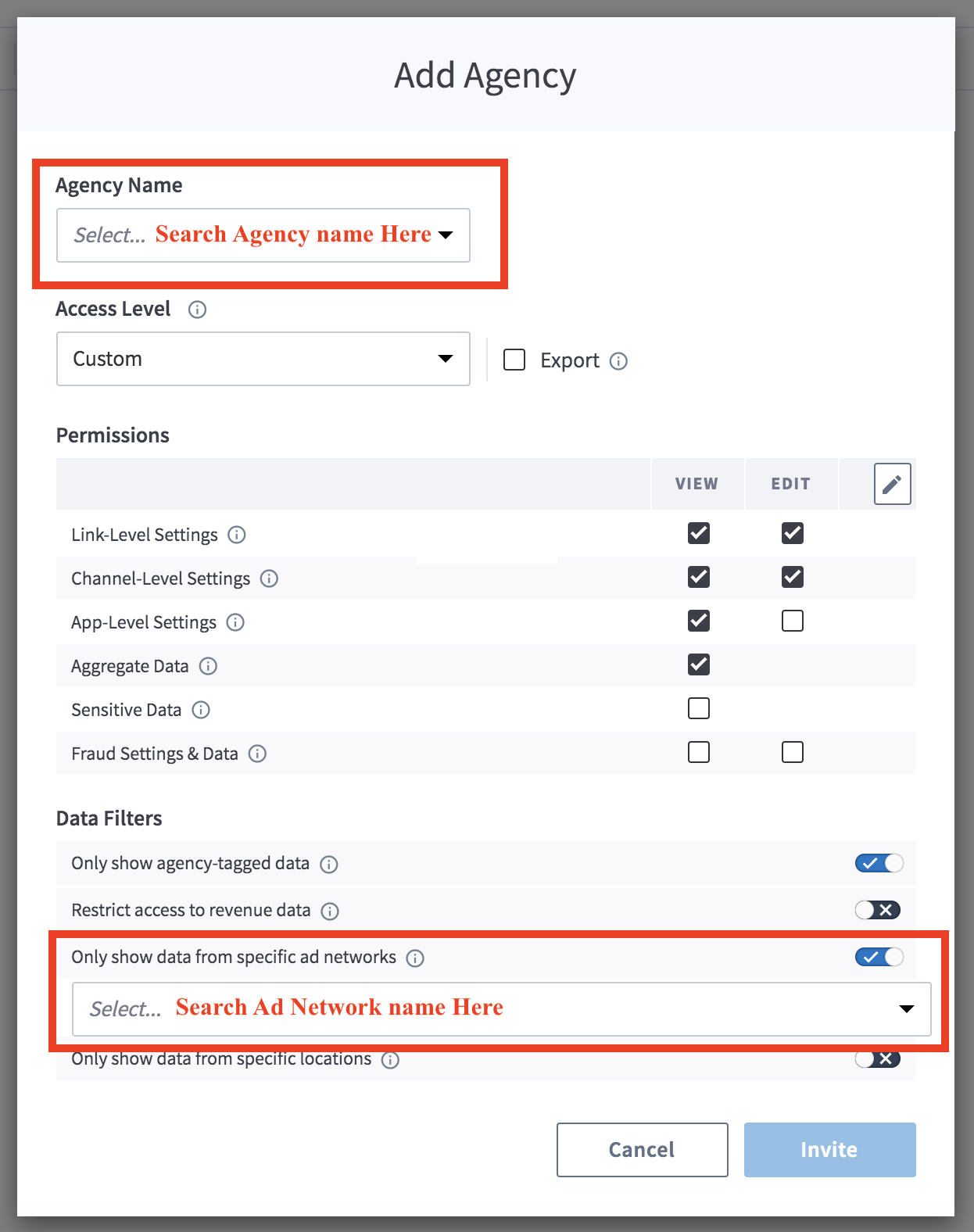
> **Agency-tagged data**
>
> If you do not enable the "Only Show Agency-Tagged Data" filter, the agency team member can export aggregate data associated with all of your campaigns, regardless of whether they are associated with them or not.
### Authentication
For calls to the Query API, you need your Branch Key and Branch Secret.
**Legacy Branch**
To retrieve your credentials in the [legacy Branch experience](https://help.branch.io/marketer-hub/branch-dashboard-overview.md):
1. Navigate to the **Account → Settings → Profile** [tab](https://dashboard.branch.io/account-settings/profile).
2. Use the **copy icons** to copy your Branch Key and Branch Secret.
**New Branch**
To retrieve your credentials in the [new Branch experience](https://help.branch.io/account-hub/credentials-new.md):
1. Navigate to the **Configuration → Security & Access → Credentials** [tab](https://branchdocs.app.link/apis-to-credentials).
2. Use the **copy icons** to copy your Branch Key and Branch Secret.
Visit our [guide](https://help.branch.io/account-hub/credentials-new.md) to learn more about managing your Branch credentials.
## Usage
### Post query
#### Request info
**Export request**
```http
POST /v1/query/analytics
Content-Type: application/json
Host: api2.branch.io
```
**Request headers**
| Header | Description | Required |
| --- | --- | --- |
| `accept` | application/json | **Yes** |
| `content-type` | application/json | **Yes** |
**Request query parameters**
| Parameter | Type | Description | Required |
| --- | --- | --- | --- |
| `branch_key` | String | The Branch Key for the relevant application. | **Yes** |
| `branch_secret` | String | The Branch Secret for the relevant application, used for authentication. | **Yes** |
| `limit` | Integer | The maximum number of results to return in the response.
**Default value**: `100`
**Max value**: `1000`
For example, if the `granularity` in the request body is set to `day`, Branch pulls results up to the limit for each day. So if the limit is set to `1000` and you query 5 days' worth of data, the API returns up to 5000 results. | No |
| `after` | Integer | A pagination parameter that indicates the index of the first result to return in the response.
**Default value**: `0`
For example, in a query with 100 results returned, setting `after` to `50` returns elements 51-100. | No |
| `query_id` | String | The value passed for this parameter is returned as a query parameter within the `paging` [object](https://help.branch.io/apidocs/query/overview.md#response-info).
**Default value**: `null`
This parameter locks the last event to include in a query, so new events that occur between queries are not added to the results. This prevents counts from changing over time.
**Note**: The `query_id` parameter should be treated as temporary and should only be used when retrieving pages of an existing query where the pagination URLs already have `query_id` set as a parameter. Do not attempt to change the `query_id` between requests or to include a `query_id` with a different query request. | No |
**Request body parameters**
| Parameter | Type | Description | Required |
| --- | --- | --- | --- |
| `start_date` | Date | A timestamp representing the oldest date to return data for. The time zone of the timestamp is set in your Branch configuration.
The format is an ISO-8601 compliant date-time string, for example, `"2024-01-20"` | **Yes** |
| `end_date` | Date | A timestamp representing the most recent date to return data for. The time zone of the timestamp is set in your Branch configuration.
No events triggered after `end_date` will be counted in the query results.
The `end_date` parameter cannot be more than 7 days after the `start_date` parameter.
The format is an ISO-8601 compliant date-time string, for example, `"2024-01-20"` | **Yes** |
| `data_source` | String | The type of event to query for, prefixed with the source.
For example, the source `eo` and the `open` event type come together to make `eo_open`, which pulls Branch app opens.
**Valid Branch data source values:**
`eo_impression`
`eo_click`
`xx_impression`
`xx_click`
`eo_branch_cta_view`
`eo_sms_sent`
`eo_open`
`eo_install`
`eo_reinstall`
`eo_web_session_start`
`eo_pageview`
`eo_commerce_event`
`eo_custom_event`
`eo_content_event`
`eo_dismissal`
`eo_user_lifecycle_event`
`cost` | **Yes** |
| `aggregation` | String | How to count events toward the final result count.
Possible aggregation values:
`unique_count`
`total_count`
`revenue`
`cost`
`cost_in_local_currency`
**Note**: When using `unique_count`, each event is only counted if an event triggered by that user has not already been seen. For example, if 10 users each trigger 3 opens, only 10 open events will be counted. | **Yes** |
| `dimensions` | Array of Strings | List of event fields to use as splits for the query.
Result counts are returned and grouped with other events that have matching values for each key provided in `dimensions`.
See the [Dimensions](https://help.branch.io/apidocs/query/overview.md#dimensions) section for a complete list. | **Yes** |
| `filters` | Array of Strings | An object where each key is a valid `dimension`, and each value is an array of string values to check against.
If a key is prefixed with a `!`, then any event with that dimension value will be excluded. Otherwise, only events with dimension values matching the filter will be counted.
See the [Example Queries](https://help.branch.io/apidocs/query/overview.md#example-queries) section for examples of the `filters` array.
Also see the [Dimensions](https://help.branch.io/apidocs/query/overview.md#dimensions) section for a complete list of valid key values. Any key may be used with the `!` prefix. | No |
| `enable_install_recalculation` | Boolean | Dedupe unattributed installs caused by duplicate events from non-opt-in users coming from paid ads.
This parameter is related to iOS 14.5 [privacy changes](https://help.branch.io/marketer-hub/category/ios-14-faqs.md). | No |
| `granularity` | String | Range of time to roll multiple events into a single result count.
For example, with a `granularity` value of `day`, the counts for each day are returned independently, whereas `all` returns a single count for the entire time range.
**Possible values**:
`all`
`day`
**Default value**: `all`
**Note**: When you set `all` for this key, Branch returns the data grouped by `start_date`. The `start_date` shown is for the start of the range, and does not mean that data is limited to just that day. | No |
| `ordered_by` | String | The result key to sort results by.
Only 1 sort key is supported.
Possible values include any `dimensions` value or the value of `aggregation`.
**Possible numerical sorting values**:
- `unique_count`
- `total_count`
- `revenue`
**Possible chronological sorting values**:
- `timestamp`
**Possible lexicographical sorting values**:
- All others
**Note**: It's not possible to provide an explicit sort method to the query, so the sort type is chosen automatically based on the value of this `ordered_by` parameter. Behavior for comparison of equal values is left undefined, and as such, the sort is not considered order stable for identical values. | No |
| `ordered` | String | The direction by which to order the results.
**Possible values**:
`ascending`
`descending`
**Default value**:
`descending` | No |
| `zero_fill` | Boolean | Whether to return result objects where the result count is 0.
If set to `false`, empty results are omitted from the response.
If `true`, fields for empty results are loaded with `null` or `0` to provide a schema.
See the [Example Queries](https://help.branch.io/apidocs/query/overview.md#include-or-omit-response-objects) section for an example of how this flag works. | No |
#### Response info
**Response body parameters**
| Parameter | Type | Description |
| --- | --- | --- |
| `results` | List of Objects | A list of JSON objects that contain result information. |
| `result` | Object | A JSON object containing the queried values, for example, `attributed` or `total_count`.
Nested inside `results`, alongside `timestamp`. |
| `timestamp` | Date | The date and time when the data related to the `result` was created.
Nested inside `results`, alongside `result`. |
| `paging` | Object | A JSON object that includes the total number of results from the query, called `total_count`.
This object also includes the number that the results are limited to, if that was included in the request.
See `limit` and `after` in the [Request Query Parameters](https://help.branch.io/apidocs/query/overview.md#request-info) section for further information. |
#### Example request & response
**Total installs**
Below is an example of a basic query that pulls the total number of installs per day, split by whether `attributed` is `true` or `false`. The number of results is limited to 5.
**Request (cURL)**
```curl
curl -X POST -H "Content-Type: application/json" -d '{
"branch_key":"",
"branch_secret":"",
"start_date": "2022-03-01",
"end_date": "2022-03-07",
"data_source": "eo_install",
"dimensions": [
"attributed"
],
"enable_install_recalculation": true,
"granularity": "day",
"aggregation": "total_count"
}' "https://api2.branch.io/v1/query/analytics?limit=5"
```
**Response (JSON)**
```json
{
"results": [{
"result": {
"attributed": "false",
"total_count": 44
},
"timestamp": "2022-03-05T00:00:00.000Z"
}, {
"result": {
"attributed": "false",
"total_count": 23
},
"timestamp": "2022-03-07T00:00:00.000Z"
}, {
"result": {
"attributed": "true",
"total_count": 14
},
"timestamp": "2022-03-05T00:00:00.000Z"
}, {
"result": {
"attributed": "false",
"total_count": 12
},
"timestamp": "2022-03-03T00:00:00.000Z"
}, {
"result": {
"attributed": "false",
"total_count": 10
},
"timestamp": "2022-03-02T00:00:00.000Z"
}],
"paging": {
"next_url": "/v1/query/analytics?limit=5&after=5",
"total_count": 13
}
}
```
See [Example Queries](https://help.branch.io/apidocs/query/overview.md#example-queries) for more examples.
## Appendix
### Dimensions
#### General information
| Dimension | Description |
| --- | --- |
| `name` | Name. |
| `origin` | Origin of the data. |
| `timestamp` | Timestamp of the data. |
| `deep_linked` | Is the data deep linked? Can be `true` or `false`. |
| `from_desktop` | Is the data from desktop? Can be `true` or `false`. |
| `attributed` | Is the data attributed? Can be `true` or `false`. |
#### User information
| Dimension | Description |
| --- | --- |
| `user_data_app_store` | User's app store.
**Not** applicable to the following data source options:
`eo_impression`,
`eo_click`,
`xx_impression`,
`xx_click`,
`eo_branch_cta_view`,
`eo_sms_sent`,
`eo_web_session_start`,
`eo_pageview`,
`eo_dismissal`,
`cost` |
| `user_data_app_version` | User's version of the app. |
| `user_data_os` | User's operating system. |
| `user_data_language` | User's language. |
| `user_data_platform` | User's platform. |
| `"user_data_environment"` | User's environment. |
| `user_data_geo_dma_code` | User's geographical Designated Market Area code. |
| `user_data_geo_country_code` | User's country code. |
| `user_data_country` | User's country. |
| `user_data_geo_region_en` | User's region. |
| `user_data_opted_in` | Is the user opted in? |
| `user_data_opted_in_status` | User's opt-in status. |
#### Custom event information
| Dimension | Description |
| --- | --- |
| `event_data_custom_param_1`
`event_data_custom_param_2`
`event_data_custom_param_3` | Available dimensions for custom event data.
**Not** applicable to the following data source options:
`eo_impression`,
`eo_click`,
`xx_impression`,
`xx_click`,
`eo_branch_cta_view`,
`eo_sms_sent`,
`eo_pageview`,
`eo_dismissal`,
`cost` |
### Click & impression source definitions
| Data source | Description |
| --- | --- |
| `eo_impression` | Real-time user device-level impressions and ad views triggered via Impression Tracking Ad Links.
SAN ad partners' impressions are **not** included in this data source. |
| `eo_click` | Real-time user device-level Branch Link clicks.
SAN ad partners' clicks are **not** included in this bucket. |
| `xx_impression` | Combined aggregated data source containing both real-time user device-level impressions and SAN ad partner impressions passed to Branch from SAN servers. |
| `xx_click"` | Combined aggregated data source containing both real-time user device-level Branch Link clicks and SAN ad partners' clicks passed to Branch from SAN servers. |
**SAN ad partners list:**
- Facebook
- Google Ads
- X (formerly Twitter)
- Snap
- Apple Search Ads
- TikTok
## Example queries
### Installs per day per OS
This query pulls installs per day and splits the results by OS of the device the user installed on. It limits the number of results to 5.
**Request (cURL)**
```curl
curl -X POST -H "Content-Type: application/json" -d '{
"branch_key":"",
"branch_secret":"",
"start_date": "2017-12-12",
"end_date": "2017-12-18",
"data_source": "eo_install",
"dimensions": [
"user_data_os"
],
"enable_install_recalculation": true,
"granularity": "day",
"aggregation": "total_count"
}' "https://api2.branch.io/v1/query/analytics?limit=5"
```
**Response (JSON)**
```json
{
"results": [
{
"result": {
"user_data_os": "ANDROID",
"total_count": 144
},
"timestamp": "2017-12-18T00:00:00.000Z"
},
{
"result": {
"user_data_os": "IOS",
"total_count": 142
},
"timestamp": "2017-12-18T00:00:00.000Z"
},
{
"result": {
"user_data_os": "IOS",
"total_count": 191
},
"timestamp": "2017-12-17T00:00:00.000Z"
},
{
"result": {
"user_data_os": "ANDROID",
"total_count": 194
},
"timestamp": "2017-12-17T00:00:00.000Z"
},
{
"result": {
"user_data_os": "ANDROID",
"total_count": 246
},
"timestamp": "2017-12-16T00:00:00.000Z"
}
],
"paging": {
"next_url": "/v1/query/analytics?query_id=CqdBOb&limit=5&after=5",
"total_count": 14
}
}
```
### Unique click counts
Below is a more complex query for pulling unique click counts. These counts are split out by 4 different dimensions.
This query also has a filter, which filters out any clicks where `last_attributed_touch_data_plus_current_feature` was `MOBILE_DEEPVIEWS` or `DESKTOP_DEEPVIEWS`.
A maximum of 5 results are returned, in descending order of `unique_count`. Results with days that had 0 clicks are returned (and not filtered out) because the `zero_fill` flag is set to `true`:
**Request (cURL)**
```curl
curl -X POST -H "Content-Type: application/json" -d '{
"branch_key":"",
"branch_secret":"",
"start_date": "2017-12-12",
"end_date": "2017-12-18",
"data_source": "eo_click",
"dimensions": [
"last_attributed_touch_data_tilde_feature",
"last_attributed_touch_data_tilde_channel",
"last_attributed_touch_data_tilde_campaign",
"last_attributed_touch_data_plus_current_feature"
],
"filters": {
"!last_attributed_touch_data_plus_current_feature": [
"MOBILE_DEEPVIEWS",
"DESKTOP_DEEPVIEWS"
]
},
"ordered": "descending",
"ordered_by": "unique_count",
"aggregation": "unique_count",
"zero_fill": true
}' "https://api2.branch.io/v1/query/analytics?limit=5"
```
**Response (JSON)**
```json
{
"results": [
{
"timestamp": "2017-12-12T00:00:00.000Z",
"result": {
"last_attributed_touch_data_tilde_channel": "ads",
"last_attributed_touch_data_tilde_campaign": "Xmas",
"last_attributed_touch_data_tilde_feature": "paid advertising",
"last_attributed_touch_data_plus_current_feature": "ADS",
"unique_count": 750
}
},
{
"timestamp": "2017-12-12T00:00:00.000Z",
"result": {
"last_attributed_touch_data_tilde_channel": "taptica#1",
"last_attributed_touch_data_tilde_campaign": "taptica#1",
"last_attributed_touch_data_tilde_feature": "paid advertising",
"last_attributed_touch_data_plus_current_feature": "ADS",
"unique_count": 723
}
},
{
"timestamp": "2017-12-12T00:00:00.000Z",
"result": {
"last_attributed_touch_data_tilde_channel": "Journeys",
"last_attributed_touch_data_tilde_campaign": "Default Banner",
"last_attributed_touch_data_tilde_feature": "journeys",
"last_attributed_touch_data_plus_current_feature": "MOBILE_JOURNEYS",
"unique_count": 553
}
},
{
"timestamp": "2017-12-12T00:00:00.000Z",
"result": {
"last_attributed_touch_data_tilde_channel": "Apple App Store",
"last_attributed_touch_data_tilde_campaign": null,
"last_attributed_touch_data_tilde_feature": "paid advertising",
"last_attributed_touch_data_plus_current_feature": "ADS",
"unique_count": 432
}
},
{
"timestamp": "2017-12-12T00:00:00.000Z",
"result": {
"last_attributed_touch_data_tilde_channel": null,
"last_attributed_touch_data_tilde_campaign": null,
"last_attributed_touch_data_tilde_feature": "marketing",
"last_attributed_touch_data_plus_current_feature": "QUICK_LINKS",
"unique_count": 201
}
}
],
"paging": {
"next_url": "/v1/query/analytics?query_id=EDdBOb&limit=5&after=5",
"total_count": 143
}
}
```
### Include or omit response objects
When `zero_fill` is set to `true`, response objects with a `total_count` equal to 0 are returned alongside other results:
**Request (JSON)**
```json
{
"branch_key":"",
"branch_secret":"",
"start_date": "2022-02-01",
"end_date": "2022-02-01",
"data_source": "xx_click",
"dimensions": [
"last_attributed_touch_data_tilde_advertising_partner_name",
"last_attributed_touch_data_tilde_campaign_id"
],
"ordered": "descending",
"aggregation": "total_count",
"zero_fill": true
}
```
**Response (JSON)**
```json
{
"result": {
"last_attributed_touch_data_tilde_advertising_partner_name": "Google AdWords",
"last_attributed_touch_data_tilde_campaign_id": "78726498102",
"total_count": 1
},
"timestamp": "2022-02-01T00:00:00.000+08:00"
},
{
"result": {
"last_attributed_touch_data_tilde_advertising_partner_name": "Google AdWords",
"last_attributed_touch_data_tilde_campaign_id": "87192837612",
"total_count": 1
},
"timestamp": "2022-02-01T00:00:00.000+08:00"
}
{
"result": {
"last_attributed_touch_data_tilde_advertising_partner_name": "Google AdWords",
"last_attributed_touch_data_tilde_campaign_id": "17384628491",
"total_count": 0
},
"timestamp": "2022-02-01T00:00:00.000+08:00"
}
```
When `zero_fill` is set to `false`, response objects with a `total_count` equal to 0 are omitted:
**Request (JSON)**
```json
{
"branch_key":"",
"branch_secret":"",
"start_date": "2022-02-01",
"end_date": "2022-02-01",
"data_source": "xx_click",
"dimensions": [
"last_attributed_touch_data_tilde_advertising_partner_name",
"last_attributed_touch_data_tilde_campaign_id"
],
"ordered": "descending",
"aggregation": "total_count",
"zero_fill": false
}
```
**Response (JSON)**
```json
{
"result": {
"last_attributed_touch_data_tilde_advertising_partner_name": "Google AdWords",
"last_attributed_touch_data_tilde_campaign_id": "78726498102",
"total_count": 1
},
"timestamp": "2022-02-01T00:00:00.000+08:00"
},
{
"result": {
"last_attributed_touch_data_tilde_advertising_partner_name": "Google AdWords",
"last_attributed_touch_data_tilde_campaign_id": "87192837612",
"total_count": 1
},
"timestamp": "2022-02-01T00:00:00.000+08:00"
}
```