> For the complete documentation index, see [llms.txt](https://help.branch.io/llms.txt).
# Cross-Events Export API Overview
## Overview
The Cross-Events Export API is a powerful tool for querying and comparing large pools of data across multiple sources.
### Access
Availability varies by Branch plan. See [Branch pricing](https://www.branch.io/pricing/).
### Benefits
With the Cross-Events Export API, your queries can:
- Access extensive aggregate-level data.
- Return an unlimited number of rows.
- Include as many dimensions as you want.
- Group results by several metrics.
- Pull from Log Click Warehouse, Log Impression Warehouse, and Aggregate SAN CCI Warehouse [data](https://help.branch.io/apidocs/cross-events-export/overview.md#notes-on-data-sources).
### Limitations
| Limitation | Details |
| --- | --- |
| Max number of rows returned | No limit.
If the result has over 200,000 rows, multiple files are returned. |
| Export window | Rolling 2-year window. |
| Max number of dimensions | No limit. |
| Max number of days queried | 90 days. |
| Rate limits | 2 requests per second.
5 requests per minute.
150 requests per hour. |
| Data readiness | Data generally takes about 1.5 hours to be ready.
To check for data readiness, you can use Branch's [Custom Exports API](https://help.branch.io/apidocs/custom-exports/overview.md#check-data-readiness) and set the `warehouse_meta_type` to `AGGREGATE`. |
### Try it!
Try out the Cross-Events Export API in your browser, using your Branch data:
[Request Data Export](https://help.branch.io/apidocs/cross-events-export.md#requestCrossEventsDataExport)
[Retrieve Export Download Status](https://help.branch.io/apidocs/cross-events-export.md#retrieveExportDownloadStatus)
## Getting started
### Before you begin
To use the Cross-Events Export API, you first need to:
1. Create a Branch account.
2. Enable Universal Ads **and** start running ad campaigns from your Branch account.
3. Implement the appropriate Branch SDK into your mobile app ([iOS](https://help.branch.io/developer-hub/ios-sdk-overview.md) | [Android](https://help.branch.io/developer-hub/android-sdk-overview.md)).
4. Make sure you have the appropriate permissions set on your user account. See the [Access](https://help.branch.io/apidocs/cross-events-export/overview.md#access) section for more.
#### General access
A user must have the [Aggregate Data Access Level](https://help.branch.io/account-hub/default-access-levels-users-roles-permissions.md#access-levels) enabled on their account to use the Cross-Events Export API.
#### Agency access
If you work with an agency that runs your advertising campaigns and want to give them access to export Cross-Events Export API data, you can assign their account(s) the [Aggregate Data Access Level](https://help.branch.io/account-hub/default-access-levels-users-roles-permissions.md#access-levels) as well.
To provide an agency team member with access to the Cross-Events Export API:
1. In the left-hand navigation, under **Setup & Testing**, select **Account Settings**.
2. On the **Account Settings** page, select the **Agencies** tab.
3. Expand the agency in question, find the agency team member you want to give access to, hover over the button in the **Actions** column, and select **Edit**.
4. In the **Edit Agency Team Member** modal:
1. Under **Access Level**, check the **Export** box.
2. Under **Permissions**, check the **Aggregate Data** box.
5. Optional: Add data filters.
1. Under **Data Filters**, toggle any necessary data filters on. Exported data will be filtered accordingly.
6. Select **Save**.
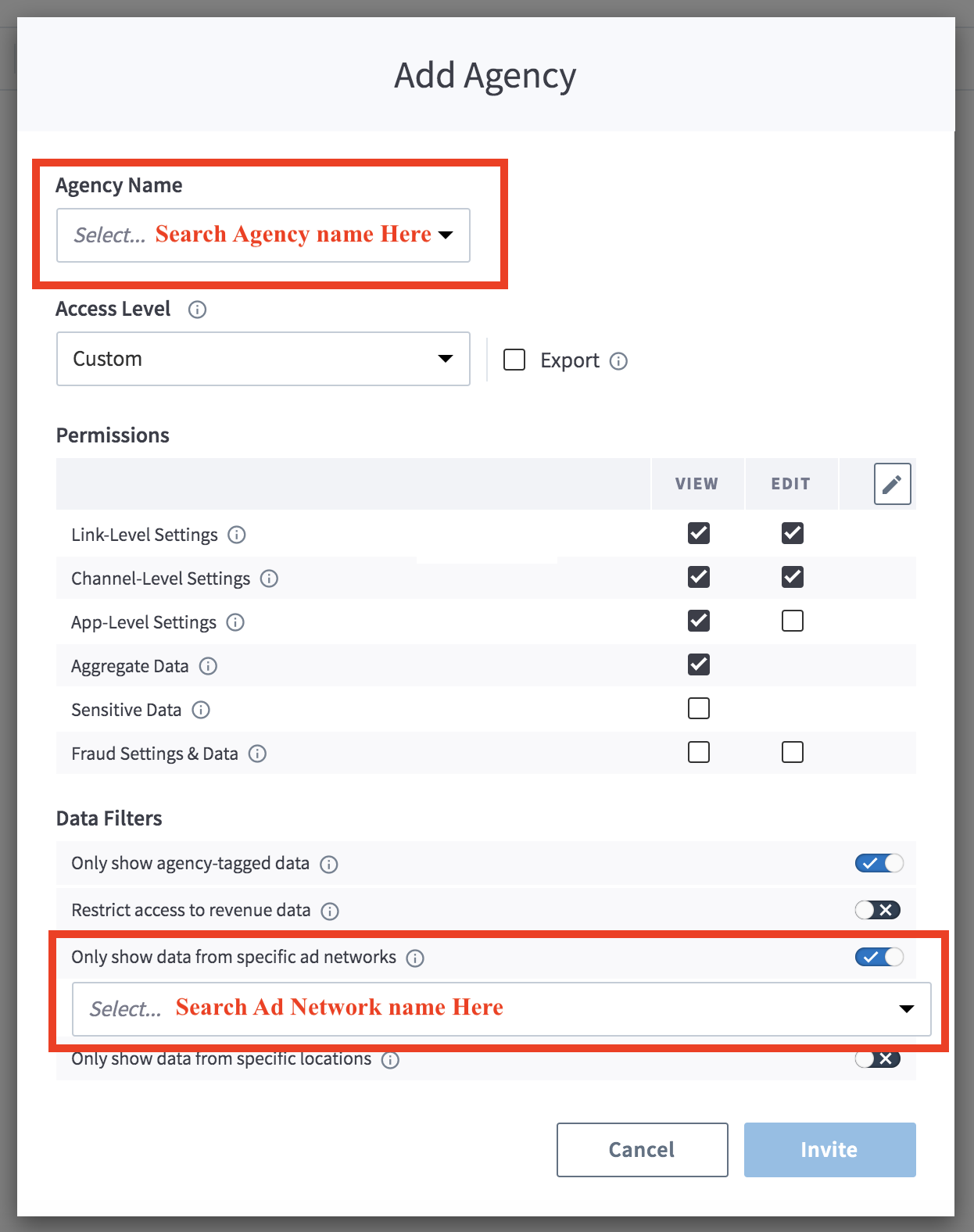
> **Agency-tagged data**
>
> If you do not enable the "Only Show Agency-Tagged Data" filter, the agency team member can export aggregate data associated with all of your campaigns, regardless of whether they are associated with them or not.
### Authentication
For calls to the Cross-Events Export API, you need your Access Token.
**Legacy Branch**
To retrieve your credentials in the [legacy Branch experience](https://help.branch.io/marketer-hub/branch-dashboard-overview.md):
1. Navigate to the **Account → Settings → User** [tab](https://dashboard.branch.io/account-settings/profile).
2. If you have not yet generated an Access Token, select the **Generate token** button.
3. Use the **copy icon** to copy your Access Token.
**New Branch**
To retrieve your credentials in the [new Branch experience](https://help.branch.io/account-hub/credentials-new.md):
1. Navigate to the **Configuration → Security & Access → Credentials** [tab](https://branchdocs.app.link/apis-to-credentials).
2. If you have not yet generated an Access Token, select the **Generate token** button.
3. Use the **copy icon** to copy your Access Token.
Visit our [guide](https://help.branch.io/account-hub/credentials-new.md) to learn more about managing your Branch credentials.
## Usage
### Request data export
#### Request info
**Export request**
```http
POST /v1/branch_aggregate/async/analytics
Host: api2.branch.io
Content-Type: application/json
```
**Request headers**
| Header | Description | Required |
| --- | --- | --- |
| `Access-Token` | Key that encapsulates the user's permission with regard to an organization. Obtained from Branch. Needed for [authentication](https://help.branch.io/apidocs/cross-events-export/overview.md#authentication). | **Yes** |
**Request query parameters**
| Parameter | Description | Required |
| --- | --- | --- |
| `organization_id` or `app_id` | Unique identifier for the app or organization requesting data. | **Yes** |
**Request body parameters**
| Parameter | Description | Required |
| --- | --- | --- |
| `start_date` | The start of the interval time range represented as an ISO-8601 complete date. | **Yes** |
| `end_date` | The end of the interval time range represented as an ISO-8601 complete date. | **Yes** |
| `dimensions` | An array representing dimension(s) to group by. See the [dimensions](https://help.branch.io/apidocs/cross-events-export/overview.md#dimensions) section for more. | No |
| `filter` | A JSON object representing one or more filters. This is a global filter and applies to all aggregations.
Filter types:
- In
- Selector
- And / Or
- Bound
- Not
- Like
See [filter examples](https://help.branch.io/apidocs/cross-events-export/overview.md#filters) below. | No |
| `granularity` | Granularity levels:
- `day`
- `week`
- `month`
- `all`
Setting a `day`, `week`, or `month` automatically adds a dimension named `date_range`, which is the date of range start. | No; defaults to **all** |
| `limit_sort_spec` | Special object. See `limit_sort_spec` [table](https://help.branch.io/apidocs/cross-events-export/overview.md#request-info) for schema. | No |
| `aggregations` | An array where each element is an aggregation. See `aggregations` [table](https://help.branch.io/apidocs/cross-events-export/overview.md#request-info) for schema. | No |
| `response_format_compression` | - snappy
- gz | No; defaults to **snappy** |
| `response_format` | - parquet
- csv
- json | No; defaults to **parquet** |
**Schema for** `limit_sort_spec`
| Parameter | Description | Required |
| --- | --- | --- |
| `sort_columns` | An array where each element is a `sort_column`. See `sort_column` [table](https://help.branch.io/apidocs/cross-events-export/overview.md#request-info) for schema. | No |
| `limit` | Limit the number of rows returned. Leave blank for no limit. | No; defaults to **no limit** |
**Schema for** `sort_column`
| Parameter | Description | Required |
| --- | --- | --- |
| `ascending_order` | Whether to return the rows in ascending order. Value can be `true` or `false`. | No; defaults to **true** |
| `order_type` | Order types:
- Numeric
- Lexicographic
- Natural | No; defaults to **natural** |
| `column` | Can be any dimension or `display_name` of an aggregation in the request. | Yes, if `sort_columns` is provided |
**Schema for** `aggregation`
| Parameter | Description | Required |
| --- | --- | --- |
| `field_name` | Metric requested.
See "Data source + field name" [table](https://help.branch.io/apidocs/cross-events-export/overview.md#data-source-field-name) below for available combinations. | **Yes** |
| `display_name` | The name you want to set for the metric, which is provided in the result. | **Yes** |
| `data_source` | The data source of the data. Learn more about the specifics of what's included in particular data sources in the [notes on data sources](https://help.branch.io/apidocs/cross-events-export/overview.md#notes-on-data-sources).
See "Data source + field name" [table](https://help.branch.io/apidocs/cross-events-export/overview.md#data-source-field-name) below for available combinations. | **Yes** |
| `days_to_accept_late_arriving_data` | Relevant for apps with late-arriving data. You can set this value as high as 7 (to accept data arriving 7 days late). | No; defaults to **0** |
| `filter` | This parameter is the same as the global `filter` defined at the root level, but applicable to only this aggregation.
See [filter examples](https://help.branch.io/apidocs/cross-events-export/overview.md#filters) below. | No |
| `start_date_override` | Override the global `start_date` set at the root level if this aggregation requires a specific date range. | No; default is **global start_date** |
| `end_date_overrride` | Override the global `end_date` set at the root level if the aggregation requires a specific date range. | No; default is **global end_date** |
#### Response info
**Response body parameters**
| Parameter | Description |
| --- | --- |
| `code` | The response code. |
| `job_id` | The unique ID of the request. Obtained from the [export request](https://help.branch.io/apidocs/cross-events-export/overview.md#request-info). |
| `status_url` | The URL of the export request. |
#### Example request & response
**Request (cURL)**
```txt
# Example 1
curl -X POST -d
'{
"end_date": "2023-10-14",
"filter": null,
"limit_sort_spec": { "sort_columns": [] },
"response_format": "csv",
"granularity": "all",
"aggregations": [
{"field_name":"total_count","display_name":"eo_click","data_source":"eo_click"},
{"field_name":"total_count","display_name":"eo_impression","data_source":"eo_impression"},
{"field_name":"total_count","display_name":"eo_commerce_event","data_source":"eo_commerce_event"},
{"field_name":"total_count","display_name":"eo_install","data_source":"eo_install"}
],
"response_format_compression": "gz",
"start_date": "2023-10-01",
"dimensions": [
"app_id"
]
}'
-H 'Access-Token: api_app_xxxxxx'
-H 'Content-Type: application/json' 'https://api2.branch.io/v1/branch_aggregate/async/analytics?organization_id=000000000000000'
# Example 2
curl -X POST -d
'{
"end_date": "2023-10-16",
"limit_sort_spec": { "sort_columns": [] },
"response_format": "csv",
"granularity": "day",
"aggregations": [
{ "field_name": "sketch_unique_count", "display_name": "unique_lifecycle_events_count", "data_source": "eo_user_lifecycle_event" }
],
"response_format_compression": "gz",
"start_date": "2023-10-11",
"dimensions": [
"name",
"last_attributed_touch_data_tilde_advertising_partner_name",
"last_attributed_touch_data_tilde_secondary_publisher",
"last_attributed_touch_data_tilde_campaign_id",
"last_attributed_touch_data_tilde_campaign",
"last_attributed_touch_data_tilde_ad_set_id",
"last_attributed_touch_data_tilde_ad_set_name",
"last_attributed_touch_data_tilde_ad_id",
"last_attributed_touch_data_tilde_ad_name",
"last_attributed_touch_data_tilde_creative_id",
"last_attributed_touch_data_tilde_creative_name",
"last_attributed_touch_data_tilde_keyword_id",
"last_attributed_touch_type",
"user_data_platform",
"user_data_os",
"user_data_country"
]
}'
-H 'Access-Token: api_app_xxxxxx'
-H 'Content-Type: application/json' 'https://api2.branch.io/v1/branch_aggregate/async/analytics?app_id=111111111111111'
```
**Response (JSON)**
```json
{
"code": 200,
"job_id": "8a2514d5-9035-445f-b42a-948112aeb807",
"status_url": "https://api2.branch.io/v1/branch_aggregate/async/analytics/a38bd2f0-9740-4334-8c96-5bfd90671b06"
}
```
View additional use cases with examples in the [additional examples](https://help.branch.io/apidocs/cross-events-export/overview.md#additional-examples) section.
### Retrieve export download status
#### Request info
**Status request**
```http
GET v1/branch_aggregate/async/status/{job_id}
Host: api2.branch.io
Accept: application/json
```
**Request headers**
| Header | Description | Required |
| --- | --- | --- |
| `Access-Token` | Key that encapsulates the user's permission with regard to an organization. Obtained from Branch. Needed for [authentication](https://help.branch.io/apidocs/cross-events-export/overview.md#authentication). | **Yes** |
**Request path parameters**
| Parameter | Description | Required |
| --- | --- | --- |
| `job_id` | The unique ID of the request. Obtained from the [export request](https://help.branch.io/apidocs/cross-events-export/overview.md#request-info). | **Yes** |
**Request query parameters**
| Parameter | Description | Required |
| --- | --- | --- |
| `organization_id` or `app_id` | Unique identifier for the app or organization requesting data. | **Yes** |
#### Response info
**Response body parameters**
| Parameter | Description |
| --- | --- |
| `code` | The response code. |
| `status` | The status of the original request by `job_id`. |
| `response_url` | The URL of your request for download. |
#### Example request & response
**Request (cURL)**
```curl
curl --request GET \
--url 'https://api2.branch.io/v1/branch_aggregate/async/status/a0563710-d55b-4293-a82c-f0cdfbbd0298?app_id=111111111111111' \
--header 'Accept: application/json' \
--header 'Access-Token: api_app_xxxxxx'
```
**Response (JSON)**
```json
{
"code": 200,
"status": "FINISHED",
"response_url": "https://branch-exports.s3.amazonaws.com/partner-query/2021-12-12-2021-12-18-eo_install-day-8a2514d5-9035-445f-b42a-948112aeb807-j6zbNS9OxQOz7spz.json?Signature=gbEoMAFAr0y7kN3stZ1zzUh60ko%3D&AWSAccessKeyId=AKIAI7A6NRHGMRDK2LIQ&Expires=1648077926"
}
```
## Appendix
### Filters
Some filters, like the `in` and `selector` filters below, are just a single filter applied to the query.
Other filters, like `and` and `or`, combine multiple filters in a single JSON object, and apply that to the query. This is done using the object's `fields` key.
**In**
```javascript
{
"type":"in",
"dimension":"dimension_name",
"values":["x","y"]
}
```
**Selector**
```javascript
{
"type":"selector",
"dimension":"dimension_name",
"value":"value (leave null if filtering for null)"
}
```
**And**
```javascript
{
"type":"and",
"fields":[
{"type":"selector","dimension":"name","value":"x"},
{"type":"selector","dimension":"name","value":"y"}
]
}
```
**Or**
```javascript
{
"type":"or",
"fields":[
{"type":"selector","dimension":"name","value":"x"},
{"type":"selector","dimension":"name","value":"y"}
]
}
```
**Bound**
```javascript
// `lower_strict`=true corresponds to "greater than" or ">"
// `lower_strict`=false corresponds to "greater than or equal to" or ">="
// This works for integer or string type comparisons
// You can remove either `upper` or `lower` for boundless comparison
// Filter example below states "where id > 5 and id <= 10"
{
"type":"bound",
"dimension":"id",
"lower":"5",
"lower_strict":"true",
"upper":"10",
"upper_strict":"false"
}
// If you remove `upper` value from example above, it would say "where id > 5"
```
**Not**
```javascript
{
"type":"not",
"field": {
"type":"and",
"fields":[
{"type":"selector","dimension":"name","value":"x"},
{"type":"selector","dimension":"name","value":"y"}
]
}
}
```
**Like**
```javascript
// Below filter will return every `campaign_name` which starts with "oct_2045"
// The "-" symbol denotes any character
{
"type":"like",
"dimension":"campaign_name",
"pattern":"oct_2045%"
}
// Reference:
// - Special character "_" will match any single character
// - Special character "%" will match any number of characters
// - Special character "\" will escape characters above, if you want literal "_" or "%"
```
### Dimensions
#### Link
```
last_op
link_alias
link_archived
link_creation_source
link_dollar_sign_3p
link_dollar_sign_android_deeplink_path
link_dollar_sign_android_deepview
link_dollar_sign_android_passive_deepview
link_dollar_sign_android_url
link_dollar_sign_canonical_identifier
link_dollar_sign_canonical_url
link_dollar_sign_deeplink_path
link_dollar_sign_desktop_deeplink_path
link_dollar_sign_desktop_deepview
link_dollar_sign_desktop_passive_deepview
link_dollar_sign_desktop_url
link_dollar_sign_fallback_url
link_dollar_sign_ios_deeplink_path
link_dollar_sign_ios_deepview
link_dollar_sign_ios_passive_deepview
link_dollar_sign_ios_url
link_dollar_sign_marketing_title
link_dollar_sign_og_description
link_dollar_sign_og_image_url
link_dollar_sign_og_title
link_dollar_sign_og_type
link_dollar_sign_og_url
link_dollar_sign_uri_redirect_mode
link_dollar_sign_web_only
link_domain
link_id
link_tilde_campaign
link_tilde_channel
link_tilde_feature
link_tilde_quick_link_template_id
link_tilde_tags
link_type
```
#### Analytics/metrics
**General**
```txt
app_id
app_name
attributed
body_ad_network_id
body_app_id
body_campaign_id
body_conversion_value
body_last_attributed_touch_data_tilde_ad_id
body_last_attributed_touch_data_tilde_ad_name
body_last_attributed_touch_data_tilde_ad_set_id
body_last_attributed_touch_data_tilde_ad_set_name
body_last_attributed_touch_data_tilde_campaign
body_last_attributed_touch_data_tilde_campaign_id
body_last_attributed_touch_data_tilde_campaign_name
body_last_attributed_touch_data_tilde_creative_id
body_last_attributed_touch_data_tilde_creative_name
body_redownload
body_source_app_id
deep_linked
name
organization_id
origin
```
**Last Attributed Touch**
```txt
last_attributed_touch_data_dollar_3p
last_attributed_touch_data_dollar_marketing_title
last_attributed_touch_data_plus_current_feature
last_attributed_touch_data_plus_referring_domain
last_attributed_touch_data_plus_via_features
last_attributed_touch_data_plus_web_format
last_attributed_touch_data_tilde_ad_id
last_attributed_touch_data_tilde_ad_name
last_attributed_touch_data_tilde_ad_set_id
last_attributed_touch_data_tilde_ad_set_name
last_attributed_touch_data_tilde_advertising_partner_id
last_attributed_touch_data_tilde_advertising_partner_name
last_attributed_touch_data_tilde_agency
last_attributed_touch_data_tilde_agency_id
last_attributed_touch_data_tilde_campaign
last_attributed_touch_data_tilde_campaign_id
last_attributed_touch_data_tilde_campaign_name
last_attributed_touch_data_tilde_channel
last_attributed_touch_data_tilde_creative_id
last_attributed_touch_data_tilde_creative_name
last_attributed_touch_data_tilde_customer_ad_name
last_attributed_touch_data_tilde_customer_ad_set_name
last_attributed_touch_data_tilde_customer_campaign
last_attributed_touch_data_tilde_customer_keyword
last_attributed_touch_data_tilde_customer_placement
last_attributed_touch_data_tilde_customer_secondary_publisher
last_attributed_touch_data_tilde_customer_sub_site_name
last_attributed_touch_data_tilde_feature
last_attributed_touch_data_tilde_id
last_attributed_touch_data_tilde_journey_id
last_attributed_touch_data_tilde_journey_name
last_attributed_touch_data_tilde_keyword
last_attributed_touch_data_tilde_keyword_id
last_attributed_touch_data_tilde_placement
last_attributed_touch_data_tilde_secondary_publisher
last_attributed_touch_data_tilde_stage
last_attributed_touch_data_tilde_tags
last_attributed_touch_data_tilde_touch_subtype
last_attributed_touch_data_tilde_view_id
last_attributed_touch_data_tilde_view_name
last_attributed_touch_type
```
**Last CTA View**
```txt
last_cta_view_data_dollar_3p
last_cta_view_data_plus_referring_domain
last_cta_view_data_plus_via_features
last_cta_view_data_plus_web_format
last_cta_view_data_tilde_ad_id
last_cta_view_data_tilde_ad_name
last_cta_view_data_tilde_ad_set_id
last_cta_view_data_tilde_ad_set_name
last_cta_view_data_tilde_advertising_partner_name
last_cta_view_data_tilde_campaign
last_cta_view_data_tilde_campaign_id
last_cta_view_data_tilde_channel
last_cta_view_data_tilde_creative_id
last_cta_view_data_tilde_creative_name
last_cta_view_data_tilde_feature
last_cta_view_data_tilde_journey_id
last_cta_view_data_tilde_journey_name
last_cta_view_data_tilde_keyword
last_cta_view_data_tilde_secondary_publisher
last_cta_view_data_tilde_stage
last_cta_view_data_tilde_tags
last_cta_view_data_tilde_view_id
last_cta_view_data_tilde_view_name
```
**SKAN**
```txt
annotation_campaign_id_mapped_value
annotation_campaign_id_revision
annotation_conversion_value_mapped_value
annotation_conversion_value_revision
annotation_customer_event_alias
annotation_dollar_3p
annotation_source_app_id_mapped_value
annotation_source_app_id_revision
```
**User Data**
```txt
user_data_app_store
user_data_app_version
user_data_brand
user_data_country
user_data_custom_events_completed
user_data_device_type
user_data_environment
user_data_geo_country_code
user_data_geo_dma_code
user_data_geo_region_en
user_data_has_app
user_data_has_clicked_ad
user_data_has_clicked_email
user_data_language
user_data_model
user_data_opted_in
user_data_opted_in_status
user_data_os
user_data_platform
user_data_standard_events_completed
```
**Other**
```txt
customer_event_alias
days_from_last_attributed_touch_to_event
days_from_last_cta_view_to_event
event_data_custom_param_1
event_data_custom_param_2
event_data_custom_param_3
event_data_product_categories
first_event_for_user
fraud_codes
fraud_names
from_desktop
```
### Data source + field name
| `data_source` | `field_name` |
| --- | --- |
| - `eo_install`
- `eo_install_blocked`
- `eo_impression`
- `eo_impression_blocked`
- `eo_click`
- `eo_click_blocked` | - `total_count`
- `sketch_unique_count`
- `cost`
- `cost_in_local_currency`
- `cost_in_app_local_currency` |
| - `eo_reinstall`
- `eo_reinstall_blocked`
- `eo_open`
- `eo_open_blocked`
- `eo_web_session_start`
- `eo_web_session_start_blocked`
- `eo_pageview`
- `eo_pageview_blocked`
- `eo_dismissal`
- `eo_dismissal_blocked`
- `eo_content_event`
- `eo_content_event_blocked`
- `eo_user_lifecycle_event`
- `eo_user_lifecycle_event_blocked`
- `eo_custom_event`
- `eo_custom_event_blocked`
- `eo_branch_cta_view`
- `eo_branch_cta_view_blocked`
- `xx_impression`
- `xx_click` | - `total_count`
- `sketch_unique_count` |
| - `eo_commerce_event`
- `eo_commerce_event_blocked` | - `total_count`
- `sketch_unique_count`
- `revenue`
- `revenue_in_local_currency` |
| - `link`
- `skadnetwork_valid_messages`
- `skadnetwork_invalid_messages` | - `total_count` |
| - `cost`
- `cost_actions`
- `cost_clicks`
- `cost_installs`
- `cost_impressions` | - `cost`
- `cost_in_local_currency`
- `cost_in_app_local_currency` |
| `skan_unified_view` | - `skan_count`
- `skan_revenue`
- `non_skan_revenue`
- `unified_revenue`
- `non_skan_total_count`
- `unified_total_count`
- `non_skan_unique_count`
- `unified_unique_count` |
### Notes on data sources
| `data_source` | Note |
| --- | --- |
| `xx_impression` | Combines impressions from `eo_impression` and SAN impression data. |
| `xx_click` | Combines clicks from `eo_click` and SAN click data. |
| `cost` | Combines cost from SAN with cost on clicks data from `eo_impression`, `eo_install`, and `eo_click`. |
| `cost_actions` | Gets cost only from SAN data. |
| `cost_clicks` | Combines cost from SAN and `eo_click`. |
| `cost_installs` | Combines cost from SAN and `eo_installs`. |
| `cost_impressions` | Combines cost from SAN and `eo_impressions`. |
### Notes on links
- Only a single aggregation, including link `data_source`, will be allowed.
- Additional analytics, like clicks and installs, can be attributed to any link type.
- Start and end dates for link `data_source` correspond to the link creation date in the app's time zone.
- When filtering in a links request, the filter should be put at the aggregation level.
### Additional examples
#### Query all standard events
Pull all Branch Standard Events (Commerce, Content, Lifecycle, and Custom):
```curl
curl -X POST -d
'{
"granularity": "all",
"response_format_compression": "gz",
"response_format": "json",
"start_date": "2023-10-01",
"end_date": "2023-10-14",
"dimensions": [
"app_id"
],
"aggregations": [
{"field_name":"total_count","display_name":"eo_commerce_event","data_source":"eo_commerce_event"},
{"field_name":"total_count","display_name":"eo_content_event","data_source":"eo_content_event"},
{"field_name":"total_count","display_name":"eo_user_lifecycle_event","data_source":"eo_user_lifecycle_event"},
{"field_name":"total_count","display_name":"eo_custom_event","data_source":"eo_custom_event"}
]
}'
-H 'Access-Token: api_app_xxxxxx'
-H 'Content-Type: application/json' 'https://api2.branch.io/v1/branch_aggregate/async/analytics?organization_id=000000000000000'
```
#### Split revenue field by ad partner
Take the `revenue` field associated with the `eo_commerce_event` data source and split it by ad partner name:
**cURL Request**
```curl
curl -X POST -d
'{
"granularity": "all",
"response_format_compression": "gz",
"response_format": "json",
"start_date": "2023-10-01",
"end_date": "2023-10-14",
"dimensions": [
"last_attributed_touch_data_tilde_advertising_partner_name"
],
"aggregations": [
{"field_name":"revenue","display_name":"revenue","data_source":"eo_commerce_event"}
]
}'
-H 'Access-Token: api_app_xxxxxx'
-H 'Content-Type: application/json' 'https://api2.branch.io/v1/branch_aggregate/async/analytics?organization_id=000000000000000'
```
**Example Returned Data**
```txt
// The first two lines show advertising partners and their corresponding revenue
// The last line shows revenue that could not be attributed back to an ad partner
{"last_attributed_touch_data_tilde_advertising_partner_name":"Taptica","revenue":12400.0}
{"last_attributed_touch_data_tilde_advertising_partner_name":"Ad4Game","revenue":6400.0}
{"revenue":6150.0}
```
#### Split various events by ad partner
Look at six different data sources and split their unique counts by ad partner name:
**cURL Request**
```curl
curl -X POST -d
'{
"granularity": "all",
"response_format_compression": "gz",
"response_format": "json",
"start_date": "2023-10-01",
"end_date": "2023-10-14",
"dimensions": [
"last_attributed_touch_data_tilde_advertising_partner_name"
],
"aggregations": [
{"field_name":"sketch_unique_count","display_name":"eo_click","data_source":"eo_click"},
{"field_name":"sketch_unique_count","display_name":"eo_install","data_source":"eo_install"},
{"field_name":"sketch_unique_count","display_name":"eo_open","data_source":"eo_open"},
{"field_name":"sketch_unique_count","display_name":"eo_reinstall","data_source":"eo_reinstall"},
{"field_name":"sketch_unique_count","display_name":"eo_web_session_start","data_source":"eo_web_session_start"},
{"field_name":"sketch_unique_count","display_name":"eo_commerce_event","data_source":"eo_commerce_event"}
]
}'
-H 'Access-Token: api_app_xxxxxx'
-H 'Content-Type: application/json' 'https://api2.branch.io/v1/branch_aggregate/async/analytics?organization_id=000000000000000'
```
**Example Returned Data**
```txt
// This data is also split by ad partner, but it gives a unique count for each queried event
// The first line shows events that cannot be attributed back to an ad partner
{"eo_commerce_event":621,"eo_install":1269,"eo_reinstall":0,"eo_open":0,"eo_web_session_start":0,"eo_click":1290}
{"last_attributed_touch_data_tilde_advertising_partner_name":"Taptica","eo_commerce_event":1265,"eo_install":2592,"eo_reinstall":0,"eo_open":0,"eo_web_session_start":0,"eo_click":1649}
{"last_attributed_touch_data_tilde_advertising_partner_name":"Ad4Game","eo_commerce_event":640,"eo_install":1286,"eo_reinstall":0,"eo_open":0,"eo_web_session_start":0,"eo_click":1648}
```
#### Pull all links for an app
Get the `total_count` for several link-related dimensions:
```curl
curl -X POST -d
'{
"granularity": "all",
"response_format_compression": "gz",
"response_format": "json",
"start_date": "2023-10-01",
"end_date": "2023-10-14",
"dimensions": [
"link_domain",
"link_alias",
"link_creation_source"
],
"aggregations": [
{"field_name":"total_count","display_name":"link","data_source":"link"}
]
}'
-H 'Access-Token: api_app_xxxxxx'
-H 'Content-Type: application/json' 'https://api2.branch.io/v1/branch_aggregate/async/analytics?app_id=111111111111111'
```
#### Add a filter
Query link data where the deep link path starts with the word `blog`:
```curl
curl -X POST -d
'{
"granularity": "all",
"response_format_compression": "gz",
"response_format": "csv",
"start_date": "2024-03-20",
"end_date": "2024-03-21",
"dimensions": [
"link_domain",
"link_alias",
"link_dollar_sign_canonical_url"
],
"aggregations": [
{
"field_name": "total_count", "display_name": "link", "data_source": "link", "filter": {"type":"like", "dimension":"link_dollar_sign_deeplink_path", "pattern":"blog%"}
}
]
}'
-H 'Access-Token: api_app_xxxxxx'
-H 'Content-Type: application/json' 'https://api2.branch.io/v1/branch_aggregate/async/analytics?app_id=111111111111111'
```